react-native-svg Text not showing in iOS
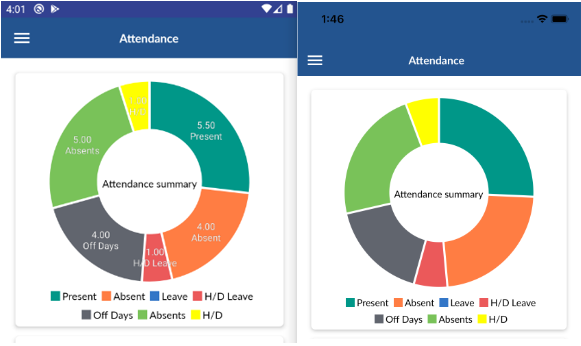
In react-native-svg text is not showing in ios but it's working on android.
You can see my code and ScreenShot.
  const Labels = ({slices, height, width}) => {
  return slices.map((slice, index) => {
    const {labelCentroid, pieCentroid, data} = slice;
    return (
      <View>
      {data.totalCount !== "0.00" ?
        <Text
          key={index}
          x={pieCentroid[0]}
          y={pieCentroid[1]}
          fill={'white'}
          textAnchor={'middle'}
          alignmentBaseline={'text-bottom'}
          fontSize={13}
          stroke={'black'}
          strokeWidth={0.1}>
          {data.totalCount}
          {/* {data.description} */}
        </Text>
 :null }
   {data.totalCount !== "0.00" ?
        <Text
          // key={index}
          x={pieCentroid[0]}
          y={pieCentroid[1]}
          fill={'white'}
          textAnchor={'middle'}
          alignmentBaseline={'text-top'}
          fontSize={13}
          stroke={'black'}
          strokeWidth={0.1}>
          {data.description}
        </Text>    :null }
      </View>
    );
  });
};

return (
  <View style={styles.container}>
    <PieChart
      animate={true}
      animationDuration={300}
      style={{height: 290}}
      valueAccessor={({item}) => item.totalCount}
      data={newArray}
      padAngle={0.02}
      // spacing={10}
      outerRadius={'95%'}
      innerRadius={'50%'}>
      <Labels />
    </PieChart>
  </View>
);
}
}
 SyedShahbazHussain
All 3 comments
Do we have any solution for it , I am facing exactly similar issue
 giriprathap
on 17 Jun 2020
giriprathap
on 17 Jun 2020
👍1
Do we have any solution for it, I am facing exactly similar issue
I solved this issue by wrap both the text in singal svg text and remove the view like this:
 <Text>
       <Text
          key={index}
          x={pieCentroid[0]}
          y={pieCentroid[1]}
          fill={'white'}
          textAnchor={'middle'}
          alignmentBaseline={'text-bottom'}
          fontSize={13}
          stroke={'black'}
          strokeWidth={0.1}>
          {data.totalCount}
        </Text>

        <Text
          // key={index}
          x={pieCentroid[0]}
          y={pieCentroid[1]}
          fill={'white'}
          textAnchor={'middle'}
          alignmentBaseline={'text-top'}
          fontSize={13}
          stroke={'black'}
          strokeWidth={0.1}>
          {data.description}
        </Text>
      </Text>
🚀2
@SyedShahbazHussain thank you very much! Such an incredible guess. I was debugging that similar stuff since 2 hours 😖
 azuxx
on 28 Oct 2020
azuxx
on 28 Oct 2020
👍1
Was this page helpful?
0 / 5 - 0 ratings
Related issues
 akshaypilankar
·
3Comments
akshaypilankar
·
3Comments
 brunolemos
·
3Comments
brunolemos
·
3Comments
 petrogad
·
3Comments
petrogad
·
3Comments
 vallvien
·
3Comments
vallvien
·
3Comments
 SteveIb
·
3Comments
SteveIb
·
3Comments
Most helpful comment