React-native-svg: Shadows, filters plans
Hi!
First of all I would like to say "Thank you" for an amazing library! It's very helpful in RN projects.
Do you have any plans to implement the SVG elements filter or feGaussianBlur ?
They will be very helpful, especially for creating the shadows for shapes.
 webschik
All 80 comments
Any updates about this?
 juan-quiver
on 13 Oct 2017
juan-quiver
on 13 Oct 2017
@webschik did you manage to find a solution regarding this either beit a native one?
 jakelacey2012
on 1 Nov 2017
jakelacey2012
on 1 Nov 2017
@jakelacey2012, unfortunately not
webschik
on 2 Nov 2017
Thank you very much for this great library! Are there any updates on this?
 olegberman
on 18 Nov 2017
olegberman
on 18 Nov 2017
I think the main difficulty is because of SVG API, for example (this is taken from w3schools lol):
<svg height="120" width="120">
  <defs>
    <filter id="f1" x="0" y="0" width="200%" height="200%">
      <feOffset result="offOut" in="SourceGraphic" dx="20" dy="20" />
      <feBlend in="SourceGraphic" in2="offOut" mode="normal" />
    </filter>
  </defs>
  <rect width="90" height="90" stroke="green" stroke-width="3"
  fill="yellow" filter="url(#f1)" />
</svg>
Will produce the following:

feOffset creates a copy of an input image in this case, then to create a shadow effect you need to apply different Blending Mode and Gaussian blur.
<filter id="f2" x="0" y="0" width="200%" height="200%">
      <feOffset result="offOut" in="SourceGraphic" dx="20" dy="20" />
      <feGaussianBlur result="blurOut" in="offOut" stdDeviation="10" />
      <feBlend in="SourceGraphic" in2="blurOut" mode="normal" />
 </filter>
And it will produce:

Not only the code for feOffset needs to be written, which will copy an image, but also different blending modes and Gaussian Blur.
olegberman
on 18 Nov 2017
If someone is interested in working on this, they can probably get some inspiration from how the mask element was implemented recently:
https://github.com/react-native-community/react-native-svg/commit/46307ecd2d2eb6849c0cb2465106201cb9901dda
https://github.com/react-native-community/react-native-svg/commit/b88cba85a41ee5af58e248674dfba3343430a014
In order to compute the mask for blending the images, it implements and uses the luminanceToAlpha type of feColorMatrix filter:
https://www.w3.org/TR/filter-effects/#element-attrdef-fecolormatrix-type
<filter id="luminanceToAlpha" filterUnits="objectBoundingBox">
<feColorMatrix id="luminance-value" type="luminanceToAlpha" in="SourceGraphic"/>
</filter>
ios:
https://github.com/react-native-community/react-native-svg/blob/b88cba85a41ee5af58e248674dfba3343430a014/ios/RNSVGRenderable.m#L215-L228
android:
https://github.com/react-native-community/react-native-svg/blob/46307ecd2d2eb6849c0cb2465106201cb9901dda/android/src/main/java/com/horcrux/svg/RenderableShadowNode.java#L269-L286
It would probably make sense to look into doing the filters on the gpu, but a plain cpu implementation just to get some support for it might already prove useful to some use cases.
 msand
on 25 Sep 2018
msand
on 25 Sep 2018
Essentially it entails adding some logic where it now renders to the current context; to instead check if the current element has the filter attribute set, if so: create a map initialised to have the SourceGraphic bitmap, then compute the output of each filter primitive in the referenced filter element in order and store the outputs in the map with the ids as the keys. Then rendering the final output instead. Blending is also demonstrated by the mask logic.
msand
on 25 Sep 2018
@msand, hello Mikael. I was recently looking to port some functionality from my ionic app to a react-native app. My obstacle is that I have glow effects on SVG elements and I would need react-native-svg support for the following tags: filter, feGaussianBlur, feMerge, and feMergeNode.
Is this something we could work together, on. I'd love to see this support added as I think many people would benefit from it, myself included. I'm pretty new to react, so what's your impression of the level of difficulty to add svg filter support?
 glthomas
on 4 Oct 2018
glthomas
on 4 Oct 2018
@glthomas Great to hear :) The react part of it is relatively small, most of the work will probably be around implementing the bitmap filters on android and ios. Could possibly use GPUImage or GPUImage2 or plain core image on ios, and one of the gpuimage ports or renderscript on android. Alternatively, plain cpu based implementations in java and obj-c might be good enough for most static use cases, and at least simpler to get the build environment set up. Or how experienced are you in c++?
msand
on 6 Oct 2018
Actually, if you only need blur, then at least on android it's possible to implement it using https://developer.android.com/reference/android/renderscript/ScriptIntrinsicBlur
and on iOS https://developer.apple.com/library/archive/documentation/GraphicsImaging/Reference/CoreImageFilterReference/index.html#//apple_ref/doc/filter/ci/CIGaussianBlur
In this case, quite a bit of the work is actually just with setting up the new elements, the filter attribute, and then possibly a comparable amount of work for setting the source graphic, processing the blur, and merging the bitmaps, but all of it should be doable without adding any dependencies and all quite similar to the work with implementing the mask element and attribute.
Quite a few other filters (e.g. the luminanceToAlpha filter) can be implemented using https://developer.android.com/reference/android/graphics/ColorMatrixColorFilter and https://developer.android.com/reference/android/graphics/LightingColorFilter
and https://developer.apple.com/library/archive/documentation/GraphicsImaging/Reference/CoreImageFilterReference/index.html#//apple_ref/doc/filter/ci/CIColorMatrix etc.
msand
on 6 Oct 2018
It seems renderscript will almost certainly be the fastest implementation available on android:
https://stackoverflow.com/a/23119957/1925631
https://github.com/patrickfav/Dali/blob/master/dali/src/main/java/at/favre/lib/dali/blur/algorithms/RenderScriptGaussianBlur.java
https://android-developers.googleblog.com/2013/08/renderscript-intrinsics.html
And the implementation seems quite straightforward, along the lines of:
RenderScript rs = RenderScript.create(theActivity);
ScriptIntrinsicBlur theIntrinsic = ScriptIntrinsicBlur.create(mRS, Element.U8_4(rs));;
Allocation tmpIn = Allocation.createFromBitmap(rs, inputBitmap);
Allocation tmpOut = Allocation.createFromBitmap(rs, outputBitmap);
theIntrinsic.setRadius(25.f);
theIntrinsic.setInput(tmpIn);
theIntrinsic.forEach(tmpOut);
tmpOut.copyTo(outputBitmap);
Can probably get some inspiration for optimisations from here: https://github.com/react-native-community/react-native-blur/blob/master/android/src/main/java/com/cmcewen/blurview/BlurringView.java
msand
on 6 Oct 2018
And for iOS something like this: https://stackoverflow.com/a/28614430/1925631
//  Needs CoreImage.framework

- (UIImage *)blurredImageWithImage:(UIImage *)sourceImage{

    //  Create our blurred image
    CIContext *context = [CIContext contextWithOptions:nil];
    CIImage *inputImage = [CIImage imageWithCGImage:sourceImage.CGImage];

    //  Setting up Gaussian Blur
    CIFilter *filter = [CIFilter filterWithName:@"CIGaussianBlur"];
    [filter setValue:inputImage forKey:kCIInputImageKey];
    [filter setValue:[NSNumber numberWithFloat:15.0f] forKey:@"inputRadius"];
    CIImage *result = [filter valueForKey:kCIOutputImageKey];

    /*  CIGaussianBlur has a tendency to shrink the image a little, this ensures it matches
     *  up exactly to the bounds of our original image */
    CGImageRef cgImage = [context createCGImage:result fromRect:[inputImage extent]];

    UIImage *retVal = [UIImage imageWithCGImage:cgImage];

    if (cgImage) {
        CGImageRelease(cgImage);
    }

    return retVal;
}
So, now the boilerplate for the elements and filter attribute would be needed, and of course, the main work of making the filter element create a rendering pipeline according to the svg compositing model: render > filter > clip > mask > blend > composite, so filters need to happen before the current clipping logic.
https://www.w3.org/TR/compositing/#compositingandblendingorder
https://www.w3.org/TR/SVG11/render.html#Introduction
https://www.w3.org/TR/SVG11/filters.html
https://www.w3.org/TR/SVG2/render.html#FilteringPaintRegions
https://www.w3.org/TR/filter-effects-1/
If the value of the filter property is none then there is no filter effect applied. Otherwise, the list of functions are applied in the order provided.
<filter-function-list> = [ <filter-function> | <url> ]+
<filter-function> = <blur()> | <brightness()> | <contrast()> | <drop-shadow()>
| <grayscale()> | <hue-rotate()> | <invert()> | <opacity()> | <sepia()> | <saturate()>
The first filter function or filter reference in the list takes the element (SourceGraphic) as the input image. Subsequent operations take the output from the previous filter function or filter reference as the input image. filter element reference functions can specify an alternate input, but still uses the previous output as its SourceGraphic.
Filter functions must operate in the sRGB color space.
A computed value of other than none results in the creation of a stacking context [CSS21] the same way that CSS opacity does. All the elements descendants are rendered together as a group with the filter effect applied to the group as a whole.
The filter property has no effect on the geometry of the target element’s CSS boxes, even though filter can cause painting outside of an element’s border box.
Conceptually, any parts of the drawing are effected by filter operations. This includes any content, background, borders, text decoration, outline and visible scrolling mechanism of the element to which the filter is applied, and those of its descendants. The filter operations are applied in the element’s user coordinate system.
The compositing model follows the SVG compositing model [SVG11]: first any filter effect is applied, then any clipping, masking and opacity. As per SVG, the application of filter has no effect on hit-testing.
msand
on 6 Oct 2018
@msand, I’m doing my best to follow along. I’ve got a lot of catch up to do, but I am going through the things you are writing here. I also started looking at the “how to” build a react native bridge.
glthomas
on 6 Oct 2018
@glthomas Does this help? How much experience do you have with java and objective-c? What parts would you be interested in working on? Perhaps I can give some more specific advice how to get some first steps going.
E.g. at first, just to get a bit familiar with the code, I would suggest just applying the filter on all the rendered content, either in android or ios, whichever you're more familiar/comfortable with. Or, if you prefer to stick to the javascript part, then perhaps creating the various elements would be a good first step. What do you think?
msand
on 6 Oct 2018
Oh, my cache updated once I sent the message, didn't see your reply before sending.
msand
on 6 Oct 2018
Latest draft of the Filter Effects Module https://drafts.fxtf.org/filter-effects/
Inspiration for filter graph building: https://github.com/chromium/chromium/blob/master/third_party/blink/renderer/core/paint/filter_effect_builder.cc
msand
on 6 Oct 2018
And some inspiration from firefox
https://dxr.mozilla.org/mozilla-beta/source/dom/svg/SVGFilterElement.h
https://dxr.mozilla.org/mozilla-beta/source/dom/svg/SVGFilterElement.cpp
https://dxr.mozilla.org/mozilla-beta/source/dom/svg/nsSVGFilters.h
https://dxr.mozilla.org/mozilla-beta/source/gfx/src/FilterSupport.cpp
https://dxr.mozilla.org/mozilla-beta/source/layout/svg/nsCSSFilterInstance.cpp
https://dxr.mozilla.org/mozilla-beta/source/layout/svg/nsSVGFilterInstance.cpp
msand
on 6 Oct 2018
And webkit:
https://github.com/WebKit/webkit/blob/master/Source/WebCore/rendering/svg/RenderSVGResourceFilter.cpp
https://github.com/WebKit/webkit/blob/master/Source/WebCore/svg/SVGFilterElement.cpp
msand
on 6 Oct 2018
Needed interfaces for the elements and the bridge: https://drafts.fxtf.org/filter-effects/#idl-index
interface mixin SVGURIReference {
  [SameObject] readonly attribute SVGAnimatedString href;
};

interface SVGFilterElement : SVGElement {
  readonly attribute SVGAnimatedEnumeration filterUnits;
  readonly attribute SVGAnimatedEnumeration primitiveUnits;
  readonly attribute SVGAnimatedLength x;
  readonly attribute SVGAnimatedLength y;
  readonly attribute SVGAnimatedLength width;
  readonly attribute SVGAnimatedLength height;
};

SVGFilterElement includes SVGURIReference;

interface mixin SVGFilterPrimitiveStandardAttributes {
  readonly attribute SVGAnimatedLength x;
  readonly attribute SVGAnimatedLength y;
  readonly attribute SVGAnimatedLength width;
  readonly attribute SVGAnimatedLength height;
  readonly attribute SVGAnimatedString result;
};

interface SVGFEGaussianBlurElement : SVGElement {

  // Edge Mode Values
  const unsigned short SVG_EDGEMODE_UNKNOWN = 0;
  const unsigned short SVG_EDGEMODE_DUPLICATE = 1;
  const unsigned short SVG_EDGEMODE_WRAP = 2;
  const unsigned short SVG_EDGEMODE_NONE = 3;

  readonly attribute SVGAnimatedString in1;
  readonly attribute SVGAnimatedNumber stdDeviationX;
  readonly attribute SVGAnimatedNumber stdDeviationY;
  readonly attribute SVGAnimatedEnumeration edgeMode;

  void setStdDeviation(float stdDeviationX, float stdDeviationY);
};

SVGFEGaussianBlurElement includes SVGFilterPrimitiveStandardAttributes;

interface SVGFEMergeElement : SVGElement {
};

SVGFEMergeElement includes SVGFilterPrimitiveStandardAttributes;

interface SVGFEMergeNodeElement : SVGElement {
  readonly attribute SVGAnimatedString in1;
};
Started work on the boilerplate: https://github.com/react-native-community/react-native-svg/commit/448e7952554e264cac4ccd65c1e1f2a44197ddf4
msand
on 7 Oct 2018
@msand, how can I pull this 448e795 commit. Is it on a special branch that I can't see?
Also, I managed to get a react-native starter project working and was able to link it to this library. I was able to get the demo code up and running on my device. Just trying to lay the ground work so that I can start poking at this library some more and gradually begin contributing on the filter work.
One thing I'll need to learn is how to make my react-native application link to an in-develop state of the react-native-svg library. That way as I'm making changes I can test them right away.
glthomas
on 13 Oct 2018
Its in my fork here: https://github.com/msand/react-native-svg/tree/filters?files=1
You can just modify the code while it's in node_modules and rebuild the native side.
Alternatively you can use npm link.
msand
on 13 Oct 2018
@msand I've cloned your filters branch and committed the interface for the RNSVGFilter.h for ios. However, I am unable to push up to your forked repo. What's the preferred process for contributing. Is it better if I fork your fork and then I submit a pull request at some point down the line when I have a few more files to contribute?
glthomas
on 23 Oct 2018
@glthomas Great! It might make sense to rebase onto master of the main repo as well. Actually, fork this repo and make a PR here instead. I only use that one for private testing and preparing my own PRs.
msand
on 23 Oct 2018
@msand I created a Pull Request to your filters branch on your forked repo. Not sure what you meant by rebasing. I anticipate multiple pull requests onto your filters branch. I'm hoping we can use the multiple PR's to serve the purpose of code reviews as this will be very much a learning process especially as it pertains to the Objective-C, which is entirely new to me.
I think once we are satisfied that we have solid functionality on your filters branch and it's well tested, we can then PR this up to master.
Does this sound like a good plan?
glthomas
on 23 Oct 2018
@glthomas Sounds good. I rebased onto master here and pushed to the filters-branch, lets use this one going forwards. Please feel free to ask anything if there's something I might be able to help explain. I've learned obj-c by maintaining this project, didn't have any previous experience with anything apple/mac/ios/obj-c related before that (summer last year). So I have a relatively fresh learning experience of that as well and can probably save you some time.
msand
on 23 Oct 2018
@msand, so I’ve been studying the existing elements as well as your previous comments and trying to determine the next steps beyond adding the interfaces. My focus initially will be on iOS. Referring back to your comment from 19 days ago you mentioned “main work of making the filter element create a rendering pipeline according to the svg compositing model”. As best as I can tell this means modifying the RNSVGRenerable.m file to include the code needed to handle the filtering (Possibly within the renderTo method and very near the if(self.mask) conditional. Beyond that I’m a bit lost how to proceed with regards to utilizing the the feMergeNode(s). Not too worried about learning objective-c. It’s starting to make sense after staring at it for a while.
glthomas
on 26 Oct 2018
@glthomas Excellent, seem you're on the right track.
It would probably make sense to refactor the masking logic a bit.
First extract a method to render a node to a CIImage: (The first part inside if (self.mask) {}, currently it uses bitmaps, but we need to use CIImage instead to get efficient filters on iOS, as in the blur example earlier: https://github.com/react-native-community/react-native-svg/issues/150#issuecomment-427582490))
I think we should extract the luminanceToAlpha from the masking logic into a primitive and rewrite it to use CIImage instead of plain bitmaps: https://github.com/react-native-community/react-native-svg/blob/1f748205014a52029577dab4de4ce9e320ae2f54/ios/RNSVGRenderable.m#L210-L229
Then we would just apply the single luminanceToAlpha primitive in the masking logic.
static CIImage *applyLuminanceToAlphaFilter(CIImage *inputImage)
{
    CIFilter *luminanceToAlpha = [CIFilter filterWithName:@"CIColorMatrix"];
    [luminanceToAlpha setDefaults];
    CGFloat alpha[4] = {0.2125, 0.7154, 0.0721, 0};
    CGFloat zero[4] = {0, 0, 0, 0};
    [luminanceToAlpha setValue:inputImage forKey:@"inputImage"];
    [luminanceToAlpha setValue:[CIVector vectorWithValues:zero count:4] forKey:@"inputRVector"];
    [luminanceToAlpha setValue:[CIVector vectorWithValues:zero count:4] forKey:@"inputGVector"];
    [luminanceToAlpha setValue:[CIVector vectorWithValues:zero count:4] forKey:@"inputBVector"];
    [luminanceToAlpha setValue:[CIVector vectorWithValues:alpha count:4] forKey:@"inputAVector"];
    [luminanceToAlpha setValue:[CIVector vectorWithValues:zero count:4] forKey:@"inputBiasVector"];
    return [luminanceToAlpha valueForKey:@"outputImage"];
}
So, another method to apply a filter primitive to a CIImage, (and/or to bitmap as now, if you don't want to rewrite the luminanceToFilter primitive used in the masking logic). This could probably be defined in a common class which all filter primitives would inherit from, something like RNSVGFilterPrimitive.
Then we should add a method on the RNSVGSvgView, similar to [self.svgView getDefinedMask:self.mask] but getDefinedFilter:self.filter instead
And then a method on RNSVGFilter, to process a CIImage in a pipeline of filter primitives. (any pre-proccesing for this can be done in parseReference, and to define the filter in the svg root view)
Once we have at least a single filter primitive, and the rendering into a CIImage, we can change the logic in renderTo such that only if neither self.filter nor self.mask is set, does it use the last branch of the current code, otherwise, it should use the general pipeline, where it makes a CIImage of the render tree (using self instead of RNSVGMask *_maskNode in the [_maskNode renderLayerTo:bcontext rect:rect];, runs the filters on it if needed, does the masking if needed, and renders the result to the current CGContext.
msand
on 27 Oct 2018
For the feMergeNodes, we should have the parseReference method of the RNSVGFilter to set up a filter graph (map from index/name to filter instance, and the outputs of instances are set as inputs to any others which reference them), such that after setting the source graphic on the first filter primitive and we call createCGImage on the CIImage of the output node, the CIFIlter pipeline handles computing all the needed filters, where the merge nodes do something like this:
CIFilter *filter = [CIFilter filterWithName:@"CISourceOverCompositing"];
[filter setValue:background forKey:kCIInputBackgroundImageKey];
[filter setValue:foreground forKey:kCIInputImageKey];
CIImage *outputImage = [filter outputImage];
Or, simply:
https://developer.apple.com/documentation/coreimage/ciimage/1437837-imagebycompositingoverimage?l_2
[foreground imageByCompositingOverImage:background]
If I've understood/remember correctly then if we keep it as CIFIlter and CIImage until the actual rendering (createCGImage), it shouldn't process redundant filters in the graph. (i.e., ones which aren't connected to the output node) And it should create less intermediate processing/memory management pressure.
msand
on 27 Oct 2018
@msand, to do the refactoring you've suggested, do we need to import CoreImage in order to start using CIImage.
#import <CoreImage/CoreImage.h>
If so what file should we be importing this too? RNSVGRenderable.m?
You mentioned also the need to refactor the mask code to use CIImage to make things efficient. How do you mean? Is the processing diverted to the GPU by using CIImage as opposed to CPU processing?
And for the record, I'm feeling really out of my league with this. I'm starting to wonder if I can contribute in a more supplemental manner. Perhaps building some tests, working on the documentation. Etc. I'm not trying to back out here, I'm just trying to be pragmatic. I've got a limited amount of time I can contribute to this and I'm beginning to sense that it's going to take a lot of time and energy to get up to speed on this. You seem to have a really solid understanding of what is happening with not only SVG but, the CoreGraphics and Image libraries. It might take me 6 months to get up to where I need to be to have a solid enough understanding of what is happening with the pipeline to contribute in a way that doesn't require as much hand holding. Please advise.
glthomas
on 27 Oct 2018
@glthomas Core Image can work on either the cpu or the gpu, in both cases it should be possible to get more efficient than the basic for loop + arithmetic, as it can utilize vector instructions, and do matrix operations very efficiently on the gpu. And in the case of filter chains, it sometimes has the potential to chain several filters together, such that it only needs to process each pixel once.
I've done an initial refactoring, and built out more of the boilerplate for the filters: https://github.com/react-native-community/react-native-svg/commit/b33f5575d86cc3d24257dbba4cc31597ac518212
Hopefully this can help you grok more of the logic and how to use CIImage/Filter. At least, applying a single filter on all of the content can be done in the same way as the masking is in the new logic. If you want I could probably build out the filter graph construction, and applying a filter chain if the filter attribute is set i.e., setting the source graphic / rendering the output; and implement e.g. the ColorMatrix filter as an example filter primitive. Then you could perhaps attempt to implement the blur, merge and mergeNode filter primitives?
msand
on 28 Oct 2018
@glthomas I think I have a rendering pipeline for filters which I'm sufficiently happy with for now at least, the applyFilter method is just the identity function for now, but once I have the filter graph constructed in parseReference, we can just set the inputImage and return the outputImage there.
static CGImageRef renderToImage(RNSVGRenderable *object,
                                CGSize bounds,
                                CGRect rect,
                                CGRect* clip)
{
    UIGraphicsBeginImageContextWithOptions(bounds, NO, 1.0);
    CGContextRef cgContext = UIGraphicsGetCurrentContext();
    CGContextTranslateCTM(cgContext, 0.0, bounds.height);
    CGContextScaleCTM(cgContext, 1.0, -1.0);
    if (clip) {
        CGContextClipToRect(cgContext, *clip);
    }
    [object renderLayerTo:cgContext rect:rect];
    CGImageRef contentImage = CGBitmapContextCreateImage(cgContext);
    UIGraphicsEndImageContext();
    return contentImage;
}

+ (CIContext *)sharedCIContext {
    static CIContext *sharedCIContext = nil;
    static dispatch_once_t onceToken;
    dispatch_once(&onceToken, ^{
        sharedCIContext = [[CIContext alloc] init];
    });

    return sharedCIContext;
}

- (void)renderTo:(CGContextRef)context rect:(CGRect)rect
{
    // This needs to be painted on a layer before being composited.
    CGContextSaveGState(context);
    CGContextConcatCTM(context, self.matrix);
    CGContextConcatCTM(context, self.transform);
    CGContextSetAlpha(context, self.opacity);

    [self beginTransparencyLayer:context];

    if (self.mask || self.filter) {
        CGRect bounds = CGContextGetClipBoundingBox(context);
        CGSize boundsSize = bounds.size;
        CGFloat width = boundsSize.width;
        CGFloat height = boundsSize.height;
        CGRect drawBounds = CGRectMake(0, 0, width, height);

        // Render content of current SVG Renderable to image
        CGImageRef currentContent = renderToImage(self, boundsSize, rect, nil);
        CIImage* contentSrcImage = [CIImage imageWithCGImage:currentContent];

        if (self.filter) {
            // https://www.w3.org/TR/SVG11/filters.html
            RNSVGFilter *_filterNode = (RNSVGFilter*)[self.svgView getDefinedFilter:self.filter];
            contentSrcImage = [_filterNode applyFilter:contentSrcImage];
        }

        if (self.mask) {
            // https://www.w3.org/TR/SVG11/masking.html#MaskElement
            RNSVGMask *_maskNode = (RNSVGMask*)[self.svgView getDefinedMask:self.mask];
            CGFloat x = [self relativeOn:[_maskNode x] relative:width];
            CGFloat y = [self relativeOn:[_maskNode y] relative:height];
            CGFloat w = [self relativeOn:[_maskNode width] relative:width];
            CGFloat h = [self relativeOn:[_maskNode height] relative:height];

            // Clip to mask bounds and render the mask
            CGRect maskBounds = CGRectMake(x, y, w, h);
            CGImageRef maskContent = renderToImage(_maskNode, boundsSize, rect, &maskBounds);
            CIImage* maskSrcImage = [CIImage imageWithCGImage:maskContent];

            // Apply luminanceToAlpha filter primitive
            // https://www.w3.org/TR/SVG11/filters.html#feColorMatrixElement
            CIImage *alphaMask = transformImageIntoAlphaMask(maskSrcImage);
            CIImage* composite = applyBlendWithAlphaMask(contentSrcImage, alphaMask);

            // Create masked image and release memory
            CGImageRef compositeImage = [[RNSVGRenderable sharedCIContext] createCGImage:composite fromRect:drawBounds];

            // Render composited result into current render context
            CGContextDrawImage(context, drawBounds, compositeImage);
            CGImageRelease(compositeImage);
            CGImageRelease(maskContent);
        } else {
            // Render filtered result into current render context
            CGImageRef filteredImage = [[RNSVGRenderable sharedCIContext] createCGImage:contentSrcImage fromRect:drawBounds];
            CGContextDrawImage(context, drawBounds, filteredImage);
            CGImageRelease(filteredImage);
        }

        CGImageRelease(currentContent);
    } else {
        [self renderLayerTo:context rect:rect];
    }
    [self endTransparencyLayer:context];

    CGContextRestoreGState(context);
}
@msand do we need to add the Core Image Framework to the project and import it?
glthomas
on 28 Oct 2018
@glthomas Hmm, well it seems to work fine as is for me. I haven't tested the filters yet, but the masking works just fine. XCode doesn't complain when I build it, and it doesn't crash when I run, so I guess what we have already covers whatever is needed.
I'm getting close to having a functional pipeline for filters:
https://github.com/react-native-community/react-native-svg/blob/c30fd3d7a02119e193c80edc6cfa37fe6d85133c/ios/Filters/RNSVGFilter.m#L24-L44
And ColorMatrix:
https://github.com/react-native-community/react-native-svg/blob/c30fd3d7a02119e193c80edc6cfa37fe6d85133c/ios/Filters/RNSVGFEColorMatrix.m#L13-L40
It doesn't have any optimizations or caching yet. But easier to get the core infrastructure working first before doing that.
msand
on 28 Oct 2018
@msand Would it be helpful if I started in on updating the readme to include a section for the filters, while you continue to hammer away at the pipeline and filter graph? Also I could add some examples for the Mask and Filter. It seems that the examples for this project are maintained in a tree branch under @magicismight. Thoughts?
glthomas
on 28 Oct 2018
@glthomas Sure, can do that. I have the ColorMatrix example from the spec mostly working now:
const ExampleFEColorMatrix = props => (
    <Svg viewBox="0 0 800 500" {...props}>
        <Defs>
            <LinearGradient
                id="a"
                gradientUnits="userSpaceOnUse"
                x1={100}
                y1={0}
                x2={500}
                y2={0}
            >
                <Stop offset={0.01} stopColor="#ff00ff" />
                <Stop offset={0.33} stopColor="#88ff88" />
                <Stop offset={0.67} stopColor="#2020ff" />
                <Stop offset={1} stopColor="#d00000" />
            </LinearGradient>
            <Filter
                id="b"
                filterUnits="objectBoundingBox"
                x="0%"
                y="0%"
                width="100%"
                height="100%"
            >
                <FEColorMatrix
                    in="SourceGraphic"
                    values=".33 .33 .33 0 0 .33 .33 .33 0 0 .33 .33 .33 0 0 .33 .33 .33 0 0"
                />
            </Filter>
            <Filter
                id="c"
                filterUnits="objectBoundingBox"
                x="0%"
                y="0%"
                width="100%"
                height="100%"
            >
                <FEColorMatrix
                    type="saturate"
                    in="SourceGraphic"
                    values={0.4}
                />
            </Filter>
            <Filter
                id="d"
                filterUnits="objectBoundingBox"
                x="0%"
                y="0%"
                width="100%"
                height="100%"
            >
                <FEColorMatrix
                    type="hueRotate"
                    in="SourceGraphic"
                    values={90}
                />
            </Filter>
            <Filter
                id="e"
                filterUnits="objectBoundingBox"
                x="0%"
                y="0%"
                width="100%"
                height="100%"
            >
                <FEColorMatrix
                    type="luminanceToAlpha"
                    in="SourceGraphic"
                    result="a"
                />
                <FEComposite in="SourceGraphic" in2="a" operator="in" />
            </Filter>
        </Defs>
        <Path fill="none" stroke="#00f" d="M1 1h798v498H1z" />
        <G fontFamily="Verdana" fontSize={75} fontWeight="bold" fill="url(#a)">
            <Path d="M100 0h500v20H100z" />
            <Text x={100} y={90}>
                Unfiltered
            </Text>
            <Text x={100} y={190} filter="url(#b)">
                Matrix
            </Text>
            <Text x={100} y={290} filter="url(#c)">
                Saturate
            </Text>
            <Text x={100} y={390} filter="url(#d)">
                HueRotate
            </Text>
            <Text x={100} y={490} filter="url(#e)">
                Luminance
            </Text>
        </G>
    </Svg>
);

And here's the mask example I've been testing:
const MaskExample = props => (
    <Svg width="100%" height="400" viewBox="0 0 800 300" {...props}>
        <Defs>
            <LinearGradient
                id="Gradient"
                gradientUnits="userSpaceOnUse"
                x1="0"
                y1="0"
                x2="800"
                y2="0"
            >
                <Stop offset="0" stopColor="white" stopOpacity="0" />
                <Stop offset="1" stopColor="white" stopOpacity="1" />
            </LinearGradient>
            <Rect
                id="Rect"
                x="0"
                y="0"
                width="800"
                height="300"
                fill="url(#Gradient)"
            />
            <Mask
                id="Mask"
                maskUnits="userSpaceOnUse"
                x="0"
                y="0"
                width="800"
                height="300"
            >
                <Rect
                    x="0"
                    y="0"
                    width="800"
                    height="300"
                    fill="url(#Gradient)"
                />
            </Mask>
            <Text
                id="Text"
                x="400"
                y="200"
                fontFamily="Verdana"
                fontSize="100"
                textAnchor="middle"
            >
                Masked text
            </Text>
        </Defs>
        <Rect x="0" y="0" width="800" height="300" fill="#FF8080" />
        <Use href="#Text" fill="blue" mask="url(#Mask)" />
        <Use href="#Text" fill="none" stroke="black" stroke-width="2" />
    </Svg>
);
More progress: Implement RNSVGFEGaussianBlur, RNSVGFEMerge & RNSVGFEMergeNode
https://github.com/react-native-community/react-native-svg/commit/21e3738f89f2ec7da5b4c0d6599f147e2b4a4d02

msand
on 29 Oct 2018
https://github.com/react-native-community/react-native-svg/commit/79748f9b20818e5b0edf1d42d011a91abe38ba20 [ios] Implement RNSVGFEBlend, RNSVGFEOffset, Fix RNSVGFEComposite
msand
on 29 Oct 2018
Added support for BackgroundImage and BackgroundAlpha, now it's already possible to do quite a lot with the existing primitives.
msand
on 29 Oct 2018
@glthomas Would be great with a bit more test cases at this point, to know what parts are still broken (of the parts that have implementations) in comparison to the ever-green browsers.
msand
on 29 Oct 2018

msand
on 29 Oct 2018
Dropshadows are possible to make now

const FilterExample = props => (
    <Svg width="100%" height="400" viewBox="0 0 200 120" {...props}>
        <Defs>
            <Filter
                id="a"
                filterUnits="userSpaceOnUse"
                x={0}
                y={0}
                width={200}
                height={120}
            >
                <FEGaussianBlur
                    in="SourceAlpha"
                    stdDeviation={4}
                    result="blur"
                />
                <FEOffset in="blur" dx={4} dy={4} result="offsetBlur" />
                <FEMerge>
                    <FEMergeNode in="offsetBlur" />
                    <FEMergeNode in="SourceGraphic" />
                </FEMerge>
            </Filter>
        </Defs>
        <Path fill="#888" stroke="#00f" d="M1 1h198v118H1z" />
        <G filter="url(#a)">
            <Path
                fill="none"
                stroke="#D90000"
                strokeWidth={10}
                d="M50 90C0 90 0 30 50 30h100c50 0 50 60 0 60z"
            />
            <Path
                fill="#D90000"
                d="M60 80c-30 0-30-40 0-40h80c30 0 30 40 0 40z"
            />
            <Text
                x={52}
                y={76}
                fill="#FFFFFF"
                stroke="#000000"
                fontSize={45}
                fontFamily="Verdana"
            >
                SVG
            </Text>
        </G>
    </Svg>
);
@msand, incredible work here. Not sure how you find the time. At any rate I tried adding the mask example you provided here to the Examples submodule maintained by @magicismight
I have a PR open over on there. Though we still need to add an icon for the example.
glthomas
on 30 Oct 2018
I get the feeling that he's been very busy the past year or so, can't remember if he has replied in any react-native-svg issues this year, or replied to any questions I've posed since I got rights to maintain the project. So I think he probably has too much other stuff going on to give much attention to these things.
Anyways, he did a great job getting most of svg working in react-native and I'm thankful for that. But we should probably move the example inside the repo and exclude it from npm, or, make a new one under react-native-community ( @dustinsavery do you have the rights for this? ). Or otherwise, I can make something under my own name and try to keep it up to date. And then it can be forked again once maintenance passes on to the ones who volunteer / are compensated to do the work. Could perhaps have a showcase part of the readme with links to nice examples / articles / tutorials etc to give more ideas and boilerplate for people to get started faster.
msand
on 30 Oct 2018
@msand I do not have access. It looks as though @magicismight is the only contributor, meaning he's probably the only one that has access. Another person that might have any insight on how to proceed here is @brentvatne. Any thoughts?
 dusave
on 30 Oct 2018
dusave
on 30 Oct 2018
@msand thank you for your work!
Do you have any estimate when filters branch will be merged in master?
 serhiipalash
on 1 Dec 2018
serhiipalash
on 1 Dec 2018
Thanks! Well, should probably implement it for android as well before merging, otherwise there will be redundant questions. You can already use it for iOS by depending on a specific commit or this branch. Publishing to npm doesn't really change anything, as there's no compile step involved with publishing, it just copies a subset of the files to npm and tags it with a version number. Commits are at least referenced by a hash of the content and are in that sense actually safer.
msand
on 4 Dec 2018
I created a drop shadow plugin for React Native Android which creates a bitmap representation of the view and blurs it with a color and opacity. Feel free to use the code, maybe this can help you with the shadow / blur plugin. It works if I wraps the svg in the Androw component.
https://www.npmjs.com/package/react-native-androw
https://github.com/folofse/androw/tree/master/react-native-androw
 folofse
on 6 Mar 2019
folofse
on 6 Mar 2019
@folofse Great work!
That can probably be used for relatively many cases as a workaround for now, by splitting svg content into background, blurred/shaded parts, and foreground.
msand
on 15 Mar 2019
@msand What's the update? How far along have you guys reached?
 thecodrr
on 22 Apr 2019
thecodrr
on 22 Apr 2019
I have a pull request open to androw, with optimizations to make the drop shadows on android as efficient / simple as I could imagine and measure: https://github.com/folofse/androw/pull/1
With regards to filters in react-native-svg, the latest code is in the filters https://github.com/react-native-community/react-native-svg/tree/filters and hasn't been touched since 29 Oct 2018. All the latest updates are here in this issue, and most probably any development related to this will be mentioned here. So, all the updates are available here for you to read already.
iOS has a several filters with basic support at least: FEComposite, FEColorMatrix, FEGaussianBlur, FEMerge, FEBlend, FEOffset, FEPointLight, FESpecularLighting
Android has drop shadow support using the react-native-androw library, and blur using react-native-blur, color matrices using react-native-color-matrix-image-filters some others with react-native-image-filter-kit and react-native-gl-image-filters etc.
@theweavrs Could you work on it? Most of it can be done by porting what is implemented in objective-c for iOS to java for Android. The libraries mentioned here can be great for learning about how it can be implemented. Search engines and the built in "search in this repository" in github are great. Then it's mostly about adapting it to the rendering pipeline of the svg spec and react-native-svg. The refactoring process will be quite similar to the one on iOS, modulo system api differences. And I can probably assist in explaining things and guiding whenever requested. But, I'm not currently working on implementing it myself, and don't have it in my current plans, as I don't have a need for them at the moment.
msand
on 22 Apr 2019
Sorry - but we need this :)
 FDiskas
on 5 Aug 2019
FDiskas
on 5 Aug 2019
@FDiskas Are you available to work on it?
msand
on 5 Aug 2019
Hello. I really appreciate all the hard work being done on react-native-svg and the filters branch, I really look forward to being able to use filters for drop shadows in a release some time soon. Thank you for the great work. 👍
 juliusbangert
on 19 Aug 2019
juliusbangert
on 19 Aug 2019
@juliusbangert I relatively recently tried rebasing the filters branch onto the master branch, so you can try it by using e.g. the filters_rebase branch https://github.com/react-native-community/react-native-svg/tree/filters_rebase or the latest commit from there: https://github.com/react-native-community/react-native-svg/commit/257c7082c28ae5c8f7072f2be528ec7cb2ab8c01
msand
on 19 Aug 2019
@msand when will be available filters and new version of library?
 bear-junior
on 8 Oct 2019
bear-junior
on 8 Oct 2019
I'm not currently working on it, and don't see myself having time to work on it in the near future. Would you be available to help build it?
msand
on 8 Oct 2019
I created a drop shadow plugin for React Native Android which creates a bitmap representation of the view and blurs it with a color and opacity. Feel free to use the code, maybe this can help you with the shadow / blur plugin. It works if I wraps the svg in the Androw component.
https://www.npmjs.com/package/react-native-androw
https://github.com/folofse/androw/tree/master/react-native-androw
Very interesting but doesn't seem to work if wrapped element position = "absolute". I tried to split svg contents creating a svg with the shaded parts and another svg with the other parts. When i try to overlay shadow layer with absolute positioning, the shadow is not rendered.
 david-laurentino
on 9 Oct 2019
david-laurentino
on 9 Oct 2019
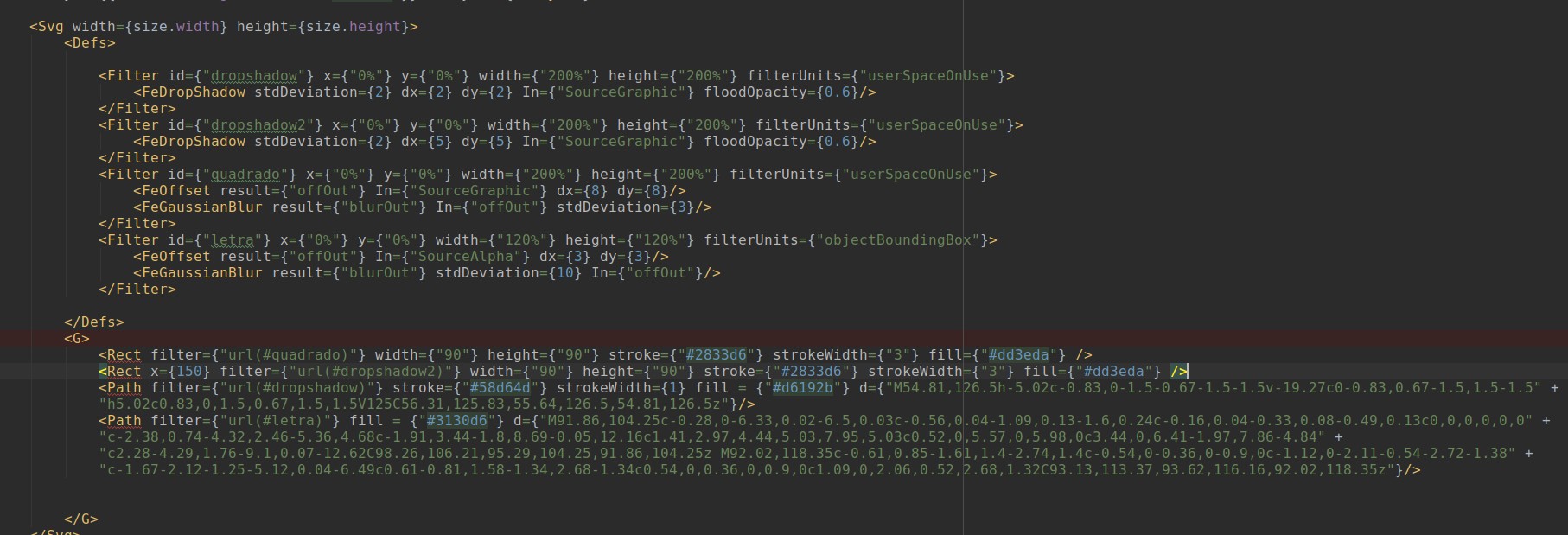
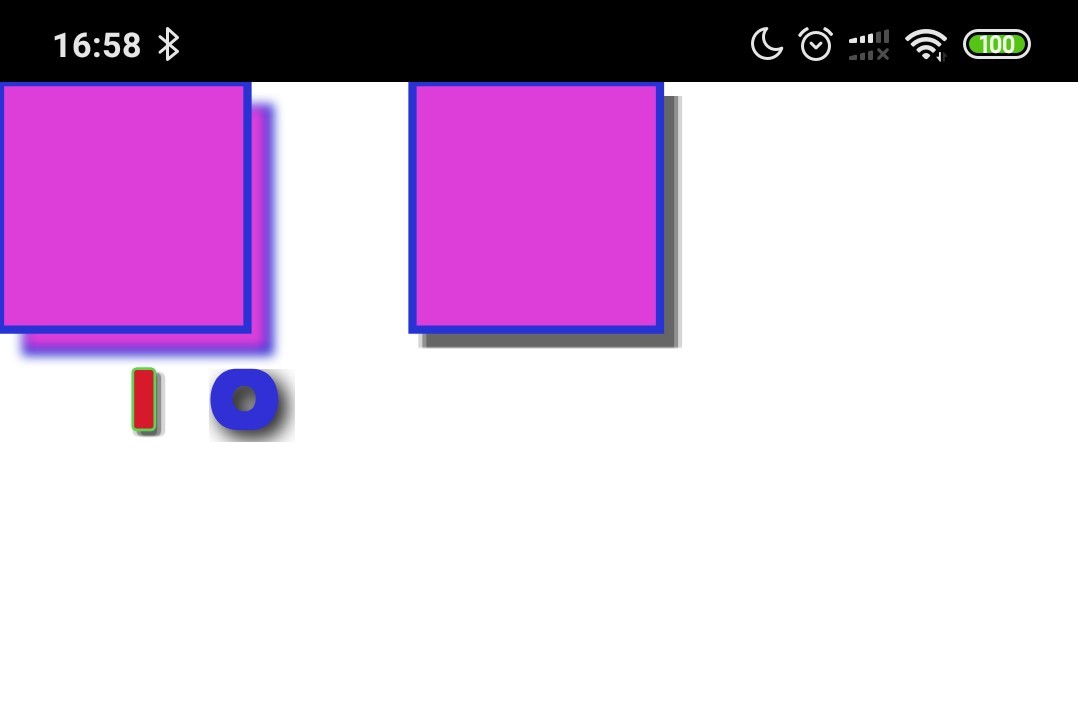
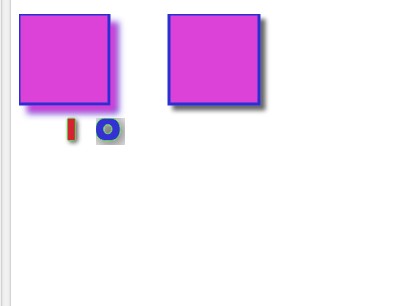
I'm implementing some svg filters for android, three for now: FeOffset, FeGaussianBlur and FeDropShadow. To make a gaussian blur effect I used the ScriptIntrinsicBlur, but it allows define only the blur radius while the svg filters (feegaussian and feedrop) use an attribute named "stdDeviation". I seached for the relation between blur radius and stdDeviation trying to find a way to convert one to another with no sucess. For this reason, the gaussian blur effect resulting of my implementation diverges from gaussian blur effects produced by browsers like firefox or Chrome. Could someone help me with that? The standard deviation implies that blurred image should be resized before apply blur? See de code and results:
Code (note de lack of feBlend in some filters, blend is hardcoded for now ):
Result with my implementation:
Result with Chrome:
david-laurentino
on 15 Oct 2019
Down scaling images before applying blur effect and then up scaling to original size produced much better results. Now I'd like to understand more about reusing canvas and bitmaps instead of creating new instances of them. I think I may be creating too many bitmap and canvas instances. I have no experience with image processing.
david-laurentino
on 16 Oct 2019
@david-laurentino Excellent work! You might get some inspiration from here: https://github.com/folofse/androw/compare/50a4d75...msand:master
If you make your changes available on github, then I can read it through and see if I can find any potential optimizations.
msand
on 16 Oct 2019
Hi @msand any news regarding implementation for SVG effects? It world be great to merge this current codebase to master branch to support at least basic effects on iOS. Also can we reuse https://github.com/folofse/androw/tree/master/react-native-androw for Android?
 oleksandr-dziuban
on 5 Feb 2020
oleksandr-dziuban
on 5 Feb 2020
Any updates on this? I'm using Expo and trying to implement a blur-radius shadow (like the shadowRadius iOS) on Android, but reading this thread now I know that filter, feGaussianBlur, feOffset are not implemented in react-native-svg yet. It's so sad because in iOS we already have shadowColor, shadowOffset, shadowOpacity, shadowRadius that allow us to implement shadows in View. But on Android we have nothing like it! We have just just a simple 'elevation' prop. I don't want to eject my project for this so react-native-svg was kinda of my hope. I think that just implementing filter, feGaussianBlur, feOffset would be enough for us to implement shadows on Android in a decent way.
 hadnet
on 21 Feb 2020
hadnet
on 21 Feb 2020
I created a drop shadow plugin for React Native Android which creates a bitmap representation of the view and blurs it with a color and opacity. Feel free to use the code, maybe this can help you with the shadow / blur plugin. It works if I wraps the svg in the Androw component.
https://www.npmjs.com/package/react-native-androw
https://github.com/folofse/androw/tree/master/react-native-androw
Can I use it with Expo?
hadnet
on 21 Feb 2020
Ok, I found this package https://github.com/tokkozhin/react-native-neomorph-shadows that implements shadow radius on Android and it works beautifully! But unfortunately it's kinda slow (specially when navigating between screens). Is there a way to optimize this @msand?
hadnet
on 21 Feb 2020
@msand Hi, for my project quite important to have SVG filters, so I tried to implement the same logic for android which you implemented for ios. It's my first try for android and java. I made filters pipeline and one filter primitive(FEGaussianBlur), but I'm not sure in some places because GaussianBlur works not as I expect.
1 - Which for part of bitmap should be applied filter? (for bounds of target element or for full layer which contains this target)
2 - How does gaussian kernel calculate? Or kernel is a constant value
https://github.com/revich2/react-native-svg/commits/filters_android - this is my changes above your branch filters_rebase
https://github.com/revich2/rn-svg-example - this is example repo with my changes
Can you help me with it?
 revich2
on 8 Apr 2020
revich2
on 8 Apr 2020
Excellent, awesome work @revich2
1 - Should probably use the current clip bounds, or the filter effects region: https://www.w3.org/TR/SVG11/filters.html#FilterEffectsRegion
2 -
The Gaussian blur kernel is an approximation of the normalized convolution:
G(x,y) = H(x)I(y)
where
H(x) = exp(-x2/ (2s2)) / sqrt(2* pi*s2)
and
I(y) = exp(-y2/ (2t2)) / sqrt(2* pi*t2)
with 's' being the standard deviation in the x direction and 't' being the standard deviation in the y direction, as specified by ‘stdDeviation’.
The value of ‘stdDeviation’ can be either one or two numbers. If two numbers are provided, the first number represents a standard deviation value along the x-axis of the current coordinate system and the second value represents a standard deviation in Y. If one number is provided, then that value is used for both X and Y.
Even if only one value is provided for ‘stdDeviation’, this can be implemented as a separable convolution.
For larger values of 's' (s >= 2.0), an approximation can be used: Three successive box-blurs build a piece-wise quadratic convolution kernel, which approximates the Gaussian kernel to within roughly 3%.
let d = floor(s * 3sqrt(2pi)/4 + 0.5)
... if d is odd, use three box-blurs of size 'd', centered on the output pixel.
... if d is even, two box-blurs of size 'd' (the first one centered on the pixel boundary between the output pixel and the one to the left, the second one centered on the pixel boundary between the output pixel and the one to the right) and one box blur of size 'd+1' centered on the output pixel.
Note: the approximation formula also applies correspondingly to 't'.
Frequently this operation will take place on alpha-only images, such as that produced by the built-in input, SourceAlpha. The implementation may notice this and optimize the single channel case. If the input has infinite extent and is constant (e.g FillPaint where the fill is a solid color), this operation has no effect. If the input has infinite extent and the filter result is the input to an ‘feTile’, the filter is evaluated with periodic boundary conditions.
‘feGaussianBlur’
https://www.w3.org/TR/SVG11/filters.html#feGaussianBlurElement
stdDeviation = "
" The standard deviation for the blur operation. If two
s are provided, the first number represents a standard deviation value along the x-axis of the coordinate system established by attribute ‘primitiveUnits’ on the ‘filter’ element. The second value represents a standard deviation in Y. If one number is provided, then that value is used for both X and Y.
A negative value is an error (see Error processing). A value of zero disables the effect of the given filter primitive (i.e., the result is the filter input image). If ‘stdDeviation’ is 0 in only one of X or Y, then the effect is that the blur is only applied in the direction that has a non-zero value.
If the attribute is not specified, then the effect is as if a value of 0 were specified.
Animatable: yes.
https://www.w3.org/TR/SVG11/filters.html#feGaussianBlurStdDeviationAttribute
For sure, I can answer any questions, and perhaps help with some of the coding if I can make some spare time available.
msand
on 10 Apr 2020
Thank you for the given materials.
At the current moment, I moved on Android all components of filters, which was implemented for ios, with a stub instead of applyFilter method. Implemented Gaussian blur filter with third party library OpenCV.4.1.0.
But there are 2 problems, the first is big, the second is small.
1) Small problem - Algorithm for Gaussian blur, which is using in WebKit implementation has a bit different from that is provide OpenCV library.
https://github.com/WebKit/webkit/blob/master/Source/WebCore/platform/graphics/filters/FEGaussianBlur.cpp - this is the link with the implementation of Gaussian blur from WebKit.
2) Big problem - OpenCV increases the application bundle on about 100+mb. This is a very powerful library, probably it is possible to do all of the effects of filters with its help, but bundle size is too big.
Probably, it is possible to take only the required module from OpenCV, but I first time in working with Android, thus I have only predictions, that this is possible.
From all this work and my researching I made several conclusions/questions:
1) Obviously, that required to choose an engine for image processing for Android.
2) (https://opencv.org/opencv-4-1/) OpenCV is an ideal variant for this goal. What do you think it is possible to take out from OpenCV only required part(Imgproc)?
3) I found more several probably useful libraries:
- https://github.com/cats-oss/android-gpuimage - As I understand, this is a clon of CIFilter for Android. But CIFilter is restricting in implementation several filters(for example, for Gaussian blur at stdX != stdY).
- https://github.com/wasabeef/glide-transformations - It simply has a lot of GitHub stars.
4) How do you think there is that ability to try to assemble filters native module from WebKit sources? This is would be very useful, for one this is possible to use for both platforms and for others this will be absolutely identical implementation.
https://github.com/WebKit/webkit/tree/master/Source/WebCore/platform/graphics/filters
What do you think about what can be done with all this?) @msand
revich2
on 11 Apr 2020
@msand, can you help me with it? probably, steer me in the right direction
revich2
on 13 Apr 2020
Sounds a bit large for sure, if that would be the approach taken, it would probably require making it an optional dependency / configurable, or if that's not possible, then as an additional module/package, either as submodule of some sort or monorepo here, or as an independent repo with links / instructions for use in this repo.
I suspect it might be worth to use whatever native apis are available on iOS to get good performance with reasonable amounts of code. But if the android implementation becomes harder than makes sense, or if there's a comparably performing c / c++ / cross-platform solution, then that is certainly a possible approach. That would probably require the NDK, which might upset some users as well, and then the optional submodule approach probably makes sense again. Ideally, there would be well performing solutions for both platforms in their respective native language (objective-c and java) to keep setup minimal, and perhaps also bundle size.
There's been loud complains about adding ~100kb to get support for essentially all of the css spec, cascade, specificity, priority, media queries etc. etc. https://github.com/react-native-community/react-native-svg/issues/1264
So, I fear some people might explode or go into rampage mode if there's an addition of even a single mb. Probably best to keep it at least somehow optional for the safety and health of everyone involved 😉
Webkit & other browser implementations might certainly be possible sources for reuse, they probably have done significant amount of performance optimisations as well. Wise to learn from their efforts.
In practise, don't worry about the implementation / approach or if it's optimal or not, as long as it works at all it's already great. And it is much easier to improve from there, once all the needed patterns / apis have been discovered and put together. It should be a community effort to find and fix any bleeding edges anyway. Ignore any potential trolls or unexperienced open source consumers / parasites that only complain and use negative language.
msand
on 13 Apr 2020
@msand I was back with new progress)) I choose the way with WebKit sources and NDK and I was able to implement Gaussian blur. And I want to do it with other filters. I think it is the right way, one task remained - it is work with threads in c++ for improving performance.
Can you help me with rebase your _filters_ branch on the newest develop branch?
Can you check my changes for this and review the code? (https://github.com/revich2/react-native-svg/commits/android_filters)
revich2
on 25 Apr 2020
@revich2 @msand Hello!
I'm here as a side watcher, wishing this filters branch to be merged eventually.
I think 100Mb dependency is just an enormous for almost any React Native application.
As I've understood @msand abandoned filter branch because started looking to new, more general, implementation (have seen in several comments) which utilizes new React Native archirecture and one unified C++ code for both Android and iOS.
I think it might make sense to go that way, as at time when this branch will be ready to merge, Fiber / Turbomodules should be released.
Anyway, thank you for your hard work! Truly appreciate that!
 likern
on 4 May 2020
likern
on 4 May 2020
This issue has been automatically marked as stale because it has not had recent activity. It will be closed if no further activity occurs. Thank you for your contributions. You may also mark this issue as a "discussion" and I will leave this open.
![stale[bot] picture](https://avatars.githubusercontent.com/in/1724?v=4&s=40) stale[bot]
on 3 Jul 2020
stale[bot]
on 3 Jul 2020
Keeping this alive, any status update about filters?
Are we working on it?
 t-ricci-enhancers
on 28 Jul 2020
t-ricci-enhancers
on 28 Jul 2020
Keeping this alive, any status update about filters?
Are we working on it?
I think this branch is dead.
It's better to look at new approach using Turbomodules and cross-platform C++ implementation
likern
on 28 Jul 2020
This issue has been automatically marked as stale because it has not had recent activity. It will be closed if no further activity occurs. Thank you for your contributions. You may also mark this issue as a "discussion" and I will leave this open.
stale[bot]
on 26 Sep 2020
Status?
 scchess
on 21 Oct 2020
scchess
on 21 Oct 2020
Just convert it to PNG, and work from there. https://stackoverflow.com/questions/28444841/render-an-svg-with-filter-effects-to-png
scchess
on 21 Oct 2020
apowerful1 has contributed $75.00 to this issue on Rysolv.
The total bounty is now $75.00. Solve this issue on Rysolv to earn this bounty.
 rysolv-bot
on 4 Jan 2021
rysolv-bot
on 4 Jan 2021
Related issues
 chrisbolin
·
48Comments
chrisbolin
·
48Comments
 kay-is
·
35Comments
kay-is
·
35Comments
 eemebarbe
·
34Comments
eemebarbe
·
34Comments
 joaom182
·
32Comments
joaom182
·
32Comments
 msageryd
·
32Comments
msageryd
·
32Comments
Most helpful comment
Hi @msand any news regarding implementation for SVG effects? It world be great to merge this current codebase to master branch to support at least basic effects on iOS. Also can we reuse https://github.com/folofse/androw/tree/master/react-native-androw for Android?