React-native-splash-screen: Android MyActivity is different from documentation
My MyActivity.java looks like this.
package com.myapp;

import com.facebook.react.ReactActivity;

public class MainActivity extends ReactActivity {

    /**
     * Returns the name of the main component registered from JavaScript.
     * This is used to schedule rendering of the component.
     */
    @Override
    protected String getMainComponentName() {
        return "myapp";
    }
}
if I add
import android.os.Bundle; // here
import com.facebook.react.ReactActivity;
// react-native-splash-screen >= 0.3.1
import org.devio.rn.splashscreen.SplashScreen; // here
// react-native-splash-screen < 0.3.1
import com.cboy.rn.splashscreen.SplashScreen; // here

...

    @Override
    protected void onCreate(Bundle savedInstanceState) {
        SplashScreen.show(this, true); //https://github.com/crazycodeboy/react-native-splash-screen/issues/167
        super.onCreate(savedInstanceState);
    }
app will crash
 rendomnet
All 13 comments
just follow the doc and it will work as expected,
don't forget to override it with SplashScreen.show(this, R.style.SplashScreenTheme);
and follow error build advice if failing
reinstall your app everytime you make any changes in android/ or ios/ folder
 GuillotJessica
on 29 May 2018
GuillotJessica
on 29 May 2018
How can I follow the documentation if it is not correct?
rendomnet
on 29 May 2018
public class MainActivity extends ReactActivity {
@Override
protected void onCreate(Bundle savedInstanceState) {
SplashScreen.show(this); // here
super.onCreate(savedInstanceState);
}
// ...other code
}
you have to add this on top of the MainActivity, and whatever you have left undereath, maybe it is not that clear, I didn't write the doc for I did follow it 2 hours ago and it work fine.
don't do it in mainApplication as you have the same override stuff as it won't work
GuillotJessica
on 29 May 2018
Your MyActivity also have?
@Override
protected String getMainComponentName() {
return "myapp";
}
this is the other code part
GuillotJessica
on 29 May 2018
should look like :
public class MainActivity extends ReactActivity {
@Override
protected void onCreate(Bundle savedInstanceState) {
SplashScreen.show(this); // here
super.onCreate(savedInstanceState);
}
// ...other code
@Override
protected String getMainComponentName() {
return "myapp";
}
}
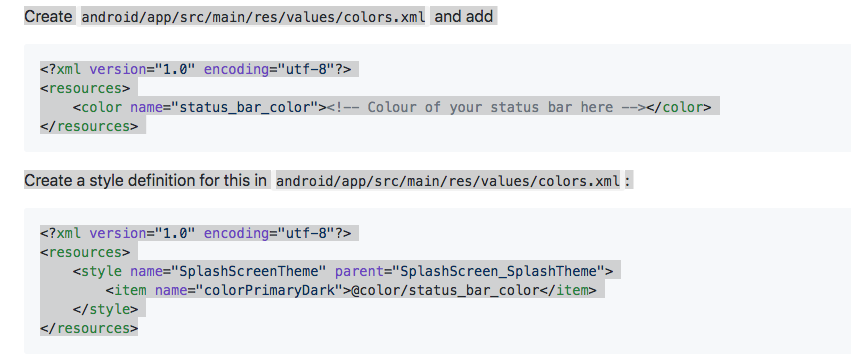
Here in documentation colors.xml mentioned twice and every time it looks different? Should we merge it?
rendomnet
on 30 May 2018
the second one, you make a specific theme for the splascScreen, I wondered back then why it wasn't in style.xml for the second one but I'm not a native developer so here is my color.xml :
<?xml version="1.0" encoding="utf-8"?>
<resources>
<color name="mainColor">#066193</color>
<color name="primary_dark">#000000</color>
<color name="white">#ffffff</color>
<color name="status_bar_color">#066193</color>
</resources>
and styles.xml
<resources>
<!-- Base application theme. -->
<style name="AppTheme" parent="Theme.AppCompat.Light.NoActionBar">
<!-- Customize your theme here. -->
</style>
<style name="SplashScreenTheme" parent="SplashScreen_SplashTheme">
<item name="colorPrimaryDark">@color/status_bar_color</item>
</style>
</resources>
So the key is to add also import android.os.Bundle; as shown bellow ;-)
package com.spry;

import android.os.Bundle;
import com.facebook.react.ReactActivity;
import org.devio.rn.splashscreen.SplashScreen;

public class MainActivity extends ReactActivity {

    @Override
    protected void onCreate(Bundle savedInstanceState) {
      SplashScreen.show(this);
      super.onCreate(savedInstanceState);
    }

    /**
     * Returns the name of the main component registered from JavaScript.
     * This is used to schedule rendering of the component.
     */
    @Override
    protected String getMainComponentName() {
        return "myapp";
    }
}
 cayasso
on 21 Jun 2018
cayasso
on 21 Jun 2018
I'm stuck at this part too.
cayasso your code helped, thanks.
 bearty
on 24 Jul 2018
bearty
on 24 Jul 2018
@cayasso I'm getting error: cannot find symbol
import android.os.bundle;
Any ideas?
 IAmMarcellus
on 2 Feb 2019
IAmMarcellus
on 2 Feb 2019
it's happening (force close) on Android Pie, there is another solution?
 dwisetiyadi
on 22 Feb 2019
dwisetiyadi
on 22 Feb 2019
I agree docs could be a bit more clear.
Instead of:
Update the MainActivity.java to use react-native-splash-screen via the following changes:
Something like:
Update the MainActivity.java to use react-native-splash-screen via the following changes (it's yours MainActivity file, not yours MainApplication file. If it doesn't exist you should insert the
onCreatemethod):
 fssantos
on 24 Feb 2019
fssantos
on 24 Feb 2019
Related issues
 johndo31
·
3Comments
johndo31
·
3Comments
 arnsa
·
5Comments
arnsa
·
5Comments
 zxyah
·
4Comments
zxyah
·
4Comments
 erdemildiz
·
5Comments
erdemildiz
·
5Comments
 jassonha21
·
3Comments
jassonha21
·
3Comments
Most helpful comment
So the key is to add also
import android.os.Bundle;as shown bellow ;-)