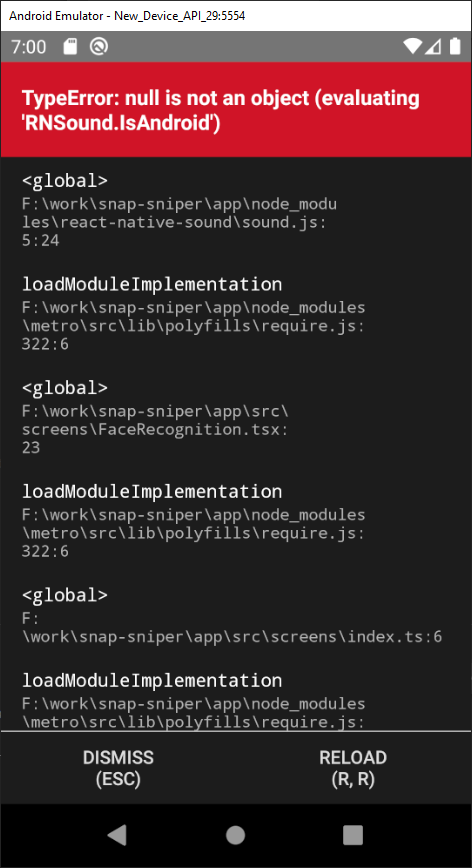
React-native-sound: null is not an object (evaluating 'RNSound.IsAndroid')
:beetle: Description
I tried installing and using this package for playing an audio file which I fetch from an API.
:beetle: What have you tried?
I followed the instructions in the wiki. I've installed the package using npm. I've also linked it using react-native link react-native-sound. It says that both Android and IOS modules have been linked. But then when I start the metro server and reload the app, everything crashes giving the error. I've also tried rebuilding the project but it doesn't work either.
:beetle: Please post your code:
import React, { Component } from 'react';
import { connect } from 'react-redux';
import { View } from 'react-native';
import { Card, Image, Button } from 'react-native-elements';
import Sound from 'react-native-sound';

class Activity extends Component {

  playSound() {
    const track = new Sound(this.props.sound, null, (error) => {
      if (error)
        console.log("Can't play sound. ", e);
      else
        track.play();
    });
  }

  render(){
    return (
      <Card title={this.props.title}>
        <View style={{ flexDirection: 'row', justifyContent: 'space-between', paddingTop: 20 }}>
          <Image
            source={{ uri: this.props.questions[0].options[0].value.image }}
            style={{ width: 100, height: 100 }}
          />
          <Image
            source={{ uri: this.props.questions[0].options[1].value.image }}
            style={{ width: 100, height: 100 }}
          />
          <Image
            source={{ uri: this.props.questions[0].options[2].value.image }}
            style={{ width: 100, height: 100 }}
          />
        </View>
        <View style={{ alignItems: 'center' }}>
          <Button
            titleStyle={{ fontSize: 40, fontWeight: '700', padding: 50 }}
            title={this.props.presentation}
            onPress={this.playSound}
          />
        </View>
      </Card>
    );
  }
}

const mapStateToProps = (state) => {
  const { presentation, sound, title, questions } = state.game;
  return { presentation, sound, title, questions };
};

export default connect(mapStateToProps, {})(Activity);
Is your issue with...
- [ ] iOS
- [x] Android
- [ ] Windows
Are you using...
- [x] React Native CLI (e.g.
react-native run-android) - [ ] Expo
- [ ] Other: (please specify)
Which versions are you using?
- React Native Sound: 0.11.0
- React Native: 0.60.5
- Android: 9.0
Does the problem occur on...
- [x] Simulator
- [ ] Device
 FatemeKhodayari
All 12 comments
Same to me. IOS only.
Android works fine.
 rafaelvinicius
on 24 Sep 2019
rafaelvinicius
on 24 Sep 2019
@FatemeKhodayari
Look this: https://github.com/zmxv/react-native-sound/issues/215#issuecomment-510543679
Running pod install
Deleting ios/build
Running react-native run-ios
rafaelvinicius
on 25 Sep 2019
@FatemeKhodayari
Look this: #215 (comment)Running
pod install
Deletingios/build
Runningreact-native run-ios
I think this may work for IOS. But my problem is with Android only. :)
FatemeKhodayari
on 25 Sep 2019
As far as I tried, there's no need to do the react-native link react-native-sound step. React Native does it automatically. No need to follow the instructions to wiki. Just rebuild the app and reload it. Everything works fine.
FatemeKhodayari
on 25 Sep 2019
Same to me in the Android 10.0 emulator.
react-native: 0.61.5
react-native-sound: 0.11.0
 prettydev
on 14 Feb 2020
prettydev
on 14 Feb 2020
I have the same problem. Just installed react-native-sound and I'm getting this error in Android emulator. I've checked the linking (compared to manual steps) and everything looks in order.
 AdamGerthel
on 18 Feb 2020
AdamGerthel
on 18 Feb 2020
same here on linux / expo. The strange thinig is that the same problem occurs also with other libraries like react-native-track-player. Is it possible that react native is responsible for this fault?
 vaidis
on 29 Feb 2020
vaidis
on 29 Feb 2020
Same problem, not working on iOS expo app
 Cat107
on 6 May 2020
Cat107
on 6 May 2020
@Cat107 Libraries which require linking will never work with an Expo app, unless you're using the bare workflow. See https://docs.expo.io/introduction/why-not-expo/
AdamGerthel
on 7 May 2020
I'm facing exactly the same issue on an ios device, why is this closed what should i do?
 beingArkReal
on 7 May 2020
beingArkReal
on 7 May 2020
I'm facing exactly the same issue on an ios device, why is this closed what should i do?
try react-native link react-native-sound
 markdashi
on 14 May 2020
markdashi
on 14 May 2020
Same problem, not working on iOS expo app
@Cat107 I tried to replace with import {Audio} from 'expo-av'
the error gone but there is no sound still
 hewang42
on 8 Dec 2020
hewang42
on 8 Dec 2020
Related issues
 Jeremaiha
·
5Comments
Jeremaiha
·
5Comments
 kurokky
·
3Comments
kurokky
·
3Comments
 Girishav
·
3Comments
Girishav
·
3Comments
 watadarkstar
·
3Comments
watadarkstar
·
3Comments
 LCD344
·
5Comments
LCD344
·
5Comments
Most helpful comment
try react-native link react-native-sound