React-native-snap-carousel: Shadow/borders of not active items not showing correctly
Is this a bug report, a feature request, or a question?
Bug report
Have you followed the required steps before opening a bug report?
(Check the step you've followed - put an x character between the square brackets ([]).)
- [x] I have read the guidelines regarding bug report.
- [x] I have reviewed the documentation in its entirety, including the dedicated documentations :books:.
- [x] I have searched for existing issues and made sure that the problem hasn't already been reported.
- [x] I am using the latest plugin version.
- [x] I am following the issue template closely in order to produce a useful bug report.
Have you made sure that it wasn't a React Native bug?
Yes
Is the bug specific to iOS or Android? Or can it be reproduced on both platforms?
Android (Emulator)
Is the bug reproductible in a production environment (not a debug one)?
Not tested on release mode
Environment
Environment:
React: 16.8.6
React native: 0.60.4
react-native-snap-carousel: 3.8.1
Target Platform:
Android (9.0)
Expected Behavior
It should decrease the opacity of the whole card, not only border
Actual Behavior
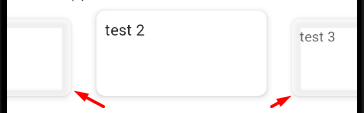
The borders (with shadow) of the not active cards have different opacity. It looks bad
Reproducible Demo
<Carousel
                        layout={'default'}
                        data={[{title: 'test', id: 1}, {title: "test 2", id: 2}, {title: "test 3", id: 3}]}
                        renderItem={this._renderItem}
                        sliderWidth={width}
                        itemWidth={itemWidth}
                    />
const {height, width} = Dimensions.get('window');
const horizontalMargin = 10;
const slideWidth = 200;
const itemWidth = slideWidth + horizontalMargin * 2;
const itemHeight = 200;

const styles = {
    slide: {

        width: itemWidth,
        height: itemHeight,
        paddingHorizontal: horizontalMargin,

        marginVertical: 10
        // other styles for the item container
    },
    slideInnerContainer: {
        width: slideWidth,
        backgroundColor: 'white',
        shadowColor: "#000",
        shadowOffset: {
            width: 0,
            height: 3,
        },
        shadowOpacity: 0.27,
        shadowRadius: 10,

        elevation: 6,
        borderRadius: 10,
        height: 100,
        padding: 10
        // other styles for the inner container
    }
};
Steps to Reproduce
Just use the above code for the Carousel. I have nothing else on the screen. The Carousel is wrapped with a
 krisidmisso
All 4 comments
This has nothing to do with the plugin and is a well known React native bug. TL;DR: Android acts like it applies an overflow: hidden rule to every single view.
You can either add a wrapper with the necessary padding around the view with the shadow or try this trick.
 bd-arc
on 2 Oct 2019
bd-arc
on 2 Oct 2019
@bd-arc im not sure if this is related to the overflow. I have no absolute positioning of any item inside the slider. Also the plugin you recommended did state that after RN 0.57 this should not be a problem (i have 0.60.4).
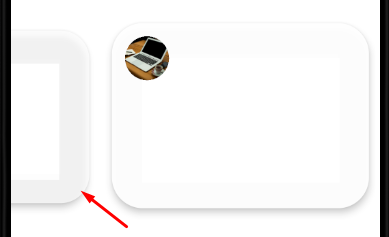
I tried adding the wrapper with padding and also installing the plugin and wrapping the slider view with it but the result is the same.
krisidmisso
on 3 Oct 2019
I see. The bad news is this still has to do with the Android rendering engine and not with the plugin. When you use an elevation and some opacity, bad things usually happen...
I'm pretty sure everything is fine when you set inactiveSlideOpacity to 1, isn't it?
bd-arc
on 3 Oct 2019
wow how did I miss that?! I added inactiveSlideOpacity={1} and now its ok. I don't mind losing the opacity to the inactive slide. Thank you!
krisidmisso
on 3 Oct 2019
Related issues
 ajonno
·
4Comments
ajonno
·
4Comments
 NikitaNeganov
·
3Comments
NikitaNeganov
·
3Comments
 CarbonC
·
4Comments
CarbonC
·
4Comments
 codejet
·
5Comments
codejet
·
5Comments
 radiosilence
·
4Comments
radiosilence
·
4Comments
Most helpful comment
I see. The bad news is this still has to do with the Android rendering engine and not with the plugin. When you use an elevation and some opacity, bad things usually happen...
I'm pretty sure everything is fine when you set
inactiveSlideOpacityto1, isn't it?