React-native-snap-carousel: Weird scrolling behavior when firstItem !== 0 & loop === true
Hi, first of all, thanks for life saving library.
I'm facing one peculiar issue - let's have a list of 5 items and firstItem set to 1, so second item in a list is selected by default. Now swipe to right to scroll to 3rd, 4th items and so on. It works as expected until you swipe from 5th item (index 4) to 1st item (index 0). After animation is done, the list is somehow re-scrolled again - see example in expo or gif.
- Strange enough, it seems to be broken in this way only when firstItem is set to anything but 0.
- It also happens only once and works afterwards quite fine.
Is this a bug report or a feature request?
Bug report
Testing environment
- [email protected] with react-native@https://github.com/expo/react-native/archive/sdk-23.0.0.tar.gz
- [email protected]
- [email protected]
- iOS simulator Version 10.0 & iPhone 7
Reproducible Demo

 jaroslav-kubicek
All 15 comments
Hi @jaroslav-kubicek,
Yes, I've also experienced it with the latest versions of React Native (it wasn't happening before RN 0.49 if I recall correctly).
I've previously tried to find the root cause, but I was left with random FlatList bugs. I decided to wait and hope for a resolution on Facebook side, but I fear nothing has changed since then.
The loop handling logic is the following: when looping, the data you provide is cloned in order to create slide duplicates. When you reach the edges of the original slides, you are then scrolling duplicates (their number being defined by prop loopClonesPerSide). Then, when the scroll interaction is finished, the scroll offset is seamlessly repositioned so that the original slide is shown, ready to be scrolled again.
The weird thing is that despite passing { animated: false } to the scrollToOffset() method , the first repositioning is still animated...
I'm a bit clueless, but I'll see what I can do (or, most probably, hack) as soon as I can.
 bd-arc
on 19 Dec 2017
bd-arc
on 19 Dec 2017
Thanks @bd-arc for such quick reply and provided info, in meanwhile I will probably workaround this issue and hope for better tomorrows.
jaroslav-kubicek
on 19 Dec 2017
Hi @jaroslav-kubicek,
I've tested with the latest RN version and it seems that the internal issue has been solved 🎉 I've updated the example to RN 0.51.0 if you want to give it a try.
bd-arc
on 2 Jan 2018
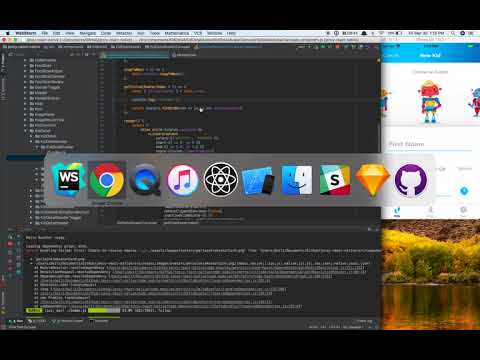
@bd-arc I'm also experiencing this exact issue with RN 0.52.2. I've noticed that every time I change to a new slide, firstItem (if a function is passed to it), get's called every time. See the attached video.
 dwilt
on 30 Mar 2018
dwilt
on 30 Mar 2018
Just realized that getInitialAvatarIndex in firstItem is firing again because the render method that the snapCarousel is in is getting fired because it's props/state changed. Nonetheless, the issue remains.
dwilt
on 30 Mar 2018
Another note -- this problem doesn't happen if I don't set firstItem.
dwilt
on 30 Mar 2018
I think I discovered the issue. Since the avatar field is _bound_ to my state, and the state changes, that's what causes it to animate incorrectly. If I hardcode firstItem={2} instead of calling getInitialAvatarIndex() (which produces a different value on every slide change) the issue doesn't happen.
dwilt
on 30 Mar 2018
Thanks for sharing your findings @dwilt! This is pretty interesting.
bd-arc
on 30 Mar 2018
@bd-arc I got same issue with #304 and #303, when loop true and combined with pagination component it's become flickering when moving from first to last and also last to first. Props I used:
loop={true}
onSnapItem={} // function to set state active index, cause it's needed by pagination component
and below the carousel i call pagination like this:
<Pagination
                        activeDotIndex={this.state.activeIndex}
                        containerStyle={{ bottom: 10, position: 'absolute', left: 0, right: 0 }}
                        dotStyle={{ width: 10, height: 10, backgroundColor: '#fff', borderRadius: 10 }}
                        dotContainerStyle={{ marginHorizontal: 2 }}
                        dotsLength={defaultData.length}
                        inactiveDotOpacity={0.4}
                        inactiveDotScale={0.9}
                        carouselRef={this._carousel}
                    />
I think its caused by setState on onSnapItem, its working normally if i did not using setState inside onSnapItem function
 muhamad-rizki
on 4 Aug 2018
muhamad-rizki
on 4 Aug 2018
i have send PR request to fix my issue above, maybe its not the best solution, but i used it to fix my current issue
muhamad-rizki
on 4 Aug 2018
I am not sure if it is related to the original issue, but I am seeing the same problem as @muhamad-rizki. With the following configuration:
<Carousel
    ref={carousel => this.carousel = carousel}
    data={items}
    renderItem={this.renderItem}
    autoplay={true}
    autoplayDelay={1000}
    autoplayInterval={4000}
    loop={true}
    sliderWidth={Dimensions.get('window').width}
    itemWidth={Dimensions.get('window').width}
    itemHeight={200}
    onSnapToItem={this.handleSlideChange}
    containerCustomStyle={{marginTop: 80}}
/>
Everything animates/renders fine until it goes from the last item to the first in the loop. The first item renders and then quickly flickers empty and back. It oddly does not happen on every loop and It happens with or without my Pagination component or an onSnapToItem handler.
 nlrowe
on 3 Jan 2019
nlrowe
on 3 Jan 2019
@bd-arc you have referred from #303/#304 to this issue, but this issue is closed and it seems to me that the bottom two comments are a separate issue from the remainder? This issue is bugging me quite a lot now, please reconsider the PR and reopen the issue, or document it in a separate issue!
 xerus2000
on 10 Apr 2019
xerus2000
on 10 Apr 2019
I am not sure if it is related to the original issue, but I am seeing the same problem as @muhamad-rizki. With the following configuration:
<Carousel
    ref={carousel => this.carousel = carousel}
    data={items}
    renderItem={this.renderItem}
    autoplay={true}
    autoplayDelay={1000}
    autoplayInterval={4000}
    loop={true}
    sliderWidth={Dimensions.get('window').width}
    itemWidth={Dimensions.get('window').width}
    itemHeight={200}
    onSnapToItem={this.handleSlideChange}
    containerCustomStyle={{marginTop: 80}}
/>
Everything animates/renders fine until it goes from the last item to the first in the loop. The first item renders and then quickly flickers empty and back. It oddly does not happen on every loop and It happens with or without my
Paginationcomponent or anonSnapToItemhandler.
Hello! did you solve your problem?
 Natkarock
on 6 Sep 2019
Natkarock
on 6 Sep 2019
Unfortunately I did not. It was a pilot project that did not move forward.
nlrowe
on 6 Sep 2019
Facing same issue. Did anybody solved the issue?
 christopher-18
on 16 Jun 2020
christopher-18
on 16 Jun 2020
Related issues
 niloufarMakhzani
·
4Comments
niloufarMakhzani
·
4Comments
 NikitaNeganov
·
3Comments
NikitaNeganov
·
3Comments
 Dr1992
·
4Comments
Dr1992
·
4Comments
 radiosilence
·
4Comments
radiosilence
·
4Comments
 wkwyatt
·
4Comments
wkwyatt
·
4Comments
Most helpful comment
Hi @jaroslav-kubicek,
I've tested with the latest RN version and it seems that the internal issue has been solved 🎉 I've updated the example to RN
0.51.0if you want to give it a try.