React-native-snap-carousel: how to set space between slides
I want to change the space between slides.
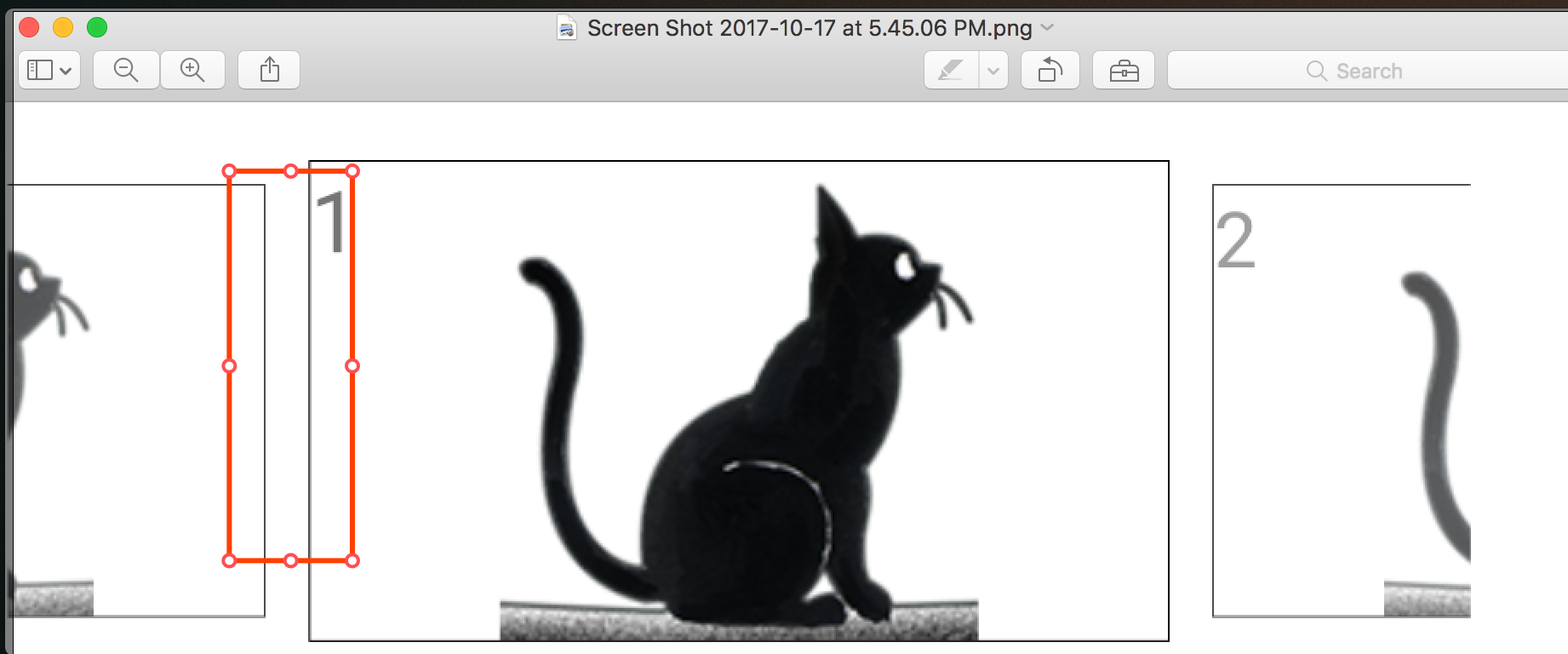
If change the margin of each item, something as the following.
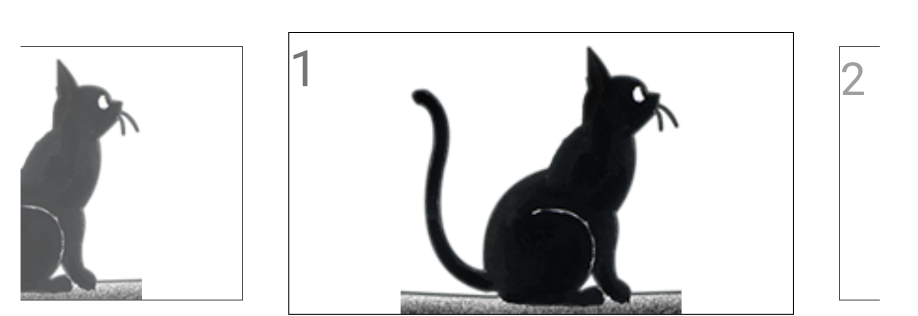
Does have any property to reset the space between slides.
 genglei01
All 17 comments
how?
 devmoonsite
on 7 Jan 2018
devmoonsite
on 7 Jan 2018
@devmoonsite Make sure to read the doc; there is an entire section that explains how in length.
 bd-arc
on 7 Jan 2018
bd-arc
on 7 Jan 2018
@bd-arc sorry to re-comment on this issue. I have read almost all the doc, but still not found a way to reduce the space between slides. Is there a way to do this?
 futantan
on 19 Apr 2018
futantan
on 19 Apr 2018
@futantan Basically, this is determined by the inactiveSlideScale prop.
Play with its value until you find something that suits you. If you set it to 1, you'll have no space between the slides.
bd-arc
on 19 Apr 2018
@bd-arc Thanks for your help!
But the space between two item is based on the width of item by percentage.
Can we define the specific number of spacing, such as 10, and keep the sacle unchanged?
futantan
on 23 Apr 2018
@futantan Sure. You just need to create an inner container and to set its padding to the value you want.
If you have trouble doing it, please create a Snack example so I can take a look at it.
bd-arc
on 23 Apr 2018
@bd-arc is it possible to have the inactive scaled behavior without the extra space between slides?
thanks.
 mrafei
on 6 Aug 2018
mrafei
on 6 Aug 2018
@mrafei It can be done thanks to custom interpolations.
You can base yours on the default interpolation and add a translateX one on top of the scale one.
bd-arc
on 6 Aug 2018
@bd-arc Thanks for the response.
I tried implementing what you said, this is my custom interpolator and animatedStyle:
`_scrollInterpolator(index, carouselProps) {
const range = [3, 2, 1, 0, -1, -2, -3];
const inputRange = getInputRangeFromIndexes(range, index, carouselProps);
return {inputRange, range};
}
_animatedStyles(index, animatedValue, carouselProps) {
const sizeRef = carouselProps.itemWidth;
let animatedOpacity = {};
let animatedScale = {};
if (carouselProps.inactiveSlideOpacity < 1) {
  animatedOpacity = {
    opacity: animatedValue.interpolate({
      inputRange: [0, 1],
      outputRange: [carouselProps.inactiveSlideOpacity, 1]
    })
  };
}

if (carouselProps.inactiveSlideScale < 1) {
  animatedScale = {
    transform: [{
      scale: animatedValue.interpolate({
        inputRange: [0, 1],
        outputRange: [carouselProps.inactiveSlideScale, 1],
        extrapolate: 'clamp'
      })
    }, {
      translateX: animatedValue.interpolate({
        inputRange: [-3, -2, -1, 0, 1, 2, 3],
        outputRange: [40, 30, 20, 10, 0, -10, -20],
        extrapolate: 'clamp'
      })
    }]
  };
}

return {
  ...animatedOpacity,
  ...animatedScale
};
}`
I think this only shifts the inactive items to right which puts only the first item left of the active item in the right position. The transform doesn't seem to affect the rest of items.
also I have tried this with useScrollView={true} and it doesn't help on top of it I lose the snap to item functionality.
Can you help me fix this?
thanks.
mrafei
on 6 Aug 2018
Sure @mrafei!
Can you please provide a Snack example that includes your latest developments?
bd-arc
on 6 Aug 2018
mrafei
on 6 Aug 2018
Hey @mrafei,
I've played with your example a few days ago and, as far as I can tell, it should just work!
I'm going to try and recreate it from scratch because this leaves me rather confused :-)
bd-arc
on 13 Aug 2018
@bd-arc
any news on this?
mrafei
on 21 Aug 2018
@mrafei And here you are: https://snack.expo.io/H10cT8K8Q ;-)
The key was to change const outputRange = [0, 1, 0]; (default value) to const outputRange = range; in the scrollInterpolator function and to modify the output ranges in animatedStyles accordingly.
bd-arc
on 21 Aug 2018
@bd-arc
This is great. Thanks again for the great library. :)
mrafei
on 21 Aug 2018
I'm unable to do this. Can someone provide a clearer example or step by step instructions?
 bishnudev
on 23 Apr 2019
bishnudev
on 23 Apr 2019
I'm unable to do this. Can someone provide a clearer example or step by step instructions?
I got it working by setting inactiveSlideScale to 1
 chengsam
on 8 Nov 2019
chengsam
on 8 Nov 2019
Related issues
 niloufarMakhzani
·
4Comments
niloufarMakhzani
·
4Comments
 NikitaNeganov
·
3Comments
NikitaNeganov
·
3Comments
 akyker20
·
3Comments
akyker20
·
3Comments
 Murena7
·
3Comments
Murena7
·
3Comments
 ajonno
·
4Comments
ajonno
·
4Comments
Most helpful comment
@futantan Basically, this is determined by the
inactiveSlideScaleprop.Play with its value until you find something that suits you. If you set it to
1, you'll have no space between the slides.