React-native-screens: Version 3.1.0: Error "Invariant Violation: requireNativeComponent: "RNSScreen" was not found in the UIManager." (Windows)
Description
Windows app doesn´t load when creating a basic new react-native app with react-native-windows and Tab Navigation.
Screenshots
Debugging Windows App

Steps To Reproduce
- Create react native app with windows using typescript and latest version (Date 09/04/2021)
npx react-native init MyTSApp --template react-native-template-typescript cd MyTSApp cd myTSApp npx react-native-windows-init --overwrite --language cs - Install needed navigation package and its dependencies and update App.tsx with code available below.
- Try running windows app and see that it errors. Note: It will work with react-native-screens ^2.18.1 instead.
Expected behavior
Windows App should load
Actual behavior
Windows App crashes showing error message (screenshot below)
- Console error: Error "Invariant Violation: requireNativeComponent: "RNSScreen" was not found in the UIManager."
Displaying error:Getting folly::toJson: JSON object value was a NaN or INF
- Console error: Error "Invariant Violation: requireNativeComponent: "RNSScreen" was not found in the UIManager."
Error in the Developer tools console is:
C:\codeWTS\BrandNewApps\RNW\Unused\TabbedTSApp\node_modules\react-native-windows\Libraries\Core\ExceptionsManager.js:180 Invariant Violation: requireNativeComponent: "RNSScreen" was not found in the UIManager.

This error is located at:
    in RNSScreen (at createAnimatedComponent.js:217)
    in AnimatedComponent (at createAnimatedComponent.js:278)
    in AnimatedComponentWrapper (at src/index.native.tsx:120)
    in Screen (at ResourceSavingScene.tsx:30)
    in ResourceSavingScene (at BottomTabView.tsx:166)
    in RNSScreenContainer (at src/index.native.tsx:145)
    in ScreenContainer (at BottomTabView.tsx:146)
    in RCTView (at View.windows.js:52)
    in View (at CompatNativeSafeAreaProvider.tsx:28)
    in CompatNativeSafeAreaProvider (at SafeAreaContext.tsx:76)
    in SafeAreaProvider (at SafeAreaProviderCompat.tsx:42)
    in SafeAreaProviderCompat (at BottomTabView.tsx:145)
    in BottomTabView (at createBottomTabNavigator.tsx:45)
    in BottomTabNavigator (at App.tsx:27)
    in EnsureSingleNavigator (at BaseNavigationContainer.tsx:409)
    in BaseNavigationContainer (at NavigationContainer.tsx:91)
    in ThemeProvider (at NavigationContainer.tsx:90)
    in NavigationContainer (at App.tsx:26)
    in App (at renderApplication.js:47)
    in RCTView (at View.windows.js:52)
    in View (at AppContainer.js:107)
    in RCTView (at View.windows.js:52)
    in View (at AppContainer.js:134)
    in AppContainer (at renderApplication.js:40)
Snack or minimal code example
App.tsx
import * as React from 'react';
import { Text, View } from 'react-native';
import { NavigationContainer } from '@react-navigation/native';
import { createBottomTabNavigator } from '@react-navigation/bottom-tabs';

function HomeScreen() {
  return (
    <View style={{ flex: 1, justifyContent: 'center', alignItems: 'center' }}>
      <Text>Home!</Text>
    </View>
  );
}

function SettingsScreen() {
  return (
    <View style={{ flex: 1, justifyContent: 'center', alignItems: 'center' }}>
      <Text>Settings!</Text>
    </View>
  );
}

const Tab = createBottomTabNavigator();

export default function App() {
  return (
    <NavigationContainer>
      <Tab.Navigator>
        <Tab.Screen name="Home" component={HomeScreen} />
        <Tab.Screen name="Settings" component={SettingsScreen} />
      </Tab.Navigator>
    </NavigationContainer>
  );
}
package.json
{
  "name": "mytsapp",
  "version": "0.0.1",
  "private": true,
  "scripts": {
    "android": "react-native run-android",
    "ios": "react-native run-ios",
    "start": "react-native start",
    "test": "jest",
    "lint": "eslint . --ext .js,.jsx,.ts,.tsx",
    "windows": "react-native run-windows"
  },
  "dependencies": {
    "@react-native-community/masked-view": "^0.1.10",
    "@react-navigation/bottom-tabs": "^5.11.9",
    "@react-navigation/native": "^5.9.4",
    "@react-navigation/stack": "^5.14.4",
    "react": "17.0.1",
    "react-native": "0.64.0",
    "react-native-gesture-handler": "^1.10.3",
    "react-native-reanimated": "^2.1.0",
    "react-native-safe-area-context": "^3.2.0",
    "react-native-screens": "^3.1.0",
    "react-native-windows": "^0.64.0-0"
  },
  "devDependencies": {
    "@babel/core": "^7.12.9",
    "@babel/runtime": "^7.12.5",
    "@react-native-community/eslint-config": "^2.0.0",
    "@types/jest": "^26.0.20",
    "@types/react-native": "^0.64.0",
    "@types/react-test-renderer": "^16.9.2",
    "babel-jest": "^26.6.3",
    "eslint": "^7.14.0",
    "jest": "^26.6.3",
    "metro-react-native-babel-preset": "^0.64.0",
    "react-test-renderer": "17.0.1",
    "typescript": "^3.8.3"
  },
  "resolutions": {
    "@types/react": "^17"
  },
  "jest": {
    "preset": "react-native",
    "moduleFileExtensions": [
      "ts",
      "tsx",
      "js",
      "jsx",
      "json",
      "node"
    ]
  }
}
Package versions
- React: "17.0.1"
- React Native: "0.64.0"
- React Native Windows: "^0.64.0-0"
- React Native Screens: "^3.1.0"
 prupipho
All 10 comments
Can you check if applying changes from #886 fixes your issue?
 WoLewicki
on 12 Apr 2021
WoLewicki
on 12 Apr 2021
Can you check if applying changes from #886 fixes your issue?
Sure!
I copied that file on the node-modules/react-native-screens/src/index.native.tsx
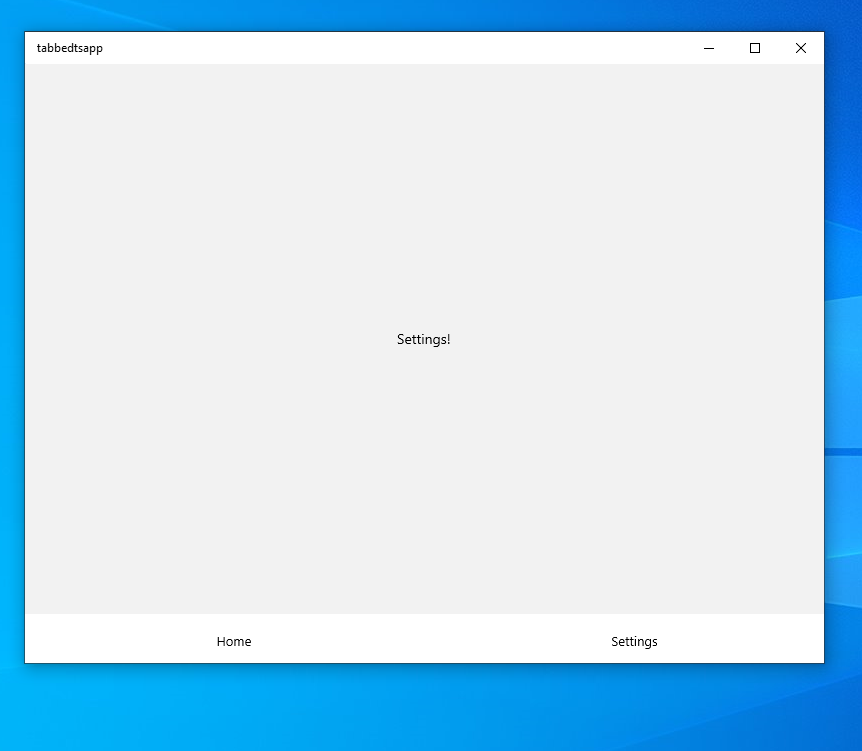
It loads the app correctly, but there´s still an issue and I couldn´t see any new error on the console for this one.
Steps:
yarn windowsto open App- click on Settings tab -> it navigates ok
- click on Home tab -> doesn´t move anymore. I tried adding another tab and doesn´t seem to respond at all after clicking on Settings Tab
prupipho
on 12 Apr 2021
I am not sure it is related to react-native-screens. Can you check if it works when you use react-native-screens version 2.18.1 and pass enableScreens(false) at the top of your App? You can also specify detachInactiveScreens={false} on all your navigators with the current version. Do any of those solutions fix it?
WoLewicki
on 12 Apr 2021
I am not sure it is related to
react-native-screens. Can you check if it works when you usereact-native-screensversion2.18.1and passenableScreens(false)at the top of your App? You can also specifydetachInactiveScreens={false}on all your navigators with the current version. Do any of those solutions fix it?
Sorry I didn´t reply yesterday. Thanks again. I tried what you mentioned. Just downgrading version to 2.18.1 seems to fix those issues.
- This fix seems to work ok with version 2.18.1. Doesn´t even need enableScreens(false) at the top of the App.. I think.
- I added
<Tab.Navigator detachInactiveScreens={false}>keeping 3.1.0 version, and still using the file: index.native.tsxfrom the PR but seems to keep failing while trying to navigate to different pages using the bottom tab.
prupipho
on 13 Apr 2021
And does setting detachInactiveScreens={false} on the navigators and also setting enableScreens(false) on top of your app in 3.1.0 resolves the issue?
WoLewicki
on 13 Apr 2021
And does setting
detachInactiveScreens={false}on the navigators and also settingenableScreens(false)on top of your app in3.1.0resolves the issue?
It does! Using 3.10 with the code in the PR you sent me, and both those things on my App, it makes it work. Really appreciate! have a nice day.
prupipho
on 13 Apr 2021
We've managed to backtrack what probably went wrong.
In a flow as you've described: Home -> Settings -> Home the app stays on Settings and freezes. But the app is not frozen - the Home is rendered underneath and the Settings should be unmounted. But it doesn't.
After navigating to the Settings this if-statement doesn't resolve to null. Having not set enableScreens(false) makes this detaching logic not come into play. Instead, react-native-screens is used which doesn't handle this case.
You can check that by making the code resolve into null in the if-statement a few lines above here by using unmountOnBlur prop like that:
<Stack.Navigator
    initialRouteName="Home"
    screenOptions={{
    unmountOnBlur: true,
    }}>
    <Stack.Screen name="Home" component={HomeScreen} />
    <Stack.Screen name="Details" component={DetailsScreen} />
</Stack.Navigator>
This makes an inactive screen resolve to null so even logic from react-native-screens works fine.
 kacperkapusciak
on 14 Apr 2021
kacperkapusciak
on 14 Apr 2021
Ok I think that updated #886 should address all of these issues. @prupipho could you check if applying the updated version makes you be able to use all navigators without any changes like detachInactiveScreens={false} or enableScreens(false) needed?
WoLewicki
on 14 Apr 2021
Thanks. I was on it ;)
Updated version works ok for me with 3.1.0 and updated file src/index.native.tsxfrom the PR
App.tsx as original without any changes and app loads and navigate perfectly.
import * as React from 'react';
import { Text, View } from 'react-native';
import { NavigationContainer } from '@react-navigation/native';
import { createBottomTabNavigator } from '@react-navigation/bottom-tabs';

function HomeScreen() {
  return (
    <View style={{ flex: 1, justifyContent: 'center', alignItems: 'center' }}>
      <Text>Home</Text>
    </View>
  );
}

function SettingsScreen() {
  return (
    <View style={{ flex: 1, justifyContent: 'center', alignItems: 'center' }}>
      <Text>Settings</Text>
    </View>
  );
}

const Tab = createBottomTabNavigator();

export default function App() {
  return (
    <NavigationContainer>
      <Tab.Navigator>
        <Tab.Screen name="Home" component={HomeScreen} />
        <Tab.Screen name="Settings" component={SettingsScreen} />
      </Tab.Navigator>
    </NavigationContainer>
  );
}
Ok, so we are releasing this change as 3.1.1 :tada:
WoLewicki
on 14 Apr 2021
Related issues
 ukasiu
·
4Comments
ukasiu
·
4Comments
 harrisrobin
·
3Comments
harrisrobin
·
3Comments
 chengsokdara
·
3Comments
chengsokdara
·
3Comments
 jeveloper
·
5Comments
jeveloper
·
5Comments
 thomasgosse
·
4Comments
thomasgosse
·
4Comments
Most helpful comment
Ok, so we are releasing this change as
3.1.1:tada: