React-native-screens: [native-stack] Header is out of the safe area on Android
_Moved from react-navigation/react-navigation#6797. Originally opened by @enheit_
Current Behavior
The header navigation is rendered beyond safe area on Android devices.

Expected Behavior
The header should be rendered in 'safe area'.

(this is how @react-navigation/stack works)
How to reproduce
Create a screen by using Screen.Stack from @react-navigation/native-stack
Your Environment
| software | version |
| ------------------------------ | ------- |
| iOS or Android | Android (v9)
| @react-navigation/native | ^5.0.0-alpha.33
| @react-navigation/native-stack | ^5.0.0
| react-native-screens | ^2.0.0-beta.2
| react-native | ~0.61.4
| expo | ~36.0.0
| node | v12.14.1
| npm or yarn | 6.13.4
 satya164
All 11 comments
@enheit can you repro the issue in v. 2.4.0?
 WoLewicki
on 31 Mar 2020
WoLewicki
on 31 Mar 2020
Hi. I am getting the same issue and it looks like it still occurs in v2.4.0
 Erc93
on 2 Apr 2020
Erc93
on 2 Apr 2020
@WoLewicki Issue is not reproducible in version 2.4.0 (Android v9)
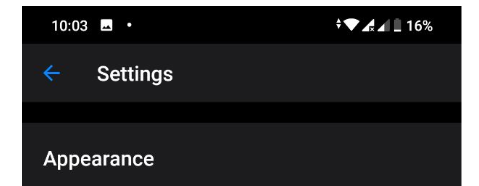
I would recommend to verify on other Android versions & devices if it possible
 enheit
on 2 Apr 2020
enheit
on 2 Apr 2020
@Erc93 can you provide a reproduction with a minimal needed configuration that would show the issue?
WoLewicki
on 2 Apr 2020
@WoLewicki
I just realised that I might be running into a separate but similar issue. I seem to be getting the problem when using import { createNativeStackNavigator } from "react-native-screens/native-stack"; to create my stack. Using the stack navigator from react-navigation seems to fix my issue.
Here is an example:
https://snack.expo.io/HqDtTeyzQ
Erc93
on 3 Apr 2020

@Erc93 I cannot repro your issue with this configuration. It looks like the safe area is correctly applied on Android. Can you be more specific on how to reproduce the bug?
WoLewicki
on 3 Apr 2020
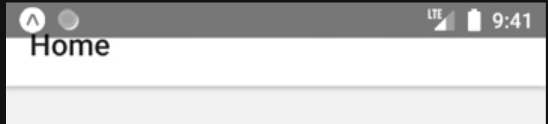
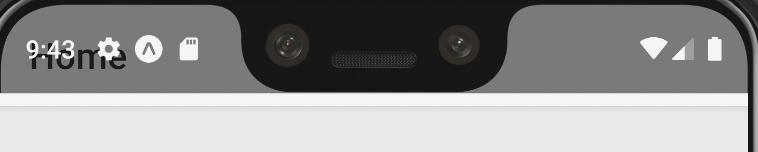
@WoLewicki I'm not sure why you cannot reproduce the issue. The issue seems to occur on both the Android device on the snack and on the Android Simulator for me.
The issue specifically happens when using createNativeStackNavigator from "react-native-screens/native-stack" to create the stack. If I replace this with createStackNavigator from "@react-navigation/stack", then the issue no longer happens.
I'm not quite sure if I am missing anything else to be able to reproduce the issue. I have tested the problem from Android 8.1 until 10 and it seems to happen on all of them. I'm also quite new to React Native so I apologise if I am being confusing.
Erc93
on 6 Apr 2020
I think the problem might be that you are trying to do it in Expo Client, which has an older version of react-native-screens, where the bug still exists. Could you try making a bare RN project with newest react-native-screens and check if the issue exists there?
WoLewicki
on 6 Apr 2020
@WoLewicki Yup you are right. I was using the Expo client the whole time. I created a bare project as you advised and the issue does not occur. Thanks for all the assistance!
Erc93
on 7 Apr 2020
Ok so sadly all you can do with Expo client is to wait for the next release where the newer native code will be added. I am closing the issue since it is resolved.
WoLewicki
on 7 Apr 2020
I found a temp solution for Android while using Expo. In the Screen options, when declaring your header (left, center and right), you can add height and marginTop to it and that can help, maybe not in all cases though.
headerCenter: (props) => (
    <Text
      style={{
        color: "white",
        fontSize: 18,
        height: 40,
        marginTop: 30,
      }}
    >
      Title
    </Text>
  ),
 dougg0k
on 15 Jun 2020
dougg0k
on 15 Jun 2020
Related issues
 ArekChr
·
5Comments
ArekChr
·
5Comments
 thorbenandresen
·
4Comments
thorbenandresen
·
4Comments
 kantorm
·
5Comments
kantorm
·
5Comments
 beetlebum
·
5Comments
beetlebum
·
5Comments
 chengsokdara
·
3Comments
chengsokdara
·
3Comments
Most helpful comment
@WoLewicki
I just realised that I might be running into a separate but similar issue. I seem to be getting the problem when using
import { createNativeStackNavigator } from "react-native-screens/native-stack";to create my stack. Using the stack navigator from react-navigation seems to fix my issue.Here is an example:
https://snack.expo.io/HqDtTeyzQ