React-native-router-flux: There is no route defined for key auth.
Version
Tell us which versions you are using:
- react-native-router-flux v4.2.0 Upgraded from 4.0.0-beta.24
- react v16.13.1
- react-native v0.61.4
Expected behaviour
Should move to CustomNavBar Class.
Actual behaviour
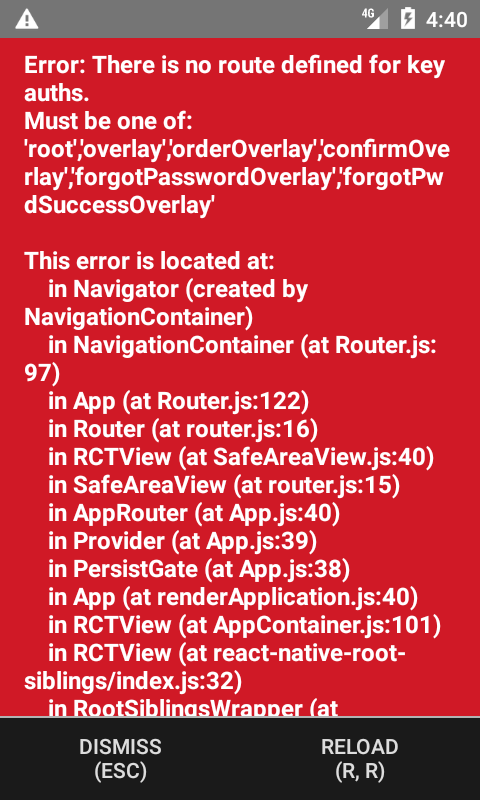
Throwing Error There is no route defined for key auth. Must be one of : 'root','overlay','orderOverlay',forgotPwdSuccessOverlay'
Steps to reproduce
For non-obvious bugs, please fork this component, modify Example project to reproduce your issue and include link here.
- Called method Actions.reset('auths');
Reproducible Demo
<Router navTransparent>
            <Lightbox>
                <Scene key="root" tintColor="#fff" style={{position: 'absolute'}} hideNavBar>
                    <Scene key="redirect" component={EnsureAuthentication}/>
                    <Scene key="auths" navBar={CustomNavBar}>
                        <Scene key="loginSignUp" component={Login} hideNavBar/>
                        <Scene key="login" component={LoginForm} title={I18n.t('loginTitle')} />
                        <Scene key="signUp" component={SignUpForm} title={I18n.t('signUpTitle')}/>
                        <Scene key="googleLogin" component={GoogleLogin}/>
                    </Scene>
                    <Drawer hideNavBar key="app" contentComponent={DrawerContent} drawerWidth={300} drawerOpenRoute="DrawerOpen" drawerCloseRoute="DrawerClose" drawerToggleRoute="DrawerToggle">
                        <Scene key="main" navBar={CustomNavBar}>
                            <Scene key="MapSearch" component={MapSearch}/>
                            <Scene key="ScanQr" hideNavBar component={ScanQr} />
                            <Scene key="searchList" hideNavBar component={SearchList}/>
                            <Scene key="editUserProfile" component={EditUserProfile} title={I18n.t('update')} />
                            <Scene key="stallDetails" hideNavBar component={StallDetails}/>
                            <Scene key="customise" hideNavBar component={Customise}/>
                            <Scene key="cart" hideNavBar component={Cart}/>
                            <Scene key="favourites" hideNavBar component={Favourites}/>
                        </Scene>
                    </Drawer>
                </Scene>
                <Scene key="overlay"/>
                <Scene key="orderOverlay" hideNavBar component={OrderOverlay}/>
                <Scene key="confirmOverlay" hideNavBar component={ConfirmOverlay}/>
                <Scene key="forgotPasswordOverlay" hideNavBar component={ForgotPasswordOverlay}/>
                <Scene key="forgotPwdSuccessOverlay" hideNavBar component={ForgotPwdSuccessOverlay}/>
            </Lightbox>
        </Router>
      </SafeAreaView>
I'm working on Existing app and i'm newbie to React Native. Any help would be highly appreciated.
 AdeelShoukatAli
All 2 comments
Same question. I've just update react-native-router-flux to version 4.2.0 and met this issue.
 tuandv1311
on 4 Aug 2020
tuandv1311
on 4 Aug 2020
I met the silimar requestion.
I resolve by pop up from the lightbox first and then do the next navigate.
I invoke the code followed in the lightbox scene when I want to get away from the lightbox.
Promise.resolve(Actions.pop()).then( ()=> {Actions.XXX()} )
 nozbwang
on 17 Sep 2020
nozbwang
on 17 Sep 2020
Related issues
 VictorK1902
·
3Comments
VictorK1902
·
3Comments
 tonypeng
·
3Comments
tonypeng
·
3Comments
 willmcclellan
·
3Comments
willmcclellan
·
3Comments
 vinayr
·
3Comments
vinayr
·
3Comments
 wootwoot1234
·
3Comments
wootwoot1234
·
3Comments