React-native-router-flux: hideTabBar is broken when used in nested stacks/scenes
Version
Tell us which versions you are using:
- react-native-router-flux v4.0.2 (latest master)
- react-native v0.56.0 (Example App)
Expected behaviour
hideTabBar on any Scene hides TabBar when that Scene is presented (as previously)
Actual behaviour
TabBar keeps on showing
Steps to reproduce
Slightly modified the Example app, added tabs to the root Stack, and added hideTabBar to the register Scenes, I have the same structure in my app. Previously using 4.0.0-beta.28, TabBar was hidden when the Scene with hideTabBar got presented, now it isn't.
      <Stack hideNavBar tabs key="root" titleStyle={{ alignSelf: 'center' }}>
        <Scene key="echo" back clone component={EchoView} getTitle={({ navigation }) => navigation.state.key} />
        <Scene key="launch" component={Launch} title="Launch" initial />
        <Stack key="customNavBar" hideTabBar titleStyle={{ alignSelf: 'center' }}>
          <Scene key="customNavBar1" title="CustomNavBar 1" navBar={CustomNavBar} component={CustomNavBarView} back />
          <Scene key="customNavBar2" title="CustomNavBar 2" navBar={CustomNavBar} component={CustomNavBarView} back />
          <Scene key="customNavBar3" title="Another CustomNavBar" navBar={CustomNavBar2} component={CustomNavBarView} back />
          <Scene key="hiddenNavBar" title="hiddenNavBar" component={CustomNavBarView} hideNavBar={true} back />
        </Stack>
        <Stack back backTitle="Back" key="register" duration={0} navTransparent>
          <Scene key="_register" hideTabBar component={Register} title="Register" />
          <Scene key="register2" hideTabBar component={Register} title="Register2" />
          <Scene key="home" component={Home} title="Replace" type={ActionConst.REPLACE} />
        </Stack>
 R1ckye
All 16 comments
I had the same issue too
Version
react-native-router-flux v4.0.1
seems broke after 4.0.0-beta.40
    <Drawer
      key="root"
      contentComponent={Sidebar}
      headerMode="none"
    >
      <Tabs key="myTabBar">
        <Scene key="tab_1" tabBarLabel="home">
          <Stack>
            <Scene key="home" component={Home} />
            <Scene key="blankPage" component={BlankPage} />
            <Scene key="listPage" component={ListPage} hideTabBar={true} /> // not work
          </Stack>
        </Scene>
        <Scene key="tab_2" tabBarLabel="BlankPage">
          <Stack>
            <Scene key="blankPage" component={BlankPage} />
          </Stack>
        </Scene>
      </Tabs>
    </Drawer>
 Agby
on 22 Aug 2018
Agby
on 22 Aug 2018
That is working in the Example code with the most recent version.


Please, take a look there, and in case you found a bug, or was able to reproduce this there, reopen this ticket with the failing example.
 daviscabral
on 23 Aug 2018
daviscabral
on 23 Aug 2018
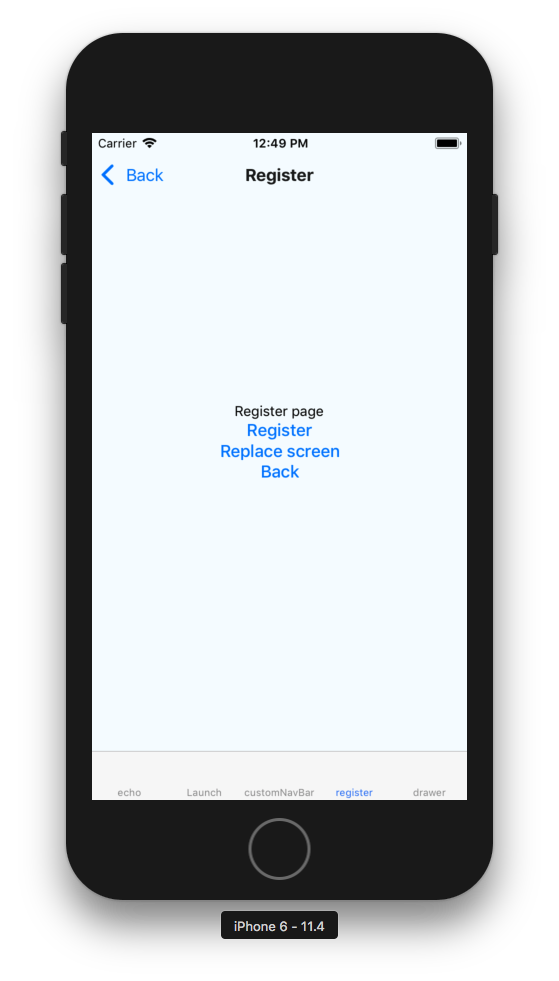
@daviscabral I'm sorry but I don't really see the hideTabBar in your screenshot of code (Cmd+F didn't work so I can't be sure), both of us above provided broken examples, mine is straight out of the Example app. But to make it straightforward, here's the full modified Example app: https://github.com/R1ckye/rnrf-broken
Just go to the register screen, it should hide the tab bar (it has hideTabBar) but it doesn't.
R1ckye
on 23 Aug 2018
Sorry - I misread the issue and the prop - I read it as hideNavBar - as the hide the navigation bar - and not the tab bar.
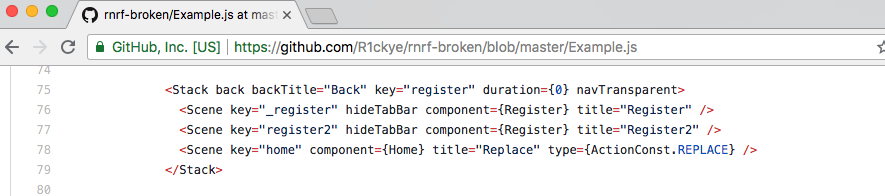
But I got your code here - and there is no hideTabBar in your example as well.
            <Stack back backTitle="Back" key="register" duration={0} navTransparent>
              <Scene key="_register" component={Register} title="Register" />
              <Scene key="register2" component={Register} title="Register2" />
              <Scene key="home" component={Home} title="Replace" type={ActionConst.REPLACE} />
            </Stack>
Check this out: https://github.com/aksonov/react-native-router-flux/issues/2076.
daviscabral
on 23 Aug 2018
R1ckye
on 23 Aug 2018
@daviscabral That issue is more than a year old, and as mentioned above by both of us, it was working exactly this way in late betas of 4.0.0, but not anymore
R1ckye
on 23 Aug 2018
I pinpointed the issue, it was broken in this commit, when react-navigation was bumped from 1.5.8 to 2.8.0
https://github.com/aksonov/react-native-router-flux/commit/d61960c6bf0139150a327a161b3d9374c6d6772f
Can you please reopen, as it's clearly a valid, existing issue?
R1ckye
on 23 Aug 2018
Sure - PRs are welcome. But the behavior really changed. That was something that I suffered a lot with the react-navigation upgrade (handling with the navBar and tabBar across stacks).
daviscabral
on 23 Aug 2018
In my case, I use Actions.refresh({ hideTabBar: true }) dinamically inside of the scene.
Like when the keyboard shows up, or under an onPress Button event...
With the RF 4.0.1, this option was not working.
Downgraded to 4.0.0-beta.28 and my problem got fixed.
 nicolas-rohricht
on 24 Aug 2018
nicolas-rohricht
on 24 Aug 2018
Yes, I belive that's because 4.0.0-beta-28 uses [email protected] - and the final 4.0 version uses [email protected]. We will need to see what else is broken/deprecated - and maybe update the API.
daviscabral
on 25 Aug 2018
confirmed that it doesn't work for me also
 pellarboss
on 7 Sep 2018
pellarboss
on 7 Sep 2018
I got it working in the PR that is opened: [ ](https://gyazo.com/664563f57ca5a9b25a57e41c5d793359
daviscabral
on 7 Sep 2018
PR #3240 added an example of how to work with this. A correct reference to the tabbar scene need to be used, or the tabbar will not be hidden. PRs to improve this are welcome, not sure about what others contributors are focusing - but I am trying to keep functionality working across Android and iOS right now.
You can check Example from master branch to see it in action.
daviscabral
on 12 Sep 2018
I still got the problem.
I tried your solution @daviscabral but it didn't work in my case. I'll try to investigate in the next few days, starting by your updated example.
Thank you for your time :)
 arribbar
on 20 Sep 2018
arribbar
on 20 Sep 2018
Great - in case you find a bug, please open an issue with as many details as possible :+1:
daviscabral
on 21 Sep 2018
Related issues
 sreejithr
·
3Comments
sreejithr
·
3Comments
 willmcclellan
·
3Comments
willmcclellan
·
3Comments
 YouYII
·
3Comments
YouYII
·
3Comments
 llgoer
·
3Comments
llgoer
·
3Comments
 vinayr
·
3Comments
vinayr
·
3Comments