React-native-router-flux: undefined is not an object (evaluating 'route.routeName')
Version
Tell us which versions you are using:
- react-native-router-flux v4.0.0-beta.24 (v3 is not supported)
- react-native v0.51.0
get this error when using Drawer in my app.js
undefined is not an object (evaluating 'route.routeName') !!?
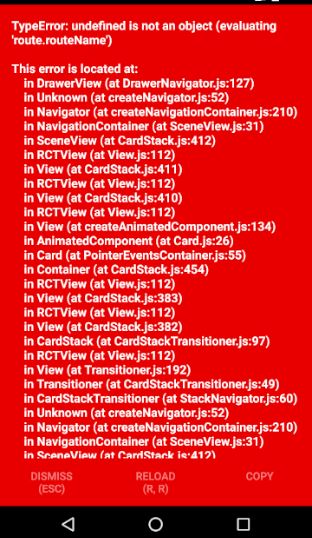
My App.js is simple and it is a fresh react native installation only with router flux, and error happens when i use contentComponent in Drawer
import React, { Component } from 'react';
import { Platform, StyleSheet, Text, View} from 'react-native';
import {Router , Scene }  from 'react-native-router-flux';
import Home from './src/components/Home';
import About from './src/components/About';
import SideMenu from './src/components/SideMenu';
import splashScreen from './src/components/splashScreen';

export default class App extends Component {
  render() {
    return (
      <Router>
          <scene hideNavBar>
              <Scene key="root">
                    <Scene key="drawer" drawer contentComponent={SideMenu}>
                      <Scene key="Home" component={Home} title="HomePage" initial/>
                      <Scene key="About" component={About} title="Second Page"/>
                    </Scene>
              </Scene>
          </scene>
      </Router>
    );
  }
}
it made me crazy !! any one has facing this issue !!?
 Shariaty
All 5 comments
You've got a typo in your code (you wrote scene with a lowercase S at a point.
Still, it's a duplicate of #2718 and it looks like the error is from react-navigation.
 Blapi
on 19 Dec 2017
Blapi
on 19 Dec 2017
I have the same issue with this code:-
react-native-router-flux: 4.0.0-beta.22
react-native: 0.49.3
<Router
    backAndroidHandler={() => Actions.pop()}
    sceneStyle={styles.sceneStyle}
  >
    <Scene key="root">
      <Scene
        key="scene1"
        component={Scene1}
        title="Scene 1"
        navigationBarStyle={styles.navigationBarStyle}
        navBarButtonColor={styles.navBarButtonColor}
        titleStyle={styles.titleStyle}
        initial
      />
      <Drawer
        hideNavBar
        key="dashboard"
        drawerImage={Images.menuIcon}
        contentComponent={Navigation}
        drawerWidth={styles.drawerWidth}
      >
        <Scene
          key="dashboard"
          component={Dashboard}
          title={strings.dashboard}
          navigationBarStyle={styles.navigationBarStyle}
          navBarButtonColor={styles.navBarButtonColor}
          titleStyle={styles.titleStyle}
          renderRightButton={renderNotificationButton}
        />
      </Drawer>
    </Scene>
  </Router>
 ghost
on 20 Dec 2017
ghost
on 20 Dec 2017
try this drawer component
key='drawer'
contentComponent={DrawerContent}
drawerWidth={250}
drawerOpenRoute = 'DrawerOpen' //maybe these 3 are missing so the problem
drawerCloseRoute = 'DrawerClose'
drawerToggleRoute = 'DrawerToggle'>
 vibhavagarwal5
on 28 Dec 2017
vibhavagarwal5
on 28 Dec 2017
@vibhavagarwal5 thanks,it works for me.is it a bug or?
 AKMaS
on 29 Dec 2017
AKMaS
on 29 Dec 2017
Its not a bug @AKMaS but a lack of documentation in this repo and in the example given!
vibhavagarwal5
on 29 Dec 2017
Related issues
 moaxaca
·
3Comments
moaxaca
·
3Comments
 fgrs
·
3Comments
fgrs
·
3Comments
 VictorK1902
·
3Comments
VictorK1902
·
3Comments
 GCour
·
3Comments
GCour
·
3Comments
 YouYII
·
3Comments
YouYII
·
3Comments
Most helpful comment
try this drawer component
key='drawer'
contentComponent={DrawerContent}
drawerWidth={250}
drawerOpenRoute = 'DrawerOpen' //maybe these 3 are missing so the problem
drawerCloseRoute = 'DrawerClose'
drawerToggleRoute = 'DrawerToggle'>