React-native-router-flux: [Bug] ComponentWillMount/DidMount/WillUnmount fires after Actions.pop()
Hello!
After migrating from v3 to v4 I see this problem:
When push 3 scenes to stack and then go back with Actions.pop() 3 times lifecycle methods will be called on same components again after unmount.
My guess that is component will get remounted and then immedeately unmounted.
index.ios.bundle?platform=ios&dev=true&minify=false:164287 componentDidMount
index.ios.bundle?platform=ios&dev=true&minify=false:164298 componentDidUpdate
index.ios.bundle?platform=ios&dev=true&minify=false:164298 componentDidUpdate
index.ios.bundle?platform=ios&dev=true&minify=false:164298 componentDidUpdate
index.ios.bundle?platform=ios&dev=true&minify=false:164308 componentWillUnmount
index.ios.bundle?platform=ios&dev=true&minify=false:164279 componentWillMount
index.ios.bundle?platform=ios&dev=true&minify=false:164287 componentDidMount
index.ios.bundle?platform=ios&dev=true&minify=false:164308 componentWillUnmount
Version
Tell us which versions you are using:
- react-native-router-flux v4.0.0-beta22
- react-native v0.50-rc
Expected behaviour
Components lifecycle methods called again ComponentWillMount/DidMount/WillUnmount
Actual behaviour
Should not call lifecycle methods after unmount.
Steps to reproduce
For non-obvious bugs, please fork this component, modify Example project to reproduce your issue and include link here.
- Go to 3 scenes deep
- Call programmatically
for ( let x in new Array(3).fill() ) {
  await Actions.pop();
}
- See problem in console
 kesha-antonov
All 29 comments
Are these nested same Scenes? Cause react 16 talks about something that might be related to this (out of order calls).
Component Lifecycle
Since React prioritizes the rendering, you are no longer guaranteed componentWillUpdate and shouldComponentUpdate of different components will fire in a predictable order. The React team is working to provide an upgrade path for apps that would break from this behavior.
Source: https://edgecoders.com/react-16-features-and-fiber-explanation-e779544bb1b7
 daviscabral
on 26 Oct 2017
daviscabral
on 26 Oct 2017
@daviscabral Hello!
When I do Actions.pop components that should just unmount will unmount and remount and unmount again. I don't think it's React related
kesha-antonov
on 26 Oct 2017
I see. Are you using redux? I am asking to see if Is there any way to track the page actions.
daviscabral
on 26 Oct 2017
@kesha-antonov Looks like your Router is not top-level and you are recalling it, probably with different params. I tried to reproduce your issue with Example provided by this component without success (from Login3 page). Please fork and modify Example as requested initially.
 aksonov
on 26 Oct 2017
aksonov
on 26 Oct 2017
@daviscabral I use mobx.
@aksonov Thank you for looking at it. I'll provide an example.
I have
<View>
  <Router ...>
    {this.scenes()}
  </Router>
   ...other Components
</View>
Ok. Solved it with other way
Closing for now
kesha-antonov
on 30 Oct 2017
It's definitely something wrong @aksonov
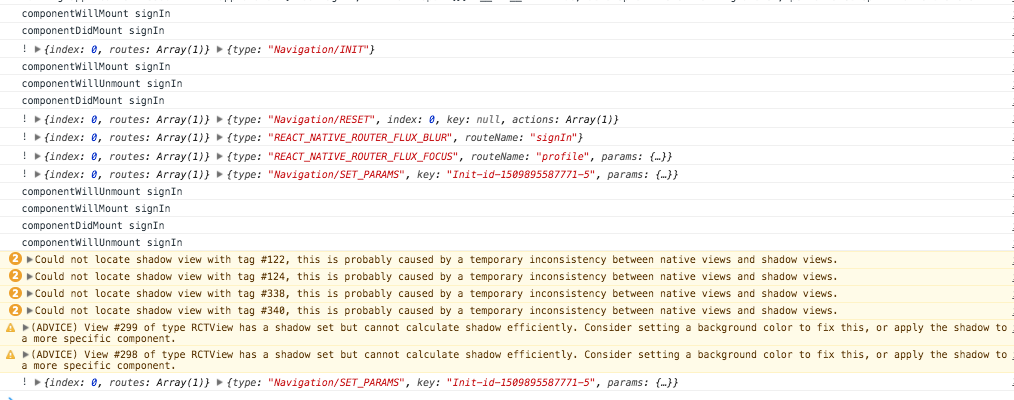
Because when I call Actions.tabbar({ type: ActionConst.RESET })
(see https://github.com/aksonov/react-native-router-flux/issues/2595)
it remounts signIn scene twice. I think this is also cause of this error: Could not locate shadow view with tag #122, this is probably caused by a temporary inconsistency between native views and shadow views.
kesha-antonov
on 5 Nov 2017
Now try to do the same with pure react-navigation and check results. RNRF doesn't do almost any rendering.
aksonov
on 5 Nov 2017
kesha-antonov
on 5 Nov 2017
Ok. Maybe it's my app related.
I found out that my App and Router re-renders after sign in.

What's be best way to solve it?
If you need to re-render component with Router. But not Router itself @aksonov
kesha-antonov
on 5 Nov 2017
Ok. Rewrote without re-render
Same errors
kesha-antonov
on 5 Nov 2017
When I disabled Actions.refresh on scene where I go from signIn errors disappear. SignIn will unmount and no errors/warnings.
Something wrong with Actions.refresh
kesha-antonov
on 5 Nov 2017
Wrapping Actions.refresh in `InteractionManager.runAfterInteractions helped. No errors/warnings
So I think they appear if Actions.refresh called on new scene when previous is not unmounted yet. What do you think? @aksonov
Ref: https://github.com/react-community/react-navigation/issues/2702
--- UPDATE ---
Yes. Errors/warnings disappear when previous scenes is unmounted completely (componentWillUnmount called).
If prev scene is not unmounted (componentWillUnmount not called yet) and we call Actions.refresh on the next scene - then prev scene get's remounted twice and errors/warnings appear.
This happens with Actions.pop and Actions.tabbar({ type: 'reset' })
kesha-antonov
on 5 Nov 2017
It looks very useful, could you submit PR?
aksonov
on 9 Nov 2017
Wrapping Actions.refresh in
InteractionManager.runAfterInteractionshelped. No errors/warnings
This is bad idea. If you're talking about this.
We should detect that prev scene is unmounted componentWillUnmount called and if not skip setProps in Actions.refresh
kesha-antonov
on 9 Nov 2017
Have you tried just to wrap it with setTimeout ?
aksonov
on 11 Nov 2017
No. Now I track it in mobx store
Good suggestion
kesha-antonov
on 11 Nov 2017
@aksonov
Yes. setTimeout works
kesha-antonov
on 16 Nov 2017
But if I use
refresh = (data) => {
    const key = getActiveState(this._state).key;
    const params = filterParam(data);
    setTimeout(() => {
      this.dispatch(NavigationActions.setParams({ key, params }));
    })
  };
for all scenes I see delay of rendering title, navbar buttons.
kesha-antonov
on 16 Nov 2017
So this is what is going on:
Actions.tabbar({ type: 'reset', ... })
- Blur current scene_1
- Focus next scene_2
componentDidMountinscene_2- Call
Actions.refresh - Since
scene_1is not unmounted yetsetParamsis called on that scene componentWillUnmount,componentDidMount,componentWillUnmountcalled on scene_1
kesha-antonov
on 16 Nov 2017
kesha-antonov
on 16 Nov 2017
@kesha-antonov It is interesting. We could easily modify our Reducer and process SET_PARAMS by RNRF (not to forward to RN). Could you try @gaodeng receipt?
aksonov
on 16 Nov 2017
Tried but didn't understand RNRF code.
Can you please help try adapt that code? @aksonov
kesha-antonov
on 16 Nov 2017
Sorry, don't have time. You may check Reducer.js and its code. For many actions it just forwards requests to navigationStore.router.getStateForAction. You may add own if else block for REFRESH action (and remove it from supportedActions map)
aksonov
on 16 Nov 2017
Ok. Thanks! I'll find solution.
kesha-antonov
on 16 Nov 2017
Closed because it is not related to RNRF.
aksonov
on 4 Jan 2018
i have the same problem,use Actions.pop({refresh: {update: new Date()}})。what i should do
 ShawSmall
on 2 Feb 2018
ShawSmall
on 2 Feb 2018
@kesha-antonov hi, do you found any solution for this? my current workaround is by adding setTimeout(() => { Actions.productListing({type: 'replace'}), 0);. But it still give me flicker effect. Another workaround is by adding a custom loader before the next scene mounted. But the loader will always be rendered everytime the next scene is called.
UPDATE:
Found the best solution so far by rendering an empty View, before navigating to the next scene.
shouldComponentUpdate(nextProps, nextState) {
    if (nextProps.status === 'ACTIVE') {
      Actions.productListing({ type: 'replace' });
    };

    return true;
  };

render() {
    if (this.props.status === 'ACTIVE') {
      return <View></View>;
    } else {
      return this.renderSubmitRegistration();
    }
  };
 fadlykayo
on 16 Jul 2018
fadlykayo
on 16 Jul 2018
Hello @fadlykayo ! I've migrated to react-navigation today
kesha-antonov
on 16 Jul 2018
Related issues
 kirankalyan5
·
3Comments
kirankalyan5
·
3Comments
 sylvainbaronnet
·
3Comments
sylvainbaronnet
·
3Comments
 maphongba008
·
3Comments
maphongba008
·
3Comments
 willmcclellan
·
3Comments
willmcclellan
·
3Comments
 wootwoot1234
·
3Comments
wootwoot1234
·
3Comments
Most helpful comment
Hello @fadlykayo ! I've migrated to react-navigation today