React-native-router-flux: How to hide back button Text Label
Version
Tell us which versions you are using:
- react-native-router-flux v4.0.0.beta.17 (v3 is not supported)
- react-native v0.46.4
Expected behaviour
the back title always shows the title of the previous screen. I would like to override this behavior by either a) being able to disable or hide the text or b) render by own custom back button (in v3 renderBackButton was a prop available, but that doesn't seem to be the case in v4)
Actual behaviour
the back button always shows with the previous screens title
 tendolukwago
All 13 comments
Have you tried backTitle ?
 aksonov
on 11 Aug 2017
aksonov
on 11 Aug 2017
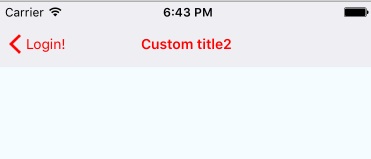
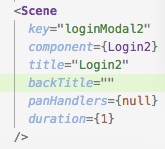
@aksonov I tried modifying the example by setting the second login screen's backTitle prop to an empty string and it defaulted to the previous page's title.
tendolukwago
on 12 Aug 2017
Try using headerLeft to render a custom component:
static navigationOptions = {
    headerLeft: (<View></View>)',
  }
I think backTitle doesn't work anymore. What works is headerBackTitle, which must be set on the previous screen.
 luco
on 12 Aug 2017
luco
on 12 Aug 2017
@luco setting headerLeft in the static navigationOptions object allowed me to hide the left title, but broke the navigationBarStyle option in RNRF.
tendolukwago
on 13 Aug 2017
@tendolukwago Can you post some screenshots? headerLeft should only render the back button and not break any styles.
luco
on 13 Aug 2017
@luco I ended up setting the headerStyle option on naviationOptions. It worked. Thanks for pointing me in the right direction!
tendolukwago
on 14 Aug 2017
@tendolukwago, instead of setting backTitle prop to _empty string_ / null value, I assigned it to space (string), i.e. backTitle=" ", and it worked like a charm! (React-Native v0.46.4)
(though that doesn't seem to be the right way to go about it)
 y2k-shubham
on 18 Aug 2017
y2k-shubham
on 18 Aug 2017
@y2k-shubham thanks for the follow up. i'll try that out.
tendolukwago
on 19 Aug 2017
@y2k-shubham @tendolukwago
I tried init={false}( If it is true back button will not be displayed), but it didn't work, so I tried backTitle=" ",Yeah! it works perfect. I have no idea what is the right way to hide back button. So I ended it up with backTitle = ""
 pigflymoon
on 6 Sep 2017
pigflymoon
on 6 Sep 2017
@tendolukwago Thanks for point this out. I too am having this issue. Can you explain a few things to me? What do you mean by, "setting the headerStyle option on naviationOptions"? I'm not familiar with headerStyle or navigationOptions in RNRF.
 ajkhatibi
on 6 Dec 2017
ajkhatibi
on 6 Dec 2017
Can confirm that setting BackTile to an empty string WITH A space ON THE SCENE YOU WANT IT REMOVED FROM does work. So for example:
<routes.Scene backTitle = " " key="Reply" component={Reply} title="Replies" />
 ThugDebugger
on 7 Jan 2018
ThugDebugger
on 7 Jan 2018
The above solutions did not work for me but This worked for me!
options={{
headerBackTitleVisible: false,
}}
 Justin9606
on 25 Mar 2021
Justin9606
on 25 Mar 2021
@Justin9606 do you apply this on your scene?
 nica0012
on 30 Mar 2021
nica0012
on 30 Mar 2021
Related issues
 rafaelcorreiapoli
·
3Comments
rafaelcorreiapoli
·
3Comments
 tonypeng
·
3Comments
tonypeng
·
3Comments
 GCour
·
3Comments
GCour
·
3Comments
 VictorK1902
·
3Comments
VictorK1902
·
3Comments
 YouYII
·
3Comments
YouYII
·
3Comments
Most helpful comment
@tendolukwago, instead of setting
backTitlepropto _empty string_ /nullvalue, I assigned it to space (string), i.e.backTitle=" ", and it worked like a charm! (React-Nativev0.46.4)(though that doesn't seem to be the right way to go about it)