React-native-router-flux: _reactNativeRouterFlux.Actions.Teams is not a function
I have my tabs and within tabs, I have a home scene and within that, I have a team scene
Here is my code
 <Scene key="tabBar" tabs hideNavBar={true}>
                            <Scene key='Home' component={Home} title='Home' initial={true}>
                                <Scene key='Teams' component={Teams} title='Teams' initial={false} />
                            </Scene>
                        </Scene>
But I can't navigate to the team's view/scene
I have Actions.Teams(); which is throws that error.
I need to have the team view part of the home stack and not a sperate tab.
 AlmogRnD
All 39 comments
Duplicate of #1988. You have to use custom navigator for container Scenes. It is not difficult, just check LightboxNavigator.js as part of RNRF.
Within V4 if you Scene has component, then it is CHILD.
 aksonov
on 11 Jul 2017
aksonov
on 11 Jul 2017
Were is LightboxNavigator.js?
AlmogRnD
on 11 Jul 2017
aksonov
on 11 Jul 2017
I'm not sure I fully understand what would be the content of doing this in react-native-router-flux? Is there any docs around this?
AlmogRnD
on 11 Jul 2017
Docs will come later, but for this case I could document it here - LightingboxNavigator is clear example of custom container - it displays main view and other 'active' view as overlay - useful for popups. You may copy code and modify how you need - display all children at once, for example, etc. Then pass it as navigator prop for container Scene.
aksonov
on 11 Jul 2017
Well, it works the same with redux and also I still want the tab for home to show up for teams IE teams is under home?
This seems a bit overkill and over complex, it would be nice to have a much easier way to call child views maybe something like Actions.Child(Teams); and just register it under home just a suggestion.
Right now I don't fully understand LightingboxNavigator? Also If I understand what your saying I need to create a container IE "main" which holds home and team view (team becomes a pop-up/overlay view) This has the tabs as part of the container how then is this loaded in the app.js with redux is it the same as just loading another component
AlmogRnD
on 11 Jul 2017
I guess I need to see an example or code for "Then pass it as navigator prop for container Scene."
The example code you have don't show this, are there complex examples showing nested scenes
AlmogRnD
on 11 Jul 2017
import MainNavigator from '../YOUR_CUSTOM_NAVIGATOR';

...
<Scene key="main" navigator={MainNavigator}>
   <Scene key='Teams' component={Teams} title='Teams' initial={false} />
</Scene>
or you may just try lightbox already:
<Scene key='lightbox' lightbox>
   <Scene key='Home' component={Home} />
   <Scene key='Teams' component={Teams} title='Teams' initial={false} />
</Scene>
This way it will display Home and after Actions.Teams it will display Home & Teams as overlay.
aksonov
on 11 Jul 2017
MainNavigator is the same code as LightboxNavigator? If I think I'm starting to understand.
I'm also glad to help with documentation or examples especial on things that I'm doing
AlmogRnD
on 11 Jul 2017
Yes, feel free to submit PR. Have you tried second way (Lightbox) ?
aksonov
on 11 Jul 2017
I have tried the following
<Scene key='lightbox' lightbox>
                            <Scene key="tabBar" tabs hideNavBar={true}>
                                <Scene key='Home' component={Home} title='Home' initial={true} >
                                    <Scene key='Teams' component={Teams} title='Teams' initial={false} />
                                </Scene>
                                <Scene key='Photos' component={Photos} title='Photos' initial={false} />
                                <Scene key='SiteDiary' component={SiteDiary} title='SiteDiary' initial={false} />
                            </Scene>
                        </Scene>
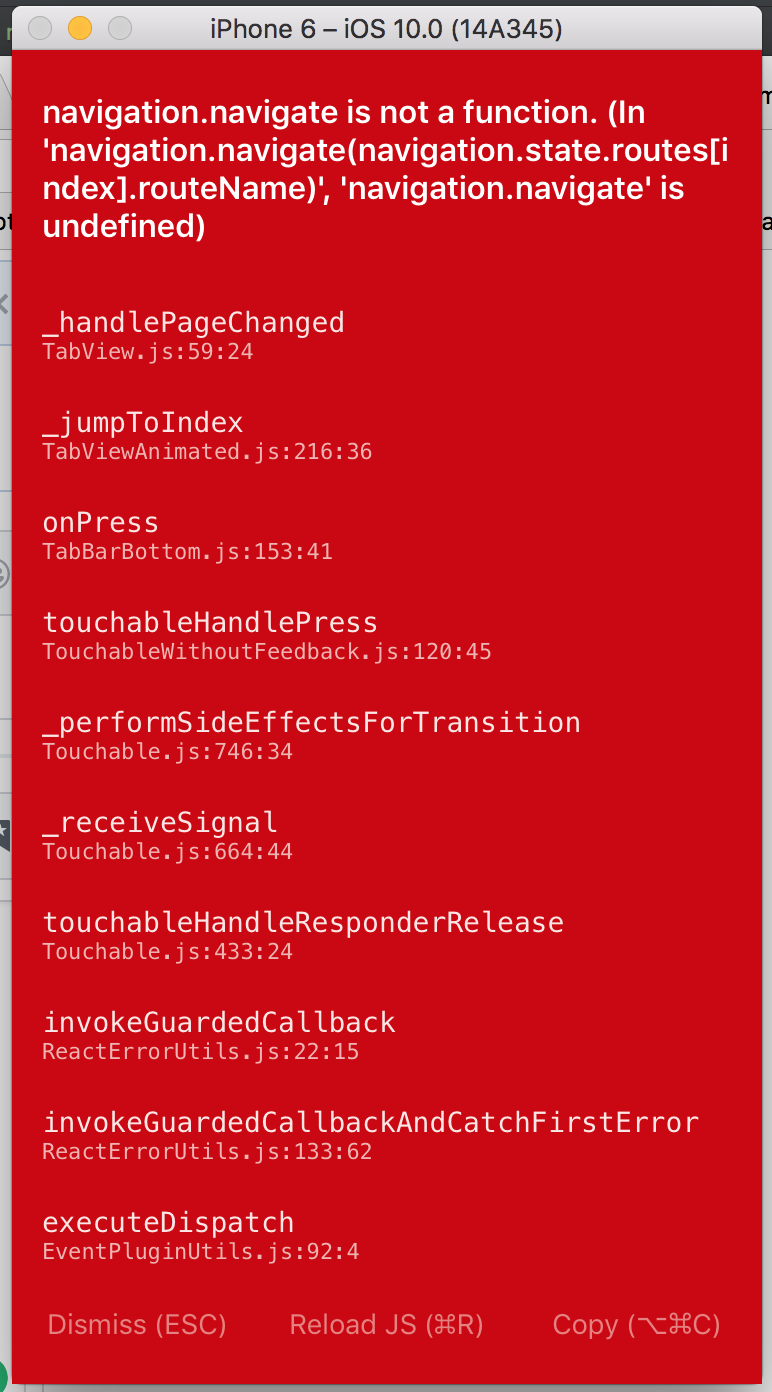
When I click any one of the tabs i.e. like photos I get the following error
AlmogRnD
on 11 Jul 2017
It is strange, could you fork and reproduce it with Example?
aksonov
on 11 Jul 2017
I also tried this
 <Scene key='lightbox' lightbox>
                            <Scene key='Home' component={Home} />
                            <Scene key='Teams' component={Teams} title='Teams' initial={false} />
                        </Scene>
Which works fine, so I would say it's not working inside tabs
AlmogRnD
on 11 Jul 2017
Could you check Example, put Error popup link inside Tabs. If it doesn't work, please create issue and I will try to fix
aksonov
on 11 Jul 2017
I also tried it this way and it did not work
<Scene key="tabBar" tabs hideNavBar={true}>
                            <Scene key='lightbox' lightbox>
                                <Scene key='Home' component={Home} title='Home' initial={true} >
                                    <Scene key='Teams' component={Teams} title='Teams' initial={false} />
                                </Scene>
                            </Scene>

                            <Scene key='Photos' component={Photos} title='Photos' initial={false} />
                            <Scene key='SiteDiary' component={SiteDiary} title='SiteDiary' initial={false} />
                        </Scene>
Does lightbox load a model? or it loads a page/view just like home?
AlmogRnD
on 11 Jul 2017
Cancel your packager, probably it is already run for other app…
On 11 Jul 2017, at 11:38, Almog Koren notifications@github.com wrote:
I can't even run example not sure what's going on first time seeing this error
https://user-images.githubusercontent.com/169507/28062199-017ad172-65e2-11e7-9aef-893f2812566f.png
—
You are receiving this because you modified the open/close state.
Reply to this email directly, view it on GitHub https://github.com/aksonov/react-native-router-flux/issues/2007#issuecomment-314390291, or mute the thread https://github.com/notifications/unsubscribe-auth/ABQpcW4xyBUTVwSV8T3m0wqwENB20Z8kks5sM0KTgaJpZM4OTmiE.
aksonov
on 11 Jul 2017
Yea fixed it deleted the comment, it's 3am here :)
What I don't understand is in the example you have this working and when I do the same thing it's not.
AlmogRnD
on 11 Jul 2017
The only difference is I'm using Redux can that be causing the issue?
AlmogRnD
on 11 Jul 2017
@aksonov I was able to recreate the issue in the example code this is the example code
<Scene key="lightbox" lightbox>
              <Scene key="root" hideNavBar hideTabBar>
                <Scene key="tabbar" gestureEnabled={false} tabs tabBarStyle={styles.tabBarStyle} activeBackgroundColor='#ddd'>
                  <Scene key="tab1" title="Tab #1" tabBarLabel="TAB #1" icon={TabIcon} navigationBarStyle={{backgroundColor: 'red'}} titleStyle={{color: 'white'}}>
                    <Scene key="tab1_1" component={TabView} title="Tab #1_1" onRight={() => alert('Right button')} rightTitle="Right"/>
                    <Scene key="tab1_2" component={TabView} title="Tab #1_2" back titleStyle={{color: 'black'}}/>
                  </Scene>
                  <Scene key="tab2" initial title="Tab #2" icon={TabIcon}>
                    <Scene
                      key="tab2_1"
                      component={TabView}
                      title="Tab #2_1"
                      renderRightButton={() => <Text>Right</Text>}
                    />
                  </Scene>
                </Scene>
              </Scene>
        </Scene>
I removed
<Scene key="modal" modal hideNavBar>
<Scene key="drawer" drawer contentComponent={TabView} >
Have you tried to popup Error from tab and got error?
aksonov
on 11 Jul 2017
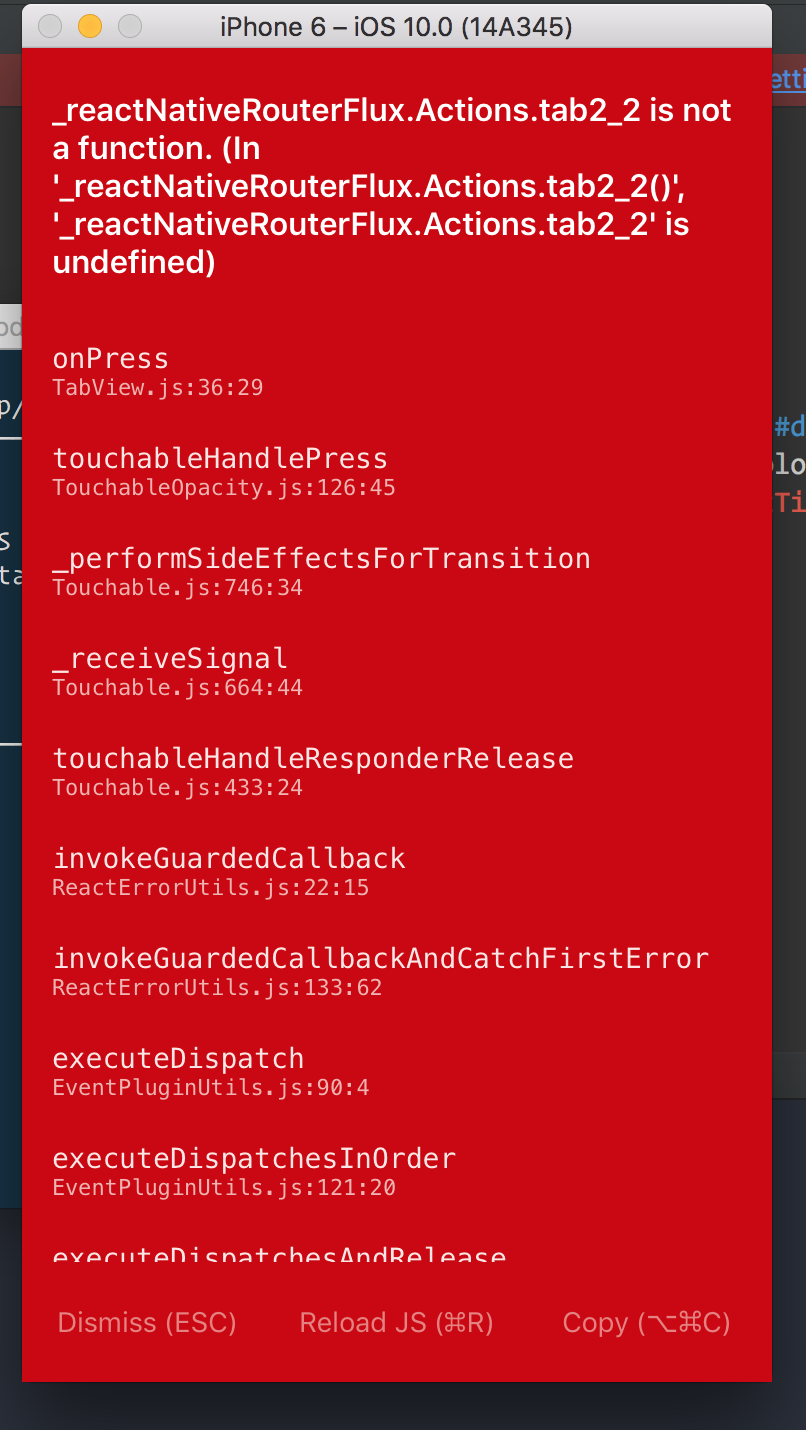
Here is the gist of the example file - https://gist.github.com/AlmogRnD/a395e6212d702d151d23e4661b68e5fa
and same error
AlmogRnD
on 11 Jul 2017
And where is tab2_2 within your gist?
aksonov
on 11 Jul 2017
Yes that is my mistake but it still does not with within my code only difference is I'm using redux
I have it wrapped up in
<Provider store={store}>
                <ConnectedRouter>
My code is the same as the example code expect the provider and connect router
here it is
<Provider store={store}>
                <ConnectedRouter>
                    <Scene key="lightbox" lightbox>
                        <Scene key="modal" modal hideNavBar>
                            <Scene key="drawer" drawer contentComponent={Photos} >
                            <Scene key="root">
                                <Scene key="login" component={Login} initial={true} title={'Login'} />
                                <Scene key="ResetPassword" component={ResetPassword} title={'Reset Password'} />
                                <Scene key="tabBar" tabs hideNavBar={true}>
                                    <Scene key='Home' component={Home} title='Home' initial={true} >
                                        <Scene key='teams' component={Teams} title='Teams' initial={false} />
                                    </Scene>
                                    <Scene key='Photos' component={Photos} title='Photos' initial={false} />
                                    <Scene key='SiteDiary' component={SiteDiary} title='SiteDiary' initial={false} />
                                </Scene>
                            </Scene>
                        </Scene>
                    </Scene>
                    </Scene>
                </ConnectedRouter>
            </Provider>
See my message above:
Within V4 if you Scene has component, then it is CHILD.
P.S. I've added it to "breaking changes"
aksonov
on 11 Jul 2017
So the only way is to use Custom Navigators but then why doesn't the lightbox work, if I wrap it inside that it should work?
Also If I create Custom Navigators how do I define "static router = MyRouter;"?
Also, I copied LightboxNavigator.js and I get the following error

Do you have a working example of this or how to do this, I getting fragments
AlmogRnD
on 11 Jul 2017
I don't see your code. Please give me link to fork of Example to reproduce.
aksonov
on 12 Jul 2017
I added Redux wrapper and Example works without any problem
aksonov
on 12 Jul 2017
@aksonov can you send me the example you have with redux would be glad to look at and see why it's not working for me
AlmogRnD
on 12 Jul 2017
Sorry, I didn't store it - it was empty reducer (store), Provider and connected Router, nothing special. Please send me link to your Example fork and will try to run.
aksonov
on 12 Jul 2017
I can't send the current project, but it's not working you see the error message and you see my code its exactly like the example
AlmogRnD
on 12 Jul 2017
So just fork Example add Redux there and send me the link. I don't have time to create new projects and experiment, sorry.
aksonov
on 12 Jul 2017
Ok I was able to recreate the issue within the example project attached code base - https://www.dropbox.com/s/f7cfrvsllaqd054/Example.zip?dl=0
Here is the issue

AlmogRnD
on 12 Jul 2017
I think in your example that is working, the reason that it's working is because you're loading the same component TabView
In the code I sent I'm loading different components
<Scene
  key="tab1_1"
   component={TabView}
   title="Tab #1_1"
   onRight={() => alert('Right button')}
   rightTitle="Right"
   />
   <Scene
   key="tab1_2"
   component={TabView}
   title="Tab #1_2"
   back
   titleStyle={{color: 'black'}}
   />
Why you can't just fork github project?
Anyway I don't see any Redux there.
And I told several times "Within V4 if you Scene has component, then it is CHILD.", Home here is CHILD, so Login inside is not processed. Why are you doing that?
class Example extends Component {
  render() {
    return (
      <Router createReducer={reducerCreate}>
        <Scene key="lightbox" lightbox>
          <Scene key="root">
            <Scene key="tabBar" tabs hideNavBar={true}>
              <Scene key='Home' component={Home} title='Home' initial={true}>
                <Scene key='Login' component={Login} title='Login' initial={true}/>
              </Scene>
              <Scene key='Home2' component={Home} title='Home' initial={true}/>
            </Scene>
          </Scene>
        </Scene>
      </Router>
    );
  }
}
@aksonov hi you have great and I really appreciate you taking the time and helping. And I plan on helping with docs or tutorials. I have to say your explanation just wasn't clear maybe it's because I'm working late or we were both thinking of different things when referring to something.
Also, I'm not sure why you couldn't have to sent a something like this
<Scene key="tabBar" tabs hideNavBar={true}>
                            <Scene key="tab1" title="Tab #1" tabBarLabel="TAB #1" icon={TabIcon}>
                                <Scene key='Home' component={Home} title='Home' initial={true}/>
                                <Scene key='teams' component={Teams} title='Teams' initial={false} />
                            </Scene>

                            <Scene key='Photos' component={Photos} title='Photos' initial={false} />
                            <Scene key='SiteDiary' component={SiteDiary} title='SiteDiary' initial={false} />
                        </Scene>
The issue was that I did not have
<Scene key="tab1" title="Tab #1" tabBarLabel="TAB #1" icon={TabIcon}>
It would have been much clear to explain that by saying you need to wrap it up in like so.
No worries, I do appreciate the help
AlmogRnD
on 12 Jul 2017
App.js
render(){
  return(
     <Provider store={store}>
      <Router navigationBarStyle={styles.navBar}
        titleStyle={styles.navBarTitle}
        barButtonTextStyle={styles.barButtonTextStyle}
        barButtonIconStyle={styles.barButtonIconStyle}
        back
        navBarButtonColor={{ color: '#fff' }}
      >
          <Stack key="root" hideNavBar>
                  <Stack key="loginStack">
                      <Scene Key="login" component={Login} title="Please Login"/>
                      <Scene Key="register" component={Register} title="Register"/>
                  </Stack>
                  <Stack key="dashboardStack">
                    <Scene Key="home" component={Home} title="Home"/>
                    <Scene Key="list" component={List} title="List"/>
                    <Scene Key="details" component={Details} title="Details"/>
                  </Stack>
            </Stack>
      </Router>
    </Provider>
  );
}
Login.js
render() {
return (
       <View style={styles.formContainer}>
              <LoginForm />
       </View>

    </View>

)
}
issue is
_reactNativeRouterFlux.Actions.register is not a function.(in '__reactNativeRouterFlux.Actions.register()',
__reactNativeRouterFlux.Actions.register' is undefined)
 surajSanwal
on 21 Feb 2018
surajSanwal
on 21 Feb 2018
You write Key with a capital K. It is key
 Blapi
on 21 Feb 2018
Blapi
on 21 Feb 2018
Related issues
 vinayr
·
3Comments
vinayr
·
3Comments
 VictorK1902
·
3Comments
VictorK1902
·
3Comments
 llgoer
·
3Comments
llgoer
·
3Comments
 basdvries
·
3Comments
basdvries
·
3Comments
 fgrs
·
3Comments
fgrs
·
3Comments
Most helpful comment
You write
Keywith a capital K. It iskey