React-native-render-html: blockquote tagsStyles and br renderer issue
Hi. Thank you for great library.
Yes I read docs and issues here...
Envirompment:
    "react-native": "0.63.4",
    "expo": "^40.0.0",
    "react-native-render-html": "^4.2.4",
I'm using expo 40 clients: web and android.
And trying to restyle default styles. Everything was good before I met blockquote, where I stuck...
Web: style written for blockquote appears on each tag inside it.
I have an html:
<blockquote>
<p>Blockquote line1<br>Blockquote line2<br>Blockquote line3<br>– <em>Author Name</em> </p>
</blockquote>
And tagsStyles:
blockquote: {
    borderLeftWidth: 10,
    borderStyle: 'solid',
    borderLeftColor: '#dfe2e5',
    padding: 12,
    paddingBottom: 0,
    marginTop: 6,
    marginLeft: 6
}
It renders wrong in web client (Expo):

Style has written for container but appears on each tag inside it.
A guess it's bug, and It worries me, because I want to use also web version of my app.
Custom renderer for br doesn't work
On android client (Expo) style applies only once on container - which is good.
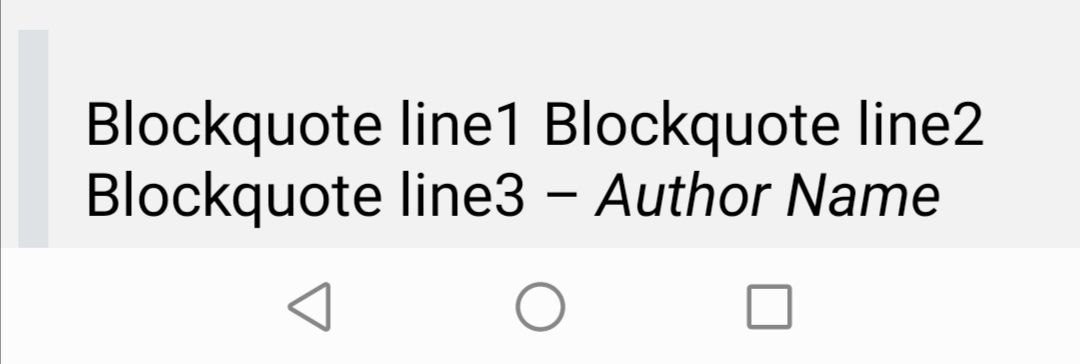
But multilines doesn't work . (br tag not rendered)
I find out here in issues advice to write renderer for <br>
const brRenderer = (htmlAttribs, children, passProps) => {
console.log('XXXXXXXXXXXXXX', htmlAttribs)
return <View style={{ height: 1, width: 1 }}> </View>
}
And that's how I call it:
<HTML
    tagsStyles={tagsStyles}
    contentWidth={contentWidth}
    renderers={{
        br: { renderer: brRenderer, wrapper: 'View' },
        p: { renderer: pRenderer, wrapper: 'View' }
    }}
    html={html}
/>
But <br> renderer doesn't appear even in a console. Then I wrote the same renderer for <p> tag, just for test, -- and it appears in the console.
Please, can someone help me, and share your ideas?
How to render <br> tag?
How to exclude applying blockquote wrapper style in every tag inside it on web client?
And I guess that it is a bug, because I tried around with docs....
 Aparus
All 3 comments
in v5 it also exist.
in "react-native-render-html": "^6.0.0-alpha.11", -- doesn't exist, everything is ok.
Aparus
on 30 Jan 2021
@Aparus thanks for pointing that out, very much appreciated :-) Still a serious bug for the v4 and v5! I don't have bandwidth to track the bug on the legacy branch but I'm open to PRs!
PS: regarding your list rendering concerns, you can try the demo app (just clone the project from the dev/foundry branch and Sorry, wrong thread :rofl: yarn start); you'll see one of the example being lists. Feel free to open a new ticket or contact me in the discord channel if you need advise.
 jsamr
on 30 Jan 2021
jsamr
on 30 Jan 2021
I tried to reproduce briefly in version 5.0.1, and below is the result:
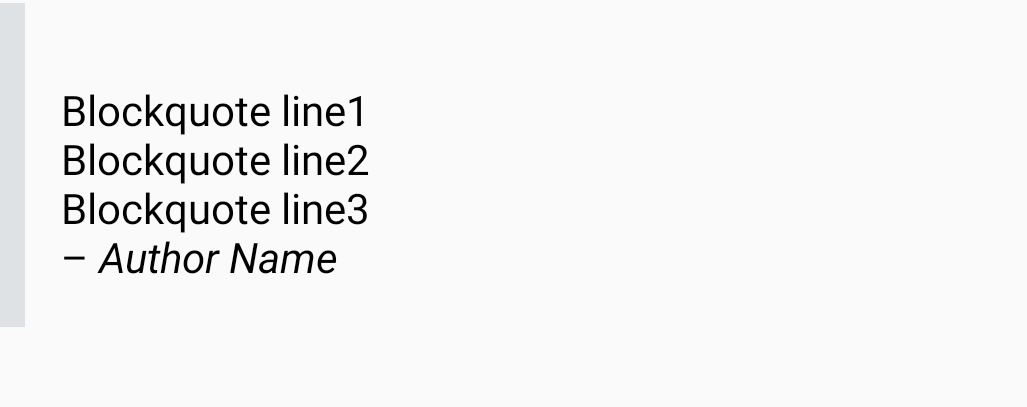
Full reproduction:
import * as React from 'react';
import {ScrollView, StyleSheet} from 'react-native';
import HTML from 'react-native-render-html';

const html = `<blockquote>
<p>Blockquote line1<br>Blockquote line2<br>Blockquote line3<br>– <em>Author Name</em> </p>
</blockquote>`;

export default function App() {
  return (
    <ScrollView contentContainerStyle={styles.container}>
      <HTML
        source={{html}}
        tagsStyles={{
          blockquote: {
            borderLeftWidth: 10,
            borderStyle: 'solid',
            borderLeftColor: '#dfe2e5',
            padding: 12,
            paddingBottom: 0,
            marginTop: 6,
            marginLeft: 6,
          },
        }}
      />
    </ScrollView>
  );
}

const styles = StyleSheet.create({
  container: {
    flexGrow: 1,
  },
});
And a test:
import React from "react";
import { StyleSheet } from "react-native";
import HTML from "../index";
import { render } from "react-native-testing-library";

/**
 * https://github.com/meliorence/react-native-render-html/issues/449
 */
describe("HTML component", () => {
  describe("should pass regression #449 regarding inherited box styles", () => {
    it("should not pass box styles to children", () => {
      const { getByText } = render(
        <HTML
          tagsStyles={{
            blockquote: {
              borderLeftWidth: 10,
              borderStyle: "solid",
            },
          }}
          source={{
            html: "<blockquote><p>Text</p></blockquote>",
          }}
        />
      );
      const text = getByText("Text");
      expect(StyleSheet.flatten(text.props.style)).toEqual({
        marginBottom: 14,
        marginTop: 14,
      });
    });
  });
});
Closing now, as it seems like this issue only affects legacy 4.x versions.
jsamr
on 3 Feb 2021
Related issues
 Anitorious
·
7Comments
Anitorious
·
7Comments
 kanikas24
·
5Comments
kanikas24
·
5Comments
 kikoseijo
·
6Comments
kikoseijo
·
6Comments
 sampsasaarela
·
8Comments
sampsasaarela
·
8Comments
 diamanthaxhimusa
·
7Comments
diamanthaxhimusa
·
7Comments