React-native-render-html: [6.x] 🚀 Welcoming the Foundry release!
Foundry Status



Check the PR!
:warning: This post will be updated on a regular basis! First pre-release has been released in late November. As long as the README is not ready, development is occurring in the dev/foundry branch. Also note that the Foundry Playground app is versioned and regularly updated!
:information_source: If you have ideas, suggestions or you dislike something in this pre-release, you're invited to comment in this thread: What do you dislike or believe is missing in Foundry?
:information_source: If you'd like to report a bug, you can comment in this thread or ping us in our Discord channel.

Hello community! I have been working on the new "Foundry" release for a while now, and I have just published a demo on expo, "Foundry Playground", where you can experiment with the new engine and its features. Please give us feedback!
Testing Foundry Playground
- Download the expo app on your smartphone (iOS, Android).
- Play with the demo:
- iOS: Open the project page from your smartphone and click "Open with Expo".
- Android: Open the project page from any device and scan the QR code to open with Expo.
Trying Foundry
From Scratch
Be careful, a lot of breaking changes! A compat module will be released to ease the transition.
npm install --save react-native-render-html@foundry
Take a look at how to use the new renderer API here: https://github.com/archriss/react-native-render-html/pull/434#issue-527747509 (section "Renderer API") or take inspiration from the demo snippets.
From the Playground
Clone
Clone this repository, "dev/foundry" branch:
git clone https://github.com/archriss/react-native-render-html.git --branch dev/foundry
cd react-native-render-html
Install
yarn install
Build
yarn build
Start the Playground App
yarn start
Test HTML Snippets on your own!
Play with demo/snippets/test.tsx and change the html variable.
A New Render Engine and CSS Processor
The new release should be significantly more reliable regarding styles and compliance with CSS / HTML standards. I have extracted two packages for this purpose:
@native-html/css-processor, which handles all the logic of translating CSS styles into native styles ;@native-html/transient-render-engine, which implements RFC002 and is in charge of creating a data structure ready for rendering.
Both packages are available in the @native-html/core project monorepo. These packages are heavily tested against standards.
Features Highlight
See https://github.com/archriss/react-native-render-html/pull/434#issue-527747509
Demo
In the demo app, you can toggle the legacy (5.x) vs Foundry (6.x) modes with the L button below. You can inspect the HTML source, and even the Transient Render Tree structure. Try out the demo here.
| Foundry / Legacy Modes | HTML Source / Transient Render Tree |
|---|---|


|


|
And a few extra screenshots
| Drawer Menu | Images |
|---|---|

|

|
Progress
Check the "Remaining Work" section here: https://github.com/archriss/react-native-render-html/pull/434
Credits
Kudos to Expensify company which has hired me to work on the white space collapsing challenge, without which I would not have been able to commit full bandwidth those last 2 weeks! A great gift to the Open Source community. If you are an expert React Native contractor, they might have work for you (reactnative [at] expensify.com).
 jsamr
jsamr
All 35 comments
For some reason, iframe is not rendered at all. Youtube embed is inside iframe, and it is not loaded. Any ideas what could be the problem?
@jsamr
 M1ck0
on 1 Dec 2020
M1ck0
on 1 Dec 2020
@M1ck0 Yes, iframes rendering is being extracted to a plugin (similar to tables), because we don't want to require consumers to depend on WebView. You can check the status of the work here: https://github.com/archriss/react-native-render-html/pull/434
jsamr
on 1 Dec 2020
@jsamr Is there a way to make them work with the current state of the package?
I tried downgrading it and it works, but then I am losing some bug fixes that are introduced in the Foundy release, which is not optimal solution
M1ck0
on 1 Dec 2020
I made it work using custom renderers. I extracted URL from iframe and loaded it into WebView like this
iframe: (htmlAttribs, children) => {
                console.log(JSON.stringify(htmlAttribs, null, 2));
                return (
                  <View>
                    <WebView
                      source={{ uri: htmlAttribs.tnode.attributes.src }}
                      style={{ flex: 1, width: width, height: 250 }}
                    />
                  </View>
                );
              },
I also needed to specify width, height, and flex for WebView because it wouldn't work on Android for some reason.
M1ck0
on 1 Dec 2020
@M1ck0
EDIT: Use @native-html/iframe-plugin
OLD ANSWER
You could write a custom renderer (it scales automatically to available screen width, given you provide contentWidth prop to the RenderHTML component). Example with this html:
<p>
<iframe width="560"
        height="315"
        src="https://www.youtube.com/embed/POK_Iw4m3fY"
        frameborder="0"
        allow="accelerometer; autoplay; clipboard-write; encrypted-media; gyroscope; picture-in-picture"
        allowfullscreen>
</iframe>
</p>
:warning: Make sure you use the latest release (6.0.0-alpha.9) to gain access to
useSharedPropshook!
| Code | Rendered |
|---|---|
|

|
jsamr
on 1 Dec 2020
Hello @jsamr in the case I want to use the version with the whitespace fixed, what version need to use?
 brayanarrieta
on 14 Jan 2021
brayanarrieta
on 14 Jan 2021
@brayanarrieta Just install the package with the foundry tag:
npm install --save react-native-render-html@foundry
Be aware, this is still an unstable version subject to API changes. There are quite a lot of breaking changes with the previous release, read the full post above for an overview https://github.com/meliorence/react-native-render-html/issues/430#issue-747058610
jsamr
on 14 Jan 2021
@brayanarrieta Just install the package with the foundry tag:
npm install --save react-native-render-html@foundryBe aware, this is still an unstable version subject to API changes. There are quite a lot of breaking changes with the previous release, read the full post above for an overview #430 (comment)
thanks @jsamr
brayanarrieta
on 14 Jan 2021
I'm trying to refactor my code from v5 in new way .... but I have so many errors and questions.
In custom renderer:
What should i use instead of htmlAttribs -- tnode.attributes ?
What should i use instead of children (2nd argument of renderer). From where should I get it? I've tried tnode.children it doesn't work...
I guess RenderHTML is default export of RNRH. Right?
That's what I did:
const quizRenderer = ({ tnode, style, key }) => {
const {
    attributes: { type, quizid: quizId },
    children
} = tnode
return <View key={key}>{children}</View>
}
quizRenderer.model = defaultHTMLElementModels.div

const variantRenderer = ({ tnode, style, key }) => {
const {
    attributes: { quizid: quizId, variantid: variantId, type },
    children
} = tnode

// const { userAnswers } = useSharedProps()

return (
    <TouchableOpacity
        key={key}
        onPress={handlePressQuizVariant(quizId, variantId)}
    >
        <Text>
            <CheckBox
                size={18}
                checked={userAnswers[quizId].includes(variantId)}
                containerStyle={{ margin: 0, padding: 0 }}
            />
            {children}
        </Text>
    </TouchableOpacity>
)
}
variantRenderer.model = defaultHTMLElementModels.div

return (
<View style={{ padding: 5 }}>
    <HTML
        renderers={{
            quiz: quizRenderer,
            variant: variantRenderer
        }}
        source={{ html }}
        contentWidth={contentWidth}
    />
</View>
)
I faced an error:
Uncaught Error: Objects are not valid as a React child (found: object with keys {type, styles, attributes, contentModel, elementModel, children, domChildren, tagName, className, id, parentStyles, hasWhiteSpaceCollapsingEnabled, displayName}). If you meant to render a collection of children, use an array instead.
Then I tried children.domChildren and children.children, the error disappeared, but children doesn't appear.
 Aparus
on 29 Jan 2021
Aparus
on 29 Jan 2021
@Aparus I totally understand that refactoring custom renderers is not obvious, and a thorough guide will be provided for the stable release. The children key of tnode object is not an array of react elements, but an array of transient nodes!
Uncaught Error: Objects are not valid as a React child (found: object with keys {type, styles, attributes, contentModel, elementModel, children, domChildren, tagName, className, id, parentStyles, hasWhiteSpaceCollapsingEnabled, displayName}). If you meant to render a collection of children, use an array instead.
So you should use TNodeChildrenRenderer to render transient children nodes instead of children.
<TNodeChildrenRenderer {...props} />
What should i use instead of htmlAttribs -- tnode.attributes ?
Absolutely!
I guess RenderHTML is default export of RNRH. Right?
Yes!
Important remarks
When creating custom renderers, the preferred pattern is to use TDefaultRenderer prop component passed to the renderer in order to inherit styles from classesStyles, tagsStyles and inline styles (style attribute). A big extra is that TDefaultRenderer is guaranteed to support onPress prop! An other extra: you can pass viewProps and textProps which will be passed to the underlying View or Text depending on the rendered react native element (which is decided by the transient render engine). You can take inspiration in this example.
EDIT: More details on the Transient Render Tree structure here: https://github.com/meliorence/react-native-render-html/blob/dev/foundry/rfc/002-CSS-whitespace-collapsing.adoc#transient-render-tree
jsamr
on 29 Jan 2021
@jsamr , thank you! I did it. Now code looks more messy. But somehow it works. And rerendering works! 👍
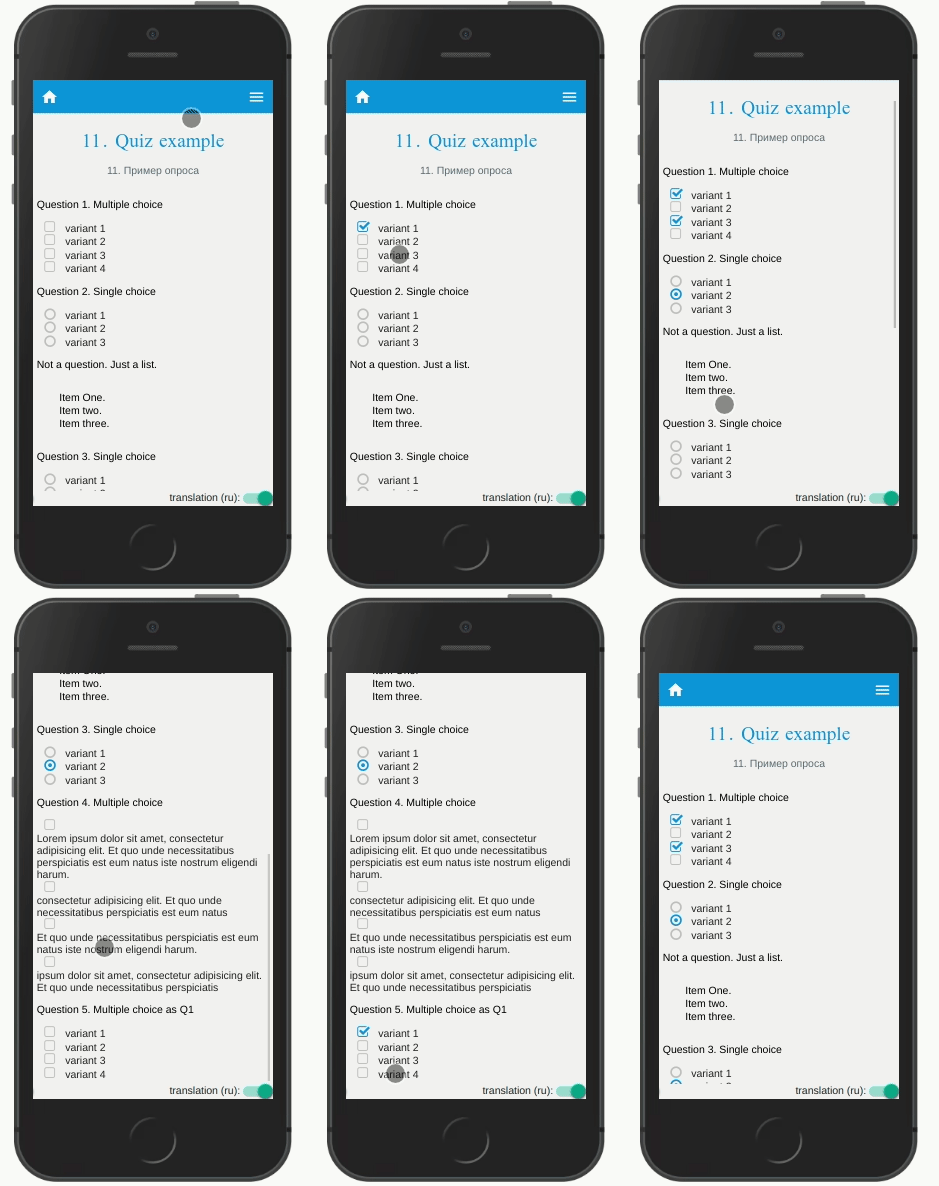
I don't see bullets on ordinary list items (not custom renderer).
I will learn more. And if I stuck somewhere I hope you don't leave me.
Aparus
on 29 Jan 2021
A note to participants: If you have ideas, suggestions or you dislike something in this pre-release, you're invited to comment in this thread: What do you dislike or believe is missing in Foundry?
jsamr
on 15 Feb 2021
1.list marker invisible
Current behavior
The default background color of ul list marker is white, So the Disc marker is invisible when background is white.
Requested Change
Marker default background color is black.
2.list marker alignment
Current behavior
When a list item has a large font size, the marker will align with top line of font. It is different with web implementation (bottom line).
Requested Change
Provide a props to controll alignment or keep consistent with web implementation.
3.pure text with line breaks
Current behavior
Pure text with line breaks will render in single line, it will render multilple line text correctly in 5.x.
Requested Change
Render line breaks of pure text correctly.
 twisger
on 22 Feb 2021
twisger
on 22 Feb 2021
@twisger Thanks for your feedback!
- I can't seem to reproduce your issue on alpha.20, see screenshots below. If it's specific to a peculiar
tagsStylessetup, please share it, or anything to could help me reproduce the issue.
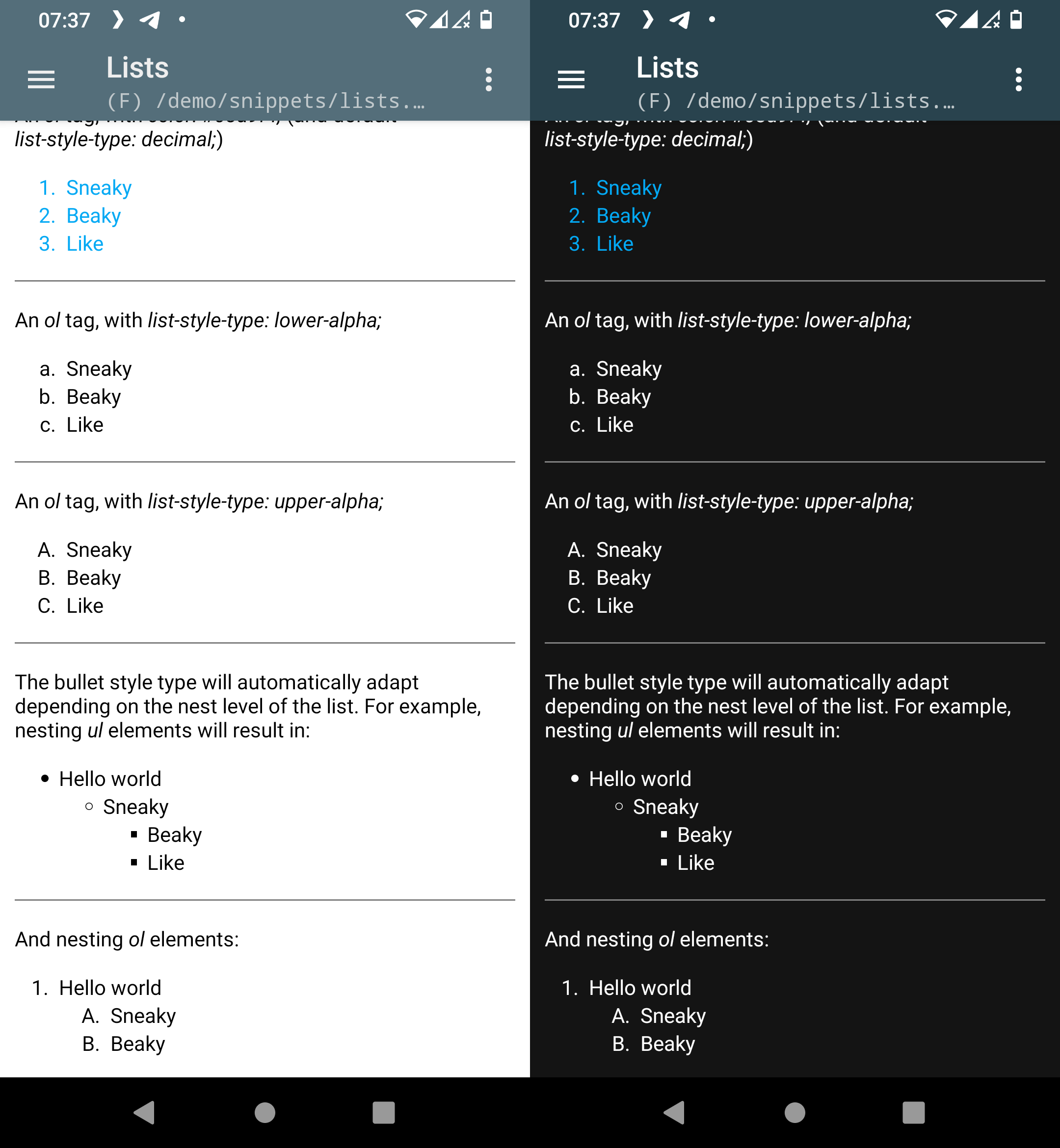
- Yes I noticed the issue, I'll address it. There is also a bug on iOS with OL, where the prefix (marker) character is truncated.
- This is a feature implementing the White Space Processing algorithm depicted in the CSS Text Module level 3, not a bug. If you want the old behavior, set
whiteSpace: 'pre'inbaseStyle
jsamr
on 22 Feb 2021
@jsamr Thanks for your reply!
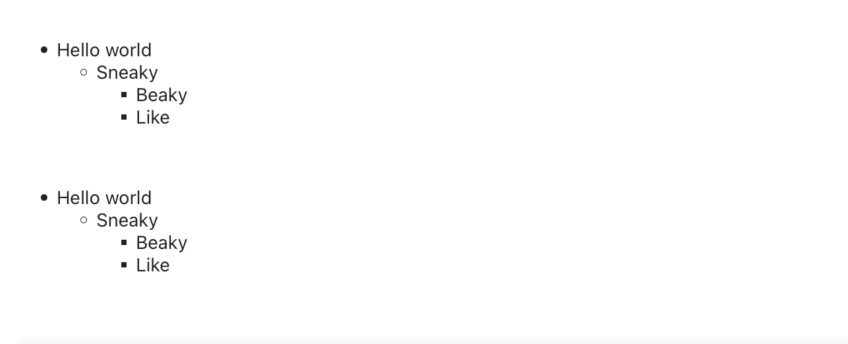
- I test the ul list marker issue again on alpha.20 and found it still exist.I already remove all tagStyle and classStyle.
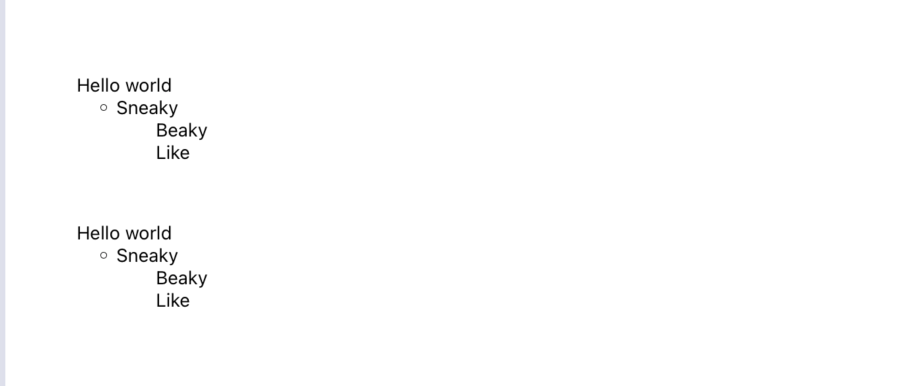
I have to add a tag style to fix it.
const tagsStyles = {
  ul: {
    color: style.grays.black,
  },
}
const contentWidth = useWindowDimensions().width
return (
  <HTML
    source={{
      html: `<ul><li>Hello world<ul><li>Sneaky<ul><li>Beaky</li><li>Like</li></ul></li></ul></li></ul>`,
    }}
    contentWidth={contentWidth}
    tagsStyles={tagsStyles}
  />
)
twisger
on 23 Feb 2021
@twisger Good catch, I'll fix that too!
jsamr
on 23 Feb 2021
Is it possible to make a custom bullet with the new API? Trying to do something like this but don't know what to do next
const ul = ({ tnode, key }) => {
    return (
      <View key={key} style={{ borderWidth: 1, borderColor: 'red' }}>
        <TNodeChildrenRenderer tnode={tnode} />
      </View>
    );
  };
ul.model = defaultHTMLElementModels.div;
 dennisbouwpas
on 17 Mar 2021
dennisbouwpas
on 17 Mar 2021
@dennisbouwpas Not yet! But the feat is scheduled before stable.
jsamr
on 17 Mar 2021
@jsamr Thanks for the quick reply !!
Ok, I see. Do you have any ideas when the stable version will be ready?
dennisbouwpas
on 17 Mar 2021
@dennisbouwpas As for now, you can at least chose the default bullet given a nest index thanks to useInternalRenderer hook. I listed the currently supported values in the below example:
function getListStyleTypeFromNestLevel(index: number) {
  return 'circle'; // 'decimal' | 'disc' | 'square' | 'lower-latin' | 'upper-latin'
}

function CustomUlRenderer(props) {
  const { Renderer, rendererProps } = useInternalRenderer('ul', props);
  return (
    <Renderer
      {...rendererProps}
      getListStyleTypeFromNestLevel={getListStyleTypeFromNestLevel}
    />
  );
};
As for a release data; that will depend on my bandwidth! But certainly before this summer.
jsamr
on 17 Mar 2021
@jsamr Hmmm 🤔 that's better yes, but is it possible to style them a bit? For example, I need to make them a bit bigger and different color. Or is it possible to use an asset image to replace that bullet, like in regular CSS?
dennisbouwpas
on 18 Mar 2021
@dennisbouwpas Not yet!
jsamr
on 18 Mar 2021
update text style when theme or color change
     baseStyle={{
        fontSize: textSize,
        fontFamily: 'System',
        whiteSpace: 'normal',
        color: textColor[theme]
      }}
 amialone
on 24 Mar 2021
amialone
on 24 Mar 2021
@amialone You should use triggerTREInvalidationPropNames={['baseStyle']}
jsamr
on 24 Mar 2021
@jsamr it works! thx 🙏
amialone
on 24 Mar 2021
I am trying to get figure tag with iframe working but i couldn`t find any solution till now.
This is my code:
```
import WebView from 'react-native-webview';
import RenderHTML from 'react-native-render-html';
import IframeRenderer from '@native-html/iframe-plugin';
const contentWidth = useWindowDimensions().width;
const computeEmbeddedMaxWidth = (availableWidth) => {
return Math.min(availableWidth, 500);
};
const renderers = {
iframe: IframeRenderer,
};
WebView={WebView}
source={{html: props.route.params.htmlContent}}
baseStyle={{color: '#fff', fontFamily: 'Tondo_A_Rg'}}
onLinkPress={(event, href) => {
Linking.openURL(href);
}}
renderersProps={{
iframe: {
scalesPageToFit: true,
webViewProps: {
/* Any prop you want to pass to iframe WebViews */
},
},
}}
contentWidth={contentWidth}
computeEmbeddedMaxWidth={computeEmbeddedMaxWidth}
/>
```
Thank you for help
 and18aa
on 24 Mar 2021
and18aa
on 24 Mar 2021
@and18aa Would you mind providing a snack? Especially, I would need to know
- The html content
- The exact desired output
I suggest we continue this discussion in our discord channel to avoid notifying all subscribers to this ticket, thank you :smiley:
jsamr
on 24 Mar 2021
472
 thekalko
on 29 Mar 2021
thekalko
on 29 Mar 2021
For those of you who are interested in CSS counter styles (roman, arabic...), good news are reported here!
jsamr
on 13 Apr 2021
@jsamr
Hello,
I can't seem to be able to use it in my code.
It's giving me this error:
**Fri Apr 16 2021 10:31:54.882]  ERROR    Error: Invalid hook call. Hooks can only be called inside of the body of a function component. This could happen for one of the following reasons:
1. You might have mismatching versions of React and the renderer (such as React DOM)
2. You might be breaking the Rules of Hooks
3. You might have more than one copy of React in the same app
See https://fb.me/react-invalid-hook-call for tips about how to debug and fix this problem.**
I used a striped down version of the examples just to try to make it work.
const HTMLComponent = React.memo(
    () => {

        return <RenderHTML
            enableExperimentalMarginCollapsing={true}
            debug={false}
            triggerTREInvalidationPropNames={['baseStyle']}
        />;
    }
);
 adderly
on 16 Apr 2021
adderly
on 16 Apr 2021
@adderly It's unlikely (though not impossible) that we have a hook misbehavior since the project is covered with the rules of hooks Eslint rules. The most likely causes are explained here. If however you're confident that the problem comes from this library, please share a reproduction in the form of a snack, or a git project.
jsamr
on 16 Apr 2021
@adderly It's unlikely (though not impossible) that we have a hook misbehavior since the project is covered with the rules of hooks Eslint rules. The most likely causes are explained here. If however you're confident that the problem comes from this library, please share a reproduction in the form of a snack, or a git project.
You are correct @jsamr , i created a new project and it worked.
But in my current codebase it just doesn't work.
adderly
on 16 Apr 2021
@adderly Probably a duplicated react package, happened to me on a yarn 2 monorepo. If you're using yarn, you can try yarn why react; with npm npm ls react to identify the origin of the duplicated module. See this guide.. I'd rather not continue this discussion here to avoid spamming all subscribers. Feel free to join our discord if you have any question.
jsamr
on 16 Apr 2021
Hi! Thanks for the great job! not sure where to open bugs regarding Foundry issues, but I've tried to test the RTL with 6.0.24-alpha and it's not 100%,
My code:
return (<HTML
        source={{ html: this.props.htmlSource }}
        imagesMaxWidth={Dimensions.get('window').width}
        alterChildren={this.alterChildren.bind(this)}
        textSelectable
            WebView={WebView}
             renderersProps={{
               ol: { enableExperimentalRtl: true },
               ul: { enableExperimentalRtl: true }}}/>);
HTML Source:
<body>
<p>English - bullets</p>
<p> </p>
<p style="text-align: center;">Center</p>
<ul style="text-align: center;">
<li dir="ltr">Hello</li>
<li dir="ltr">world</li>
</ul>
<p dir="ltr" style="text-align: center;"> </p>
<p> </p>
<p>Left</p>
<ul>
<li>Hello</li>
<li>world</li>
</ul>
<p> </p>
<p> </p>
<p> </p>
<p dir="rtl" style="text-align: right;">Right</p>
<ul dir="rtl" style="text-align: right;">
<li>Hello</li>
<li>world</li>
</ul>
<p dir="rtl" style="text-align: right;"> </p>
</body>
react-native-render-html:


 nadav2051
on 19 Apr 2021
nadav2051
on 19 Apr 2021
@nadav2051 It's totally appropriate to comment in this thread for Foundry bug reports! I however prefer snacks as it's very fast to reproduce. Also, it would be nice to add in which platform the bug appears. On my end, I didn't manage to reproduce the RTL issue neither on Android (10), nor on iOS (14.4). See the repro I used here: https://snack.expo.io/@jsamr/rnrh-alpha24-rtl-repro
As per the centering issue, worth investigating. I'll take a look.
jsamr
on 19 Apr 2021
Related issues
 kanikas24
·
5Comments
kanikas24
·
5Comments
 Pradeet
·
7Comments
Pradeet
·
7Comments
 KimJeonghun91
·
4Comments
KimJeonghun91
·
4Comments
 Anitorious
·
7Comments
Anitorious
·
7Comments
 sayem314
·
6Comments
sayem314
·
6Comments
Most helpful comment
@Aparus I totally understand that refactoring custom renderers is not obvious, and a thorough guide will be provided for the stable release. The
childrenkey oftnodeobject is not an array of react elements, but an array of transient nodes!So you should use
TNodeChildrenRendererto render transient children nodes instead ofchildren.Absolutely!
Yes!
Important remarks
When creating custom renderers, the preferred pattern is to use
TDefaultRendererprop component passed to the renderer in order to inherit styles fromclassesStyles,tagsStylesand inline styles (style attribute). A big extra is thatTDefaultRendereris guaranteed to supportonPressprop! An other extra: you can passviewPropsandtextPropswhich will be passed to the underlyingVieworTextdepending on the rendered react native element (which is decided by the transient render engine). You can take inspiration in this example.EDIT: More details on the Transient Render Tree structure here: https://github.com/meliorence/react-native-render-html/blob/dev/foundry/rfc/002-CSS-whitespace-collapsing.adoc#transient-render-tree