React-native-reanimated: AnimatedFlatList's scroll and drag performance - Reanimated2
Description
AnimatedFlatList's scroll and drag performance seems poor. I'm just using opacity and scale property for animation with interpolation. During scroll performance was not good but if I was dragging slowly, ui thread performance was descending so dramatically. Did I miss something?
My test device is iPhone6s
Screenshots

Steps To Reproduce
See code below. You can copy and paste to any project, it will work.
Expected behavior
Smooth 60fps opacity and scale animation.
Actual behavior
2-30 fps animation :(
Snack or minimal code example
import React from 'react';
import {StyleSheet, FlatList, View, Text, Dimensions} from 'react-native';
import Animated, {
  Extrapolate,
  interpolate,
  useAnimatedScrollHandler,
  useAnimatedStyle,
  useSharedValue,
} from 'react-native-reanimated';

const AnimatedFlatList = Animated.createAnimatedComponent(FlatList);

const items = [
  {id: 1, text: 'A'},
  {id: 2, text: 'B'},
  {id: 3, text: 'C'},
  {id: 4, text: 'D'},
  {id: 5, text: 'E'},
  {id: 6, text: 'F'},
  {id: 7, text: 'G'},
  {id: 8, text: 'H'},
  {id: 9, text: 'I'},
  {id: 10, text: 'J'},
  {id: 11, text: 'K'},
  {id: 12, text: 'L'},
];

const {width: SCREEN_WIDTH} = Dimensions.get('window');
const ITEM_WIDTH = SCREEN_WIDTH / 5;
const data = [...items, ...items, ...items];

export const Home = () => {
  const transX = useSharedValue(0);

  const renderItem = ({item, index}) => {
    return <Item index={index} item={item} transX={transX} />;
  };

  const scrollHandler = useAnimatedScrollHandler({
    onScroll: (event) => {
      transX.value = event.contentOffset.x;
    },
  });

  return (
    <View style={styles.container}>
      <View style={styles.listContainer}>
        <AnimatedFlatList
          onScroll={scrollHandler}
          horizontal
          showsHorizontalScrollIndicator={false}
          style={styles.list}
          data={data}
          decelerationRate="fast"
          centerContent
          snapToInterval={ITEM_WIDTH}
          scrollEventThrottle={16}
          pagingEnabled
          snapToAlignment="center"
          renderItem={renderItem}
          keyExtractor={(item, index) => `${item.id}-${index}`}
        />
      </View>
    </View>
  );
};

const Item = ({index, item, transX}) => {
  const animatedStyle = useAnimatedStyle(() => {
    return {
      opacity: opacityAnimation(transX, index),
      transform: [
        {
          scale: scaleAnimation(transX, index),
        },
      ],
    };
  });
  return (
    <Animated.View style={[styles.box, animatedStyle]} item={item}>
      <Text style={styles.label}>{item.text}</Text>
    </Animated.View>
  );
};

const scaleAnimation = (transX, index) => {
  'worklet';

  return interpolate(
    transX.value,
    [
      (index - 2) * ITEM_WIDTH,
      (index - 1) * ITEM_WIDTH,
      index * ITEM_WIDTH,
      (index + 1) * ITEM_WIDTH,
      (index + 2) * ITEM_WIDTH,
    ],
    [0.5, 0.7, 1, 0.7, 0.5],
    Extrapolate.CLAMP,
  );
};

const opacityAnimation = (transX, index) => {
  'worklet';

  return interpolate(
    transX.value,
    [
      (index - 3) * ITEM_WIDTH,
      (index - 2) * ITEM_WIDTH,
      (index - 1) * ITEM_WIDTH,
      index * ITEM_WIDTH,
      (index + 1) * ITEM_WIDTH,
      (index + 2) * ITEM_WIDTH,
      (index + 3) * ITEM_WIDTH,
    ],
    [0, 0.5, 0.8, 1, 0.8, 0.5, 0],
    Extrapolate.CLAMP,
  );
};

const styles = StyleSheet.create({
  container: {
    flex: 1,
    alignItems: 'center',
    justifyContent: 'center',
    backgroundColor: '#efefef',
  },
  listContainer: {
    height: ITEM_WIDTH + 250,
    alignItems: 'center',
    justifyContent: 'center',
  },
  list: {
    height: ITEM_WIDTH * 2,
    flexGrow: 0,
    paddingHorizontal: ITEM_WIDTH * 2,
  },
  box: {
    width: ITEM_WIDTH,
    height: ITEM_WIDTH,
    backgroundColor: 'blue',
    borderRadius: 20,
    alignItems: 'center',
    justifyContent: 'center',
    shadowColor: '#000',
    shadowOffset: {
      width: 0,
      height: 6,
    },
    shadowOpacity: 0.37,
    shadowRadius: 7.49,

    elevation: 12,
  },
  label: {
    fontWeight: 'bold',
    fontSize: 24,
    color: '#fff',
  },
});
Package versions
- React: 16.13.1
- React Native: 0.63.3
- React Native Reanimated: 2.0.0-rc.0
- NodeJS: 14.4.0
 ysfzrn
All 14 comments
Issue validator - update # 1
Hello!
Congratulations! Your issue passed the validator! Thank you!
![github-actions[bot] picture](https://avatars.githubusercontent.com/in/15368?v=4&s=40) github-actions[bot]
on 8 Dec 2020
github-actions[bot]
on 8 Dec 2020
I think this is very similar to https://github.com/software-mansion/react-native-reanimated/issues/1499#issuecomment-737931602. The thing is you probably calculate styles etc. even for the invisible views. With the fix in #1502 and the proper design described in the linked comment, you should be fine.
 karol-bisztyga
on 9 Dec 2020
karol-bisztyga
on 9 Dec 2020
Hmm it seems so different approach from Animated API. Ok, I will try. After that I will write the results as soon as. Thanks for reply
ysfzrn
on 9 Dec 2020
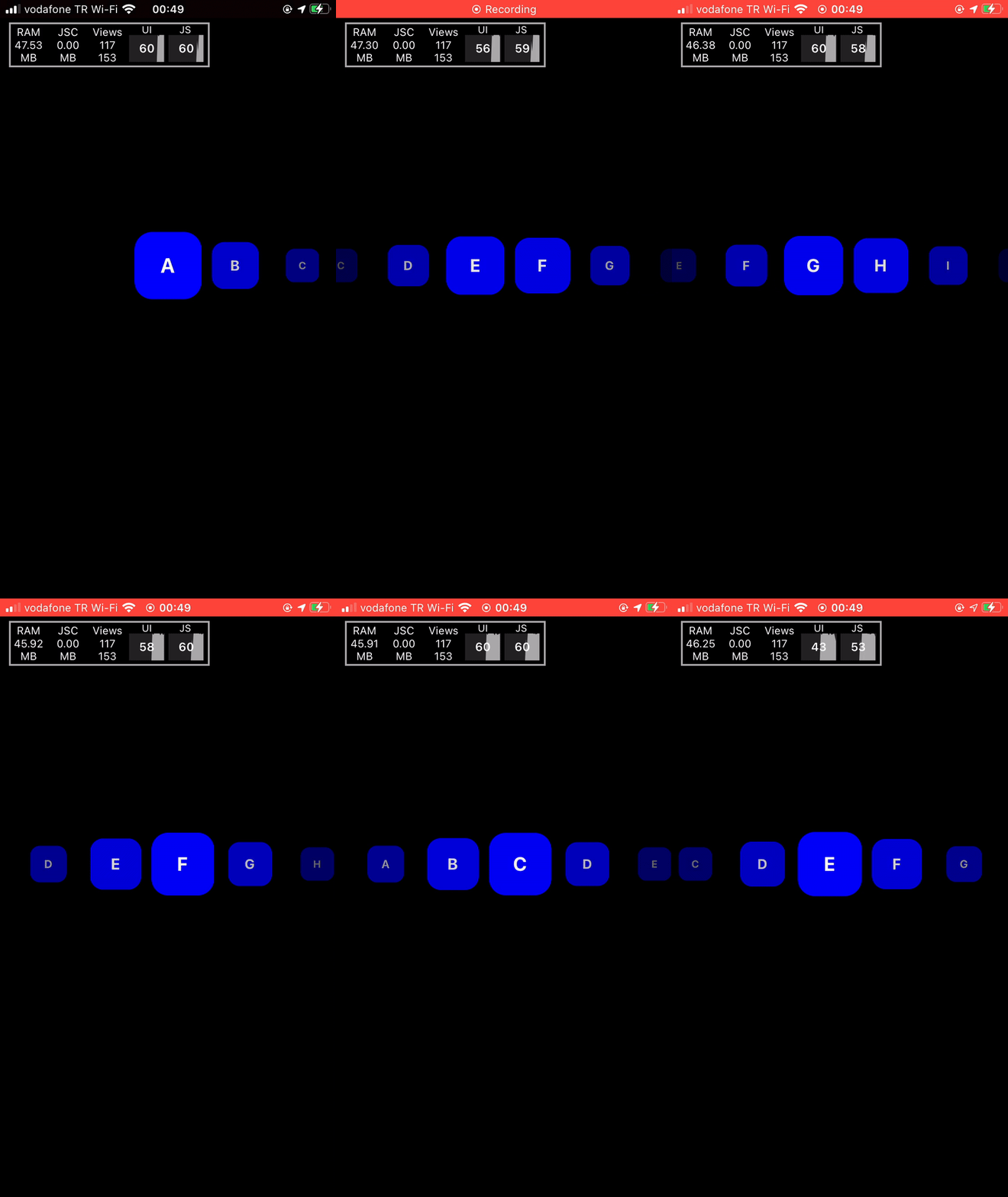
1502 After making the change here, I changed my code based on your example. I have tested on Android and iOS. The result is fine (50-60fps) 👍.
I have changed list item's code. I have derived animation value based on my conditions And according to animation value, I called interpolate function or assigned static value.
//...
const Item = ({index, item, transX}) => {
const udv = useDerivedValue(() => {
if (
transX.value >= (index - 3) * ITEM_WIDTH &&
transX.value <= (index + 3) * ITEM_WIDTH
) {
return transX.value;
} else if (transX.value < (index - 3) * ITEM_WIDTH) {
return null;
} else if (transX.value > (index + 3) * ITEM_WIDTH) {
return null;
}
});
//...
const scaleAnimation = (udv, index) => {
'worklet';
return udv.value === null
? 0
: interpolate(
udv.value,
[
(index - 2) * ITEM_WIDTH,
(index - 1) * ITEM_WIDTH,
index * ITEM_WIDTH,
(index + 1) * ITEM_WIDTH,
(index + 2) * ITEM_WIDTH,
],
[0.5, 0.7, 1, 0.7, 0.5],
Extrapolate.CLAMP,
);
};
//...
You can see the full code below.
Full Code!
import React from 'react';
import {StyleSheet, FlatList, View, Text, Dimensions} from 'react-native';
import Animated, {
Extrapolate,
interpolate,
useAnimatedScrollHandler,
useAnimatedStyle,
useDerivedValue,
useSharedValue,
} from 'react-native-reanimated';
const AnimatedFlatList = Animated.createAnimatedComponent(FlatList);
const items = [
{id: 1, text: 'A'},
{id: 2, text: 'B'},
{id: 3, text: 'C'},
{id: 4, text: 'D'},
{id: 5, text: 'E'},
{id: 6, text: 'F'},
{id: 7, text: 'G'},
{id: 8, text: 'H'},
{id: 9, text: 'I'},
{id: 10, text: 'J'},
{id: 11, text: 'K'},
{id: 12, text: 'L'},
];
const {width: SCREEN_WIDTH} = Dimensions.get('window');
const ITEM_WIDTH = SCREEN_WIDTH / 5;
const data = [...items, ...items, ...items];
export const Home = () => {
const transX = useSharedValue(0);
const renderItem = ({item, index}) => {
return <Item index={index} item={item} transX={transX} />;
};
const scrollHandler = useAnimatedScrollHandler({
onScroll: (event) => {
transX.value = event.contentOffset.x;
},
});
return (
<View style={styles.container}>
<View style={styles.listContainer}>
<AnimatedFlatList
onScroll={scrollHandler}
horizontal
showsHorizontalScrollIndicator={false}
style={styles.list}
data={data}
decelerationRate="fast"
centerContent
snapToInterval={ITEM_WIDTH}
scrollEventThrottle={16}
pagingEnabled
snapToAlignment="center"
renderItem={renderItem}
keyExtractor={(item, index) => `${item.id}-${index}`}
/>
</View>
</View>
);
};
const Item = ({index, item, transX}) => {
const udv = useDerivedValue(() => {
if (
transX.value >= (index - 3) * ITEM_WIDTH &&
transX.value <= (index + 3) * ITEM_WIDTH
) {
return transX.value;
} else if (transX.value < (index - 3) * ITEM_WIDTH) {
return null;
} else if (transX.value > (index + 3) * ITEM_WIDTH) {
return null;
}
});
const animatedStyle = useAnimatedStyle(() => {
return {
opacity: opacityAnimation(udv, index),
transform: [
{
scale: scaleAnimation(udv, index),
},
],
};
});
return (
<Animated.View style={[styles.box, animatedStyle]} item={item}>
<Text style={styles.label}>{item.text}</Text>
</Animated.View>
);
};
const scaleAnimation = (udv, index) => {
'worklet';
return udv.value === null
? 0
: interpolate(
udv.value,
[
(index - 2) * ITEM_WIDTH,
(index - 1) * ITEM_WIDTH,
index * ITEM_WIDTH,
(index + 1) * ITEM_WIDTH,
(index + 2) * ITEM_WIDTH,
],
[0.5, 0.7, 1, 0.7, 0.5],
Extrapolate.CLAMP,
);
};
const opacityAnimation = (udv, index) => {
'worklet';
return udv.value === null
? 0
: interpolate(
udv.value,
[
(index - 3) * ITEM_WIDTH,
(index - 2) * ITEM_WIDTH,
(index - 1) * ITEM_WIDTH,
index * ITEM_WIDTH,
(index + 1) * ITEM_WIDTH,
(index + 2) * ITEM_WIDTH,
(index + 3) * ITEM_WIDTH,
],
[0, 0.5, 0.8, 1, 0.8, 0.5, 0],
Extrapolate.CLAMP,
);
};
const styles = StyleSheet.create({
container: {
flex: 1,
alignItems: 'center',
justifyContent: 'center',
backgroundColor: '#000',
},
listContainer: {
height: ITEM_WIDTH + 250,
alignItems: 'center',
justifyContent: 'center',
},
list: {
height: ITEM_WIDTH * 2,
flexGrow: 0,
paddingHorizontal: ITEM_WIDTH * 2,
},
box: {
width: ITEM_WIDTH,
height: ITEM_WIDTH,
backgroundColor: 'blue',
borderRadius: 20,
alignItems: 'center',
justifyContent: 'center',
shadowColor: '#000',
shadowOffset: {
width: 0,
height: 6,
},
shadowOpacity: 0.37,
shadowRadius: 7.49,
elevation: 12,
},
label: {
fontWeight: 'bold',
fontSize: 24,
color: '#fff',
},
});
ysfzrn
on 9 Dec 2020
I also added getItemLayout to FlatList with useCallbacks, animation increased to 60 fps 🥳 🥳 🥳
  //...
  const renderItem = useCallback(({item, index}) => {
    return <Item index={index} item={item} transX={transX} />;
  }, []);

  const keyExtractor = useCallback((item, index) => `${item.id}-${index}`, []);
  const getItemLayout = useCallback(
    (data, index) => ({
      length: ITEM_WIDTH,
      offset: ITEM_WIDTH * index,
      index,
    }),
    [],
  );

  //...
I'm glad it worked for you 🙌 🎉 Good job. I consider the issue resolved therefore I'm closing it. If you encounter more problems like this, feel free to open a new one or reopen this one.
All the best.
karol-bisztyga
on 10 Dec 2020
const data = [...items, ...items, ...items, ...items, ...items, ...items, ...items, ...items, ...items, ...items];
After changing this line, the ui thread is broken (20fps). I tested IOS and Android at the same time. 50 can work fine, but it will freeze if it exceeds 50.
@ysfzrn @karol-bisztyga
 vance-liu
on 12 Jan 2021
vance-liu
on 12 Jan 2021
I suppose, Flatlist is doing calculation for every item when you are scrolling. Maybe you can try to optimize FlatList little more than me
ysfzrn
on 12 Jan 2021
@vance-liu on which reanimated version are you? I believe the PR from @karol-bisztyga didn't land in a release yet, but that should be fixed.
 mrousavy
on 12 Jan 2021
mrousavy
on 12 Jan 2021
Package versions
- React: 16.13.1
- React Native: 0.63.4
- React Native Reanimated: 2.0.0-rc.1
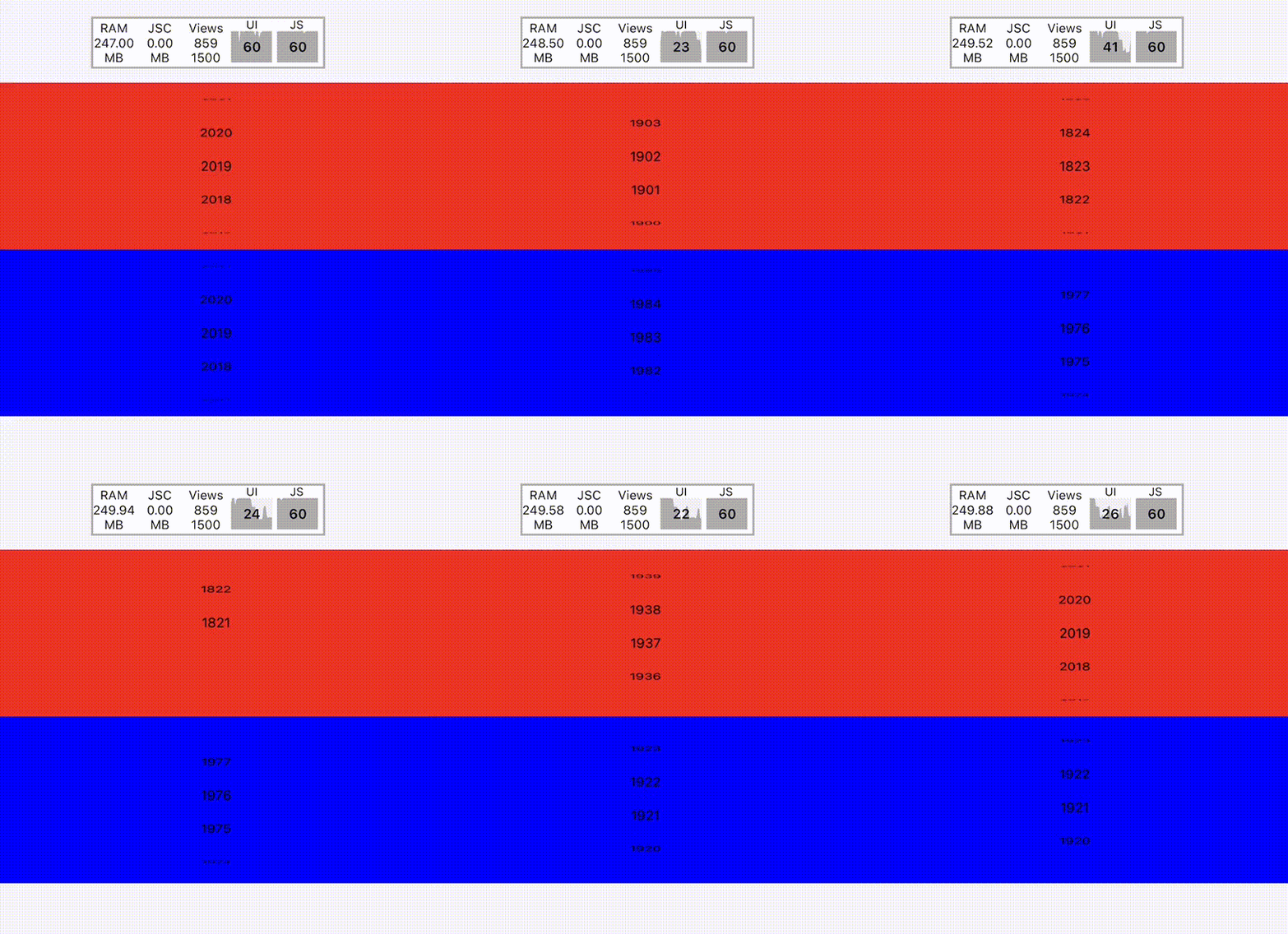
I tested the AnimatedFlatList example from top, (50 items)the JS and UI thread is broken(20-30fps). Also remake a ScrollView by PanGesture and Reanimated, in order to create a picker component like PickerIOS. (200 items)UI thread is broken(40-50fps).
vance-liu
on 12 Jan 2021
you can install next version with this yarn add react-native-reanimated@next @karol-bisztyga's PR was merged in next version. I checked
ysfzrn
on 12 Jan 2021
@vance-liu, could you try it from the latest package built from master? Take one from here:
https://github.com/software-mansion/react-native-reanimated/actions?query=workflow%3A%22Build+npm+package%22
(remember to remove all caches, so you test on a fresh install)
 jakub-gonet
on 12 Jan 2021
jakub-gonet
on 12 Jan 2021
This is my code, PickerScrollView is same like ScrollableViewExample.
I upgraded from alpha to next a few hours ago. I‘m sure using the latest version from NPM(2.0.0-rc.1). Also remove all caches.
import React from 'react';
import { Text, View, StyleSheet } from 'react-native';
import Animated, {
    Extrapolate,
    interpolate,
    useSharedValue,
    useDerivedValue,
    useAnimatedStyle
} from 'react-native-reanimated';

import { PickerScrollView } from '../picker-scroll-view';

const ITEM_HEIGHT = 32;
const VISIBLE_ITEMS = 5;
const perspective = 600;
const RADIUS_REL = VISIBLE_ITEMS / 2;

const rotateXAnimation = (udv: Animated.SharedValue<number>, index: number) => {
    'worklet';

    if (udv.value === null) {
        return '90deg';
    }
    return (
        Math.max(
            -1,
            Math.min(
                1,
                Math.asin(
                    interpolate(
                        udv.value,
                        [index - RADIUS_REL, index, index + RADIUS_REL],
                        [-1, 0, 1],
                        Extrapolate.CLAMP
                    )
                )
            )
        ) *
            90 +
        'deg'
    );
};

const styles = StyleSheet.create({
    container: {
        flex: 1,
        justifyContent: 'center',
        alignItems: 'center'
    },
    item: {
        height: ITEM_HEIGHT,
        flexDirection: 'row',
        alignItems: 'center',
        justifyContent: 'center'
    },
    title: {
        color: 'white',
        fontSize: 24,
        marginBottom: 31
    }
});
const start = 2021 - 200;
const values = new Array(new Date().getFullYear() - start + 1)
    .fill(0)
    .map((_, i) => {
        const value = start + i;
        return { value, label: `${value}` };
    })
    .reverse();

const PickItem = ({ index, item, translateY }: any) => {
    const udv = useDerivedValue<any>(() => {
        const currentIndex = (translateY.value - ITEM_HEIGHT * 2) / -ITEM_HEIGHT;
        if (currentIndex <= index - RADIUS_REL || currentIndex >= index + RADIUS_REL) {
            return null;
        }
        return currentIndex;
    });
    const animatedStyle = useAnimatedStyle(() => {
        return {
            transform: [{ perspective }, { rotateX: rotateXAnimation(udv, index) }]
        };
    }, []);
    return (
        <Animated.View style={[styles.item, animatedStyle]}>
            <Text>{item.label}</Text>
        </Animated.View>
    );
};

const PickerDemo = () => {
    const translateY = useSharedValue(0);
    const renderItem = (item: any, index: number) => {
        return <PickItem key={String(index)} index={index} item={item} translateY={translateY} />;
    };

    const translateY2 = useSharedValue(0);
    const renderItem2 = (item: any, index: number) => {
        return <PickItem key={String(index)} index={index} item={item} translateY={translateY2} />;
    };

    return (
        <View style={styles.container}>
            <View
                style={{
                    width: '100%',
                    height: ITEM_HEIGHT * VISIBLE_ITEMS,
                    backgroundColor: 'red'
                }}
            >
                <PickerScrollView translateY={translateY}>
                    {values.map(renderItem)}
                </PickerScrollView>
            </View>
            <View
                style={{
                    width: '100%',
                    height: ITEM_HEIGHT * VISIBLE_ITEMS,
                    backgroundColor: 'blue'
                }}
            >
                <PickerScrollView translateY={translateY2}>
                    {values.map(renderItem2)}
                </PickerScrollView>
            </View>
        </View>
    );
};

export default PickerDemo;
Video:
vance-liu
on 12 Jan 2021
Related issues
 nextriot
·
3Comments
nextriot
·
3Comments
 alexfov
·
3Comments
alexfov
·
3Comments
 dinhmai74
·
3Comments
dinhmai74
·
3Comments
 levibuzolic
·
3Comments
levibuzolic
·
3Comments
 bdrobinson
·
3Comments
bdrobinson
·
3Comments
Most helpful comment
I also added getItemLayout to FlatList with useCallbacks, animation increased to 60 fps 🥳 🥳 🥳