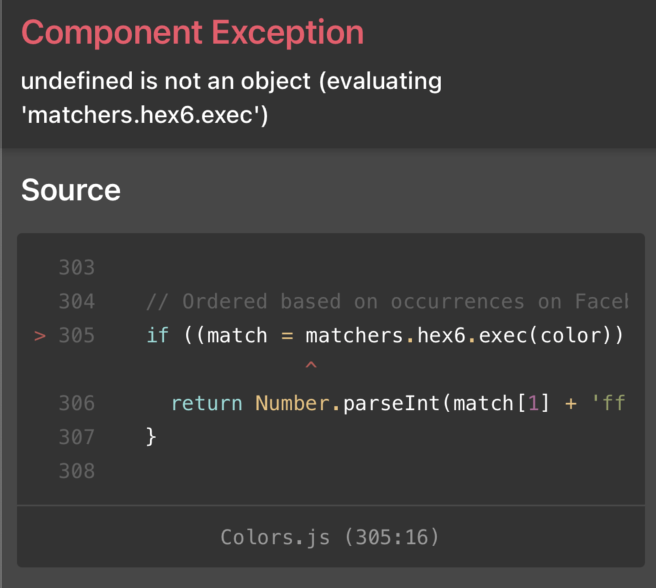
React-native-reanimated: interpolateColor ERROR: Cannot read property 'exec' of undefined
Description
Trying to animate background color, but got error Cannot read property 'exec' of undefined. Also tried to wrap return value of backgroundColor into processColor function but got the same result
Code example:
import React, {memo, useMemo, useCallback} from 'react';
import {StyleSheet} from 'react-native';
import Animated, {
    useSharedValue,
    useDerivedValue,
    useAnimatedStyle,
    withTiming,
    interpolateColor,
} from 'react-native-reanimated';
import {TouchableWithoutFeedback} from 'react-native-gesture-handler';

const ENABLED_POSITION = 20;

export const Thumbler = memo(() => {
    const x = useSharedValue(ENABLED_POSITION);
    const enabled = useSharedValue(0);
    const translateX = useDerivedValue(() => x.value * enabled.value);

    const onPress = useCallback(() => {
        enabled.value = withTiming(1, {duration: 100});
    }, []);
    const backgroundColor = useDerivedValue(() => {
        return interpolateColor(enabled.value, [0, 1], ['#333333', '#666999']);
    });
    const useIndicatorStyle = useAnimatedStyle(() => ({
        transform: [{translateX: translateX.value}],
    }));
    const useThumblerStyle = useAnimatedStyle(() => ({
        backgroundColor: backgroundColor.value,
    }));

    const indicatorStyle = useMemo(
        () => [styles.indicator, useIndicatorStyle],
        [useIndicatorStyle],
    );
    const thumblerStyle = useMemo(() => [styles.thumbler, useThumblerStyle], [
        useThumblerStyle,
    ]);

    return (
        <TouchableWithoutFeedback onPress={onPress} style={styles.touchable}>
            <Animated.View style={thumblerStyle}>
                <Animated.View style={indicatorStyle} />
            </Animated.View>
        </TouchableWithoutFeedback>
    );
});

const styles = StyleSheet.create({
    touchable: {
        height: 20,
        width: 38,
        justifyContent: 'center',
        alignItems: 'center',
    },
    thumbler: {
        width: 36,
        height: 18,
        borderRadius: 9,
    },
    indicator: {
        width: 18,
        height: 18,
        borderRadius: 20,
        backgroundColor: '#ddd',
    },
});
Package versions:
- React Native: 0.63.3
- React Native Reanimated: 2.0.0-alpha.9.1
 caiphaav
All 9 comments
Issue validator - update # 4
Hello!
It seems like there are some problems with your issue. Please fix them and wait for the validator to confirm that everything is alright.
Thank you!
Validator encountered following problems:
- Section required but not found: steps to reproduce(for label 🐞 bug)
- Section required but not found: expected behavior(for label 🐞 bug)
- Section required but not found: actual behavior(for label 🐞 bug)
![github-actions[bot] picture](https://avatars.githubusercontent.com/in/15368?v=4&s=40) github-actions[bot]
on 24 Nov 2020
github-actions[bot]
on 24 Nov 2020
It seems to work when I'm convert HEX strings to 32bit numbers
const backgroundColor = useDerivedValue(() =>
        interpolateColor(enabled.value, [0, 1], [0xff2a2a2c, 0xff0b2c5a]),
);
But can it work with HEX strings?
caiphaav
on 24 Nov 2020
@caiphaav I can confirm that this bug exists in my project too.
 AlexeyVlasenko
on 24 Nov 2020
AlexeyVlasenko
on 24 Nov 2020
AlexeyVlasenko
on 24 Nov 2020
Can you please include the full call stack of the crash. Seeing just a tiny bit of the redbox does not provide us with enough information to investigate this.
 kmagiera
on 2 Dec 2020
kmagiera
on 2 Dec 2020
I'm still getting the issue on rc.0 is it possible?
 wcandillon
on 14 Dec 2020
wcandillon
on 14 Dec 2020
Yes, It's possible, because we haven't been releasing a new version with this patch. We try to release a new version every two week - it should happen on Thursday or Friday.
 piaskowyk
on 14 Dec 2020
piaskowyk
on 14 Dec 2020
How can i get a 32bit color code from a hex code? Also, how can I update to the fixed version when this is patched?
 servonlewis
on 18 Dec 2020
servonlewis
on 18 Dec 2020
@servonlewis We released new version with patch today, link here. You should just change version in package.json
If you need convert hex string to 32bit number you can use parseInt(hexString, 16) for example:
0xffff0000 => 4294901760
parseInt('ffff0000', 16) => 4294901760
piaskowyk
on 18 Dec 2020
Related issues
 levibuzolic
·
3Comments
levibuzolic
·
3Comments
 alexfov
·
3Comments
alexfov
·
3Comments
 bdrobinson
·
3Comments
bdrobinson
·
3Comments
 mldb
·
3Comments
mldb
·
3Comments
 colinux
·
3Comments
colinux
·
3Comments