React-native-reanimated: alpha8 JS thread functions called without `runOnJS()` crash ungracefully
Functions that now require to use runOnJS() causes the app to crash if runOnJS() is not used. However it crashes quite abruptly.
This is on Android.
 wcandillon
All 11 comments
Some documentation or at least mentioning of this as a breaking api change would have been nice, but otherwise alpha 8 has been an amazing release. Thank you!
I've also seen the android-specific issue described here. I just wanted to comment below how I ended up refactoring my main JS thread function calls in case anyone else is confused by runOnJS:
alpha-7:
const tapGestureHandler = useAnimatedGestureHandler({
  onActive: (evt, ctx) => {
    onPress() // onPress comes from props
  }
  ...
alpha-8:
import { runOnJS } from 'react-native-reanimated'

const tapGestureHandler = useAnimatedGestureHandler({
  onActive: (evt, ctx) => {
    runOnJS(onPress)()
  }
  ...
I also wanted to ask, if we now have to explicitly declare functions to be run on a thread, should we be using runOnUI more often?
 drewandre
on 30 Oct 2020
drewandre
on 30 Oct 2020
If you have few assigns of some shared values in a row and wanna make sure it's synchronous you should use rubOnUI, because real assign to the shared value is asynchronous
 terrysahaidak
on 30 Oct 2020
terrysahaidak
on 30 Oct 2020
Otherwise in a normal scenario you shouldn’t have to use runOnUI, right? Like if I’m just setting an animated value on the main react-native JS thread? Thanks @terrysahaidak
drewandre
on 30 Oct 2020
Otherwise in a normal scenario you shouldn’t have to use runOnUI, right? If I’m just seeing an animated value on the main react-native JS thread? Thanks @terrysahaidak
Single set will work just the same as runOnUI. So yeah, you can avoid it. The runOnJS is mostly for us to notify we run something asynchronously when we didn't want to
terrysahaidak
on 30 Oct 2020
Otherwise in a normal scenario you shouldn’t have to use runOnUI, right? If I’m just seeing an animated value on the main react-native JS thread? Thanks @terrysahaidak
Single set will work just the same as runOnUI. So yeah, you can avoid it. The runOnJS is mostly for us to notify we run something asynchronously when we didn't want to
Is there some measurements how fast / slow these async assignments? What general lag to expect?
 likern
on 2 Nov 2020
likern
on 2 Nov 2020
How to resolve this issue. My app crashes when -
a.i want to focus an input text on finished.
input_search_box_translate_x.value = withSpring(isShowInputBox && 1 || width, { damping: 20 }, (finished) => { runOnJS(focusAndBlurInputBox)(isShowInputBox, inputTextRef); <-- Guessing this is causing the app to crash. })
focusAndBlurInputBox function -
export const focusAndBlurInputBox = (isShowInputBox, inputTextRef) => {
    'worklet';
    if (!isShowInputBox) {
        inputTextRef.current.clear();
        inputTextRef.current.blur();
    } else {
        inputTextRef.current.focus();
    }
}
b. Also the same should also work when i need to update the state by calling setValues state hook when on finished.
content_translate_y.value= withSpring(isShowInputBox && 1 || height, { damping: 20 }, (finished) => { //how to get the following working? setSearchValues({ ...searchValues, searchForPostId: post.postId }); });
 dhirajanand014
on 12 Nov 2020
dhirajanand014
on 12 Nov 2020
How to resolve this issue. My app crashes when -
a.i want to focus an input text on finished.
input_search_box_translate_x.value = withSpring(isShowInputBox && 1 || width, { damping: 20 }, (finished) => { runOnJS(focusAndBlurInputBox)(isShowInputBox, inputTextRef); <-- Guessing this is causing the app to crash. })
focusAndBlurInputBox function - export const focusAndBlurInputBox = (isShowInputBox, inputTextRef) => { 'worklet'; if (!isShowInputBox) { inputTextRef.current.clear(); inputTextRef.current.blur(); } else { inputTextRef.current.focus(); } }b. Also the same should also work when i need to update the state by calling setValues state hook when on finished.
content_translate_y.value= withSpring(isShowInputBox && 1 || height, { damping: 20 }, (finished) => { //how to get the following working? setSearchValues({ ...searchValues, searchForPostId: post.postId }); });
Any Update?
dhirajanand014
on 13 Nov 2020
Could you please provide us at least the error message and some stacktrace?
terrysahaidak
on 13 Nov 2020
Could you please provide us at least the error message and some stack trace?
There is no error or any stack trace. However, the app crashes when i put in the runOnJS(focusAndBlurInputBox)(isShowInputBox, inputTextRef); or any setState() function in the finished block. If none of these are present and just like how the example has the console.log() in the finished block, there are no issues.
I'm referring the tar builds to actually use the runOnJS() function. With the usual npm package - 2.0.0.alpha.8 => i used to get the below error -
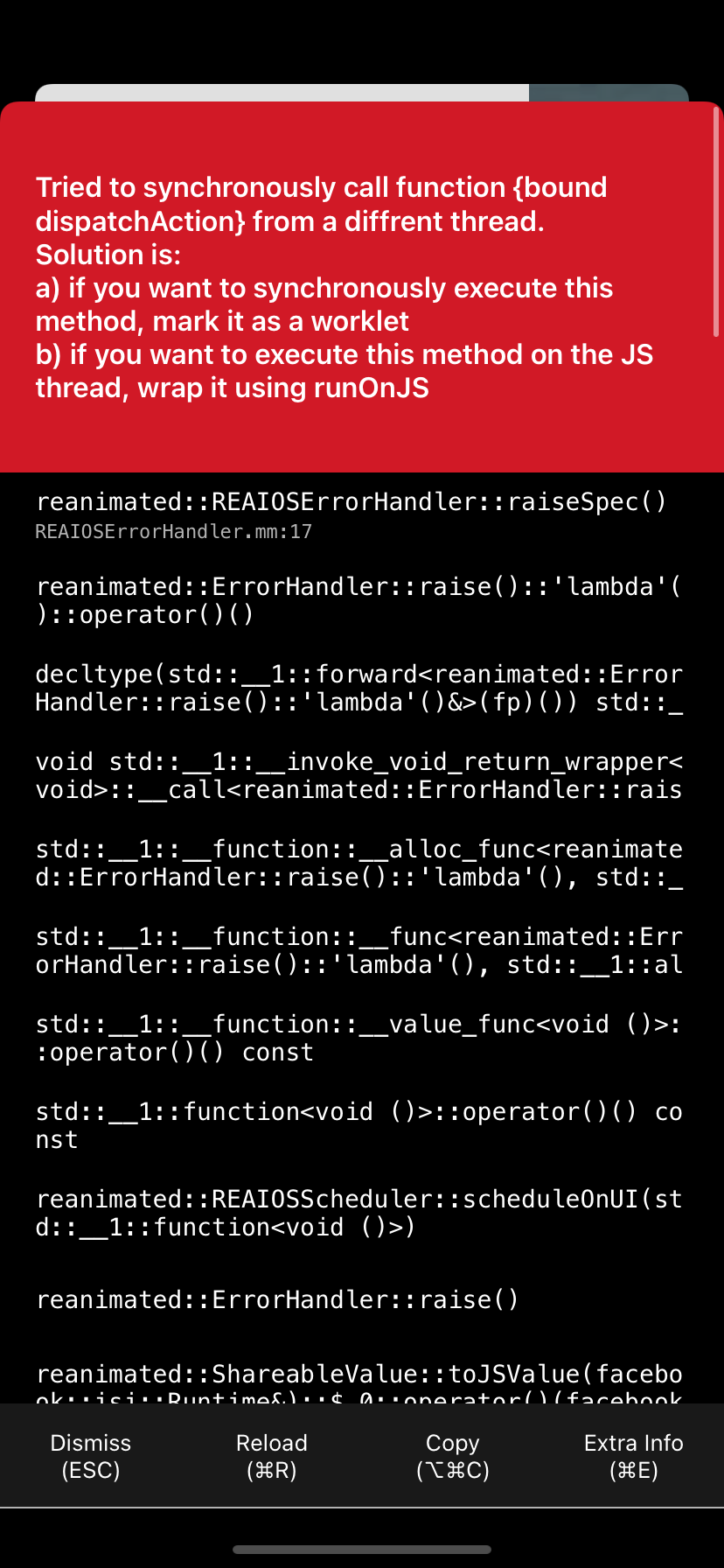
Please let know the correct usage of the finished block in the callback in the withSpring Animation. Particularly setting the input text focus and setting the state of React hooks.
dhirajanand014
on 14 Nov 2020
This is fixed, right? feel free to reopen if you disagree.
wcandillon
on 11 Dec 2020
This is fixed, right? feel free to reopen if you disagree.
I have still the same error. Im just following tutorial to learn reanimated. And below code is from one of these tutorials. Im getting error when i click button and also as I said I'm new on react-native, is there anyone help me? Why this code isnt correct?
"react-native-reanimated": "2.0.0-rc.1",

import React from 'react';
import { View, Button } from 'react-native';
import Animated, {
  useSharedValue,
  useAnimatedStyle,
  withTiming,
  useDerivedValue,
} from 'react-native-reanimated';

export default function AnimatedStyleUpdateExample() {
  const progress=useSharedValue(0)
  const translateX=useDerivedValue(()=>{
    return progress.value*100
  })

  const animatedStyles=useAnimatedStyle(()=>{
    return {
      transform:[{translateX:translateX.value}]
    };
  });

  return (
    <View>
      <Animated.View style={[{height:100,width:100,backgroundColor:"red"}, animatedStyles]} />
      <Button onPress={() => (progress.value = withTiming( Math.random()))} title="Hey" />
    </View>
  );
}
 Cetger
on 26 Dec 2020
Cetger
on 26 Dec 2020
Related issues
 a-eid
·
18Comments
likern
·
23Comments
a-eid
·
18Comments
likern
·
23Comments
 mrousavy
·
24Comments
mrousavy
·
24Comments
 mickejohansson
·
18Comments
mickejohansson
·
18Comments
 Eli-Nathan
·
44Comments
Eli-Nathan
·
44Comments
Most helpful comment
Some documentation or at least mentioning of this as a breaking api change would have been nice, but otherwise alpha 8 has been an amazing release. Thank you!
I've also seen the android-specific issue described here. I just wanted to comment below how I ended up refactoring my main JS thread function calls in case anyone else is confused by
runOnJS:alpha-7:
alpha-8:
I also wanted to ask, if we now have to explicitly declare functions to be run on a thread, should we be using
runOnUImore often?