React-native-reanimated: V2: PanGestureHandler is not completely intruptable
whats wrong
Dragging a component using PanGestureHandler then releasing it to snap to a position with spring animation,
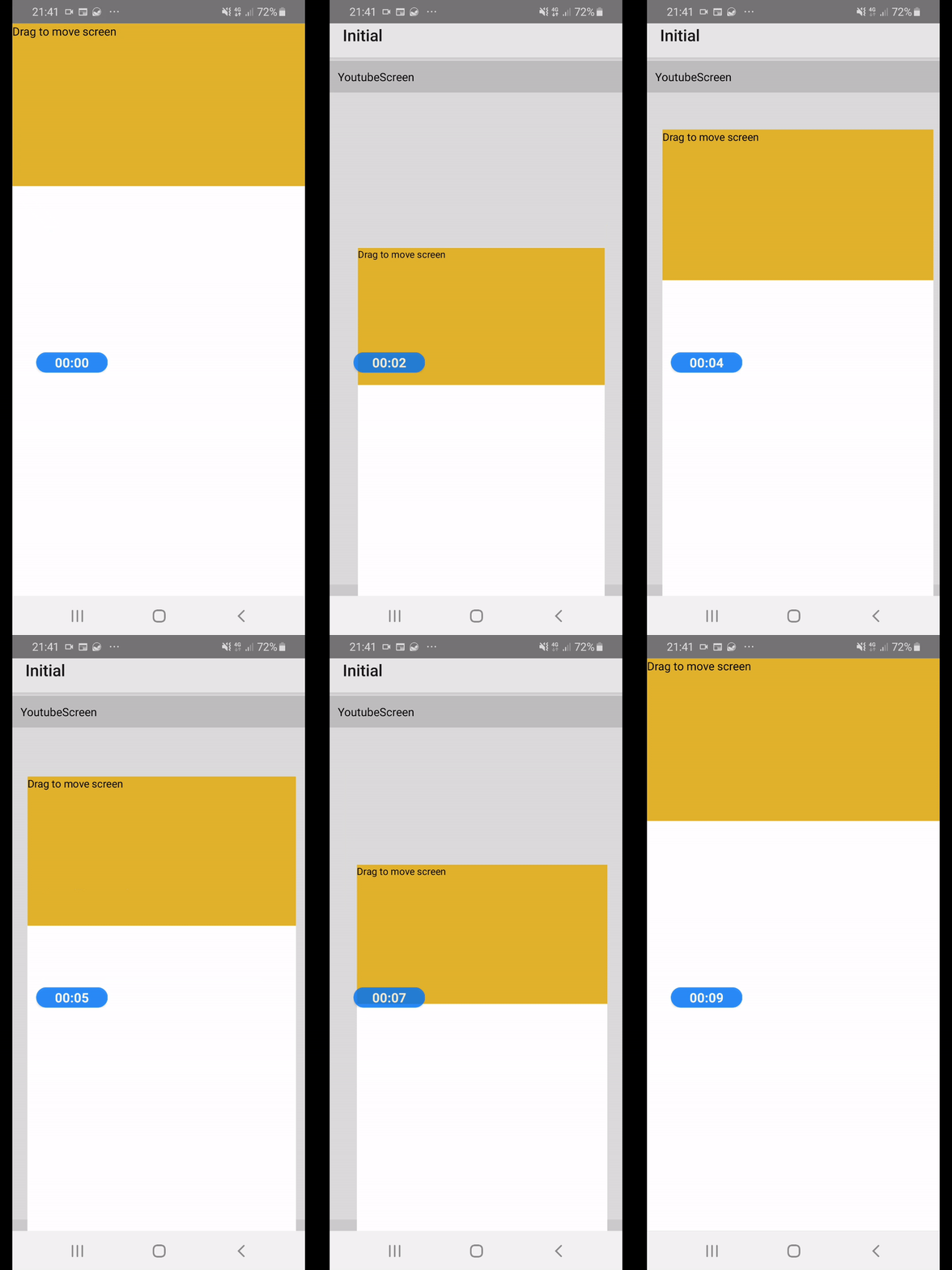
if we tap on the PanGestureHandler again beford the animation completes, when released without any panning/dragging, none of the onEnd, onFail, onCancel are fired.
how to reproduce
It happened in my code but I also noticed it in liquid swipe example from reanimated v2
here is what happens when you tap on the PanGestureHandler and don't drag it, just press it in and then release it:
 sa8ab
sa8ab
All 21 comments
Hi. That's because PanGH reacts to pan :) In order to handle Tap, you should also use TapGH.
 terrysahaidak
on 16 Jun 2020
terrysahaidak
on 16 Jun 2020
@terrysahaidak Thanks alot Terry.
So I should use TabGH inside pan and set a waitFor prop for it? so if the PanGH is active, that becomes deactive, right?
sa8ab
on 16 Jun 2020
I think you should just use both with simultaneousHandlers prop.
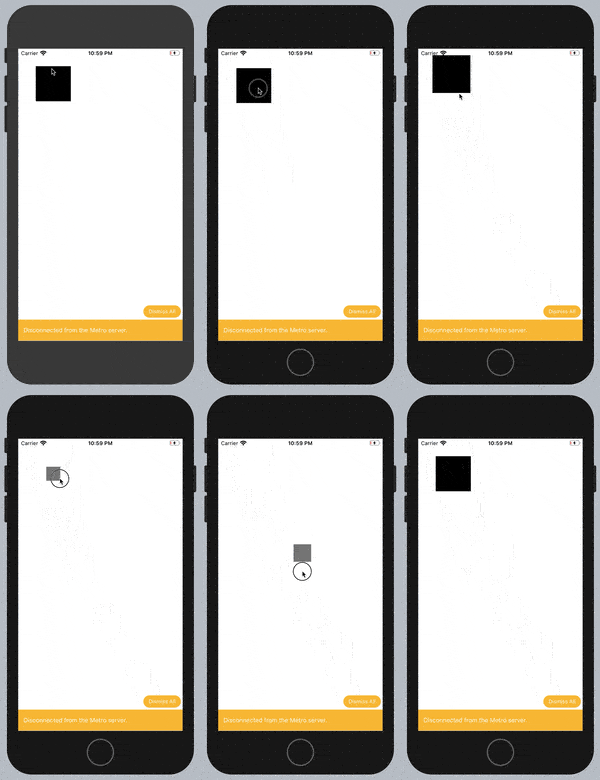
Here is an example:
https://github.com/terrysahaidak/chernivtsi.min.js-6-worklets-talk-example/blob/master/App.js
terrysahaidak
on 16 Jun 2020
Great example, thanks again.
One thing I have noticed about TabGH was that when it is tapped, and then held it for like 1 second, then released, in the case none of the events are fired.
following the same problem I had to make this component using LongGH instead of TabGH.
here is the link:
link to repository
this problem would fix with TabGH if we set a long maxDurationMs on it, is it the right way to handle it? Kindly, any ideas on it please? @terrysahaidak
sa8ab
on 16 Jun 2020
I think you should just use both with simultaneousHandlers prop.
I think that wont work for me to use two handlers at the same time because there are 2 different snap points! but it is was great help and clear answer
sa8ab
on 16 Jun 2020
There is a bug in animatedGestureHandler thing. You can find PR which fixes it.
terrysahaidak
on 17 Jun 2020
@terrysahaidak I did as you said in the example code for simultaneousHandlers but only the inner handler invokes the event.
here is the full code for the screen.
import React, {useRef} from 'react';
import {View, StatusBar, StyleSheet, TextInput} from 'react-native';
import {
  PanGestureHandler,
  TapGestureHandler,
} from 'react-native-gesture-handler';
import Animated, {
  useAnimatedStyle,
  useAnimatedGestureHandler,
  useSharedValue,
  useDerivedValue,
  useAnimatedProps,
  interpolate,
  Extrapolate,
  withSpring,
} from 'react-native-reanimated';

const AnimatedText = Animated.createAnimatedComponent(TextInput);

const SliderScreen = () => {
  const thing = useSharedValue(40);
  const scale = useSharedValue(1);
  const tapRef = useRef();
  const panRef = useRef();

  const activeValue = useDerivedValue(() => {
    return interpolate(thing.value, [0, 360 - 40], [0, 10], Extrapolate.CLAMP);
  });

  const gestureHandler = useAnimatedGestureHandler({
    onStart: (event, context) => {
      context.tX = thing.value;
    },
    onActive: (event, context) => {
      const translation = context.tX + event.translationX;
      thing.value = translation;
    },
  });

  const tapHandler = useAnimatedGestureHandler({
    onStart: () => {
      scale.value = 1.8;
      console.log('Start');
    },
    onEnd: () => {
      scale.value = 1;
      console.log('End');
    },
  });

  const sz = useAnimatedStyle(() => {
    return {
      transform: [
        {translateX: thing.value},
        {translateY: -20},
        {scale: withSpring(scale.value)},
      ],
    };
  });

  const props = useAnimatedProps(() => {
    return {
      text: `${activeValue.value}`,
    };
  });

  return (
    <View style={{flex: 1, backgroundColor: 'white'}}>
      <StatusBar translucent />
      <View style={s.container}>
        <View style={s.line} />
        <TapGestureHandler
          ref={tapRef}
          simultaneousHandlers={panRef}
          onGestureEvent={tapHandler}>
          <Animated.View>
            <PanGestureHandler
              ref={panRef}
              simultaneousHandlers={tapRef}
              onGestureEvent={gestureHandler}>
              <Animated.View style={[s.dot, sz]} />
            </PanGestureHandler>
          </Animated.View>
        </TapGestureHandler>
      </View>

      <AnimatedText
        editable={false}
        style={{
          backgroundColor: 'whitesmoke',
        }}
        animatedProps={props}
      />
    </View>
  );
};

export default SliderScreen;

const s = StyleSheet.create({
  container: {
    marginVertical: 100,
    // marginHorizontal: 20,
    height: 40,
    // backgroundColor: 'whitesmoke',
    justifyContent: 'center',
  },
  line: {
    width: '100%',
    height: 4,
    backgroundColor: 'lightgray',
  },
  dot: {
    width: 40,
    height: 40,
    backgroundColor: '#1abc9c',
    borderRadius: 20,
    position: 'absolute',
  },
});
there is a bug in GH you need to trigger render somehow (you can simple call some setState) on mount only then it will see refs of each other
terrysahaidak
on 2 Jul 2020
@terrysahaidak
The workaround you sugggested did not work for me and it is the same result. Here is the code
const [refState, setRefState] = useState(0);
useEffect(() => {
    // for activating the simultaneous handlers
    setRefState(1);
  });

  const tapRef = useRef();
  const panRef = useRef();
make sure it will be executed only after mount
terrysahaidak
on 5 Jul 2020
I am so confused right now I copied your @terrysahaidak example and it was working fine with handlers at the same time although it didn't have any setState, but mine with the same logic of code didn't. can I do setTimeout and then call the setStste in the useEffect?
(The other confusion is that the translation was less than the dragging, about half of it. like if you drag 100px, the translation was 50!!, while the code was assigning the whole drag event to translation!!!!!! )
sa8ab
on 5 Jul 2020
could you create a reproducing repo?
terrysahaidak
on 5 Jul 2020
@terrysahaidak I created a repo here is the link
https://github.com/sa8ab/reproducing-reanimated-issue
first problem: in the screen named Terry, the amount of translation is half of the amount of dragging.
second: In the slider screen simultaneous handlers are not recognizing each other.
note: I made the project for android. I mean the setup for ios is not done in the repo.
thank you for your attention in advanced.
sa8ab
on 6 Jul 2020
@terrysahaidak any ideas?
sa8ab
on 11 Jul 2020
Hi. That's because PanGH reacts to pan :) In order to handle Tap, you should also use TapGH.
@terrysahaidak As I understand from https://docs.swmansion.com/react-native-gesture-handler/docs/state/#active
there should be always any of these state FAILED, CANCELLED, END at end of gesture lifecycle.
But none of these are called.
I also try to implement interruptable swipable row. And in onStart I have:
onStart: (_, ctx) => {
  cancelAnimation(positionX);
  ctx.position = positionX.value;
}
so at touch it stops previous animations running (if they were).
But the problem that no other callbacks are called when I release gesture. Neither onEnd, onCancel nor onFinish.
I think it's a bug because it prevents from creating interruptable animations.
 likern
on 28 Aug 2020
likern
on 28 Aug 2020
PanGestureHandlers should at least set CANCELLED if it wasn't recognized as pan gesture.
[Fri Aug 28 2020 18:44:59.800]  LOG      [SwipableRow:onStart] ctx.swipeStarted: false
[Fri Aug 28 2020 18:45:01.850]  LOG      [SwipableRow:onEnd] ctx.swipeStarted: true
[Fri Aug 28 2020 18:45:01.950]  LOG      [SwipableRow:onFinish] ctx.swipeStarted: true
[Fri Aug 28 2020 18:45:01.149]  LOG      [SwipableRow:onStart] ctx.swipeStarted: true
Having onStart as last call I can't compensate cancelAnimation(positionX); called inside onStart
likern
on 28 Aug 2020
This is a reproducible code https://gist.github.com/likern/2d5c36d9859f2e68f65c6cd538498178
likern
on 28 Aug 2020
I think it's a bug but it's resolved already in master, can you patch the Hooks file to use code from master instead and check again?
terrysahaidak
on 28 Aug 2020
I think it's a bug but it's resolved already in master, can you patch the Hooks file to use code from master instead and check again?
@terrysahaidak I've tested and now see onFinish being called after onStart.
That should solve my problem.
One more simple question - how can I continue animation after it being stopped by cancelAnimation(positionX);.
I would want to have something similar like continueAnimation(positionX). Is it possible?
likern
on 28 Aug 2020
you just need to start it again. because probably you'll change some state of animation during the idle time.
for that case, I use worklet function which runs that animation and call it from different places.
terrysahaidak
on 28 Aug 2020
there was withPause hook in the latest @wcandillon's video which may be handy :)
terrysahaidak
on 28 Aug 2020
Related issues
 robertgonzales
·
3Comments
robertgonzales
·
3Comments
 dinhmai74
·
3Comments
dinhmai74
·
3Comments
 levibuzolic
·
3Comments
levibuzolic
·
3Comments
 bjartebore
·
3Comments
bjartebore
·
3Comments
 colinux
·
3Comments
colinux
·
3Comments
Most helpful comment
there was withPause hook in the latest @wcandillon's video which may be handy :)