React-native-reanimated: Transition API not working on Android
Hey, so I was really impressed by the new Transition API's ease of use and immediately tried it out, but it just won't work on Android for me. On iOS it works just fine, but on Android, it won't animate anything.
I have the following function (which is basically a straight copy of the progress.js example):
import React, { useState, useRef } from "react";
import { View, StyleSheet } from "react-native";
import { Transitioning, Transition } from "react-native-reanimated";

import { Button } from "common";

export default function TestScreen() {
  const transition = <Transition.Change interpolation="easeInOut" durationMs={600} />;

  let [perc, setPerc] = useState(20);
  const ref = useRef();

  return (
    <Transitioning.View ref={ref} transition={transition} style={styles.centerAll}>
      <Button
        activeOpacity={0.2}
        onPress={() => {
          ref.current.animateNextTransition();
          setPerc(perc + 20 <= 100 ? perc + 20 : 20);
        }}
        style={{ borderRadius: 0 }}
        viewStyle={styles.accordionButtonStyle}
      >
        {perc + 20 <= 100 ? "+20%" : "-80%"}
      </Button>
      <View style={styles.bar}>
        <View style={{ height: 5, width: `${perc}%`, backgroundColor: "#FF5252" }} />
      </View>
    </Transitioning.View>
  );
}

const styles = StyleSheet.create({
  accordionButtonStyle: {
    shadowColor: "black",
    shadowOffset: { width: 0, height: 0 },
    shadowOpacity: 0.2,
    shadowRadius: 3
  },
  centerAll: {
    flex: 1,
    alignItems: "center",
    marginTop: 100
  },
  bar: {
    marginTop: 30,
    height: 5,
    width: "80%",
    backgroundColor: "#AAA"
  }
});
I simply import this to my StackNavigator like this:
import { createStackNavigator } from "react-navigation";

import HomeScreen from "tabs/main/home/HomeScreen";
import ArticleScreen from "tabs/main/article/ArticleScreen";
import TestScreen from "tabs/main/test/TestScreen";
import { nav } from "static/constants";

export const MainStack = createStackNavigator(
  {
    Home: {
      screen: HomeScreen,
      navigationOptions: {
        title: "Home"
      }
    },
    Article: {
      screen: ArticleScreen
    },
    Test: {
      screen: TestScreen,
      navigationOptions: {
        title: "Testing Area"
      }
    }
  },
  {
    initialRouteName: nav.HOME
  }
);
I have two screen caps that illustrate the behavior:


Here is some other data that may be important:
React version: 16.8.6
React Native version: 0.59.8
Android API Level: 28
Reanimated version: 1.0.1
Am I missing something really obvious here? Maybe someone can help me. Thanks in advance!
 TheWirv
All 32 comments
I have same issue (works 👌 on iOS but not on Android), here is my code:
public render(): React.ReactNode {
const style = WorkoutProcessPauseStyle();
const testID = this.props.testID || "WPRocessPause";
const transition = (
<Transition.Together>
<Transition.In type={"slide-right"} durationMs={250} interpolation={"easeInOut"} />
<Transition.In type={"fade"} durationMs={200} delayMs={125} interpolation={"easeInOut"} propagation={"top"} />
</Transition.Together>
);
return (
<Transitioning.View transition={transition} ref={this.ref} style={style.pauseContainer}>
<View style={style.pauseTimerContainer}>
<Text style={style.pauseTimerLabel}>{i18next.t("workoutProcess.timerRestLabel")}</Text>
<WorkoutProcessTimer
type={WorkoutProcessTimerType.CountDown}
displayType={WorkoutProcessTimerDisplayType.PauseTimer}
testID={`${testID}-timer`}
style={{ textStyle: style.pauseTimer }}
goNext={this.props.goNext}
/>
</View>
<View style={style.pauseFinishedWorkoutContainer}>
<View>
<Text style={style.pauseFinishedWorkoutHeading}>{i18next.t("workoutProcess.finishedWorkoutLabel")}</Text>
<TouchableUniversal onPress={this.props.goNext} style={{ innerStyle: style.pauseFinishedButtonContainer }}>
<View style={style.nameContainer}>
<Text style={style.finishedExerciseName} numberOfLines={1} ellipsizeMode={"tail"}>
Finished workout name
</Text>
</View>
<View style={style.iconContainer}>
<IconUniversal style={style.icon} name={"pencil"} />
</View>
</TouchableUniversal>
</View>
</View>
</Transitioning.View>
);
}
 mralj
on 11 Jun 2019
mralj
on 11 Jun 2019
I too was experiencing this in an an app I'm working on. For whatever reason, the problem seems to be specific to tabbed navigators. If I replace all tabbed navigators with stacks, the transitions work fine.
@mralj and @Mazzel-13, are you both using react-navigation's tabbed navigators of some kind (top, bottom, or material variants)? Based on the screen capture, it looks as though @mralj is at least.
Here's a minimal reproduction based on the progress example:
import React, { useState, useRef } from 'react';
import { View, StyleSheet, Button } from 'react-native';
import { Transitioning, Transition } from 'react-native-reanimated';
import {
createStackNavigator, createBottomTabNavigator, createAppContainer
} from 'react-navigation';
function Progress() {
const transition = <Transition.Change interpolation="easeInOut" />;
let [perc, setPerc] = useState(20);
const ref = useRef();
return (
<Transitioning.View
ref={ref}
style={styles.centerAll}
transition={transition}>
<Button
title={perc + 20 <= 100 ? '+20%' : '-80%'}
color="#FF5252"
onPress={() => {
ref.current.animateNextTransition();
setPerc(perc + 20 <= 100 ? perc + 20 : 20);
}}
/>
<View style={styles.bar}>
<View
style={{ height: 5, width: `${perc}%`, backgroundColor: '#FF5252' }}
/>
</View>
</Transitioning.View>
);
}
const styles = StyleSheet.create({
centerAll: {
flex: 1,
alignItems: 'center',
marginTop: 100,
},
bar: {
marginTop: 30,
height: 5,
width: '80%',
backgroundColor: '#aaa',
},
});
// If you replace createBottomTabNavigator with createStackNavigator, the
// transitions work.
export default createAppContainer(createBottomTabNavigator({
Home: {
screen: Progress,
path: 'home'
},
}));
 thomasw
on 14 Jun 2019
thomasw
on 14 Jun 2019
@mralj and @Mazzel-13, are you both using react-navigation's tabbed navigators of some kind (top, bottom, or material variants)? Based on the screen capture, it looks as though @mralj is at least.
Unfortunately that is not the case, in fact I am not even using react-navigation but Wix's react-native-navigation
mralj
on 14 Jun 2019
Are you using react-native-screens?
thomasw
on 14 Jun 2019
Okay, I have an even more minimal reproduction. In my environment, I had react-native-screens installed but disabled because of an unrelated issue. I noticed that the transitions would work in some contexts if I re-enabled screens.
When screens are disabled, react-navigation's TabNavigator wraps tabs in a View with removeClippedSubviews enabled. See https://github.com/react-navigation/tabs/blob/44b895fa114465fedafba217c27a2918ed38367d/src/views/ResourceSavingScene.js#L35
If I rip all of the navigation stuff out and similarly wrap the progress example in a view with removeClippedSubviews enabled, then transitions stop working.
import React, { useState, useRef } from 'react';
import { View, StyleSheet, Button } from 'react-native';
import { Transitioning, Transition } from 'react-native-reanimated';

export default function Progress() {
  const transition = <Transition.Change interpolation="easeInOut" />;

  let [perc, setPerc] = useState(20);
  const ref = useRef();

  // Transitions will not work on Android with removeClippedSubviews. If you set
  // this to false, transitions will work.
  return (
    <View removeClippedSubviews style={{ flex: 1 }}>
      <Transitioning.View
          ref={ref}
          style={styles.centerAll}
          transition={transition}>
        <Button
            title={perc + 20 <= 100 ? '+20%' : '-80%'}
            color="#FF5252"
            onPress={() => {
              ref.current.animateNextTransition();
              setPerc(perc + 20 <= 100 ? perc + 20 : 20);
            }}
        />
        <View style={styles.bar}>
          <View
            style={{ height: 5, width: `${perc}%`, backgroundColor: '#FF5252' }}
          />
        </View>
      </Transitioning.View>
    </View>
  );
}

const styles = StyleSheet.create({
  centerAll: {
    flex: 1,
    alignItems: 'center',
    marginTop: 100,
  },
  bar: {
    marginTop: 30,
    height: 5,
    width: '80%',
    backgroundColor: '#aaa',
  },
});
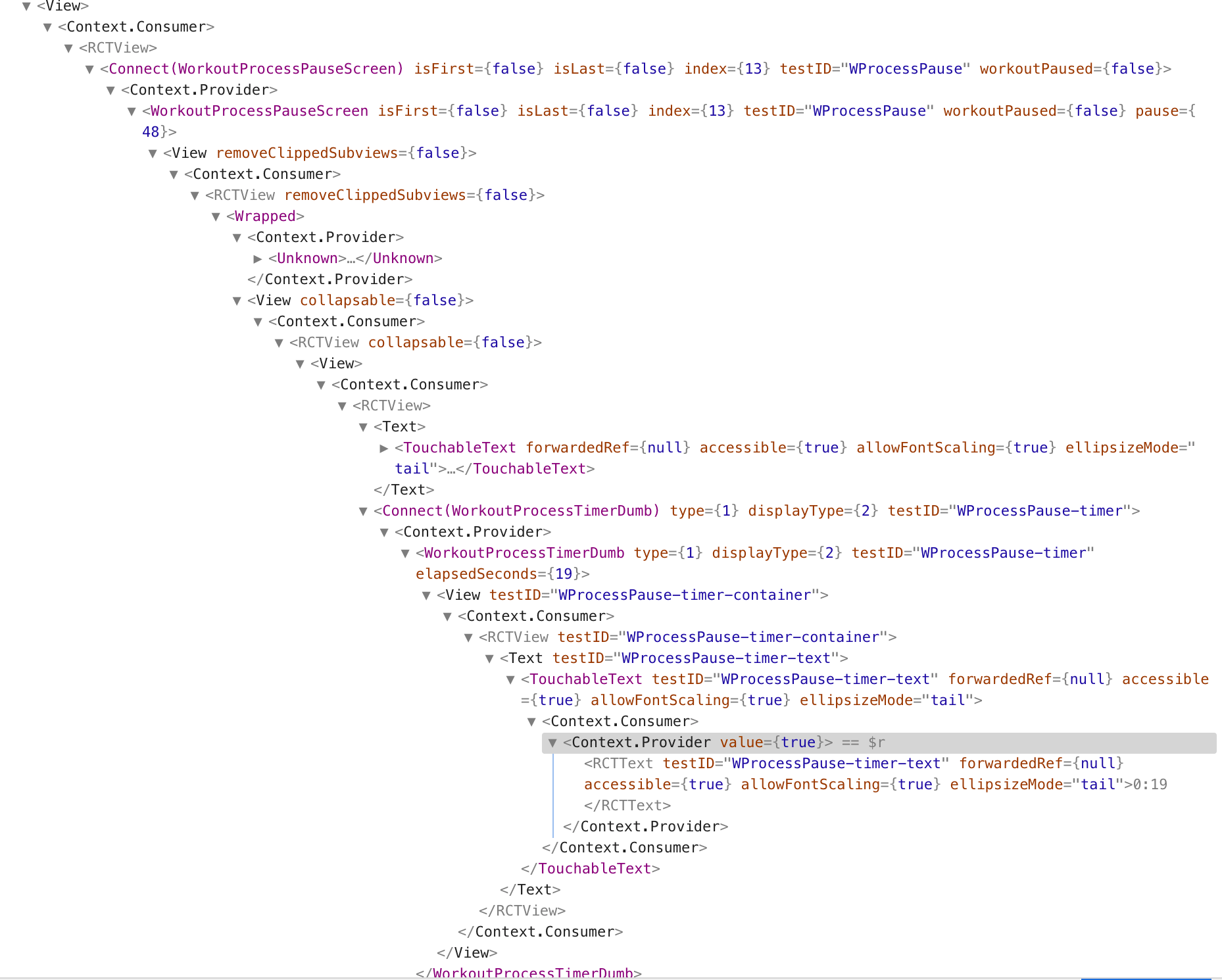
@mralj, can you check your render tree for any views along the way with removeClippedSubviews enabled? I searched the react-native-navigation repo for removeClippedSubviews but didn't get any hits. There might be other causes here.
thomasw
on 15 Jun 2019
Hi, thanks for helping out, but I also cannot see any references to removeClippedSubviews.
Unfortunately this is low priority for us ATM because we are soon launching MVP of the app, and these transitions are just "nice to have" not "must have" feature. So I cannot spend too much time looking into this :/
I have tired to wrap everything into <View removeClippedSubviews style={{ flex: 1 }}> as you did in your example from above, but that didn't help.
Here is screenshot of tree rendered on the Android:
mralj
on 17 Jun 2019
I too was experiencing this in an an app I'm working on. For whatever reason, the problem seems to be specific to tabbed navigators. If I replace all tabbed navigators with stacks, the transitions work fine.
@mralj and @Mazzel-13, are you both using react-navigation's tabbed navigators of some kind (top, bottom, or material variants)? Based on the screen capture, it looks as though @mralj is at least.
Here's a minimal reproduction based on the progress example:
import React, { useState, useRef } from 'react';
import { View, StyleSheet, Button } from 'react-native';
import { Transitioning, Transition } from 'react-native-reanimated';
import {
  createStackNavigator, createBottomTabNavigator, createAppContainer
} from 'react-navigation';

function Progress() {
  const transition = <Transition.Change interpolation="easeInOut" />;

  let [perc, setPerc] = useState(20);
  const ref = useRef();

  return (
    <Transitioning.View
      ref={ref}
      style={styles.centerAll}
      transition={transition}>
      <Button
        title={perc + 20 <= 100 ? '+20%' : '-80%'}
        color="#FF5252"
        onPress={() => {
          ref.current.animateNextTransition();
          setPerc(perc + 20 <= 100 ? perc + 20 : 20);
        }}
      />
      <View style={styles.bar}>
        <View
          style={{ height: 5, width: `${perc}%`, backgroundColor: '#FF5252' }}
        />
      </View>
    </Transitioning.View>
  );
}

const styles = StyleSheet.create({
  centerAll: {
    flex: 1,
    alignItems: 'center',
    marginTop: 100,
  },
  bar: {
    marginTop: 30,
    height: 5,
    width: '80%',
    backgroundColor: '#aaa',
  },
});


// If you replace createBottomTabNavigator with createStackNavigator, the
// transitions work.

export default createAppContainer(createBottomTabNavigator({
    Home: {
      screen: Progress,
      path: 'home'
    },
}));
Are you using react-native-screens?
I actually do use both React Navigation's Bottom Tab Navigator and react-native-screens, so that might very well be the cause of trouble.
Edit: Wait, are you saying that it doesn't work when RNScreens is _disabled_? Because I have screens enabled and it doesn't work. I'm a bit confused by your comment up top. 🙈
TheWirv
on 18 Jun 2019
Based on the tree posted by @mralj, my suspicion is that there are multiple causes at work here. removeClippedSubviews is just one of them.
Edit: Wait, are you saying that it doesn't work when RNScreens is disabled? Because I have screens enabled and it doesn't work. I'm a bit confused by your comment up top
When react-native-screens is enabled (it is installed and you've called useScreens()), removeClippedSubviews={true} is not used by react-navigation's tabbed navigators. Transitions should work under those conditions unless something else is breaking them. Using the first minimal reproduction that I posted, you should be able to duplicate this behavior by adding useScreens() to get the transitions to work and removing useScreens() to cause them to break again.
@Mazzel-13, if you're using a tabbed navigator and screens, transitions should be working unless something else is using removeClippedSubviews higher up in your tree (or there is another root cause at play). Note that you can't simply add a View with removeClippedSubviews={false} to work around this. If a View higher up in three has it enabled, transitions won't work.
FWIW, after getting Transitions to work in my app, I found them to be largely unusable on Android (https://github.com/kmagiera/react-native-reanimated/issues/257#issuecomment-487119010 was just one issue I encountered almost immediately). While I do think it's worth helping to track down the cause of issues like the one we're discussing, I wouldn't recommend investing heavily here because you're anticipating being able to use reanimated in a production context immediately. It seems we need to help it mature a bit first.
thomasw
on 19 Jun 2019
I'm using it with StackNavigation and RNScreen enabled, but Transitions doesn't work on Android :\
function Pager(props: Props) {
    const { style, initialPage = 0, children, onLastPageIsDone, ...scrollViewProps } = props
    const pagerRef = useRef<ViewPager>(null)
    const transitioningRef = useRef<TransitioningView>(null)
    const pagesQuantity = Children.toArray(children).filter(child => !!child).length
    const initialProgress = initialPage + 1 / pagesQuantity
    const [progress, setProgress] = useState(initialProgress)
    const [currentPage, setCurrentPage] = useState(initialPage)
    const isLastPage = currentPage === pagesQuantity - 1
    const isFirstPage = currentPage === 0
    const transition = (
        <Transition.Change durationMs={3000} interpolation="easeIn" />
    )

        function _onPageScroll(event: NativeSyntheticEvent<ViewPagerAndroidOnPageScrollEventData>) {
        const { position } = event.nativeEvent
        const { onPageScroll } = props

        if (position !== currentPage) {
            const newProgress = position + 1 / pagesQuantity;
            setCurrentPage(position)
            setProgress(newProgress)
        }

        if (typeof onPageScroll === 'function') onPageScroll(event)
    }

    function _nextPage() {
        if (isLastPage) typeof onLastPageIsDone === 'function'
            && onLastPageIsDone()
        else {
            const newPageIndex = currentPage + 1
            pagerRef.current!.setPage(newPageIndex)
        }
    }

    function _previousPage() {
        if (!isFirstPage) pagerRef.current!.setPage(currentPage - 1)
    }

    useEffect(() => {
        transitioningRef.current!.animateNextTransition()
    }, [currentPage])

    return (
        <Fragment>
            <ViewPager
                {...scrollViewProps}
                ref={pagerRef}
                initialPage={initialPage}
                onPageScroll={_onPageScroll}
                style={[styles.container, style]}
            >
                {children}
            </ViewPager>
            <SafeAreaView style={styles.buttonsContainer}>
                <View style={styles.progressBarContainer}>
                    <ProgressBar style={styles.progressBar} progress={progress} />
                </View>
                <Transitioning.View
                    ref={transitioningRef}
                    transition={transition}
                >
                    <Button onPress={_previousPage} disabled={currentPage === 0} style={[styles.buttons, { opacity: isFirstPage ? 0 : 1 }]} mode="text">
                        Anterior
                    </Button>
                </Transitioning.View>
                <Button onPress={_nextPage} style={styles.buttons} mode="contained">
                    {currentPage === pagesQuantity - 1 ? 'Concluir' : 'Próximo'}
                </Button>
            </SafeAreaView>
        </Fragment >
    )
}

export default Pager
 brunocrpontes
on 5 Jul 2019
brunocrpontes
on 5 Jul 2019
Hi! I'm experiencing same issue. Transition work well on iOS but not on Android.
    "react-native": "0.59.10",
    "react-native-gesture-handler": "1.3.0",
    "react-native-reanimated": "1.1.0",
    "react-native-screens": "1.0.0-alpha.22",
    "react-navigation": "3.11.1",
 Freddy03h
on 29 Jul 2019
Freddy03h
on 29 Jul 2019
All issues about it are related to react-native version >= 0.59.*, maybe the problema is there...
brunocrpontes
on 29 Jul 2019
Hi guys,
I don't know if is the same issue or i'm doing something wrong but I'm trying to run this code on my Android device and it doesn't do working...
import React, { useRef, useEffect, useState } from 'react';

import { Transitioning, Transition } from 'react-native-reanimated';
import { BorderlessButton } from 'react-native-gesture-handler';

import { FontAwesome } from '@expo/vector-icons';

import { UserRow } from 'components';

import styles from './style';

const CarouselHeader = props => {
  const { username, callbackClose } = props;
  const { usernameStyle, headerStyle, closeButtonStyle } = styles;

  const ref = useRef();

  const transition = (
    <Transition.Sequence>
      <Transition.Out type="fade" durationMs={400} interpolation="easeIn" />
      <Transition.Change />
      <Transition.Together>
        <Transition.In
          type="slide-bottom"
          durationMs={400}
          interpolation="easeOut"
          propagation="bottom"
        />
        <Transition.In type="fade" durationMs={200} delayMs={200} />
      </Transition.Together>
    </Transition.Sequence>
  );

  useEffect(() => {
    ref.current.animateNextTransition();
  }, [ref.current]);

  return (
    <Transitioning.View ref={ref} transition={transition}>
      <UserRow key={username} username={username} textStyle={usernameStyle}>
        <BorderlessButton onPress={callbackClose} style={closeButtonStyle}>
          <FontAwesome name="close" size={18} color="#fff" />
        </BorderlessButton>
      </UserRow>
    </Transitioning.View>
  );
};

export default CarouselHeader;
This is my package.json
{
  "@expo/vector-icons": "^10.0.5",
    "@feathersjs/feathers": "^3.3.1",
    "@feathersjs/socketio-client": "^1.2.1",
    "expo": "^34.0.1",
    "expo-av": "^6.0.0",
    "expo-camera": "^6.0.0",
    "expo-constants": "^6.0.0",
    "expo-image-manipulator": "^6.0.0",
    "expo-image-picker": "^6.0.0",
    "expo-localization": "^6.0.0",
    "expo-permissions": "^6.0.0",
    "expo-pixi": "^0.3.1",
    "feathers-redux": "^3.0.0",
    "i18n-js": "^3.3.0",
    "parse": "^1.11.1",
    "prop-types": "^15.6.2",
    "react": "16.8.3",
    "react-native": "https://github.com/expo/react-native/archive/sdk-34.0.0.tar.gz",
    "react-native-elements": "^0.19.1",
    "react-native-gesture-handler": "^1.3.0",
    "react-native-reanimated": "^1.2.0",
    "react-native-redash": "^7.5.1",
    "react-native-screens": "^1.0.0-alpha.22",
    "react-native-size-matters": "^0.2.1",
    "react-navigation": "^3.11.1",
    "react-navigation-animated-switch": "^0.2.1",
    "react-navigation-fluid-transitions": "^0.3.2",
    "react-navigation-material-bottom-tabs": "^1.0.0",
    "react-redux": "^7.1.0",
    "redux": "^4.0.4",
    "redux-promise-middleware": "^6.1.1",
    "redux-thunk": "^2.3.0",
    "socket.io-client": "^2.2.0"
}
 rolandvar
on 24 Aug 2019
rolandvar
on 24 Aug 2019
Hi! I retry Transition on Android after upgrading to 0.60.5. Still get the issue that none of the Transition animation works.
    "react-native": "0.60.5",
    "react-native-gesture-handler": "1.4.1",
    "react-native-reanimated": "1.2.0",
    "react-native-screens": "2.0.0-alpha.1",
    "react-navigation": "4.0.0",
But now I figured out that Transition work if I don't use react-native-screens (I just commented useScreens)
Upgrading to 0.60 wasn't easy because of unlinking all native dependencies, but because Transition doesn't work before the migration, I don't think the issue came from this.
But I'm using react-native-screens since 1.0.0-alpha.14 so maybe I missed an upgrade or breaking change for this dep. But I don't find changelog on the repo.
Any idea on this ?
Freddy03h
on 9 Sep 2019
I reproduced the issue on Expo (here the snack : https://snack.expo.io/@freddy03h/issue-transition-inside-navigation). The example work well on iOS but not an Android.
Wrapping the view inside a StackNavigator is enough to break Transition.
Calling useScreen or not doesn't change the result here.
It's weird because in my app it's not the same behavior. Transition work even wrapped inside multiple stacks and tabs navigators, but only if useScreens isn't called.
I don't know expo well, maybe useScreens is automatically called on an expo project ?
Freddy03h
on 9 Sep 2019
I still can reproduce the issue after upgrading some dependencies.
    "react-native": "0.61.2",
    "react-native-gesture-handler": "1.4.1",
    "react-native-reanimated": "1.3.0",
    "react-native-screens": "2.0.0-alpha.6",
    "react-navigation": "4.0.10",
The issue also existing on Expo 35, but this time it clearly work if we don't call useScreens() and doesn't if we call this function.
Freddy03h
on 25 Oct 2019
Any updates on this? Also can't get transitions to work on Android:
"react": "16.9.0",
"react-native": "0.61.2",
"react-native-reanimated": "^1.3.0",
"react-native-gesture-handler": "1.4.1",
"react-native-screens": "1.0.0-alpha.23",
"react-navigation": "3.11.1",
 sbearben
on 26 Oct 2019
sbearben
on 26 Oct 2019
I had this issue when I didn't done app/build.gradle changes. @sbearben and @Freddy03h can you copy paste your dependencies { ... } object from app/build.gradlew here?
brunocrpontes
on 26 Oct 2019
Ok:
dependencies {
    implementation fileTree(dir: "libs", include: ["*.jar"])
    implementation "com.facebook.react:react-native:+"  // From node_modules
    implementation 'com.google.android.gms:play-services-auth:16.0.0'
    implementation 'androidx.appcompat:appcompat:1.1.0-rc01'
    implementation 'androidx.swiperefreshlayout:swiperefreshlayout:1.1.0-alpha02'

    if (enableHermes) {
      def hermesPath = "../../node_modules/hermes-engine/android/";
      debugImplementation files(hermesPath + "hermes-debug.aar")
      releaseImplementation files(hermesPath + "hermes-release.aar")
    } else {
      implementation jscFlavor
    }
}
added to settings.gradle:
include ':react-native-reanimated'
project(':react-native-reanimated').projectDir = new File(rootProject.projectDir, '../../../node_modules/react-native-reanimated/android')
added to app/build.grade:
implementation project(':react-native-reanimated')
added to packages in the Android Application file:
override fun getPackages() = listOf(
   ...
   ReanimatedPackage()
)
I have same issue in Android but only when enableScreens() from react-native-screens
 farshidshahmoradi1996
on 28 Dec 2019
farshidshahmoradi1996
on 28 Dec 2019
I'm using react-navigation 5 and rn-screens and transition animations not working on android
sometimes I change some view settings and it starts to work after fast-refresh but when I reload the app it doesn't work anymore.
disabling the enableScreens won't help.
 Ashkan-Oliaie
on 19 Feb 2020
Ashkan-Oliaie
on 19 Feb 2020
Facing the same issue.Transitions stopped working for me in 0.61.0-rc.3
 arunkumarpaleti
on 3 Mar 2020
arunkumarpaleti
on 3 Mar 2020
Well, pretty strangely I am facing some issues as well not sure if it is linked to this one or not. The app is able to run in the testing env ( I am using expo, so doing expo start and running on an android device works ) but when I build the app the animation just crashes a white screen appears and back to what it was.
Did anyone get a fix to this?
 sarthakpranesh
on 5 Apr 2020
sarthakpranesh
on 5 Apr 2020
im facing the same issue, using react-navigation 5 and RN 0.62.
If i wrap my app with drawer navigator, transition wont work, but with stack is running well
 tyogautomo
on 18 Apr 2020
tyogautomo
on 18 Apr 2020
Anything on this?
 SDP190
on 25 May 2020
SDP190
on 25 May 2020
+1 Same problem here. Expo, react navigation 5, and a drawer navigator.
 bnowak008
on 23 Jun 2020
bnowak008
on 23 Jun 2020
I don't know the versions of reanimated, and screens used in expo, but it's not the newest versions.
It's resolved on newest versions : https://github.com/software-mansion/react-native-screens/issues/203#issuecomment-640917824
Freddy03h
on 24 Jun 2020
Closing as it seems to be resolved, feel free to reply if that's not the case.
 jakub-gonet
on 7 Jul 2020
jakub-gonet
on 7 Jul 2020
@jakub-gonet Hi, still doesn't work on android, when using inside react-navigation bottom tab navigator. Reproducible demo: https://snack.expo.io/fcIcx_i5B.
 alexeymolchan
on 28 Jul 2020
alexeymolchan
on 28 Jul 2020
Hello!
This issue is still present, no transitions working on Android.
Config:
"@react-navigation/bottom-tabs": "^5.8.0",
"@react-navigation/native": "^5.7.2",
"@react-navigation/stack": "^5.8.0",
"react-native-safe-area-context": "^3.1.1",
"react-native-screens": "^2.9.0",
"@react-native-community/masked-view": "^0.1.10",
"react": "16.13.1",
"react-native": "0.63.2",
"react-native-gesture-handler": "^1.7.0",
"react-native-reanimated": "^1.10.1",
 Sin-
on 24 Sep 2020
Sin-
on 24 Sep 2020
Hello!
This issue is still present, no transitions working on Android.
Config:"@react-navigation/bottom-tabs": "^5.8.0", "@react-navigation/native": "^5.7.2", "@react-navigation/stack": "^5.8.0", "react-native-safe-area-context": "^3.1.1", "react-native-screens": "^2.9.0", "@react-native-community/masked-view": "^0.1.10", "react": "16.13.1", "react-native": "0.63.2", "react-native-gesture-handler": "^1.7.0", "react-native-reanimated": "^1.10.1",
Could you please provide a reproducing example?
 terrysahaidak
on 24 Sep 2020
terrysahaidak
on 24 Sep 2020
We decided to not support Transitions API some time ago due to the fact it was experimental for a really long time and Reanimated2 should be easy enough that it won't be needed (or we may rewrite it using Reanimated 2).
We accept PRs though.
jakub-gonet
on 24 Sep 2020
Related issues
 levibuzolic
·
3Comments
levibuzolic
·
3Comments
 bjartebore
·
3Comments
bjartebore
·
3Comments
 afctemka
·
3Comments
afctemka
·
3Comments
 wasim-abuzaher
·
3Comments
wasim-abuzaher
·
3Comments
 ShaMan123
·
3Comments
ShaMan123
·
3Comments
Most helpful comment
Okay, I have an even more minimal reproduction. In my environment, I had react-native-screens installed but disabled because of an unrelated issue. I noticed that the transitions would work in some contexts if I re-enabled screens.
When screens are disabled, react-navigation's TabNavigator wraps tabs in a View with
removeClippedSubviewsenabled. See https://github.com/react-navigation/tabs/blob/44b895fa114465fedafba217c27a2918ed38367d/src/views/ResourceSavingScene.js#L35If I rip all of the navigation stuff out and similarly wrap the progress example in a view with
removeClippedSubviewsenabled, then transitions stop working.@mralj, can you check your render tree for any views along the way with
removeClippedSubviewsenabled? I searched the react-native-navigation repo forremoveClippedSubviewsbut didn't get any hits. There might be other causes here.