React-native-reanimated-bottom-sheet: Strange space at the bottom when headerMode='none' with React Navigation
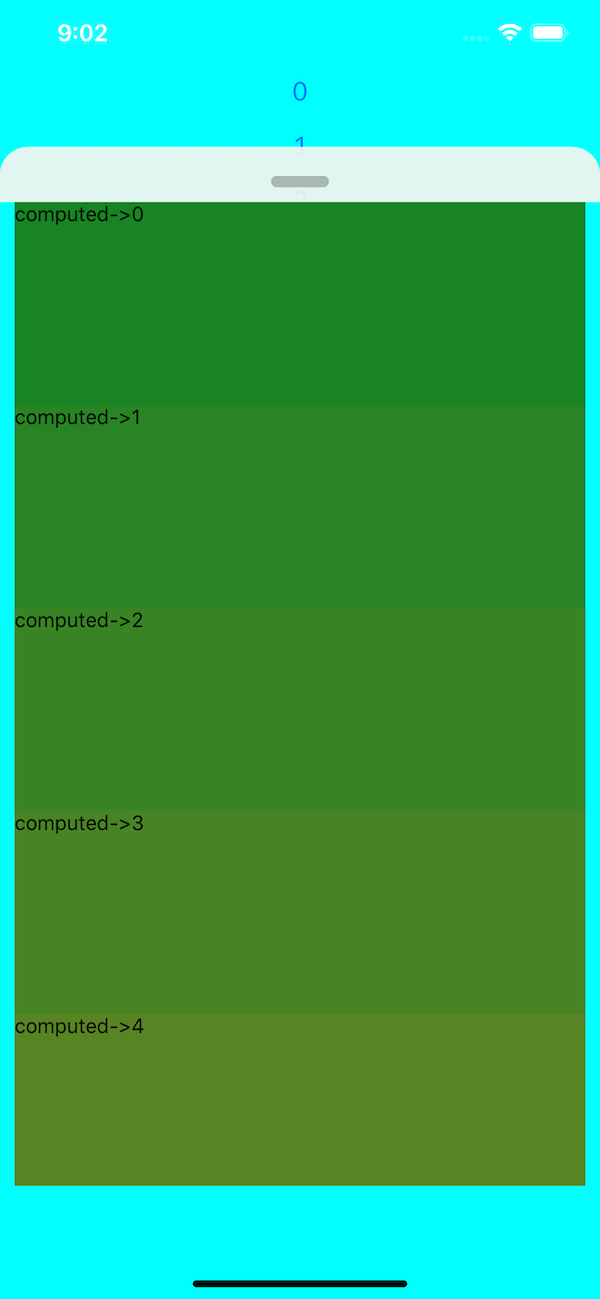
Facing strange empty transparent space at the bottom when headerMode is set to 'none'. This screenshot is from the Example => Test.js file
I have tried setting height to 100% to the Animated.View used for renderContent
Can you point please me in right direction, what should I configure ?
 Janak-Nirmal
All 3 comments
I got the same issue this morning.
It's not a full and complete solution, but in my case I fixed a part of the problem by putting the BottomSheet outside the SafeAreaView. The other part was related to the dimensions of the header and the footer of my page.
 blixit
on 22 Jun 2020
blixit
on 22 Jun 2020
@blixit Thank you. Moving this outside the SafeArea It worked, like you said. Thanks as lot.
Janak-Nirmal
on 23 Jun 2020
I had a similar problem. There was a huge empty space blocked (around half of the screen if the bottom sheet is opened to full screen).
The structure was like this:
<View style={{ flex: 1 }}>
  <View>
    <BottomSheet/>
    <View (with the background's content) />
  <View>
<View>
I solved this problem by removing one
<View style={{ flex: 1 }}>
  <BottomSheet/>
    <View (with the background's content) />
<View>
The removed view layer did not had any styles or settings so I honestly don't know why it was breaking the sheet. Hope it will help someone in the future. 😄
 speter9701
on 10 Jul 2020
speter9701
on 10 Jul 2020
Related issues
 Daavidaviid
·
5Comments
Daavidaviid
·
5Comments
 lukebars
·
5Comments
lukebars
·
5Comments
 Saad-Bashar
·
6Comments
Saad-Bashar
·
6Comments
 praneeth-hiver
·
4Comments
praneeth-hiver
·
4Comments
 ShaikIrfan1739
·
3Comments
ShaikIrfan1739
·
3Comments
Most helpful comment
I got the same issue this morning.
It's not a full and complete solution, but in my case I fixed a part of the problem by putting the BottomSheet outside the SafeAreaView. The other part was related to the dimensions of the header and the footer of my page.