React-native-push-notification: LocalNotificationSchedule is calling another instance in my app
Bug
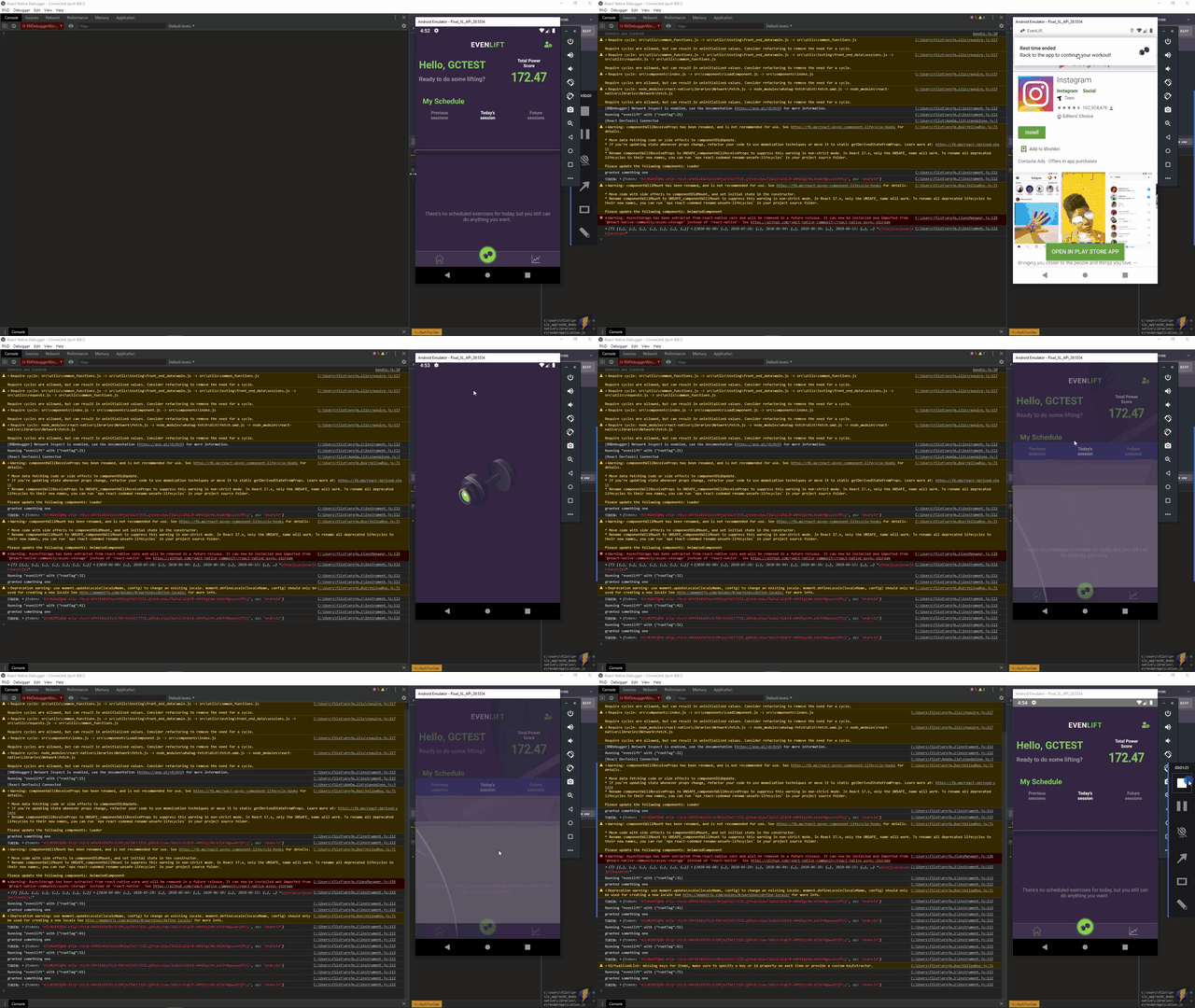
Im facing an weird bug, when i push the notification this call another instance app inside my actual app (see the video for more explicit info)
The steps are:
- App.js is loaded
- in App.js i have this code
componentDidMount() {
// some initial functions
  this.configureNotifications()
}

configureNotifications = () => {
  PushNotification.configure({
      onRegister(token) {
        console.log('TOKEN:', token)
        tokenTEMP = token
      },

      // (required) Called when a remote is received or opened, or local notification is opened
      onNotification(notification) {
        console.log('NOTIFICATION:', notification)

        // process the notification

        // (required) Called when a remote is received or opened, or local notification is opened
        notification.finish(PushNotificationIOS.FetchResult.NoData)
      },

      // (optional) Called when Registered Action is pressed and invokeApp is false, if true onNotification will be called (Android)
      onAction(notification) {
        console.log('ACTION:', notification.action)
        console.log('NOTIFICATION:', notification)

        // process the action
      },

      // (optional) Called when the user fails to register for remote notifications. Typically occurs when APNS is having issues, or the device is a simulator. (iOS)
      onRegistrationError(err) {
        console.error(err.message, err)
      },

      // IOS ONLY (optional): default: all - Permissions to register.
      permissions: {
        alert: true,
        badge: true,
        sound: true,
      },

      // Should the initial notification be popped automatically
      // default: true
      popInitialNotification: false,

      /**
       * (optional) default: true
       * - Specified if permissions (ios) and token (android and ios) will requested or not,
       * - if not, you must call PushNotificationsHandler.requestPermissions() later
       * - if you are not using remote notification or do not have Firebase installed, use this:
       *     requestPermissions: Platform.OS === 'ios'
       */
      requestPermissions: true,
    })
    PushNotification.localNotificationSchedule({
      id: '202',
      title: 'Rest time ended',
      message: 'Back to the app to continue your workout!', // (required)
      soundName: 'beep.mp3',
      playSound: true,
      invokeApp: false,
      ticker: "My Notification Ticker",
      number: 202,
      date: new Date(Date.now() + 10 * 1000), // in 10 secs
    })
}
At the end of that 10 seconds a notification pops up and when i click this one is here where the bug is, another app instance is called inside my actual app
My AndroidManifest.xml
<manifest xmlns:android="http://schemas.android.com/apk/res/android"
          xmlns:tools="http://schemas.android.com/tools"
          package="com.evenlift">

  <uses-permission android:name="android.permission.INTERNET" />
  <uses-permission android:name="android.permission.VIBRATE"/>
  <uses-permission android:name="android.permission.RECORD_AUDIO"/>
  <uses-permission android:name="android.permission.CAMERA" />
  <uses-permission android:name="android.permission.READ_EXTERNAL_STORAGE" />
  <uses-permission android:name="android.permission.WRITE_EXTERNAL_STORAGE" />

  <application
    android:resizeableActivity="false"
    android:name=".MainApplication"
    android:label="@string/app_name"
    android:icon="@mipmap/ic_launcher"
    android:roundIcon="@mipmap/ic_launcher_round"
    android:allowBackup="false"
    android:theme="@style/AppTheme"
    android:usesCleartextTraffic="true" tools:targetApi="28">
    <activity
      android:name=".SplashActivity"
      android:theme="@style/SplashTheme"
      android:screenOrientation="portrait"
      android:label="@string/app_name">
      <intent-filter>
        <action android:name="android.intent.action.MAIN" />
        <category android:name="android.intent.category.LAUNCHER" />
      </intent-filter>
    </activity>
    <activity
      android:name=".MainActivity"
      android:label="@string/app_name"
      android:screenOrientation="portrait"
      android:configChanges="keyboard|keyboardHidden|orientation|screenSize"
      android:windowSoftInputMode="adjustResize"
      android:exported="true">
    </activity>
    <activity android:name="com.facebook.react.devsupport.DevSettingsActivity" />

    <receiver android:name="com.dieam.reactnativepushnotification.modules.RNPushNotificationActions" />
    <receiver android:name="com.dieam.reactnativepushnotification.modules.RNPushNotificationPublisher" />
    <receiver android:name="com.dieam.reactnativepushnotification.modules.RNPushNotificationBootEventReceiver">
      <intent-filter>
        <action android:name="android.intent.action.BOOT_COMPLETED" />
      </intent-filter>
    </receiver>

    <service
      android:name="com.dieam.reactnativepushnotification.modules.RNPushNotificationListenerService"
      android:exported="false" >
      <intent-filter>
        <action android:name="com.google.firebase.MESSAGING_EVENT" />
      </intent-filter>
    </service>


    <meta-data  android:name="com.dieam.reactnativepushnotification.notification_channel_name"
                android:value="evenlift"/>
    <meta-data  android:name="com.dieam.reactnativepushnotification.notification_channel_description"
                android:value="timer-notifications"/>

    <!-- Change the value to true to enable pop-up for in foreground (remote-only, for local use ignoreInForeground) -->
    <meta-data  android:name="com.dieam.reactnativepushnotification.notification_foreground"
                android:value="true"/>
    <!-- Change the value to false if you don't want the creation of the default channel -->
    <meta-data  android:name="com.dieam.reactnativepushnotification.channel_create_default"
                android:value="false"/>
    <!-- Change the resource name to your App's accent color - or any other color you want -->
    <meta-data  android:name="com.dieam.reactnativepushnotification.notification_color"
                android:resource="@color/white"/> <!-- or @android:color/{name} to use a standard color -->

    <meta-data  android:name="com.dieam.reactnativepushnotification.notification_channel_name.rn-push-notification-channel-id-4-300"
                android:value="evenlift silent"/>
    <meta-data  android:name="com.dieam.reactnativepushnotification.notification_channel_description.rn-push-notification-channel-id-4-300"
                android:value="timer-notifications"/>
  </application>

</manifest>
Environment info
react-native info output:
System:
    OS: Windows 10 10.0.18362
    CPU: (12) x64 Intel(R) Core(TM) i7-8700 CPU @ 3.20GHz
    Memory: 3.58 GB / 15.87 GB
  Binaries:
    Node: 12.18.2 - C:\Program Files\nodejs\node.EXE
    Yarn: 1.22.0 - C:\Program Files (x86)\Yarn\bin\yarn.CMD
    npm: 6.14.5 - C:\Users\flixt\AppData\Roaming\npm\npm.CMD
  SDKs:
    Android SDK:
      API Levels: 25, 26, 27, 28, 29
      Build Tools: 27.0.3, 28.0.3, 29.0.0, 30.0.0
      System Images: android-28 | Intel x86 Atom_64, android-28 | Google APIs Intel x86 Atom, android-29 | Google APIs Intel x86 Atom, android-29 | Google Play Intel x86 Atom
  IDEs:
    Android Studio: Version  4.0.0.0 AI-193.6911.18.40.6514223
  npmPackages:
    react: 16.9.0 => 16.9.0
    react-native: 0.61.5 => 0.61.5
Library version :4.0.0
Steps To Reproduce
In my case
- Schedule one notification
- Wait until notification
- Press notification and voila another instance called
Describe what you expected to happen:
1.Press the notification and only re-open the app, resuming the current state navigation page etc
Reproducible sample code
componentDidMount() {
// some initial functions
  this.configureNotifications()
}

configureNotifications = () => {
  PushNotification.configure({
      onRegister(token) {
        console.log('TOKEN:', token)
        tokenTEMP = token
      },

      // (required) Called when a remote is received or opened, or local notification is opened
      onNotification(notification) {
        console.log('NOTIFICATION:', notification)

        // process the notification

        // (required) Called when a remote is received or opened, or local notification is opened
        notification.finish(PushNotificationIOS.FetchResult.NoData)
      },

      // (optional) Called when Registered Action is pressed and invokeApp is false, if true onNotification will be called (Android)
      onAction(notification) {
        console.log('ACTION:', notification.action)
        console.log('NOTIFICATION:', notification)

        // process the action
      },

      // (optional) Called when the user fails to register for remote notifications. Typically occurs when APNS is having issues, or the device is a simulator. (iOS)
      onRegistrationError(err) {
        console.error(err.message, err)
      },

      // IOS ONLY (optional): default: all - Permissions to register.
      permissions: {
        alert: true,
        badge: true,
        sound: true,
      },

      // Should the initial notification be popped automatically
      // default: true
      popInitialNotification: false,

      /**
       * (optional) default: true
       * - Specified if permissions (ios) and token (android and ios) will requested or not,
       * - if not, you must call PushNotificationsHandler.requestPermissions() later
       * - if you are not using remote notification or do not have Firebase installed, use this:
       *     requestPermissions: Platform.OS === 'ios'
       */
      requestPermissions: true,
    })
    PushNotification.localNotificationSchedule({
      id: '202',
      title: 'Rest time ended',
      message: 'Back to the app to continue your workout!', // (required)
      soundName: 'beep.mp3',
      playSound: true,
      invokeApp: false,
      ticker: "My Notification Ticker",
      number: 202,
      date: new Date(Date.now() + 10 * 1000), // in 10 secs
    })
}
 YisusMB
All 2 comments
Hi,
Probably because the activity/application in AndroidManifest is not correctly set.
Look into the example folder (AndroidManifest) and search for "singleTask" this property/value should solve the issue.
 Dallas62
on 17 Jul 2020
Dallas62
on 17 Jul 2020
@Dallas62 Wow! That works! Thank you so much! I'll close this issue now <3
YisusMB
on 17 Jul 2020
Related issues
 GastonEDiaz
·
3Comments
GastonEDiaz
·
3Comments
 edwinharly
·
3Comments
edwinharly
·
3Comments
 ahmadallo1
·
3Comments
ahmadallo1
·
3Comments
 NiuQiaoling
·
3Comments
NiuQiaoling
·
3Comments
 uendar
·
3Comments
uendar
·
3Comments
Most helpful comment
Hi,
Probably because the activity/application in AndroidManifest is not correctly set.
Look into the example folder (AndroidManifest) and search for "singleTask" this property/value should solve the issue.