React-native-push-notification: Notification popup not appearing in when in background or quit state.
Bug
Hi, I'm having an issue while receiving notification when the app is in the background or killed in fact I can see the notification is received, can see the icon in the status bar, vibration working like normal but no popup appears.
Please find below my environment and config info, Thanks !
Environment info
react-native info output:
System:
    OS: macOS 10.15.5
    CPU: (4) x64 Intel(R) Core(TM) i5-7360U CPU @ 2.30GHz
    Memory: 81.48 MB / 16.00 GB
    Shell: 3.2.57 - /bin/bash
  Binaries:
    Node: 13.10.1 - /usr/local/bin/node
    Yarn: 1.22.4 - /usr/local/bin/yarn
    npm: 6.13.7 - /usr/local/bin/npm
    Watchman: 4.9.0 - /usr/local/bin/watchman
  Managers:
    CocoaPods: 1.9.1 - /usr/local/bin/pod
  SDKs:
    iOS SDK:
      Platforms: iOS 13.5, DriverKit 19.0, macOS 10.15, tvOS 13.4, watchOS 6.2
    Android SDK: Not Found
  IDEs:
    Android Studio: 3.6 AI-192.7142.36.36.6392135
    Xcode: 11.5/11E608c - /usr/bin/xcodebuild
  Languages:
    Java: 11.0.2 - /usr/bin/javac
    Python: 2.7.15 - /usr/local/bin/python
  npmPackages:
    @react-native-community/cli: ^2.9.0 => 2.10.0
    react: 16.11.0 => 16.11.0
    react-native: 0.62.2 => 0.62.2
  npmGlobalPackages:
    *react-native*: Not Found
Library version: 3.5.2
Steps To Reproduce
- Put the app in the background or kill it
- Send the notification
Describe what you expected to happen:
- A popup appears showing the notification when the app is killed or in the background
Reproducible sample code
build.gradle
  buildscript {
      ext {
         googlePlayServicesVersion = "20.0.0"
         firebaseIidVersion = "20.2.0"
         firebaseMessagingVersion = "20.2.0"
         buildToolsVersion = "28.0.3"
         minSdkVersion = 21
         compileSdkVersion = 28
         targetSdkVersion = 28
         supportLibVersion = "28.0.0"
         ext.kotlinVersion = '1.3.10'
     }
     repositories {
         google()
         jcenter()
         mavenCentral()
         maven {
             url 'https://maven.fabric.io/public'
         }
     }
    dependencies {
        classpath 'com.android.tools.build:gradle:3.6.3'
        classpath 'com.google.gms:google-services:4.3.3'
        classpath 'com.google.firebase:firebase-crashlytics-gradle:2.1.0'
        classpath "org.jetbrains.kotlin:kotlin-gradle-plugin:$kotlinVersion"
    }
}
app/build.gradle
    implementation 'com.google.firebase:firebase-analytics:17.4.3'
    implementation 'com.google.firebase:firebase-crashlytics:17.0.0'
    implementation 'com.google.firebase:firebase-messaging:20.2.0'
    implementation 'com.google.firebase:firebase-messaging-directboot:20.2.0'
Payload:
{ "notification": { "text": "test", "title": "title" }, "data": { "dataSample": "sample"}, "priority": "high" }"
 theasc
All 15 comments
Hi @theasc
Do you reproduce this with example project ?
 Dallas62
on 11 Jun 2020
Dallas62
on 11 Jun 2020
Hi @Dallas62,
Yes, it does the same, I receive the remote notification but no popup appearing.
I took exactly the same project and added my google-services.json file.
theasc
on 11 Jun 2020
Found the solution. This information should be on the readme.
theasc
on 11 Jun 2020
Yes, this solution is in the readme on dev branch 😅
Dallas62
on 11 Jun 2020
Good to know that was the only place I didn't look, I guess it'll also be on the next release. Thanks for the help!
theasc
on 11 Jun 2020
@Dallas62
@theasc
Hello.
I am facing the same problem as yours (Android).
I have added in my AndroidManifest.xml
<meta-data
android:name="com.google.firebase.messaging.default_notification_channel_id"
android:value="@string/default_notification_channel_id"
tools:replace="android:value" />
but I still did not receive the popup notification as expected when the application was in the background and killed state.
I just see the icon in the status bar.
INFOMATION ABOUT VERISON PACKAGE
"react-native": "0.61.5",
"@react-native-firebase/app": "^7.1.4",
"@react-native-firebase/messaging": "^7.1.3",
"react-native-push-notification": "^3.5.2",
Config
PushNotification.configure({
            onRegister: function (token) {
                if (__DEV__) {
                    console.log("[NotificationService] onRegister: ", token)
                }
            },
            onNotification: function (notification) {
                if (__DEV__) {
                    console.log("[NotificationService] onNotification: ", notification)
                }
                // process the notification
                if (!notification?.data) {
                    return
                }
                notification.userInteraction = true;
                onOpenNotification(notification)
                if (Utils.isIOS()) {
                    // (required) Called when a remote is received or opened, or local notification is opened
                    notification.finish(PushNotificationIOS.FetchResult.NoData)
                }
            },
            // IOS ONLY (optional): default: all - Permissions to register.
            permissions: {
                alert: true,
                badge: true,
                sound: true,
            },

            // Should the initial notification be popped automatically
            // default: true
            popInitialNotification: true,

            /**
             * (optional) default: true
             * - Specified if permissions (ios) and token (android and ios) will requested or not,
             * - if not, you must call PushNotificationsHandler.requestPermissions() later
             * - if you are not using remote notification or do not have Firebase installed, use this:
             *     requestPermissions: Platform.OS === 'ios'
             */
            requestPermissions: true,
        })
Payload remote notification from backend
{
   "to" : "DEVICE_TOKEN",
   "collapse_key" : "type_a",
   "notification" : {
      "body" : "Body of Your Notification",
      "title": "Title of Your Notification"
   },
   "data" : {
      "event_id" : 20,
      "key_2" : "Value for key_2"
   }
}
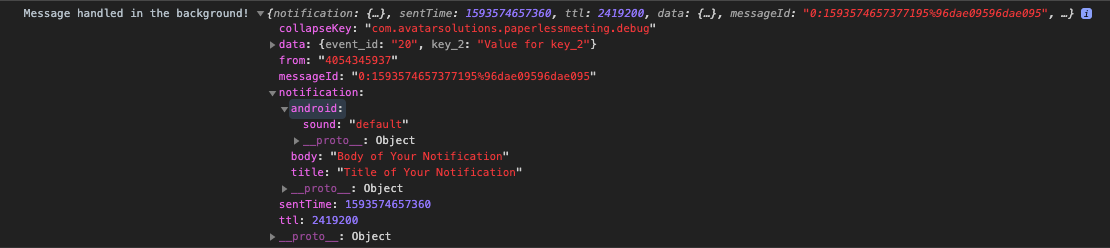
I am using an android virtual machine for my project.

I am looking forward to the solutions from everyone. Thank you.
 000xuandu
on 1 Jul 2020
000xuandu
on 1 Jul 2020
Hi @000xuandu
What is the value of:
@string/default_notification_channel_id
?
Dallas62
on 1 Jul 2020
Hi @000xuandu
What is the value of:@string/default_notification_channel_id?
<string name="default_notification_channel_id">a\' Meeting Channel Id</string>
in strings.xml
000xuandu
on 1 Jul 2020
Your channel id is wrong,
Check #1395 or the README of the dev branch.
Dallas62
on 1 Jul 2020
Your channel id is wrong,
Check #1395 or the README of thedevbranch.
Did you mean to write this fixed value? rn-push-notification-channel-id-4-300
Or where can I get my channel id? YOUR-CHANEL-ID-4-300
000xuandu
on 1 Jul 2020
@Dallas62 thanks. I am reading it.
000xuandu
on 1 Jul 2020
Your channel id is wrong,
Check #1395 or the README of thedevbranch.Did you mean to write this fixed value?
rn-push-notification-channel-id-4-300Or where can I get my channel id?
YOUR-CHANEL-ID-4-300
Yes this is a fixed value such as rn-push-notification-channel-id-4-300
Dallas62
on 1 Jul 2020
Your channel id is wrong,
Check #1395 or the README of thedevbranch.Did you mean to write this fixed value?
rn-push-notification-channel-id-4-300
Or where can I get my channel id?YOUR-CHANEL-ID-4-300Yes this is a fixed value such as
rn-push-notification-channel-id-4-300
@Dallas62
Thanks. It worked for me.
000xuandu
on 2 Jul 2020
Hello @Dallas62 It's not working for me. When I try to run, my build failed. Can you help me ?


 davidmargoses
on 17 Sep 2020
davidmargoses
on 17 Sep 2020
Hi,
I now recommend you to create channels yourself according to the documentation, and pass the channel when triggering the notification.
In the next version, this will not be allowed anymore.
Dallas62
on 17 Sep 2020
Related issues
 Benzer1406
·
3Comments
Benzer1406
·
3Comments
 GastonEDiaz
·
3Comments
GastonEDiaz
·
3Comments
 cookienawer
·
3Comments
cookienawer
·
3Comments
 TfADrama
·
3Comments
TfADrama
·
3Comments
 selimonline
·
3Comments
selimonline
·
3Comments