React-native-push-notification: onNotification is not calling when app is in background
Bug
When I am calling fcm server push notification api data is not showing on onNotification function.
Environment info
react-native info output:
// paste it here
Library version: 3.4.0
Steps To Reproduce
I use the following code for recieving push notification
- Call the service from postman collection for fcm
- we got data in onNotification when app is in foreground but not in backgorund
...
Describe what you expected to happen:
1.
2.
Reproducible sample code
PushNotification.configure({
// (optional) Called when Token is generated (iOS and Android)
onRegister: function (token) {
console.log("TOKEN:", token);
thats.setState({deviceToken:token});
},
  // (required) Called when a remote or local notification is opened or received
  onNotification: function (notification) {


    console.log('** NOTIFICATION: **', notification);

  if (Platform.OS === 'ios') {
    if (notification.alert.length !== 0) {
      //handleNotification(notification)
      notification.finish(PushNotificationIOS.FetchResult.NoData);
    }
  } else {
    //handleNotification(notification)
  }


  },

  // IOS ONLY (optional): default: all - Permissions to register.
  permissions: {
    alert: true,
    badge: true,
    sound: true,
  },

  // Should the initial notification be popped automatically
  // default: true
  popInitialNotification: true,


  requestPermissions: true,
});

PushNotification.popInitialNotification((notification) => {
  console.log(notification);
})
 rizwanshaikh199091
All 65 comments
Hi @rizwanshaikh199091
Can you provide more information ?
Where did you put PushNotification.configure ? Inside a component ?
Can you reproduce it in example project ?
 Dallas62
on 11 May 2020
Dallas62
on 11 May 2020
Hi @Dallas62
Thanks for quick reply, I put my code inside constructor function.
This is the code that I put inside constructor function of my call and calling api from postman.
    PushNotification.configure({
      // (optional) Called when Token is generated (iOS and Android)
      onRegister: function (token) {
        console.log("TOKEN:", token);
        thats.setState({deviceToken:token});
      },

      // (required) Called when a remote or local notification is opened or received
      onNotification: function (notification) {


        console.log('** NOTIFICATION: **', notification);

      if (Platform.OS === 'ios') {
        if (notification.alert.length !== 0) {
          //handleNotification(notification)
          notification.finish(PushNotificationIOS.FetchResult.NoData);
        }
      } else {
        //handleNotification(notification)
      }


      },

      // IOS ONLY (optional): default: all - Permissions to register.
      permissions: {
        alert: true,
        badge: true,
        sound: true,
      },

      // Should the initial notification be popped automatically
      // default: true
      popInitialNotification: true,


      requestPermissions: true,
    });

    PushNotification.popInitialNotification((notification) => {
      console.log(notification);
    })
I have attached a few screenshots taken in both the conditions. Please have a look.


Please advice. Thanks
rizwanshaikh199091
on 11 May 2020
Hi @Dallas62
Thanks for quick reply, I put my code inside constructor function.
This is the code that I put inside constructor function of my call and calling api from postman.
I have attached a few screenshots taken in both the conditions. Please have a look.
Please advice. Thanks
I think you should put the PushNotification.configure Outside of a component,
Take a look at example
Dallas62
on 11 May 2020
Okay let me try this
rizwanshaikh199091
on 11 May 2020
I'm having the same issue. Tried it both in componentDidMount and outside of a component. Same issue.
 davidsalib
on 12 May 2020
davidsalib
on 12 May 2020
Okay let me try this
I didn't notice, but in your screenshot there is the data, which means you received the notification, so everything is OK, no ?
https://firebase.google.com/docs/cloud-messaging/android/receive#handling_messages
onMessageReceived is provided for most message types, with the following exceptions:
Notification messages delivered when your app is in the background: In this case, the notification is delivered to the device’s system tray. A user tap on a notification opens the app launcher by default.
Messages with both notification and data payload, when received in the background: In this case, the notification is delivered to the device’s system tray, and the data payload is delivered in the extras of the intent of your launcher Activity.
App state | Notification | Data | Both
-- | -- | -- | --
Foreground | onMessageReceived | onMessageReceived | onMessageReceived
Background | System tray | onMessageReceived | Notification: system trayData: in extras of the intent.
I know this is not what you expect, but I don't think we can change this.
Dallas62
on 12 May 2020
Same issue here, I tried with the example app and onNotification is always called except when app is in backgroud.
The App is just cloned from git example.
I'm trying it in an Android 7.0 device
 taymer
on 19 May 2020
taymer
on 19 May 2020
Ok, i figured it out: the problem is that onNewIntent() is not called on ReactContextBaseJavaModule
This solution worked in the example app: https://stackoverflow.com/a/45749359/829300
I modified
public class RNPushNotification implementing Application.ActivityLifecycleCallbacks and overriding
public void onActivityStarted(Activity activity) {
    Intent intent = activity.getIntent();
    Bundle bundle = this.getBundleFromIntent(intent);
    if (bundle != null) {
        bundle.putBoolean("foreground", false);
        intent.putExtra("notification", bundle);
        mJsDelivery.notifyNotification(bundle);
    }
}
public void onActivityStarted(Activity activity) {
    Intent intent = activity.getIntent();
    Bundle bundle = this.getBundleFromIntent(intent);
    if (bundle != null) {
        bundle.putBoolean("foreground", false);
        intent.putExtra("notification", bundle);
        mJsDelivery.notifyNotification(bundle);
    }
}
@taymer This appears to be a source of crashes now. I've received the following stacktrace a number of times over the weekend (Release build).
I assume this means mJsDelivery may not always be initialised when onActivityStarted runs.
java.lang.NullPointerException: Attempt to invoke virtual method 'void com.dieam.reactnativepushnotification.modules.d.c(android.os.Bundle)' on a null object reference
  at com.dieam.reactnativepushnotification.modules.RNPushNotification.onActivityStarted(RNPushNotification.java:5)
  at android.app.Application.dispatchActivityStarted(Application.java:406)
  at android.app.Activity.dispatchActivityStarted(Activity.java:1239)
  at android.app.Activity.onStart(Activity.java:1724)
  at androidx.fragment.app.d.onStart(FragmentActivity.java:1)
  at androidx.appcompat.app.e.onStart(AppCompatActivity.java:1)
  at android.app.Instrumentation.callActivityOnStart(Instrumentation.java:1432)
  at android.app.Activity.performStart(Activity.java:7848)
  at android.app.ActivityThread.handleStartActivity(ActivityThread.java:3294)
  at android.app.servertransaction.TransactionExecutor.performLifecycleSequence(TransactionExecutor.java:221)
  at android.app.servertransaction.TransactionExecutor.cycleToPath(TransactionExecutor.java:201)
  at android.app.servertransaction.TransactionExecutor.executeLifecycleState(TransactionExecutor.java:173)
  at android.app.servertransaction.TransactionExecutor.execute(TransactionExecutor.java:97)
  at android.app.ActivityThread$H.handleMessage(ActivityThread.java:2016)
  at android.os.Handler.dispatchMessage(Handler.java:107)
  at android.os.Looper.loop(Looper.java:214)
  at android.app.ActivityThread.main(ActivityThread.java:7356)
  at java.lang.reflect.Method.invoke(Method.java:-2)
  at com.android.internal.os.RuntimeInit$MethodAndArgsCaller.run(RuntimeInit.java:492)
  at com.android.internal.os.ZygoteInit.main(ZygoteInit.java:930)
 wbercx
on 25 May 2020
wbercx
on 25 May 2020
Hi @wbercx
Can you provide the android:launchMode of your activity ?
Dallas62
on 25 May 2020
@Dallas62 singleTop.
I do not remember the exact reason why though. I feel like I've had to mess with that a few times over the years. I wrote a particularly useless commit message for that too...
EDIT:
I ended up making the following change. Not an Android developer, so I don't know if it makes a real difference, but at least it is not broken. Then again, the original worked _for me_ as well.
````diff
public RNPushNotification(ReactApplicationContext reactContext) {
super(reactContext);
reactContext.addActivityEventListener(this);
- // This is used to delivery callbacks to JS. Instantiated before registering activityLifeCycleCallbacks.
mJsDelivery = new RNPushNotificationJsDelivery(reactContext);
Application applicationContext = (Application) reactContext.getApplicationContext(); applicationContext.registerActivityLifecycleCallbacks(this); // The @ReactNative methods use this mRNPushNotificationHelper = new RNPushNotificationHelper(applicationContext);- // This is used to delivery callbacks to JS
mJsDelivery = new RNPushNotificationJsDelivery(reactContext);
mRNPushNotificationHelper.checkOrCreateDefaultChannel();}
````
wbercx
on 25 May 2020
@wbercx
Ok, I reverted the PR and changed the code in the JS side, this might be good.
I do more tests and release a fix ASAP
Dallas62
on 25 May 2020
@Dallas62 Have a look at the above, I edited it just moments earlier.
wbercx
on 25 May 2020
@wbercx This is not a good solution anyway, this cause a bug on background by triggering the notification again and again when you switch from background / foreground state. #1455
The check in the JS side is not enough to handle properly the popInitialNotitication it's just a boolean, once it's true nothing can be done.
I switched to the id of the notification but I need to check iOS.
Dallas62
on 25 May 2020
Is this fixed? It's not working for me either.
 AndersonSchmidt
on 9 Jun 2020
AndersonSchmidt
on 9 Jun 2020
Hi @AndersonSchmidt
The main reason this is not triggered on Android is that you put .configure inside a component.
Move it outside of a component and this should work.
Dallas62
on 9 Jun 2020
@Dallas62 First of all, thank you for your response. I already tried to do it as the image shows. It only calls onNotification if the app is in Foreground. If I exit or navigate to another app, I receive the notification but onNotification is not called. I'm using version 3.5.1. I don't know what to do anymore, I spent all day trying to fix this. I would be really glad if you have any solution for me. Thanks.

AndersonSchmidt
on 9 Jun 2020
In another issue:
Can you provide AndroidManifest ?
Also try to clean Android build cache and upgrade to 3.5.2.
Dallas62
on 9 Jun 2020
@Dallas62

AndersonSchmidt
on 9 Jun 2020
@Dallas62 what version of android is your device ? I've still the same issue with 7.0
taymer
on 9 Jun 2020
@taymer But didn't you manage to solve it? Your solution was even merged, but I saw that it was removed on version 3.5.2. By the way, I tested on android 8 and 10 and it's not working.
AndersonSchmidt
on 9 Jun 2020
@AndersonSchmidt I've tried 3.5.2, but I'm still using my piece of code, which works with the app in background, but not if it's closed (it calls onNotification only if you put the app in background and then again in foreground) . Sadly for now I've not enough time to check this issue.
taymer
on 9 Jun 2020
@taymer I understand. Do you have any tips/suggestions for me? I need to call onNotification ALWAYS when a notification is received to update a redux state to add a notification badge number on my hamburger button, so the user will know if and how many notifications he has. I was progressing well but got stuck on this. Check the badge I'm using.
AndersonSchmidt
on 9 Jun 2020
@AndersonSchmidt I've just tried the example app with version 3.5.2 and it works like a charm, so the problem is in our use of the library
taymer
on 10 Jun 2020
I will retest this at the end of the day.
The main reason of this problem is when you try to manage the callback of onNotification inside a component.
Dallas62
on 10 Jun 2020
Also check the launchMode of your AndroidManifest @AndersonSchmidt in example project the value is singleTop.
Dallas62
on 10 Jun 2020
@Dallas62 In the example inside the library the launch mode is singleTask
taymer
on 10 Jun 2020
@Dallas62 First of all, thank you for your response. I already tried to do it as the image shows. It only calls onNotification if the app is in Foreground. If I exit or navigate to another app, I receive the notification but onNotification is not called. I'm using version 3.5.1. I don't know what to do anymore, I spent all day trying to fix this. I would be really glad if you have any solution for me. Thanks.
@taymer @Dallas62 Am I doing it right in this image?
AndersonSchmidt
on 10 Jun 2020
@taymer @Dallas62 By the way, I've just cloned the project and run the example project and it is not working as well. The same thing, it is not calling when the app is in the background. I tested on a real Galaxy J7 Prime with Android 8.1.0.
AndersonSchmidt
on 10 Jun 2020
Hi @AndersonSchmidt
Can you provide the message you send to the device ?
Also take a look to:
https://github.com/zo0r/react-native-push-notification/issues/1431#issuecomment-627132371
I was not able to reproduce the issue with example project, all work as expected and follow the Firebase implementation:
App state | Notification | Data | Both
-- | -- | -- | --
Foreground | onMessageReceived | onMessageReceived | onMessageReceived
Background | System tray | onMessageReceived | Notification: system trayData: in extras of the intent.
Dallas62
on 10 Jun 2020
@Dallas62

AndersonSchmidt
on 11 Jun 2020
This is why onNotification is not trigger.
Look at my previous message.
You can’t use notification field with background handler.
You must use data (and not combined with notification).
Then if you want to notify the user, trigger a local notification.
Dallas62
on 11 Jun 2020
I am facing the same kind of issue on the android phone. I have used scheduleLocalNotificaiton in my application.
Follow the below steps in an example(the demo project which is given in this repo) of android app:
- Launch the app
- Click on Schedule notification for 30 seconds
- Now click on the hardware back button to make the app in the background
- Now notification will come and click on it.
- App will open again but Alert will not display means onNotification method does not fire
I have spent more than 8 hours to resolve this issue but can't succeed. Is there any way to fix this issue?
 mehul2013
on 11 Jun 2020
mehul2013
on 11 Jun 2020
Hi @mehul2013
On the current version of the library, scheduled notification doesn't trigger onNotification.
You can test the version on dev branch but some changes will be made before the release.
I try to update the CHANGELOG.md on dev as soon as changes are made.
Dallas62
on 11 Jun 2020
This is why
onNotificationis not trigger.
Look at my previous message.You can’t use
notificationfield with background handler.
You must usedata(and not combined withnotification).
Then if you want to notify the user, trigger a local notification.
Thank you @Dallas62! That was the problem. It's working perfect now.
AndersonSchmidt
on 12 Jun 2020
This is why
onNotificationis not trigger.
Look at my previous message.You can’t use
notificationfield with background handler.
You must usedata(and not combined withnotification).
Then if you want to notify the user, trigger a local notification.
@Dallas62 Really appreciate this explanation and just want to clarify if I have this correct. If I do a remote notification while the application is in the Foreground onNotification will be called, but if the app is in the background or closed onNotification will not be called with a regular remote notification and instead one must send a silent notification (only data, empty notification) and this will be processed in the onNotification callback(with the information available on data)?
I have a similar situation as @AndersonSchmidt where I need to add information to my redux store from another user messaging so I need to ensure the notification causes this data to be processed.
Thanks again! If this question is not clear please let me know.
 Faolain
on 21 Jun 2020
Faolain
on 21 Jun 2020
Hi,
If you want a background process in any cases, you must send data-only notification.
This way you should be able to trigger a local notification and run your process.
Persist your state at the end of the process.
Long process are not allowed (not sure but it’s <10/20s), prefer send data in notification than requesting a server when possible.
Dallas62
on 21 Jun 2020
Thank you so much @Dallas62 that worked exactly like you said! If you would like me to add this information to the README I would be more than happy to do so in a PR let me know! :)
Faolain
on 21 Jun 2020
You can make a PR if you want, this is from the official documentation of Firebase
Dallas62
on 21 Jun 2020
@AndersonSchmidt @Dallas62 , I try to use onNotificaiton property but it only works when app is in foreground , not in background. can you guys tell me what may be the issues?
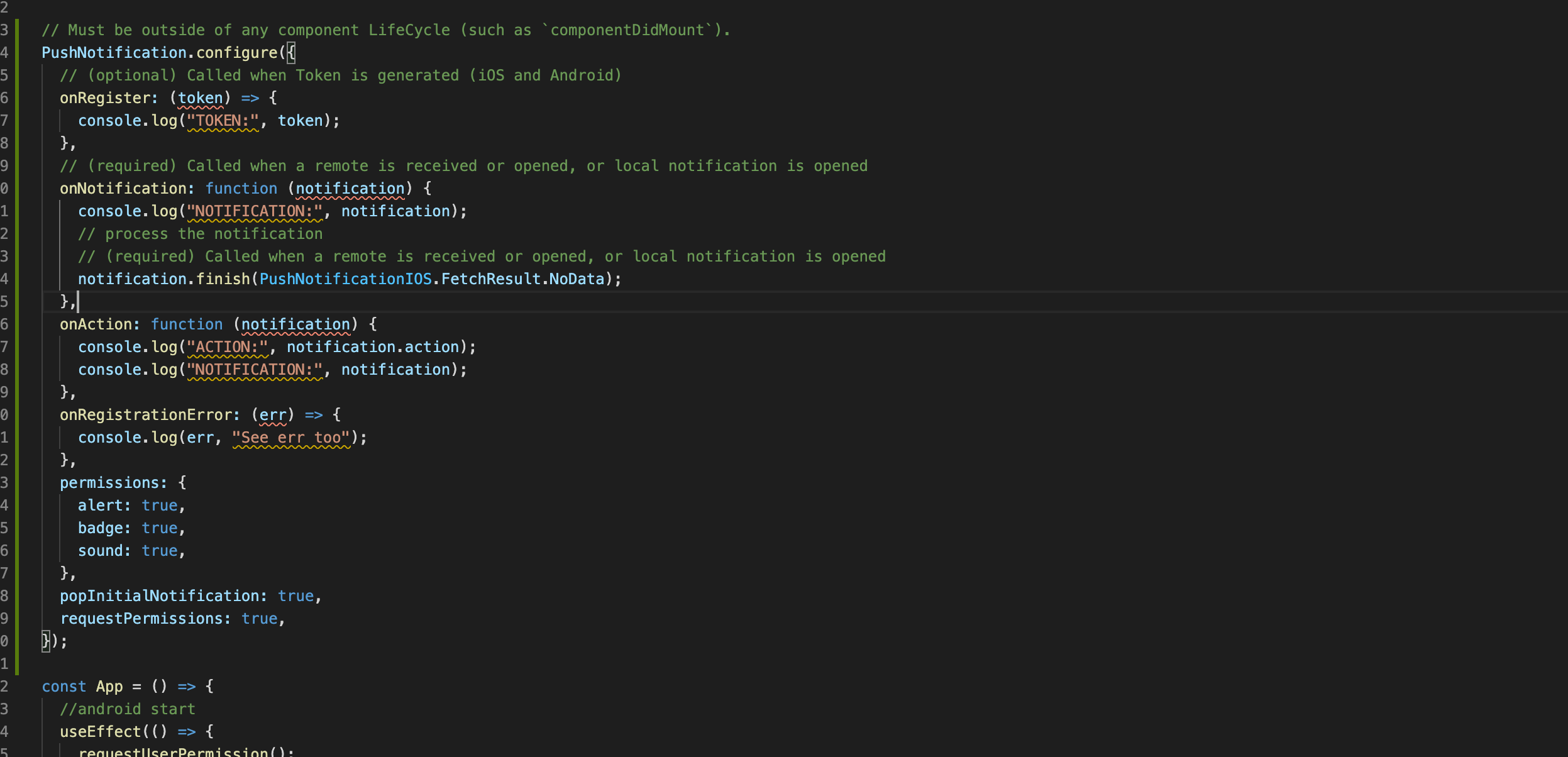
 kirantripathi
on 25 Aug 2020
kirantripathi
on 25 Aug 2020
Hi @kirantripathi
https://github.com/zo0r/react-native-push-notification/issues/1431#issuecomment-642441772
Dallas62
on 25 Aug 2020

@Dallas62 thanks for that, now I am getting notification response in onNotification callback, but when I click notification "userInteraction" key is not present in quit state , and I am not able to perform any operation on it. I need to perform some operation when click on notification.so for that what should I do . can you help me on that?
kirantripathi
on 26 Aug 2020
This is why
onNotificationis not trigger.
Look at my previous message.You can’t use
notificationfield with background handler.
You must usedata(and not combined withnotification).
Then if you want to notify the user, trigger a local notification.
I am still facing this problem. can you give some example code? Thank you
 naveenprakash74
on 3 Sep 2020
naveenprakash74
on 3 Sep 2020
This is why
onNotificationis not trigger.
Look at my previous message.You can’t use
notificationfield with background handler.
You must usedata(and not combined withnotification).
Then if you want to notify the user, trigger a local notification.
I've followed this process. I sent data-only and trigger a local notification. But when I press the notification it will trigger another local notification. Can you please give an example on how you implement receiving remote notifications and trigger local notification.
 romelbonnie
on 16 Nov 2020
romelbonnie
on 16 Nov 2020
Hi @romelbonnie
There is an userInteraction field in the notification object.
true == user has pressed the notification.
Regards,
Dallas62
on 16 Nov 2020
Oh I see. Thank you @Dallas62
romelbonnie
on 16 Nov 2020


@Dallas62
Please give me a solution
i configure PushNotification out of component (Bottom of App Class)
and call localNotification but nothing happened
but i see "console.log('TOKEN:', token);" in debugger and just it
please help me !!!
 ehsanmolaei991
on 29 Nov 2020
ehsanmolaei991
on 29 Nov 2020
Hi,
There is no channelId defined.
Dallas62
on 29 Nov 2020
Tnx Man.
Hi,
There is no channelId defined.
Tnx Man
ehsanmolaei991
on 29 Nov 2020


@Dallas62
Hi again
I can't solve my problem
I can use local notification for myapp but i can't use remote mode
I add google service and firebase and google.json in build.gradle and android/app
I use this AndroidManifest
and put this sender Id
please help me,
ehsanmolaei991
on 30 Nov 2020
Hi @rizwanshaikh199091
You are using deprecated properties in your AndroidManifest, please refer to the changelog for upgrade your manifest.
Also you don't provide the Payload of the notification, it's not possible to help you without it.
Refer to:
https://firebase.google.com/docs/cloud-messaging/concept-options
and
https://github.com/zo0r/react-native-push-notification/blob/master/trouble-shooting.md#1-local-notifications
For more informations.
Regards,
Dallas62
on 30 Nov 2020
Hey I found this issue in Ios side
 sanatChoubey
on 30 Mar 2021
sanatChoubey
on 30 Mar 2021
@Dallas62
I am sending a data notification and the onNotification function is not called when the app is in the background. But it is called when the application is in the foreground.
{
 "to" : "fXJ_A95kTQOqm6koxOFBwh:APA91bEAUKYfn4dUhxa00yKNzs4F0b3nAh8oxXGC3cegOxhI2kCQN0XbZ0elI9M640W4SYllNF_rHQOWm8V1ryaueUN6h9ddfX2n9xfQplAzzRzBxVqDdyLa0Yl7NjigsZtlDqTeVS1i",
 "data" : {
     "initiatorId" : "127167807"
 },
  "priority": "high"
}
 stephanoparaskeva
on 30 Mar 2021
stephanoparaskeva
on 30 Mar 2021
I am sending a data notification and the onNotification function is not called when the app is in the background. But it is called when the application is in the foreground.
{
 "to" : "fXJ_A95kTQOqm6koxOFBwh:APA91bEAUKYfn4dUhxa00yKNzs4F0b3nAh8oxXGC3cegOxhI2kCQN0XbZ0elI9M640W4SYllNF_rHQOWm8V1ryaueUN6h9ddfX2n9xfQplAzzRzBxVqDdyLa0Yl7NjigsZtlDqTeVS1i",
 "data" : {
     "initiatorId" : "127167807"
 },
  "priority": "high"
}
hey @stephanoparaskeva
I got know after a day is that javascript code never run in background you need to be in app so it basically work when you tap notifications or in foreground .
but this case not applied on android android works in background with headless js.
Thanks
sanatChoubey
on 30 Mar 2021
Hi @stephanoparaskeva
For iOS, please refer to the iOS repository.
For Android make sure Android Manifest is configured as described in the Readme.
In general, do not put .configure() inside a component.
Regards
Dallas62
on 30 Mar 2021
@Dallas62
This is my index.js file:
const onRegister = ({ token }: TDeviceInfo) => AsyncStorage.setItem(FCM_OR_APNS_TOKEN, token);

PushNotification.configure({
  onRegister,
  onNotification,
  popInitialNotification: true,
  requestPermissions: true,
});

const findTokenEvent = (evt: TEvent) =>
  evt.name === VoipPushNotification.RNVoipPushRemoteNotificationsRegisteredEvent;

VoipPushNotification.addEventListener('didLoadWithEvents', (events: Array<TEvent>) => {
  const apnsVoipToken = events.find(findTokenEvent)?.data;
  AsyncStorage.setItem(APNS_VOIP_TOKEN, apnsVoipToken || '');
});


AppRegistry.registerComponent(name, () => app);
This is my androidmanifest.xml file:
https://pastebin.com/d9Ut5ZYV
I think it should be correct?
stephanoparaskeva
on 30 Mar 2021
@stephanoparaskeva
Make sure you are on the latest version and the channel "QB_PUSH_NOTIFICATION_CHANNEL" is created.
You can remove all the "C2D" things inside you AndroidManifest.
Since there is also, another library which can intercept you code, you can check logs with: adb logcat.
Regards,
Dallas62
on 30 Mar 2021
@stephanoparaskeva
Make sure you are on the latest version and the channel "QB_PUSH_NOTIFICATION_CHANNEL" is created.
You can remove all the "C2D" things inside you AndroidManifest.Since there is also, another library which can intercept you code, you can check logs with:
adb logcat.Regards,
I commented out the QB_PUSH_NOTIFICATION_CHANNEL so it should work as default right?
I removed all C2D things
I upgraded to latest "react-native-push-notification": "^7.2.3"
Still onNotification does not run in the background.
Here is my updated androidManifest.xml
https://pastebin.com/Vh8G45dr
What should I look for in logcat?
What else could be causing this issue that you have noticed?
stephanoparaskeva
on 30 Mar 2021
@Dallas62 It works for me on IOS but not on android in the background. This is the request I make on IOS and it works:
lola \
-bundleId com.euclid \
-device 35214b2782c4445231d7512dfa2bfed89b9fcde32d284e1acd5633d631c4ef2f \
-teamId HLR7ND6WN5 \
-authKey AuthKey_SHVZ2CXB5P.p8 \
-notificationType background \
-json "{ \"aps\": { \"content-available\": 1 }, \"initiatorId\": 127167807  }"
But this does not, for android and this only works in the foreground for android:
{
 "to" : "fXJ_A95kTQOqm6koxOFBwh:APA91bEAUKYfn4dUhxa00yKNzs4F0b3nAh8oxXGC3cegOxhI2kCQN0XbZ0elI9M640W4SYllNF_rHQOWm8V1ryaueUN6h9ddfX2n9xfQplAzzRzBxVqDdyLa0Yl7NjigsZtlDqTeVS1i",
 "data" : {
     "initiatorId" : "127167807"
 },
  "priority": "high"
}
Hi @stephanoparaskeva
Did you create the channel? By calling .createChannel(...) ?
Dallas62
on 31 Mar 2021
Hi @Dallas62
I have created the channel, but this did not help, here is the manifest:
        <meta-data  android:name="com.dieam.reactnativepushnotification.notification_foreground"
            android:value="false"/>
        <service
            android:name="com.dieam.reactnativepushnotification.modules.RNPushNotificationListenerService"
            android:exported="false" >
            <intent-filter>
                <action android:name="com.google.firebase.MESSAGING_EVENT" />
            </intent-filter>
        </service>
        <service android:name="com.dieam.reactnativepushnotification.modules.RNPushNotificationRegistrationService" />
        <receiver android:name="com.dieam.reactnativepushnotification.modules.RNPushNotificationActions" />
        <receiver android:name="com.dieam.reactnativepushnotification.modules.RNPushNotificationPublisher" />
        <receiver android:name="com.dieam.reactnativepushnotification.modules.RNPushNotificationBootEventReceiver">
            <intent-filter>
                <action android:name="android.intent.action.BOOT_COMPLETED" />
                <action android:name="android.intent.action.QUICKBOOT_POWERON" />
                <action android:name="com.htc.intent.action.QUICKBOOT_POWERON"/>
            </intent-filter>
        </receiver>
        <meta-data
            android:name="com.dieam.reactnativepushnotification.notification_channel_name"
            android:value="QB_PUSH_NOTIFICATION_CHANNEL" />
        <meta-data
            android:name="com.dieam.reactnativepushnotification.notification_channel_description"
            android:value="Channel for Quickblox push notification events" />
        <meta-data
            android:name="com.dieam.reactnativepushnotification.notification_color"
            android:resource="@color/primary" />

        <service android:name="com.quickblox.messages.services.fcm.QBFcmPushInstanceIDService">
            <intent-filter>
                <action android:name="com.google.firebase.INSTANCE_ID_EVENT" />
            </intent-filter>
        </service>
And here is the channel creation in index.js
  PushNotification.configure({
    onRegister,
    onNotification,
    popInitialNotification: true,
    requestPermissions: true,
  });

  PushNotification.createChannel(
    {
      channelId: 'QB_PUSH_NOTIFICATION_CHANNEL', // (required)
      channelName: 'QB_PUSH_NOTIFICATION_CHANNEL', // (required)
      playSound: false, // (optional) default: true
      soundName: 'default', // (optional) See `soundName` parameter of `localNotification` function
    },
    created => console.log(`createChannel returned '${created}'`) // (optional) callback returns whether the channel was created, false means it already existed.
  );
I am sending the notification via Postman and it triggers onNotification when the app is in the foreground, but it does not trigger onNotification when the app is in the background.
I am sending a data message via postman and here is the JSON:
{
 "to" : "fXJ_A95kTQOqm6koxOFBwh:APA91bEAUKYfn4dUhxa00yKNzs4F0b3nAh8oxXGC3cegOxhI2kCQN0XbZ0elI9M640W4SYllNF_rHQOWm8V1ryaueUN6h9ddfX2n9xfQplAzzRzBxVqDdyLa0Yl7NjigsZtlDqTeVS1i",
 "data" : {
     "initiatorId" : "127167807"
 },
  "priority": "high"
}
This works in the foreground but not in the background
Regards
stephanoparaskeva
on 31 Mar 2021
@stephanoparaskeva
You can try to add the channel as default channel:
  <meta-data
      android:name="com.dieam.reactnativepushnotification.default_notification_channel_id"
      android:value="QB_PUSH_NOTIFICATION_CHANNEL" />
If the channel is not created and used, the notification will not work.
Dallas62
on 31 Mar 2021
Hi @Dallas62
  <meta-data
      android:name="com.dieam.reactnativepushnotification.default_notification_channel_id"
      android:value="QB_PUSH_NOTIFICATION_CHANNEL" />
I have tried this too and it doesnt work. I have also removed this channel entirely and it doesnt work.
Nothing about the message specifies a channel:
{
 "to" : "fXJ_A95kTQOqm6koxOFBwh:APA91bEAUKYfn4dUhxa00yKNzs4F0b3nAh8oxXGC3cegOxhI2kCQN0XbZ0elI9M640W4SYllNF_rHQOWm8V1ryaueUN6h9ddfX2n9xfQplAzzRzBxVqDdyLa0Yl7NjigsZtlDqTeVS1i",
 "data" : {
     "initiatorId" : "127167807"
 },
  "priority": "high"
}
It works in the foreground but does not work in the background. There must some other reason, the request is made via postman and is a data request, it does not specify a notification field and it has data The android manifest follows the readme, the package is on the latest version and the configure() function is run outside of any component.
The data notification is sent via postman but the application never runs the onNotification function when the app is closed. It is run successfully when the application is in the foreground.
On IOS I can successfully get the onNotification function to run when the app is closed when sending a data/background APNS push.
What have I done wrong on the android side?
Here are some screenshots of the postman request:


And here is a screenshot of the console.warn(notification) in onNotification function when in the foreground.

stephanoparaskeva
on 31 Mar 2021
You must setup and use a channel (created, set as default of specified in notification payload).
If not, background notifications won't work.
https://developer.android.com/training/notify-user/channels
Caution: If you target Android 8.0 (API level 26) and post a notification without specifying a notification channel, the notification does not appear and the system logs an error.
Firebase documentation (Android 2b.):
https://firebase.google.com/docs/cloud-messaging/http-server-ref#notification-payload-support
android_channel_id
Then, we will be able to investigate.
If everything is set up, you can check the log of the device with logcat.
Open a new issue with the log of logcat when you send a the notification (app in background).
Dallas62
on 31 Mar 2021
Hi @Dallas62
Here is the new issue created with the LOGCAT logs and the channel_id:
https://github.com/zo0r/react-native-push-notification/issues/1930
stephanoparaskeva
on 31 Mar 2021
Related issues
 nguyenvanphuc2203
·
3Comments
nguyenvanphuc2203
·
3Comments
 NiuQiaoling
·
3Comments
NiuQiaoling
·
3Comments
 nidzovito
·
3Comments
nidzovito
·
3Comments
 edwinharly
·
3Comments
edwinharly
·
3Comments
 cookienawer
·
3Comments
cookienawer
·
3Comments
Most helpful comment
This is why
onNotificationis not trigger.Look at my previous message.
You can’t use
notificationfield with background handler.You must use
data(and not combined withnotification).Then if you want to notify the user, trigger a local notification.