React-native-push-notification: How to prevent app from coming to foreground on notification action click
In a Headless.js task I trigger a localPushNotification with notification actions.
PushNotification.localNotification({
  title: REQUEST_TITLE,
  message: REQUEST_MESSAGE,
  playSound: false,
  soundName: "default",
  actions: '["Yes", "No"]',
});
I configured the handling this way:
PushNotification.configure({
    onNotification: handleNotificationClick
});

PushNotification.registerNotificationActions(["Yes", "No"]);

DeviceEventEmitter.addListener('notificationActionReceived', (event) => {
  console.log("Received notification action event" + JSON.stringify(event));
});
When the app is in background and I click one of the notification actions, the application is launched and brought to foreground.
The onNotification handler is called, the DeviceEventEmitter.addListener callback is not called.
Does anyone know how to solve this issue? I want to handle the notification action click without bringing the application to the foreground.
The configuration of the push notifications is executed in the componentWillMount method in App.js.
My setup is:
- react-native:
0.59.5 - react-native-push-notifications:
3.1.9
Thanks in advance!
 mathiasmoeller
All 56 comments
I tried version 3.3.1. Same thing happens
mathiasmoeller
on 6 May 2020
Hi,
I didn't test this, but did you try to put this outside the componentWillMount ?
 Dallas62
on 12 May 2020
Dallas62
on 12 May 2020
Hey, having the exact same issue, though my set up is a bit different. I followed the example in the main repo. Set up a class for Handler, and NotifService as shown there.
When I click on an action button, the notification object comes with the added action property, but the DeviceEventEmitter listener is never triggered.
 ab5y
on 12 May 2020
ab5y
on 12 May 2020
@Dallas62
Hi,
I didn't test this, but did you try to put this outside thecomponentWillMount?
My set up is all functional. Is this is the only solution? Have you had a chance to take a look at this issue?
Thanks.
ab5y
on 27 May 2020
Hi,
I didn't test this, but did you try to put this outside thecomponentWillMount?
Yes, I also tried it in the index.js but it did not seem to work. The app always started in the foreground. Any other ideas I could try?
mathiasmoeller
on 27 May 2020
Hi,
Does it occurs on iOS and Android ?
Dallas62
on 27 May 2020
Hi,
Does it occurs on iOS and Android ?
In Android for me.
ab5y
on 27 May 2020
Yes so far I only tested in on Android.
mathiasmoeller
on 27 May 2020
I gave it another try after upgrading to 3.5.2
Still the same behavior. I tried to call the configuration and listener registration from App.js in componentWillMount as well as directly in index.js.
In both scenarios the app opened completely when clicking on a notification action and the onNotification handler is called instead of notificationActionReceived.
@Dallas62 were you able to reproduce this? I am struggling for a while now and I really need this to work 😅 . Help is very much appreciated.
mathiasmoeller
on 29 May 2020
Hi,
I didn’t make change on this, so 3.5.2 will produce the same behavior.
I will try to find time on this, I need to finish some work before that 😉
Dallas62
on 29 May 2020
Okay I totally understand this :) Thanks a lot already!
mathiasmoeller
on 29 May 2020
I will take a look today,
So there is two issues here, first of all the action is not intercepted when you press Yes or No and the app is in background/killed.
And the second one, you would like to avoid the app to go in foreground when the user press the action.
Am I right ?
Dallas62
on 30 May 2020
I will take a look today,
So there is two issues here, first of all the action is not intercepted when you pressYesorNoand the app is in background/killed.
And the second one, you would like to avoid the app to go in foreground when the user press the action.
Am I right ?
In my use case, I need to intercept the action and possibly navigate to a particular screen. But this should be doable as long as the device event emitter catches the action pressed.
ab5y
on 30 May 2020
@ab5y
The action is set in the notification from onNotification:
{"action": "No", ...}
Hi,
I deep dive into this, and I don't know how it can work actually.
I find a way to fix this and I will probably publish a fix on devbranch soon. There is still some work to finish.
Dallas62
on 30 May 2020
I will take a look today,
So there is two issues here, first of all the action is not intercepted when you pressYesorNoand the app is in background/killed.
And the second one, you would like to avoid the app to go in foreground when the user press the action.
Am I right ?
Yes. In my scenario, I want to trigger some tasks inside the app without bringing the app to the foreground. Basically like the quick answer functionality in WhatsApp or Telegram.
My App will show a Question and a Yes and No button. The user should be able to answer without opening the app.
If he clicks the main notification and not one of the actions, the app should open like usual and the onNotification handler could handle it.
I think ideally you would want to be able to configure if the app comes to the foreground or not when clicking on an action? But maybe this is another feature then.
Thanks a lot!
mathiasmoeller
on 31 May 2020
Hi,
I implemented a new management for actions on dev branch.
CHANGELOG and README are up to date.
https://github.com/zo0r/react-native-push-notification/tree/dev
Example app should help you for the implementation, you can set:
invokeApp: false when you send actions, this while trigger onAction (only if invokeApp: false).
Then call PushNotification.invokeApp(notification) to bring back the app in foreground (if needed).
Also check the CHANGELOG, I made many others changes since this fix is breaking.
Dallas62
on 31 May 2020
@Dallas62 Thank you so much for adding this feature
There is another problem now
Once the application is completely closed, the actions will no longer work!
I tested it on Android
Please fix this as well
 SiSa68
on 3 Jun 2020
SiSa68
on 3 Jun 2020
@Dallas62 Thank you so much for adding this feature
There is another problem now
Once the application is completely closed, the actions will no longer work!
I tested it on Android
Please fix this as well
Hi @SiSa68
I don’t understand the problem, can you provide what your are doing ?
I tested this feature and everything was working as expected, so if there is an issue a complete description to reproduce the issue is required.
- What you do (code, workflow) ?
- What you expect ?
- What is the current behavior ?
Dallas62
on 3 Jun 2020
@Dallas62
I'm trying to show a notification with actions, and I don't want to invoke the app when user choose an action.
So I config PushNotification like this:
PushNotification.configure({
  onNotification: (notification: any) => {
    console.log('onNotification', notification);
  },
  onAction: function (notification) {
    console.log("ACTION:", notification.action);
    console.log("NOTIFICATION:", notification);
  },
  popInitialNotification: true,
  requestPermissions: true,
});
And I show a notification this way:
PushNotification.localNotification({
  id: '1', // for Android
  userInfo: {id: '1'}, // for iOS
  title: 'My notification title',
  message: 'My notification message',
  actions: '["Yes", "No"]',
  invokeApp: false,
});
Now when app is in forground or background (not closed completely), it work as I expected and onAction calls when I select an action and I can handle the action.
But when I show a notification and then close the app completely (from recent apps), then when I select the action, nothing happens!
Neither onAction nor onNotification is executed. Even the app doesn't invoke
SiSa68
on 3 Jun 2020
How do you invoke localNotification when the app is closed ?
With a remote notification ?
Dallas62
on 3 Jun 2020
In fact I use background task to show notification
With this library react-native-background-fetch
SiSa68
on 3 Jun 2020
But you can reproduce in this way also:
Run app and show localNotification and then close app (from recent apps)
Then select an action of notification
SiSa68
on 3 Jun 2020
Hi @SiSa68
I was able to reproduce this and made a fix.
Be aware that a new receiver is needed in AndroidManifest.
Dallas62
on 3 Jun 2020
@Dallas62
I tested again and add new receiver to AndroidManifest
Now when I select the action, the notification closes, but the onAction does not fires (when app is closed)
SiSa68
on 3 Jun 2020
I found a bug, but not the behaviour described, only the latest action was notified.
On the example project onAction is call correctly when the App is closed.
I trigger the notification, kill the application then press the action.
If it's only with react-native-background-fetch, can you provide a small reproducible code that trigger the notification ?
Dallas62
on 3 Jun 2020
It works 😃
It takes some second (I tested only in debug mode), but onAction fires
Also I placed PushNotification config statement in the wrong place (App.js), and Now I moved it to beginning of index.js file
Thanks for your great work @Dallas62
SiSa68
on 3 Jun 2020
Thanks for the feedback too !
Didn’t caught this issue without this test 😉
I will wait a bit before publish the release, there is important changes. If I can get other few feedback it would be great! 😀
Dallas62
on 4 Jun 2020
Thanks for the feedback too !
Didn’t caught this issue without this test 😉
I will wait a bit before publish the release, there is important changes. If I can get other few feedback it would be great! 😀
I am integrating it now and will give you feedback ASAP! Thanks A LOT!
mathiasmoeller
on 4 Jun 2020
So far it seems to work like a glove! I also like the new way of handling the actions. Good work!
I will let you know if I find any issues or bugs.
I strongly believe that Open Source Development should be supported more. If you are the new maintainer of this project @Dallas62 and enable Sponsoring for this repo I will be happy to show my support and gratitude :)
mathiasmoeller
on 4 Jun 2020
I have found one possible improvement.
If the user clicks an action and I decide to invoke the app I can call
PushNotification.invokeApp(notification);.
Now I probably want to navigate to some screen instead of the main application screen.
But this is not possible until the app is fully loaded. Therefore, it would be great if the invokeApp method would return a Promise that resolves when the app is fully launched. I don't even know if this is possible in Android so this is just a suggestion.
I don't really need this feature anyway, just came across my mind.
If anyone needs this functionality he could solve it by storing some value in the store in the onAction handler and then reading the value on application launch. Depending on the value you could perform some actions like navigating to a screen.
mathiasmoeller
on 4 Jun 2020
Unfortunately, I found a bug.
This plugin uses PushNotificationIOS under the hood to implement notifications on iOS.
The iOS implementation that talks to this plugin does not know about the onAction method yet. This will cause an error to throw:
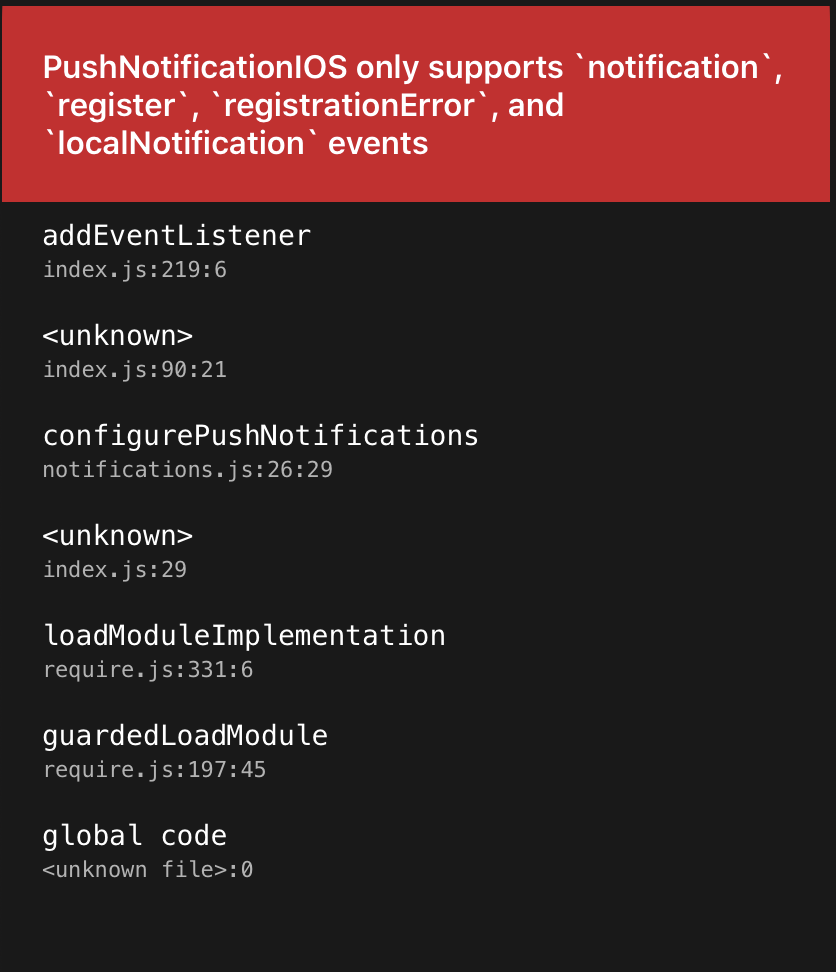
It is thrown here.
The problem is this line.
I tried fixing it by running:
if (Platform.OS === 'ios') {
  PushNotification.configure({
    onNotification: handleNotificationClick,
  });
} else {
  PushNotification.configure({
    onNotification: handleNotificationClick,
    onAction: handleNotificationActionClick
  });
}
This does not help though since this.callNative( 'addEventListener', [ 'action', this._onAction ] ); is called even when no onAction listener is registered.
mathiasmoeller
on 4 Jun 2020
I just publish a fix
Dallas62
on 4 Jun 2020
I just tested on iOS, and I found a bug
When the app is in foreground and I open the notification, the app crashes with this error
ReferenceError: Can't find variable: notif
And do you have any suggestions for showing action on iOS?
SiSa68
on 12 Jun 2020
With the help of this library, I was able to show action
But when I select the action, it gives the same error as before:
ReferenceError: Can't find variable: notif

Notifications._onNotification
    index.js:331:18
<unknown>
    [native code]:0
PushNotificationEmitter.addListener$argument_1
    index.js:238:18
emit
    EventEmitter.js:190:12
callFunctionReturnFlushedQueue
    [native code]:0
I'm glad I found this, I need this exact behaviour - I have a problem though and one observation.
When I press an action, onAction won't fire. I know this is reported above but I still cant get it to work after playing around with the configuration. When I press the main body of the notification, onNotification does fire.
This is what I have:
AndroidManifest.xml:
    <application
        android:name=".MainApplication"
        android:allowBackup="false"
        android:icon="@mipmap/ic_launcher"
        android:label="@string/app_name"
        android:roundIcon="@mipmap/ic_launcher_round"
        android:theme="@style/AppTheme"
        android:usesCleartextTraffic="true"
        android:largeHeap="true"
        >
        <receiver android:name="com.dieam.reactnativepushnotification.modules.RNPushNotificationActions" />
index.js:
(function () {
  PushNotification.configure({
    onNotification: function (notification) {
      console.log("NOTIFICATION:", notification);
    },
    onAction: function (notification) {
      console.log("ACTION:", notification.action);
      console.log("NOTIFICATION:", notification);
    },
    popInitialNotification: true,
    requestPermissions: true,
  });
})();

AppRegistry.registerComponent(appName, () => App);
firebase.messaging().setBackgroundMessageHandler(backgroundNotificationHandler);
backgroundNotificationHandler.js:
const backgroundNotificationHandler = async message => {

  if (currentAppState === 'background' && message.data.notificationType === INITIATING) {
    backgroundIncomingCallNotification(incomingCallNotificationTitle, incomingCallNotificationBody, notificationID);
backgroundIncomingCallNotification.js:
const backgroundIncomingCallNotification = async (
  notificationTitle,
  notificationBody,
  notificationID,
) => {
  try {
    PushNotification.localNotification({
      /* Android Only Properties */
      invokeApp: false,
      priority: 'max',
      id: 1, // (optional) Valid unique 32 bit integer specified as string. default: Autogenerated Unique
      bigText: "My big text that will be shown when notification is expanded", // (optional) default: "message" prop
      subText: "This is a subText", // (optional) default: none
      color: "red", // (optional) default: system default
      vibrate: true, // (optional) default: true
      vibration: 300, // vibration length in milliseconds, ignored if vibrate=false, default: 1000
      ongoing: false, // (optional) set whether this is an "ongoing" notification
      importance: "max", // (optional) set notification importance, default: high
      /* iOS and Android properties */
      title: "My Notification Title", // (optional)
      message: "My Notification Message", // (required)
      playSound: false, // (optional) default: true
      soundName: "default", // (optional) Sound to play when the notification is shown. Value of 'default' plays the default sound. It can be set to a custom sound such as 'android.resource://com.xyz/raw/my_sound'. It will look for the 'my_sound' audio file in 'res/raw' directory and play it. default: 'default' (default sound is played)
      actions: '["Answer", "Decline"]', // (Android only) See the doc for notification actions to know more
    });

  } catch (error) {
    console.log(error);
  }
}
Why shouldn't the actions be firing the onAction callback? When pressing the actions the notification cancels which is great and the app isn't invoked.
Before finding your new commits I did have the actions firing with the old API:
(function() {
  // Register all the valid actions for notifications here and add the action handler for each action
  PushNotificationAndroid.registerNotificationActions(['Accept','Reject','Yes','No']);
  DeviceEventEmitter.addListener('notificationActionReceived', function(action){
    console.log ('Notification action received: ' + action);
    const info = JSON.parse(action.dataJSON);
    if (info.action == 'Accept') {
      // Do work pertaining to Accept action here
    } else if (info.action == 'Reject') {
      // Do work pertaining to Reject action here
    }
    // Add all the required actions handlers
  });
})();
This is all tested on physical devices.
Also my observation is that if the actions do not invoke the app, then neither should pressing on the main body of the notification.
Thanks for the great work!
 whenmoon
on 14 Jun 2020
whenmoon
on 14 Jun 2020
Hi @whenmoon
Which commit do you use for your tests ?
Dallas62
on 14 Jun 2020
Hi @whenmoon
Which commit do you use for your tests ?
Hi @Dallas62, I should be the latest https://github.com/zo0r/react-native-push-notification/commit/cf278977de70e790285db5f8320501fcb0e5924f
that's a good point though, let me check I've got the right one..
whenmoon
on 14 Jun 2020
@Dallas62 My apologies, I didn't clone properly - now it is working!
What do you think about my last comment which is not allowing invoking the app on pressing the main body of the notification?
whenmoon
on 14 Jun 2020
Hum...
I’m not sure this is a good idea, when a user click on a notification, he expects to go in the application and preferably at the right screen.
Disable it may lead to a bad user experience, and I’m not sure it’s possible to disable it.
Action without invoke the application (foreground) is ok when it’s an action like « Ignore ». If the user wants to ignore the notification in another way, he can swipes it out.
Dallas62
on 14 Jun 2020
Hi @Dallas62
Were you able to check the bug I reported?
SiSa68
on 15 Jun 2020
Hi @SiSa68
I missed it, will check today
Dallas62
on 15 Jun 2020
Dallas62
on 15 Jun 2020
Thanks @Dallas62
Now that bug has been solved
But there are still two problems
When the app is in foreground and we select notification or action, only onNotification fires and the notification information is empty:
{"alert": undefined, "badge": undefined, "data": {"id": "1111"}, "finish": [Function finish], "fireDate": undefined, "foreground": true, "id": undefined, "message": undefined, "sound": undefined, "userInteraction": false}
The other problem is when the app is closed (from recent apps) and we select the action, the onNotification is not executed at all (it work properly for notification select)
SiSa68
on 15 Jun 2020
Hi @SiSa68
This is on iOS?
Actually there is no compatibility with react-native-notifications
Dallas62
on 15 Jun 2020
Yes @Dallas62 , It happens on iOS
I just use react-native-notifications to create actions on notification category.
Is there any other way to have action on iOS?
SiSa68
on 15 Jun 2020
It would be perfect if you add the ability to create actionable notification for iOS to this library
SiSa68
on 15 Jun 2020
I will take a look ASAP @SiSa68
I’m a bit busy with work at home these days, but as soon as I get some time, I will look to the iOS library mentioned in the Readme and try to fork/refactor it in this repository.
Dallas62
on 15 Jun 2020
It will be great. Thanks a lot already
SiSa68
on 15 Jun 2020
Hi @Dallas62
Were you able to find some time to check this case?
SiSa68
on 29 Jun 2020
Hi @Dallas62
Were you able to find some time to check this case?
Hi @SiSa68,
Not for iOS yet...
I just setup everything to test this
Dallas62
on 29 Jun 2020
@Dallas62 Any news?
When do you think you can give it time?
Can I hope that this problem will be solved soon?
SiSa68
on 4 Jul 2020
Hi @SiSa68
This will be release this weekend for Android
Dallas62
on 4 Jul 2020
@SiSa68 Would you find any way to have actions on iOS?
 yehiaemad
on 16 Jul 2020
yehiaemad
on 16 Jul 2020
@yehiaemad
I could show actions with the help of react-native-push-notification and react-native-notifications
But still had some issues
SiSa68
on 3 Aug 2020
Changes have been made on the iOS library, can you check the documentation to know if this fit your needs ?
(Not available directly from this library actually)
Dallas62
on 26 Oct 2020
Related issues
 NiuQiaoling
·
3Comments
NiuQiaoling
·
3Comments
 cookienawer
·
3Comments
cookienawer
·
3Comments
 selimonline
·
3Comments
selimonline
·
3Comments
 uendar
·
3Comments
uendar
·
3Comments
 DaniShalash
·
3Comments
DaniShalash
·
3Comments
Most helpful comment
So far it seems to work like a glove! I also like the new way of handling the actions. Good work!
I will let you know if I find any issues or bugs.
I strongly believe that Open Source Development should be supported more. If you are the new maintainer of this project @Dallas62 and enable Sponsoring for this repo I will be happy to show my support and gratitude :)