React-native-push-notification: RNPushNotification.requestPermissions got 1 arguments, expected 0
Bug
Hello there. I've just updated from 3.1.9 to 3.3.0 and started to get this message:
Message occurs right after PushNotification.configure which runs on my main screen (after login)
2020-04-29 11:03:06.684 14016-14152/com.uniotecnologia.vippa E/unknown:ReactNative: Exception in native call
    com.facebook.react.bridge.NativeArgumentsParseException: RNPushNotification.requestPermissions got 1 arguments, expected 0
        at com.facebook.react.bridge.JavaMethodWrapper.invoke(JavaMethodWrapper.java:349)
        at com.facebook.react.bridge.JavaModuleWrapper.invoke(JavaModuleWrapper.java:151)
        at com.facebook.react.bridge.queue.NativeRunnable.run(Native Method)
        at android.os.Handler.handleCallback(Handler.java:789)
        at android.os.Handler.dispatchMessage(Handler.java:98)
        at com.facebook.react.bridge.queue.MessageQueueThreadHandler.dispatchMessage(MessageQueueThreadHandler.java:27)
        at android.os.Looper.loop(Looper.java:164)
        at com.facebook.react.bridge.queue.MessageQueueThreadImpl$4.run(MessageQueueThreadImpl.java:226)
        at java.lang.Thread.run(Thread.java:764)
Environment info
react-native info output:
System:
    OS: Windows 10 10.0.18363
    CPU: (8) x64 Intel(R) Core(TM) i7-4700MQ CPU @ 2.40GHz
    Memory: 615.31 MB / 7.92 GB
  Binaries:
    Node: 12.16.1 - C:\Program Files\nodejs\node.EXE
    Yarn: 1.22.4 - C:\Users\pedrorissato\AppData\Roaming\npm\yarn.CMD
    npm: 6.13.4 - C:\Program Files\nodejs\npm.CMD
    Watchman: 4.9.4 - C:\opt\watchman\bin\watchman.EXE
  SDKs:
    Android SDK: Not Found
  IDEs:
    Android Studio: Version  3.6.0.0 AI-192.7142.36.36.6241897
  Languages:
    Java: Not Found
    Python: 2.7.17
  npmPackages:
    @react-native-community/cli: Not Found
    react: 16.11.0 => 16.11.0
    react-native: 0.62.2 => 0.62.2
  npmGlobalPackages:
    *react-native*: Not Found
Library version: 3.3.0
Steps To Reproduce
- Upgrade react-native-push-notification in packages.json from 3.1.9 to 3.3.0
- Removed from AndroidManifest.xml
<service android:name="com.dieam.reactnativepushnotification.modules.RNPushNotificationRegistrationService"/>
Reproducible sample code
AndroidManifes.xml
    <meta-data android:name="com.dieam.reactnativepushnotification.notification_channel_name" android:value="Vippa Notification Channel" />
        <meta-data android:name="com.dieam.reactnativepushnotification.notification_channel_description" android:value="vippa_01" />
        <meta-data android:name="com.dieam.reactnativepushnotification.notification_color" android:resource="@android:color/white" />
        <receiver android:name="com.dieam.reactnativepushnotification.modules.RNPushNotificationPublisher" />
        <receiver android:name="com.dieam.reactnativepushnotification.modules.RNPushNotificationBootEventReceiver">
            <intent-filter>
                <action android:name="android.intent.action.BOOT_COMPLETED" />
            </intent-filter>
        </receiver>
        <service
            android:name="com.dieam.reactnativepushnotification.modules.RNPushNotificationListenerService"
            android:exported="false" >
            <intent-filter>
                <action android:name="com.google.firebase.MESSAGING_EVENT" />
            </intent-filter>
        </service>
MainApplication.java
public class MainApplication extends MultiDexApplication implements ReactApplication {

  private final ReactNativeHost mReactNativeHost =
      new ReactNativeHost(this) {
        @Override
        public boolean getUseDeveloperSupport() {
          return BuildConfig.DEBUG;
        }

        @Override
        protected List<ReactPackage> getPackages() {
          @SuppressWarnings("UnnecessaryLocalVariable")

          List<ReactPackage> packages = new PackageList(this).getPackages();

          packages.add(new RNFirebaseNotificationsPackage());
          packages.add(new RNFirebaseMessagingPackage());
          packages.add(new LottiePackage());

          return packages;
        }

        @Override
        protected String getJSMainModuleName() {
          return "index";
        }
      };
React Native configuration:
PushNotification.configure({
      onNotification(notification) {
           <BUSSINESS LOGIC>
        }
        notification.finish('backgroundFetchResultNoData');
      },
      senderID: '<ID>',
      permissions: { alert: true, badge: true, sound: true },
      popInitialNotification: true,
      requestPermissions: true,
    });
 pedrohenriquerissato
All 8 comments
Hi @pedrohenriquerissato
Do you call PushNotification.requestPermissions(); ?
 Dallas62
on 29 Apr 2020
Dallas62
on 29 Apr 2020
This look like java and JS are not at the same version
Dallas62
on 29 Apr 2020
Hi @pedrohenriquerissato
Do you callPushNotification.requestPermissions();?
No. I expect to requestPermissions = true on configure to do this.
Althought not related, i noticed that Android Notification Alert permission not being shown to user, but is already allowed in Settings, so i'm not concerning about this now, the main error mentioned is causing a fatal crash which is critical right now. Just adding that on iOS, Notification Permission alert is being displayed as usual.
pedrohenriquerissato
on 29 Apr 2020
Made a fresh new app. Code: https://github.com/pedrohenriquerissato/issue1391 and bug was not reproducible. Besides, onRegister was triggered, which is not happening in my other project. So, must be a problem with my project, not with the library.
But, worth mentioning that even with this new sample code, Notification Permission alert is not shown on Android.
Regards.
pedrohenriquerissato
on 30 Apr 2020
Can we open this back up, please @Dallas62?
I am having this same issue since upgrading to 3.3.0, no other changes. Was working fine prior.
Edit: So I was having the RNPushNotification.requestPermissions got 0 arguments, expected 1 error but now I just reinstalled the app and was greeted with Default FirebaseApp is not initialized in this process com.example.app. Make sure to call FirebaseApp.initializeApp(Context) first. Neither occurred prior to upgrading.
Edit2: Added image.
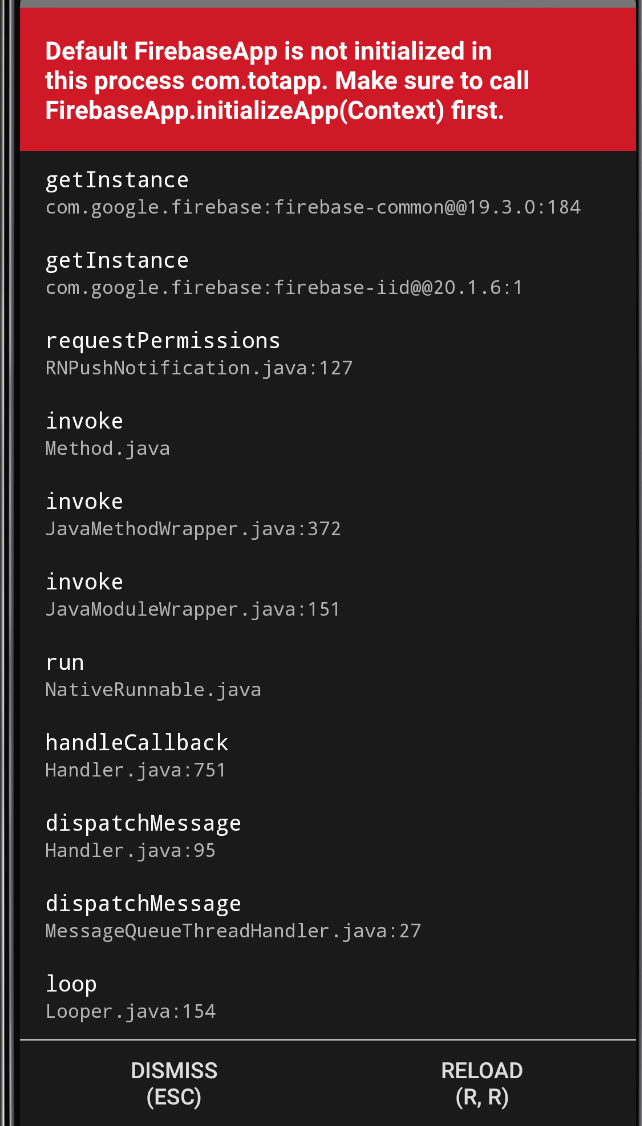
Edit3: I'm not using remote notifications or firebase in my application.
 alonzno
on 1 May 2020
alonzno
on 1 May 2020
Can you test this:
https://github.com/zo0r/react-native-push-notification/issues/1167#issuecomment-621999423
Dallas62
on 1 May 2020
Fixed my issue, thank you very much @Dallas62. I believe that the README should be updated to reflect this. I would update it but I'm new to git collaboration protocols and I'm unsure what is the proper method to do so.
alonzno
on 1 May 2020
Fixed my issue, thank you very much @Dallas62. I believe that the README should be updated to reflect this. I would update it but I'm new to git collaboration protocols and I'm unsure what is the proper method to do so.
Hi @alonzno, a PR is welcome ! 😃
Dallas62
on 1 May 2020
Related issues
 ssolida
·
3Comments
ssolida
·
3Comments
 DanDance
·
3Comments
DanDance
·
3Comments
 atteia
·
4Comments
atteia
·
4Comments
 selimonline
·
3Comments
selimonline
·
3Comments
 anativ
·
3Comments
anativ
·
3Comments
Most helpful comment
Can you test this:
https://github.com/zo0r/react-native-push-notification/issues/1167#issuecomment-621999423