React-native-push-notification: How to stop ongoing notification.
I'm unable to cancel an ongoing notification, no idea why. Has anybody encountered the same issue?
 moisesynfam
All 27 comments
Have you already tried with PushNotification.cancelLocalNotifications() or the PushNotification.cancelAllLocalNotifications() method?
 mo-patel
on 24 Nov 2019
mo-patel
on 24 Nov 2019
PushNotification.cancelLocalNotifications() doesn't work, PushNotification.cancelAllLocalNotifications() does but I don't want to clear all notifications, just the ongoing one.
moisesynfam
on 25 Nov 2019
This may be a bit obvious but I have to ask, PushNotification.cancelLocalNotification() requires an id parameter which references the notification that was set. Can you confirm that the correct id is being passed in? This seems to work for me as expected.
mo-patel
on 25 Nov 2019
@mo-patel AFAIU, PushNotification.cancelLocalNotification() is for android and requires an id and PushNotification.cancelAllLocalNotifications() is for ios. But,
is there a way to delete all android notifications at once without providing the id ?
Also, is there a way to get all the notification id number in an Array ?
 kaiyes
on 3 Dec 2019
kaiyes
on 3 Dec 2019
@kaiyes That is not necessarily true. You can use PushNotification.cancelAllLocalNotifications() on android too as i have used it myself.
On your second point, as of yet, i don't think there is any supported method of getting all notification id's. What i did instead was create and store the id of the notification in to a JSON object alongside all of it's other details. I then retrieved that entire object and used it accordingly.
mo-patel
on 4 Dec 2019
@mo-patel thanks. I just found that out yesterday when I got curious and just wanted to try and see if that works ! And it did. It's not mentioned anywhere ! Should be in the docs
kaiyes
on 5 Dec 2019
Also, PushNotification.clearLocalNotification(2) exists too, but is not working for me
 DrSchmurge
on 7 May 2020
DrSchmurge
on 7 May 2020
cancelLocalNotifications isnt working for me as well
I have made sure that id is correct-
PushNotification.cancelLocalNotifications({ id });
v- "react-native-push-notification": "^5.0.1",
 shubhamkes
on 16 Mar 2021
shubhamkes
on 16 Mar 2021
Hi,
You can use PushNotification.clearLocalNotification(tag, id), tag can be null.
Regards
 Dallas62
on 16 Mar 2021
Dallas62
on 16 Mar 2021
PushNotification.clearLocalNotification({id}) works fine when I am using repeatTime and repeatType.
However my motive is to remove the ongoing notification (targeted with id). But sadly its not working :(
Also tried to debug into native code and found out that
scheduledNotificationsPersistence.getAll().keySet()
doesn't seem to return anything
shubhamkes
on 16 Mar 2021
Hi @schumannd
PushNotification.clearLocalNotification(tag, id) doesn't accept an object.
Regards
Dallas62
on 16 Mar 2021
Oops I confused it with PushNotification.cancelLocalNotifications({id: '123'});
Tried clearLocalNotification as well rn, as per your suggestion.
Getting following error
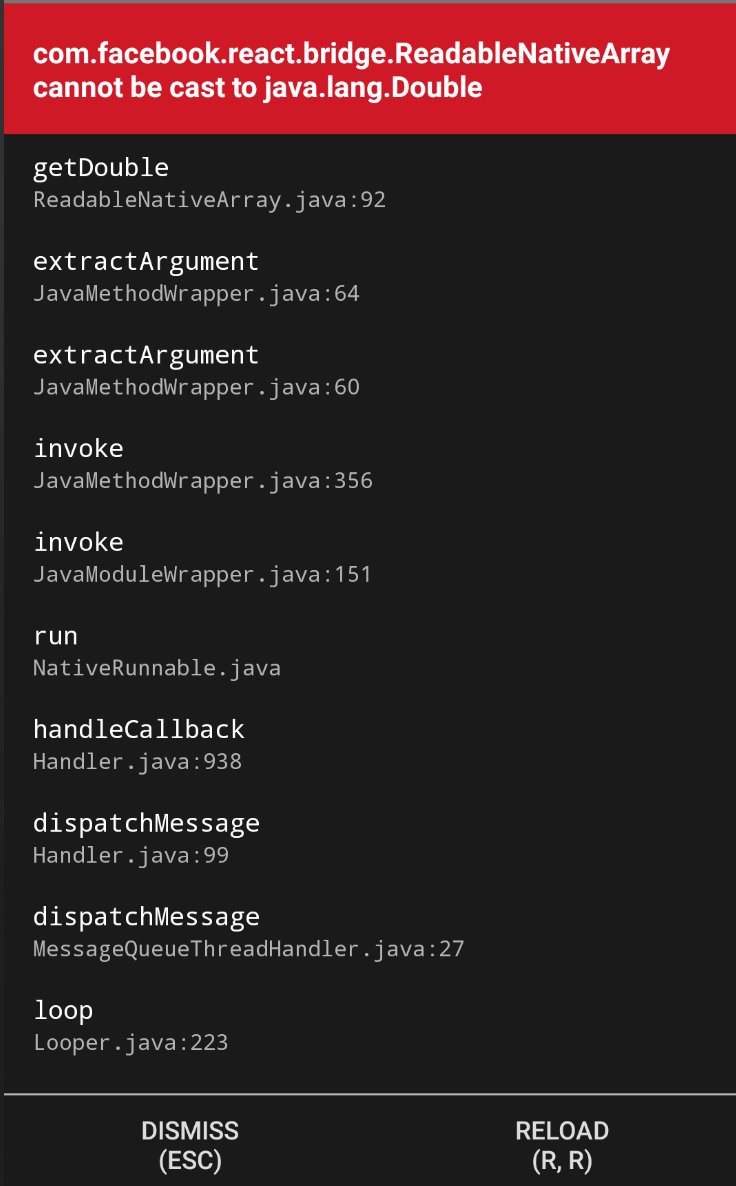
shubhamkes
on 16 Mar 2021
Hi @moisesynfam
What did you tried ?
It's seems you tried an object and as I said:
PushNotification.clearLocalNotification(tag, id) doesn't accept an object.
https://github.com/zo0r/react-native-push-notification/issues/1247#issuecomment-800053262
Dallas62
on 16 Mar 2021
PushNotification.clearLocalNotification(tag, '123'), where 123 is the identifier of notification.
This isnt working,
Had tried sending id as number as well, this step stopped crashing but it isnt clearing notification from notification center
shubhamkes
on 16 Mar 2021
Ok, and what is the code you are using to trigger the notification ?
Dallas62
on 16 Mar 2021
PushNotification.localNotification
shubhamkes
on 16 Mar 2021
If you don't publish all the parameters I can't help.
Dallas62
on 16 Mar 2021
PushNotification.localNotification({
    collapse_key: '123',
    channelId,
    url,
    largeIconUrl,
    bigPictureUrl,
    bigText,
    subText,
    title,
    message,

    /* Android Only Properties */
    autoCancel: true,
    tag: channelId,
    group: group,
    ongoing: convertedOnGoing,

    invokeApp: true,

    usesChronometer: false, // default: false.

    timeoutAfter: null,

    color,
    vibrate: true, // (optional) default: true
    vibration: '300', // vibration length in milliseconds, ignored if vibrate=false, default: 1000
    /* iOS only properties */
    alertAction: 'view', // (optional) default: view
    category: '', // (optional) default: empty string

    /* iOS and Android properties */
    // id: this.lastId, // (optional) Valid unique 32 bit integer specified as string. default: Autogenerated Unique ID
    userInfo: { id }
    playSound,
    soundName,
    number: 1,
    id,
});
I am triggering localNotification on receiving notification from firebase server
shubhamkes
on 16 Mar 2021
So you are using:
PushNotification.clearLocalNotification(tag, id);
where tag is the value of: channelId ?
Dallas62
on 16 Mar 2021
Yes, exactly
Apart from that have tried
js
 PushNotification.getDeliveredNotifications(({ ...props }) => {
         PushNotification.removeDeliveredNotifications([props[0].identifier]);
 });
Where in props value in console is
js
 {"0": {"body": "Notification body.", "group": "order2", "identifier": "223", "tag": "sk-notification-high-priority", "title": "Notification title!"}}
Sadly this method also not working
shubhamkes
on 16 Mar 2021
From a recent change, you can test:
https://github.com/zo0r/react-native-push-notification#5-removedeliverednotifications
PushNotification.removeDeliveredNotifications(identifiers);
where identifers is an array of notification id.
Dallas62
on 16 Mar 2021
Have tried that also, please check in above comment
shubhamkes
on 16 Mar 2021
Yes, but you didn't pass an array.
Dallas62
on 16 Mar 2021
Ooops, while trying here and there, I removed array.
But I had tried array also initially, but not worked :(
shubhamkes
on 16 Mar 2021
With PushNotification.removeDeliveredNotifications(identifiers); try to remove the tag option when calling:
PushNotification.localNotification()
Wow it worked 😃
Thank you for your time :)
shubhamkes
on 16 Mar 2021
If this issue is in latest version as well, Shall we add this gotcha to README ?
Do you want me to create a pr?
shubhamkes
on 17 Mar 2021
Related issues
 Kiran0791
·
3Comments
Kiran0791
·
3Comments
 GastonEDiaz
·
3Comments
GastonEDiaz
·
3Comments
 TfADrama
·
3Comments
TfADrama
·
3Comments
 ssolida
·
3Comments
ssolida
·
3Comments
 NiuQiaoling
·
3Comments
NiuQiaoling
·
3Comments
Most helpful comment
With
PushNotification.removeDeliveredNotifications(identifiers);try to remove thetagoption when calling: