React-native-push-notification: AndroidManifest.xml:22:18-91 Error:
Hi,
When configuring the push notification in the fresh project and run the application i got this error:
Error:
Attribute application@appComponentFactory value=(android.support.v4.app.CoreComponentFactory) from [com.android.support:support-compat:28.0.0] AndroidManifest.xml:22:18-91
is also present at [androidx.core:core:1.0.0] AndroidManifest.xml:22:18-86 value=(androidx.core.app.CoreComponentFactory).
Suggestion: add 'tools:replace="android:appComponentFactory"' to
"react-native": "0.59.9",
"react-native-push-notification": "3.1.3",
 Ethan0007
All 40 comments
I came to post about this too. Seems to be a new problem from today, due to a new gms version. Same problem is being discussed for react-native-device-info, where they already have a PR up https://github.com/react-native-community/react-native-device-info/pull/693/commits/ec930b3f61da83e46cd70ecd108e0fe7a873fcb0.
This same change makes react-native-push-notification work too, from my own testing, so hopefully that helps you for now, too.
 mattimck
on 18 Jun 2019
mattimck
on 18 Jun 2019
same issue here.
@mattimck I just changed the gms version in build.gradle of react-native-push-notificatoin as the link. but It didn't work. Could you explain how to apply it?
 uropsm
on 18 Jun 2019
uropsm
on 18 Jun 2019
with @mattimck 's solution,
I also changed firebase version to 17.6.0 and build is success.
Don't know yet if it works.
uropsm
on 18 Jun 2019
FYI, PR is here https://github.com/zo0r/react-native-push-notification/pull/1092
mattimck
on 18 Jun 2019
after watching @mattimck 's solution,
I changed one but it came with error 'Could not find com.google.firebase:firebase-messaging:16.1.0.'
so I changed firebase version to 17.6.0, but it did not help.
keeps showing same error.
 pram11
on 18 Jun 2019
pram11
on 18 Jun 2019
implementation "com.google.android.gms:play-services-gcm:${safeExtGet('googlePlayServicesVersion', '16.1.0')}"
implementation "com.google.firebase:firebase-messaging:${safeExtGet('firebaseVersion', '17.6.0')}"
uropsm
on 18 Jun 2019
Yep @pram11 , as @uropsm said, it should just be googlePlayServicesVersion that needs to be changed from + to 16.1.0. I didn't seem to need to change firebase at all, since it was already defined as a specific version, but curious how you go with it.
mattimck
on 18 Jun 2019
oh, I found I changed some before check this article. :)
pram11
on 18 Jun 2019
I had the same situation as @uropsm - just changing googlePlayServicesVersion wasn't enough, I also needed to change the firebaseVersion.
 jakubukrop
on 18 Jun 2019
jakubukrop
on 18 Jun 2019
I don't know the details well.
but the problem is today's release(of firebase-messaging, play-services-gcm) started supporting andoridx. Supporting androidx causes the error.
So need to fix to previous version.
com.google.firebase:firebase-messaging:17.6.0
com.google.android.gms:play-services-gcm:16.1.0
uropsm
on 18 Jun 2019
Hi,
the problem is that when we include the implementation project(':react-native-push-notification')
in app/build.gradle , i already update the
com.google.firebase:firebase-messaging:17.6.0
com.google.android.gms:play-services-gcm:16.1.0, but when building the app, got same issue.
thanks.
Ethan0007
on 18 Jun 2019
@Ethan0007
did you clean project after changing?
cd /yourproject/android
./gradlew clean
cd ..
react-native run-android
uropsm
on 18 Jun 2019
@uropsm yes sir, i do clean,
by the way this is my app/build.gradle,
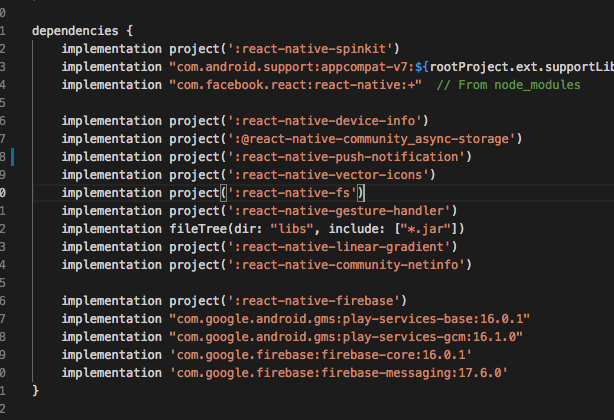
and build.gradle:
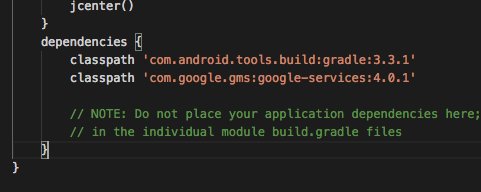
is it necessary to add play-service-base and play-service-gcm?
Ethan0007
on 18 Jun 2019
@uropsm but when i comment implementation project(':react-native-push-notification') my application works. but suddenly when i include it it give an same error above.
Ethan0007
on 18 Jun 2019
@Ethan0007
I changed node_modules/react-native-push-notification/andorid/build.gradle
not my project build.gradle
uropsm
on 18 Jun 2019
I had the same situation as @uropsm - just changing
googlePlayServicesVersionwasn't enough, I also needed to change thefirebaseVersion.
Quite right - apologies for bad information above. When I got home from work, discovered I also needed to fix the firebase version 👍
mattimck
on 18 Jun 2019
@uropsm sir, where did i put node_modules/react-native-push-notification/andorid/build.gradle ?
Ethan0007
on 18 Jun 2019
@uropsm in app/build.gradle
you can use this
dependencies {
    compile "com.google.android.gms:play-services-gcm:16.1.0"
    compile "com.google.firebase:firebase-messaging:17.6.0"
    compile (project(':react-native-push-notification')) {
        exclude group: "com.google.android.gms", module: "play-services-gcm"
        exclude group: "com.google.firebase", module: "firebase-messaging"
    }
    ...
}
 duongtungls
on 18 Jun 2019
duongtungls
on 18 Jun 2019
its working. thanks!
Ethan0007
on 18 Jun 2019
Getting this error after running yarn start (already used the listed fix):
events.js:183
throw er; // Unhandled 'error' event
^
Error: listen EADDRINUSE :::8081
at Server.setupListenHandle [as _listen2] (net.js:1360:14)
at listenInCluster (net.js:1401:12)
at Server.listen (net.js:1485:7)
at Promise (/home/virtumonde/Desktop/Development/InvestmentClicker1.0 (another copy)/node_modules/metro/src/index.js:253:20)
at new Promise (<anonymous>)
at Object.<anonymous> (/home/virtumonde/Desktop/Development/InvestmentClicker1.0 (another copy)/node_modules/metro/src/index.js:252:14)
at Generator.next (<anonymous>)
at asyncGeneratorStep (/home/virtumonde/Desktop/Development/InvestmentClicker1.0 (another copy)/node_modules/metro/src/index.js:46:24)
at _next (/home/virtumonde/Desktop/Development/InvestmentClicker1.0 (another copy)/node_modules/metro/src/index.js:66:9)
at <anonymous>
error Command failed with exit code 1.
Is someone else getting this?
 virtumonde
on 18 Jun 2019
virtumonde
on 18 Jun 2019
@virtumonde Error: listen EADDRINUSE :::8081
mean some where is running dev server on port 8081. You can terminate all terminals to close other dev server and yarn start again. If still doesn't work maybe restart computer finally solution
duongtungls
on 18 Jun 2019
@virtumonde
Error: listen EADDRINUSE :::8081
mean some where is running dev server on port 8081. You canterminate all terminalsto close other dev server andyarn startagain. If still doesn't work mayberestart computerfinally solution
Thanks for your help.
virtumonde
on 18 Jun 2019
What if I don't have or use play-services or firebase? I don 't have this dependency in build.graddle.
I am using only local notification schedule (configured in manifest) but still getting same error.
Thank you
 frattle
on 18 Jun 2019
frattle
on 18 Jun 2019
@duongtungls thanks for the immediate solution.
So I guess the problem ist with the line
node_modules//react-native-device-info/android/build.gradle: implementation "com.google.android.gms:play-services-gcm:$googlePlayServicesVersion"
and $googlePlayServicesVersion being not set and defaulting to :+ or something similar.
Another bundle react-native-device-info has solved the issue in the following way:
implementation "com.google.android.gms:play-services-auth:${safeExtGet('googlePlayServicesAuthVersion', '16.0.1')}"
should we use a similar solution for this project?
Also:
How does one set the variable $googlePlayServicesVersion? Setting that variable would seem like a cleaner solution than the one proposed by @duongtungls
 schumannd
on 18 Jun 2019
schumannd
on 18 Jun 2019
As a fix, you can add these to your gradle.properties so they'll get picked up by that safeExtGet function.
googlePlayServicesVersion=16.1.0
firebaseVersion=17.6.0
 gumballhead
on 18 Jun 2019
gumballhead
on 18 Jun 2019
@uropsm in
app/build.gradle
you can use thisdependencies { compile "com.google.android.gms:play-services-gcm:16.1.0" compile "com.google.firebase:firebase-messaging:17.6.0" compile (project(':react-native-push-notification')) { exclude group: "com.google.android.gms", module: "play-services-gcm" exclude group: "com.google.firebase", module: "firebase-messaging" } ... }
Still getting same error...
 kssai62
on 18 Jun 2019
kssai62
on 18 Jun 2019
@uropsm in
app/build.gradle
you can use thisdependencies { compile "com.google.android.gms:play-services-gcm:16.1.0" compile "com.google.firebase:firebase-messaging:17.6.0" compile (project(':react-native-push-notification')) { exclude group: "com.google.android.gms", module: "play-services-gcm" exclude group: "com.google.firebase", module: "firebase-messaging" } ... }Still getting same error...
You need clean project and re-sync Gradle before build
duongtungls
on 18 Jun 2019
As a fix, you add these to your
gradle.propertiesso they'll get picked up by thatsafeExtGetfunction.googlePlayServicesVersion=16.1.0 firebaseVersion=17.6.0
I tried with this way but got this error conflict with library react-native-camera
FAILURE: Build failed with an exception.
* What went wrong:
Could not resolve all files for configuration ':app:releaseRuntimeClasspath'.
> Could not find com.google.android.gms:play-services-vision:16.1.0.
@gumballhead ok thanks. This has been added only 3 Months ago, so an update of the package would be needed.
Edit: apparently it worked before that as well.
schumannd
on 18 Jun 2019
As a fix, you can add these to your
gradle.propertiesso they'll get picked up by thatsafeExtGetfunction.googlePlayServicesVersion=16.1.0 firebaseVersion=17.6.0
Thanks, this helped
frattle
on 18 Jun 2019
My team faced this issue in three different projects. Each one need a different fix and all are working fine now.
I mentioned all 3 fixes below
Solution 1:
implementation(project(":react-native-push-notification"), {
exclude group: "com.google.android.gms"
exclude group: "com.google.firebase"
})
After that the notifications stopped working here so I have to add this in my app/android/build.gradle:
ext {
googlePlayServicesVersion = "16.0.0"
firebaseVersion = "17.3.4"
}
Solution 2:
In another case i only added this line in my build.gradle file
ext {
buildToolsVersion = '28.0.3'
minSdkVersion = 23
compileSdkVersion = 27
targetSdkVersion = 27
supportLibVersion = '27.1.1'
// this line solve my problem
googlePlayServicesVersion = '16.+'
}
Solution 3:
Finally in app/build.gradle
you can use this
dependencies {
    compile "com.google.android.gms:play-services-gcm:16.1.0"
    compile "com.google.firebase:firebase-messaging:17.6.0"
    compile (project(':react-native-push-notification')) {
        exclude group: "com.google.android.gms", module: "play-services-gcm"
        exclude group: "com.google.firebase", module: "firebase-messaging"
    }
    ...
}
 jsmitrah
on 19 Jun 2019
jsmitrah
on 19 Jun 2019
project/build.gradle
......
ext {
googlePlayServicesVersion = "16.0.0"
firebaseVersion = "17.0.0"
}
react-native-device-info Also used!
 gh7800
on 20 Jun 2019
gh7800
on 20 Jun 2019
I am using both React-native-push-notifications and react-native-device-info.
implementation(project(":react-native-push-notification"), {
exclude group: "com.google.android.gms"
exclude group: "com.google.firebase"
})
implementation(project(":react-native-device-info"), {
exclude group: "com.google.android.gms"
exclude group: "com.google.firebase"
})
After that the notifications stopped working here so I have to add this in my app/android/build.gradle:
ext {
googlePlayServicesVersion = "16.0.0"
firebaseVersion = "17.3.4"
}
 kapilgorve
on 25 Jun 2019
kapilgorve
on 25 Jun 2019
Dose anyone has solution with this problem without replacing
implementation project(':react-native-push-notification')
by
compile (project(':react-native-push-notification')) {
        exclude group: "com.google.android.gms", module: "play-services-gcm"
        exclude group: "com.google.firebase", module: "firebase-messaging"
}
Because I have an automatic build system, react-native link only give me implementation project(':react-native-push-notification') and I can't edit that :((
 ThanhQuang1410
on 3 Jul 2019
ThanhQuang1410
on 3 Jul 2019
@jsmitrah thanks! Solution 1 did help me, but I also had to those lines:
implementation ("com.google.firebase:firebase-messaging:17.6.0",  {
      exclude group: "com.google.android.gms"
    })
 pedrosimao
on 9 Jul 2019
pedrosimao
on 9 Jul 2019
As a fix, you add these to your
gradle.propertiesso they'll get picked up by thatsafeExtGetfunction.googlePlayServicesVersion=16.1.0 firebaseVersion=17.6.0I tried with this way but got this error conflict with library
react-native-cameraFAILURE: Build failed with an exception. * What went wrong: Could not resolve all files for configuration ':app:releaseRuntimeClasspath'. > Could not find com.google.android.gms:play-services-vision:16.1.0.
Same issue
 ghost
on 30 Jul 2019
ghost
on 30 Jul 2019
As a fix, you add these to your
gradle.propertiesso they'll get picked up by thatsafeExtGetfunction.googlePlayServicesVersion=16.1.0 firebaseVersion=17.6.0I tried with this way but got this error conflict with library
react-native-cameraFAILURE: Build failed with an exception. * What went wrong: Could not resolve all files for configuration ':app:releaseRuntimeClasspath'. > Could not find com.google.android.gms:play-services-vision:16.1.0.
@tinpt123 did you try the way like my answer ?
duongtungls
on 30 Jul 2019
As a fix, you add these to your
gradle.propertiesso they'll get picked up by thatsafeExtGetfunction.googlePlayServicesVersion=16.1.0 firebaseVersion=17.6.0I tried with this way but got this error conflict with library
react-native-cameraFAILURE: Build failed with an exception. * What went wrong: Could not resolve all files for configuration ':app:releaseRuntimeClasspath'. > Could not find com.google.android.gms:play-services-vision:16.1.0.@tinpt123 did you try the way like my answer ?
yes, but fail :(
ghost
on 30 Jul 2019
As a fix, you add these to your
gradle.propertiesso they'll get picked up by thatsafeExtGetfunction.googlePlayServicesVersion=16.1.0 firebaseVersion=17.6.0I tried with this way but got this error conflict with library
react-native-cameraFAILURE: Build failed with an exception. * What went wrong: Could not resolve all files for configuration ':app:releaseRuntimeClasspath'. > Could not find com.google.android.gms:play-services-vision:16.1.0.@tinpt123 did you try the way like my answer ?
yes, but fail :(
add googlePlayServicesVisionVersion = "16.2.0" to worked for me
 xkevin190
on 10 Sep 2019
xkevin190
on 10 Sep 2019
This issue has been automatically marked as stale because it has not had recent activity. It will be closed in 30 days if no further activity occurs. Thank you for your contributions.
![github-actions[bot] picture](https://avatars.githubusercontent.com/in/15368?v=4&s=40) github-actions[bot]
on 10 Sep 2020
github-actions[bot]
on 10 Sep 2020
Related issues
 cidevant
·
3Comments
cidevant
·
3Comments
 anativ
·
3Comments
anativ
·
3Comments
 edwinharly
·
3Comments
edwinharly
·
3Comments
 nguyenvanphuc2203
·
3Comments
nguyenvanphuc2203
·
3Comments
 NiuQiaoling
·
3Comments
NiuQiaoling
·
3Comments
Most helpful comment
@uropsm in
app/build.gradleyou can use this