React-native-push-notification: Local Notifications not working on Android Oreo (target SDK 26)
Problem: Notifications are working fine on iOS, but when I run the app on my Android device with Oreo I get no notifications and the following error in my logs:
12-08 13:19:23.423 4324 26687 E NotificationService: No Channel found for pkg=com.saferackexample, channelId=null, id=1222192301, tag=null, opPkg=com.saferackexample, callingUid=10196, userId=0, incomingUserId=0, notificationUid=10196, notification=Notification(channel=null pri=1 contentView=null vibrate=[0,300] sound=content://settings/system/notification_sound defaults=0x4 flags=0x10 color=0x00000000 category=call vis=PRIVATE)
compileSdkVersion:` 26,
buildToolsVersion: 26.0.02,
build.gradle dependencies:
dependencies {
    compile project(':react-native-push-notification')
    compile(project(':react-native-maps')){
        exclude group: 'com.google.android.gms', module: 'play-services-base'
        exclude group: 'com.google.android.gms', module: 'play-services-maps'
      }
    compile project(':react-native-background-geolocation')
    compile(name: 'tslocationmanager', ext: 'aar')
    compile fileTree(dir: "libs", include: ["*.jar"])
    compile "com.android.support:appcompat-v7:26.1.0"
    compile "com.facebook.react:react-native:+"  // From node_modules

    compile ("com.google.android.gms:play-services-base:11.6.0") {
        force = true;
    }
    compile ("com.google.android.gms:play-services-maps:11.6.0") {
        force = true;
    }
    compile ("com.google.android.gms:play-services-gcm:11.6.0") {
        force = true;
    }
    compile ("com.google.android.gms:play-services-location:11.6.0") {
        force = true;
    }
}
I installed the package exactly as described in the repo and I'm only looking to use local notifications in my app. Has anyone come across this or have a possible solution?
Thank you very much for your assistance.
 rhysgoehring
All 16 comments
Same here. I hope react-native developers will release a own android notification library soon.
 piu130
on 11 Dec 2017
piu130
on 11 Dec 2017
I have forked this library adding this:
compile 'com.android.support:appcompat-v7:26.0.+'
in react-native-push-notification/android/build.gradle
and
NotificationCompat.Builder notification = new NotificationCompat.Builder(context, "channelId")
NotificationManager notificationManager = notificationManager();
if (Build.VERSION.SDK_INT >= Build.VERSION_CODES.O) {
int importance = NotificationManager.IMPORTANCE_HIGH;
NotificationChannel notificationChannel = new NotificationChannel("quartermaster", "quartermaster", importance);
notificationChannel.enableLights(true);
notificationChannel.setLightColor(Color.RED);
notificationChannel.enableVibration(true);
notificationChannel.setVibrationPattern(new long[]{100, 200, 300, 400, 500, 400, 300, 200, 400});
notificationManager.createNotificationChannel(notificationChannel);
}
both in react-native-push-notification/android/src/main/java/com/dieam/reactnativepushnotification/modules/RNPushNotificationHelper.java
Unfortunately I have badges working - but the intents aren't working fully.
 dlimx
on 12 Dec 2017
dlimx
on 12 Dec 2017
@dlimx Have you had any luck getting your fork to work for local notifications on Oreo?
rhysgoehring
on 19 Dec 2017
@rhysgoehring I simply disabled the service for the time being to prevent crashes... unfortunately not in a state where I can refactor or really fork the library :(
dlimx
on 20 Dec 2017
For anyone else struggling with this. I got around this issue by downgrade my target sdk version to 25. Not ideal but works until a proper fix is merged in.
In app/build.gradle
...
targetSdkVersion 25
...
 adamjacob
on 30 Jan 2018
adamjacob
on 30 Jan 2018
Same issue.. +1
 sandropoluan
on 2 Feb 2018
sandropoluan
on 2 Feb 2018
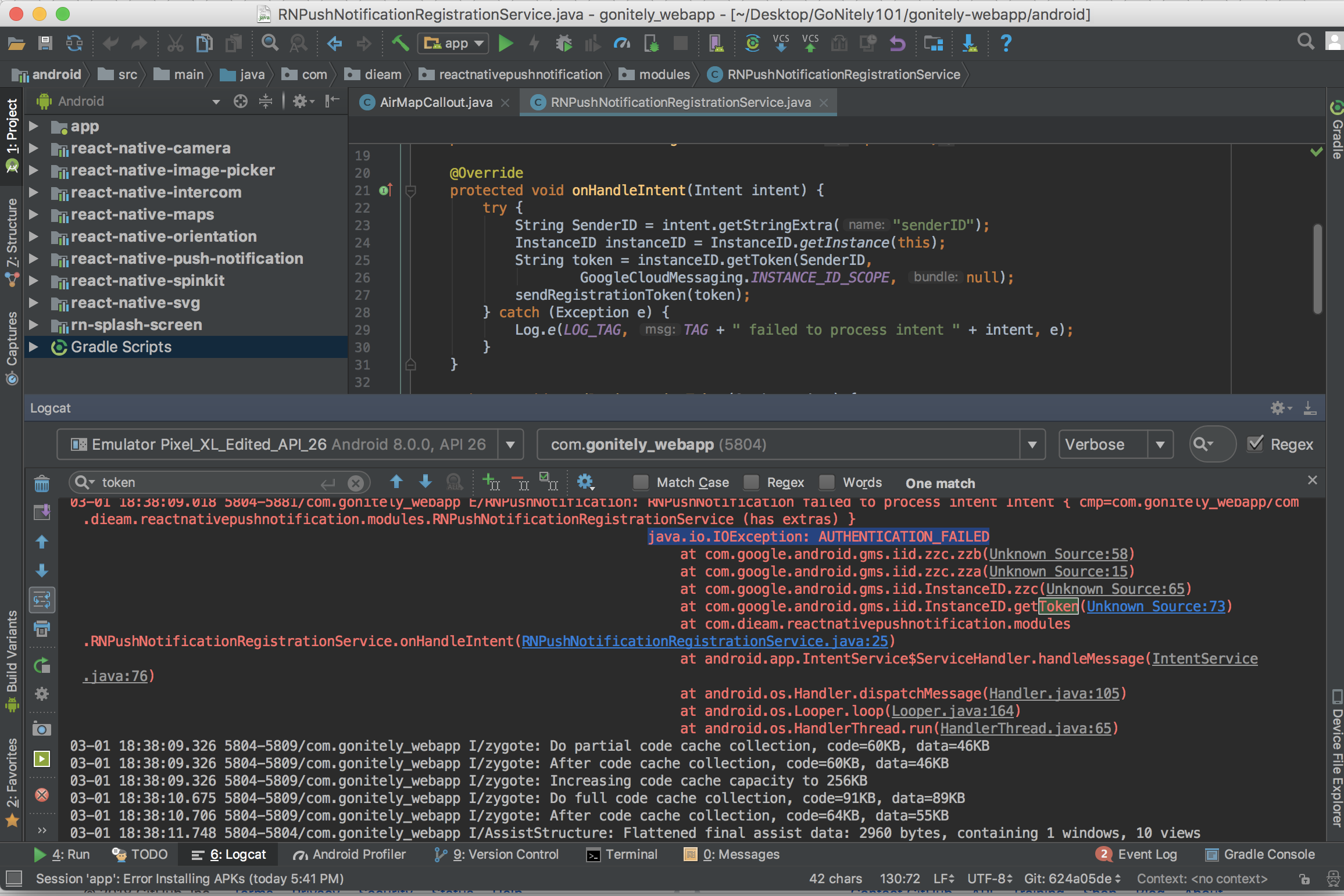
Anyone was able to resolve this issue? I have a problem with Android Oreo, all other devices work except Android Oreo .. (this is Android Studio logcat attached, I am using target SDK 26)
 sheydarezaee
on 2 Mar 2018
sheydarezaee
on 2 Mar 2018
This PR should fix the problem. You can also change targetSdkVersion to 25 as mentioned above.
piu130
on 3 Mar 2018
thanks @piu130 with https://github.com/zo0r/react-native-push-notification/pull/657 update, I am able to receive notifications, but app crashes upon receiving notifications. I tested this when app is closed. any resolution on that?
sheydarezaee
on 6 Mar 2018
Same issue here. Any update on when this PR is going in?
 Stevespear426
on 22 Mar 2018
Stevespear426
on 22 Mar 2018
Well, after RN 0.56 release it seems even more important for this lib to have proper support for SDK 26+.
 wregis
on 8 Jul 2018
wregis
on 8 Jul 2018
PR #657 was merged some days ago. Can you check it's working well on Oreo by using the package from github directly ?
We will release a npm package when we are sure it's working well for everyone.
 Gp2mv3
on 9 Jul 2018
Gp2mv3
on 9 Jul 2018
@Gp2mv3 Hi, I installed the package directly from github repo but it still didn't work as expected on Oreo with targetSDK 27. Workaround was to set gradle property DEFAULT_COMPILE_SDK_VERSION in react-native-push-notification module build.gradle like this (note the DEFAULT_COMPILE_SDK_VERSION):
def DEFAULT_COMPILE_SDK_VERSION = 27
def DEFAULT_BUILD_TOOLS_VERSION = "23.0.1"
def DEFAULT_TARGET_SDK_VERSION = 23
def DEFAULT_SUPPORT_LIB_VERSION = "23.1.1"
def DEFAULT_GOOGLE_PLAY_SERVICES_VERSION = "+"
 marjan89
on 17 Jul 2018
marjan89
on 17 Jul 2018
Same for me, local notification not working in oreo
 roysG
on 20 Dec 2018
roysG
on 20 Dec 2018
For Android Oreo support on localNotification, I added these lines in manifest
<application ... >

    <meta-data  android:name="com.dieam.reactnativepushnotification.notification_channel_name"
        android:value="YOUR NOTIFICATION CHANNEL NAME"/>

    <meta-data  android:name="com.dieam.reactnativepushnotification.notification_channel_description"
        android:value="YOUR NOTIFICATION CHANNEL DESCRIPTION"/>

    <!-- Change the resource name to your App's accent color - or any other color you want -->
    <meta-data  android:name="com.dieam.reactnativepushnotification.notification_color"
        android:resource="@android:color/white"/>

    ...
as mentioned in localNotificationSchedule configuration here
 mtiziano
on 11 Jan 2019
mtiziano
on 11 Jan 2019
Add Notification Chanel in MainActivity.java
public void onResume() {
        super.onResume();
        NotificationManager nMgr = (NotificationManager) getSystemService(Context.NOTIFICATION_SERVICE);
        if (Build.VERSION.SDK_INT >= Build.VERSION_CODES.O) {
            int importance = NotificationManager.IMPORTANCE_HIGH;

            NotificationChannel notificationChannel = new NotificationChannel("appChannel", "appchannel", importance);
            notificationChannel.enableLights(true);
            notificationChannel.setLightColor(Color.RED);
            notificationChannel.enableVibration(true);
            notificationChannel.setVibrationPattern(new long[]{100, 200, 300, 400, 500, 400, 300, 200, 400});
            nMgr.createNotificationChannel(notificationChannel);
        }

        nMgr.cancelAll();
    }
 ABibin
on 29 May 2019
ABibin
on 29 May 2019
Related issues
 anativ
·
3Comments
anativ
·
3Comments
 cookienawer
·
3Comments
cookienawer
·
3Comments
 Benzer1406
·
3Comments
Benzer1406
·
3Comments
 edwinharly
·
3Comments
edwinharly
·
3Comments
 atteia
·
4Comments
atteia
·
4Comments
Most helpful comment
For anyone else struggling with this. I got around this issue by downgrade my target sdk version to 25. Not ideal but works until a proper fix is merged in.
In app/build.gradle