React-native-push-notification: Android 8 (Oreo) support & state of repo
First off, as a fellow open source maintainer, I'd like to thank @zo0r @npomfret (and everyone) for the job they did in maintaining this library for a long time but (and trust me I'm sorry about this) right now this repo is basically abandoned; nobody answers issues nor reviews PRs nor updates the lib since months.
Please, allow new blood to jump in and keep the library at least maintained if not actively developed upon. Or transfer it to somebody else. Push notifications are a core feature for many react native apps and it's not good to rely on a fork. I suggest you ask to the React Native Community to at least take it over so that other people can help with it.
That said, I'm using react-native 0.49 and build tools 26 and when I tried our prod app on an Android 8 device, when I set up the push notifications in the app a toast message appears:
developer warning for package <app_name> failed to post notification on channel null see log for more details
By doing a quick search it looks like in Android O:
Starting in Android 8.0 (API level 26), notification channels allow you to create a user-customizable channel for each type of notification you want to display. Notification channels provide a unified system to help users manage notifications. When you target Android 8.0 (API level 26), you must implement one or more notification channels to display notifications to your users. If you don't target Android 8.0 (API level 26) but your app is used on devices running Android 8.0 (API level 26), your app behaves the same as it would on devices running Android 7.1 (API level 25) or lower.
By looking around it shouldn't be too hard to implement this on the native side:
And no, I cannot move back to lower build tools because of other libs I'm using.
 kelset
All 24 comments
Nice attitude!
Waiting for the positive answer of the creators.
 ital0
on 17 Oct 2017
ital0
on 17 Oct 2017
I do have to ask, since it has now been a month since this issue was filed... @zo0r What is the state of the repo? The last change was at the end of August. Any news?
 ErikMikkelson
on 17 Nov 2017
ErikMikkelson
on 17 Nov 2017
@kelset @ital0 @ErikMikkelson
As I said before, contributors are welcome.
I don't really have the time to review and accept all PR, I only accept breaking RN fixes (as @npomfret), if you want to be a maintainer, please drop me an email.
Also keep on mind when adding new features and breaking changes that this package is used by many apps out there (if you want to be a maintainer).
 zo0r
on 17 Nov 2017
zo0r
on 17 Nov 2017
As I said before, contributors are welcome.
Where? Moreover, you haven't accepted a PR in months.
if you want to be a maintainer, please drop me an email.
I did. July 20th. Got no answer.
Now I can't anymore, but, again:
Please, allow new blood to jump in and keep the library at least maintained if not actively developed upon. Or transfer it to somebody else. Push notifications are a core feature for many react native apps and it's not good to rely on a fork. I suggest you ask to the React Native Community to at least take it over so that other people can help with it.
kelset
on 17 Nov 2017
So is this package not compatible with Oreo?
 rhysgoehring
on 8 Dec 2017
rhysgoehring
on 8 Dec 2017
I have forked this library adding this:
compile 'com.android.support:appcompat-v7:26.0.+'
in react-native-push-notification/android/build.gradle
and
NotificationCompat.Builder notification = new NotificationCompat.Builder(context, "channelId")
NotificationManager notificationManager = notificationManager();

if (Build.VERSION.SDK_INT >= Build.VERSION_CODES.O) {
  int importance = NotificationManager.IMPORTANCE_HIGH;

  NotificationChannel notificationChannel = new NotificationChannel("quartermaster", "quartermaster", importance);
  notificationChannel.enableLights(true);
  notificationChannel.setLightColor(Color.RED);
  notificationChannel.enableVibration(true);
  notificationChannel.setVibrationPattern(new long[]{100, 200, 300, 400, 500, 400, 300, 200, 400});
  notificationManager.createNotificationChannel(notificationChannel);
}
both in react-native-push-notification/android/src/main/java/com/dieam/reactnativepushnotification/modules/RNPushNotificationHelper.java
Unfortunately I have badges working - but the intents aren't working fully. Any help here would be appreciated.
 dlimx
on 12 Dec 2017
dlimx
on 12 Dec 2017
+1
This lib is not working on Android Oreo
 sandropoluan
on 5 Feb 2018
sandropoluan
on 5 Feb 2018
Guys, we faced the same issue in our app. No notifications were showing up on devices with Android 8 on them. It turned out the fix was easy. Just go into your app/build.gradle and switch your targetSdkVersion from 26 to 25. Leave everything else as it is. You don't have to lower the buildToolsVersion or compileSdkVersion.
 eyeCU113
on 15 Mar 2018
eyeCU113
on 15 Mar 2018
@sandropoluan @eyeCU113 @rhysgoehring @kelset
I added your changes in to the Community Edition clone I created of this Library located here: https://github.com/calcazar/react-native-push-notification-CE
 calcazar
on 25 Apr 2018
calcazar
on 25 Apr 2018
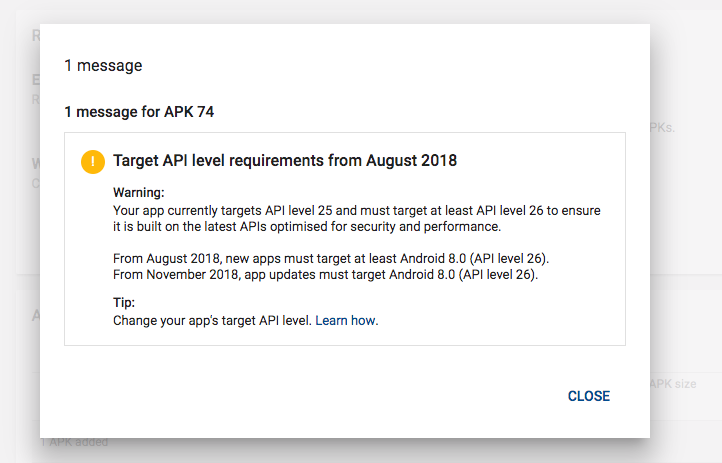
@zo0r It looks like in August 2018 the Google App store will not allow apps targeting API versions before 26 (Oreo) so this issue may need to be fixed or this library will become unusable by production apps.
 jacobbeasley
on 14 May 2018
jacobbeasley
on 14 May 2018
@calcazar Could you submit a PR for this fix and could we perhaps get it merge dback into react-native-push-notification? Thanks!
jacobbeasley
on 14 May 2018
I have a handful of other PR's/Changes/fixes in my clone that fix other issues like FCM support or the notifications not calling onNotification on tap.
This project is a stone's throw away from abandoned so I'd recommend forking or using my clone. I'm actively approving PR's and accepting contributors as I don't want to be the only one supporting the library :)
With all that said.. if you think it would help, I can get a PR this evening. I can't make promises that @zo0r would merge it in and publish to npm though :(
calcazar
on 14 May 2018
Well, this existing project has 2800 stars, 653 forks, and 83 watchers... so might be nice to keep it alive at least for now. You are right, though... might be worth forking it at some point. Maybe @zo0r would also consider adding you as a contributor since you are actively maintaining it and fixing issues.
jacobbeasley
on 14 May 2018
I wouldn't mind.. w.e we have to do to get this library updated and supported has my vote. @zo0r
calcazar
on 14 May 2018
Based on @zo0r 's github profile, it looks like his last commit was May 8th, so just a week ago. He normally commits almost daily, so I bet he's just on vacation for a couple weeks. So, lets give him a week or two to respond. He may be willing to promote someone to a contributor who can merge PRs and review PRs.
jacobbeasley
on 15 May 2018
Otherwise, if we do have someone maintaining it in another fork, he may be willing to update the README to refer people to the new fork that is now being maintained. That is a common pattern in open source projects like this.
jacobbeasley
on 15 May 2018
@jacobbeasley - Do you have a source for this comment? Thanks for the insight, I'd like to read a little more.
It looks like in August 2018 the Google App store will not allow apps targeting API versions before 26 (Oreo) so this issue may need to be fixed or this library will become unusable by production apps.
 hannigand
on 16 May 2018
hannigand
on 16 May 2018
@hannigand
 doodlemoonch
on 16 May 2018
doodlemoonch
on 16 May 2018
Is there an update on the state of this repo ? It seems the repo isn't maintained any-more and a lot of apps are using it (mine too).
Is there an alternative if this package is dead ?
 Gp2mv3
on 3 Jul 2018
Gp2mv3
on 3 Jul 2018
@Gp2mv3 I recently added push notification to my project. since this repo seems not to be updated soon, I use this package:
react-native-firebase
 AliRadmanesh
on 27 Aug 2018
AliRadmanesh
on 27 Aug 2018
@AliRadmanesh Do you mind if i ask how you migrated over to Firebase? We need to as part of our project due to GCM being discontinued, but i'm having no end of trouble in setting it up?
 KemikalGeneral
on 17 Oct 2018
KemikalGeneral
on 17 Oct 2018
@KemikalGeneral of course. Installation is a long process. I just can show you the links I used to connect my project with firebase and react-native-firebase module.
follow this links (all things you need is in this site and google firebase console website):
https://rnfirebase.io/
read this link: https://rnfirebase.io/docs/v5.x.x/notifications/introduction
read Notification section carefully to find out what kind of notification you need.
then you have to follow step by step the manual to install the module.
But before all of these, first I highly recommend you to install and test Basic Starter Kit of RNFirebase module. It has all features of this module inside.
AliRadmanesh
on 17 Oct 2018
what the update of this issue still occurring.. can you give me the solution :(
 tiffanym19
on 6 Nov 2019
tiffanym19
on 6 Nov 2019
@eyeCU113 Thanks for the fix. I encountered the same issue but downgrading the target SDK version really worked.
 absb1625
on 29 Dec 2020
absb1625
on 29 Dec 2020
Related issues
 selimonline
·
3Comments
selimonline
·
3Comments
 TfADrama
·
3Comments
TfADrama
·
3Comments
 cookienawer
·
3Comments
cookienawer
·
3Comments
 Kiran0791
·
3Comments
Kiran0791
·
3Comments
 cidevant
·
3Comments
cidevant
·
3Comments
Most helpful comment
Guys, we faced the same issue in our app. No notifications were showing up on devices with Android 8 on them. It turned out the fix was easy. Just go into your app/build.gradle and switch your targetSdkVersion from 26 to 25. Leave everything else as it is. You don't have to lower the buildToolsVersion or compileSdkVersion.