React-native-push-notification: localNotificationSchedule is firing inmidiatly
If I use the code like in the example
date: new Date(Date.now() + (60 * 1000))
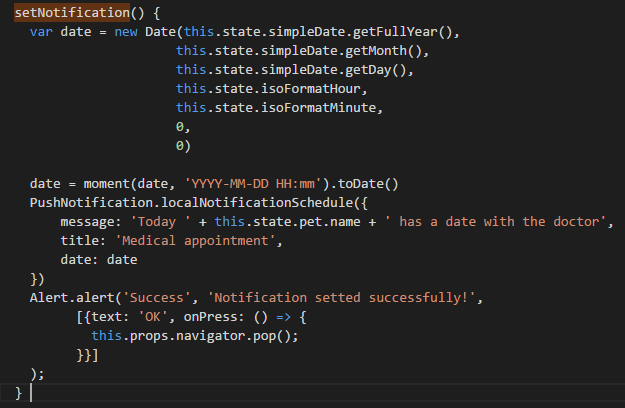
It works perfectly but if I try to create a date with some parameters it fires the notification inmidiatly, the date is well formed.
Here is a screenshot of my code
 josehernandezv
All 8 comments
Maybe the device where you're testing could has a different hour than your local system. Take into account that Date.now() gets the system hour, not the device's hour (At least if you're using a virtual device) and notification is fired according system hour, not device' hour. When you set a schedule notification in the past the notification appears inmediatly
 germanst
on 11 Jul 2017
germanst
on 11 Jul 2017
Same issue here. I have a lot of future dateTime to schedule.. and all are firing immediately. On param date i'm using a UTC Datetime...
 joaom182
on 19 Mar 2018
joaom182
on 19 Mar 2018
Hi @joaom182
Did you find the solution?
 marcelodesouza
on 29 May 2018
marcelodesouza
on 29 May 2018
I am facing the same problem,did anyone got the solution?
 imsinghdurgesg
on 20 Nov 2018
imsinghdurgesg
on 20 Nov 2018
the problem is we are setting notification time in past, so it fires immediately in android but iOS ignore
all the notifications which is set with past time.
 faisal3413
on 3 Jan 2019
faisal3413
on 3 Jan 2019
Hi @marcelodesouza in localNotificationSchedule method , date can not be past day date otherwise it will fire immediately , so you have to put a logic if date is past day then just add 7 day with same time(hour,minute...) . It will work, as it worked for me.
imsinghdurgesg
on 8 Jan 2019
you can use format: new Date("July 31, 2019 16:00:00")
 ghost
on 1 Aug 2019
ghost
on 1 Aug 2019
This issue has been automatically marked as stale because it has not had recent activity. It will be closed in 30 days if no further activity occurs. Thank you for your contributions.
![github-actions[bot] picture](https://avatars.githubusercontent.com/in/15368?v=4&s=40) github-actions[bot]
on 1 Aug 2020
github-actions[bot]
on 1 Aug 2020
Related issues
 selimonline
·
3Comments
selimonline
·
3Comments
 nidzovito
·
3Comments
nidzovito
·
3Comments
 DaniShalash
·
3Comments
DaniShalash
·
3Comments
 DanDance
·
3Comments
DanDance
·
3Comments
 edwinharly
·
3Comments
edwinharly
·
3Comments
Most helpful comment
Hi @marcelodesouza in localNotificationSchedule method , date can not be past day date otherwise it will fire immediately , so you have to put a logic if date is past day then just add 7 day with same time(hour,minute...) . It will work, as it worked for me.