React-native-push-notification: "Native module cannot be null"
I just upgrade React-native from 0.28 to 0.30, and get this error:
"Native module cannot be null"
I tried reinstall npm and remove all build files.
What can I do?
 hedegren
All 46 comments
I have the same problem today on iOS.
I think this has nothing to do with this repository, might be better to submit this issue / ask for help in react-native repository.
On the other hand, if this repository is using "require" instead of "import", the issue might be here. I did not manage to solve this problem today.
 tomazahlin
on 1 Aug 2016
tomazahlin
on 1 Aug 2016
I think you need to link it first:
https://facebook.github.io/react-native/docs/pushnotificationios.html
 fmnxl
on 2 Aug 2016
fmnxl
on 2 Aug 2016
For example, I had it linked, but I still got this error. Today my coworker updated react-native to 0.31-rc. He said it solved the issue, but I haven't tried myself yet.
tomazahlin
on 2 Aug 2016
I run it on real iPad device successfully, but got the same error on iOS emulator.
info:
react-native 0.31.0
 charlesLin
on 10 Aug 2016
charlesLin
on 10 Aug 2016
Any solutions on that? i have this error on emulator and on iphone it stopped loading the bundle ( might smth else cause this issue with bundle but it happened at the same time = ))
react-native 0.31.0
 zo-chu
on 14 Aug 2016
zo-chu
on 14 Aug 2016
I am getting the same error, has this been fixed. I am on RN 0.32
 bkhanal
on 5 Sep 2016
bkhanal
on 5 Sep 2016
Have you checked in your MainApplicaiton that its been linked correctly? I think this is a common cause of this issue
 npomfret
on 15 Sep 2016
npomfret
on 15 Sep 2016
Same issue on RN 0.32, in iOS, please if anyone has been able to fix this let us know.
BTW – It all works fine on Android, the problem is only in iOS for me... I have linked libraries as per the official PushNotificationIOS docs. Any clues @charlesLin @tomazahlin @hedegren ??
 CharlieIGG
on 20 Sep 2016
CharlieIGG
on 20 Sep 2016
Rebuilding and running the app from Xcode did the trick for me.
 thbwd
on 26 Sep 2016
thbwd
on 26 Sep 2016
You do really need to go through manual procedure to get it work https://facebook.github.io/react-native/docs/linking-libraries-ios.html#manual-linking if you don't have a developer account in apple center
 antoniopuero
on 8 Oct 2016
antoniopuero
on 8 Oct 2016
No, just follow the instructions in the readme.
npomfret
on 10 Oct 2016

I'm having the same issue. My versions are as follows:
- "react-native": "0.39.2",
- "react-native-push-notification": "^2.2.1"
I've removed /node_modules /android /ios folders. Then ran the following commands in that order: - npm install
- react-native upgrade
- react-native link
It seems the culprit is the required/import problem.
If you change the following line from: - const NativeEventEmitter = require('NativeEventEmitter');
to this: - import NativeEventEmitter from 'NativeEventEmitter';
That did the trick. However, I shouldn't be changing the node_modules files. This should be fixed.
 tanapaydin
on 10 Feb 2017
tanapaydin
on 10 Feb 2017
Where do you change the require to import? What file(s)?
 liftyourgame
on 16 Apr 2017
liftyourgame
on 16 Apr 2017
Just done a fresh RN latest install and get the same error.
 quantuminformation
on 27 Apr 2017
quantuminformation
on 27 Apr 2017
Same error on ios after update to 0.44.


I reinstall node_modules, clear all caches, nothing helps.
 alexeyMohnatkin
on 15 May 2017
alexeyMohnatkin
on 15 May 2017
following the instructions on RA site about linking helped for me https://facebook.github.io/react-native/docs/linking-libraries-ios.html#manual-linking
 zalesky
on 22 May 2017
zalesky
on 22 May 2017
What I did to fix this was:
- Close all open react-native packagers
- Clean the build
- Run the app
Simply running the app via the command line didn't work for me.
 jamesone
on 24 Oct 2017
jamesone
on 24 Oct 2017
Same error with react-native '^0.52.2'
I did the react-native upgrade and this issue occurs.
I did manual linking also but not able to resolve.

 malangaveuday
on 5 Feb 2018
malangaveuday
on 5 Feb 2018
@malangaveuday, have you followed the instructions outlined here: https://facebook.github.io/react-native/docs/pushnotificationios.html?
 e2o
on 7 Feb 2018
e2o
on 7 Feb 2018
I have linked it manually for 8 times today already and it is still not working... Any help would be appreciated. I can see below that it is not recognising react-native-push-notification but it is recognising a different on (which I don't want to use but just added as a test)
rnpm-install info Android module react-native-notifications is already linked
rnpm-install info iOS module react-native-notifications is already linked
rnpm-install info Android module react-native-push-notification is already linked
rnpm-install info Linking assets to ios project
rnpm-install info Linking assets to android project
rnpm-install info Assets have been successfully linked to your project
 ghost
on 5 Apr 2018
ghost
on 5 Apr 2018
@malangaveuday did you manage to resolve this issue? I am having the exact same with main.jsbundle
 mproctor340
on 10 Apr 2018
mproctor340
on 10 Apr 2018
We use CocoaPods in our project and simple linking doesn't work.
react-native version: 0.54.3
Here is a how-to for CocoaPods users:
- Add PushNotification subspec to Podfile:
pod 'React', :path => '../node_modules/react-native', :subspecs => [
    'Core',
    ...
    'RCTPushNotification',
    ...
  ]
- Execute
pod updateTerminal when you iniosfolder - Open
*.xcworkspaceworkspace file in XCode (for our 0.54.3 react-native version the only working XCode version is 9.2) - Choose the first tab on the left pane
- There are two top-most projects in your left pane now - Pods and your project, expand your project
- Open Libraries folder
- Open node_modules folder in Finder and find
RCTPushNotification.xcodeprojfile - Drag
RCTPushNotification.xcodeprojfile from Finder toLibrariesfolder in XCode - Choose your target on the right in Xcode -> General tab
- Scroll to Linked Frameworks and Libraries
- Tap on plus sign
- Enter
libRCTPushNotificationin search input field (not tvOS) - If it's found - add it to the project
- Try to build you project via
react-native run-iosand then run it
I hope it will work for you, mates 🤗
 8of
on 23 Apr 2018
8of
on 23 Apr 2018
I have a native app and I bundled my react-native app as in this documentation. I am also getting the same error what I will do?
 sarath-rp
on 22 May 2018
sarath-rp
on 22 May 2018
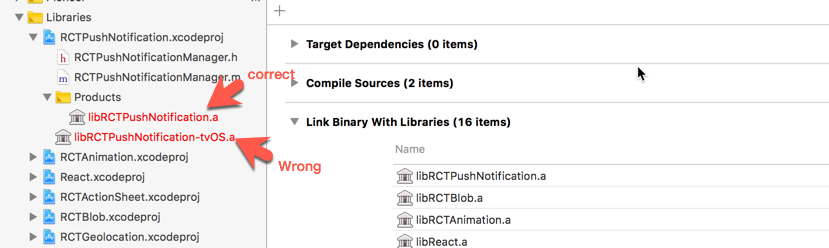
Followed the instructions https://facebook.github.io/react-native/docs/pushnotificationios.html still got Native Module cannot be null
Then found that I linked a wrong file. Correct it and delete build and node_modules, run npm install and react-native run-ios, works!
 Lie8466
on 30 May 2018
Lie8466
on 30 May 2018
Alright this took me forever to figure out. Shoutout to @8of his solution worked great for me. I started with an expo app using create-react-native-app but had to detach to ExpoKit for _reasons_.
@8of 's solution works great for detached expo applications. After adding
pod 'React', :path => '../node_modules/react-native', :subspecs => [
    'Core',
    ...
    'RCTPushNotification',
    ...
  ]
To my podfile, it worked flawlessly. I was able to follow the remaining steps from the FB docs here : https://facebook.github.io/react-native/docs/pushnotificationios.html#content
Hope this helps someone! It took me way too long to figure it out.
 lsirdevan
on 25 Jul 2018
lsirdevan
on 25 Jul 2018
I had the same problem with create-react-native-app. I had to delete the import * as StatusBar from "react-native"; line to fix it.
 sbichenko
on 9 Sep 2018
sbichenko
on 9 Sep 2018
This was weird... I eventually just had to link manually. The lesson? Don't trust react-native link!
 Radilx
on 13 Sep 2018
Radilx
on 13 Sep 2018
I have React Native project and Native app combined. And I have version of react native 0.57.0
and React version "react": "16.5.0", screen shoot attached.
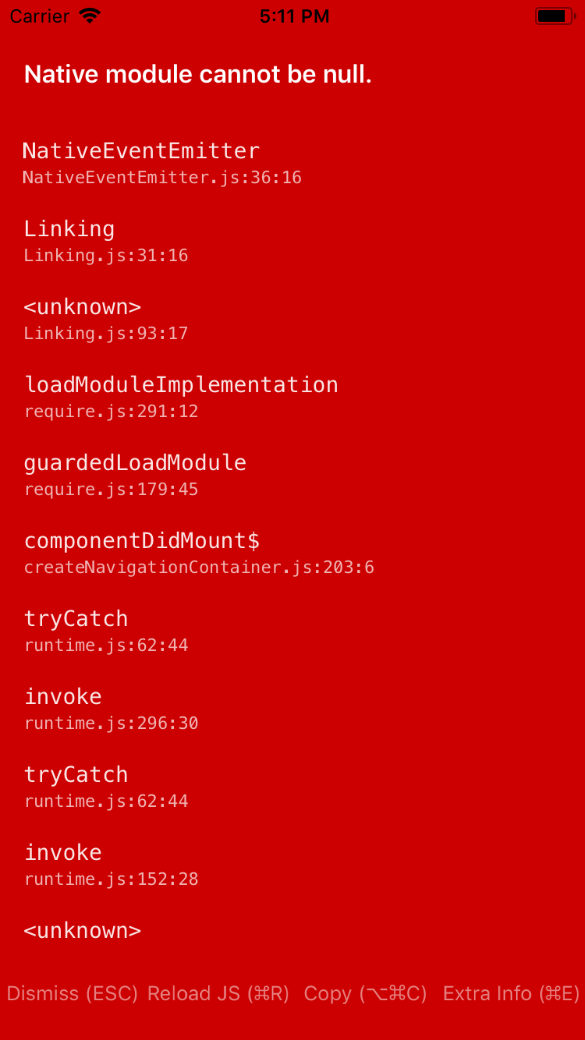
any one help regarding on that.
 anilkumar1505
on 20 Nov 2018
anilkumar1505
on 20 Nov 2018
how to solve the problem above?
 duonghan
on 6 Dec 2018
duonghan
on 6 Dec 2018
I had same problem and issue is fixed by running POD update command then expo start and reinstall build.
 rb162215
on 12 Mar 2019
rb162215
on 12 Mar 2019
try running react-native link.
worked for me
 shlok97
on 19 Mar 2019
shlok97
on 19 Mar 2019
Just a note for anyone as dumb as me. I have multiple RN projects and I had this problem because I had metro running for the wrong project
 brenwell
on 28 Mar 2019
brenwell
on 28 Mar 2019
WRONG WAY (Old message to keep the history)
To solve RN 0.60: - add `pod 'React-RCTPushNotification', :path => '../node_modules/react-native/Libraries/PushNotificationIOS'` to `ios/Podfile` - execute `pod install` - execute `react-native run-ios`
Check the next answers.
 umbrella-kirill-karpov
on 25 Jul 2019
umbrella-kirill-karpov
on 25 Jul 2019
remove react-native-push-notification in node_modules
run npm install [email protected]
 cumen
on 5 Aug 2019
cumen
on 5 Aug 2019
Thanks @cumen This happened to me after an upgrade from 3.1.3 to 3.1.8. Strange thing is changelog is not yet there in https://github.com/zo0r/react-native-push-notification/blob/master/CHANGELOG.md
 ziaulrehman40
on 8 Aug 2019
ziaulrehman40
on 8 Aug 2019
To solve RN 0.60:
- add
pod 'React-RCTPushNotification', :path => '../node_modules/react-native/Libraries/PushNotificationIOS'toios/Podfile- execute
pod install- execute
react-native run-ios
After added React-RCTPushNotification to my ios/Podfile, I'm having a duplication problem when building:
```
duplicate symbol _RCTRemoteNotificationReceived in:
.../Xcode/DerivedData/my-project-xcode-folder/Build/Products/Debug-iphoneos/RNCPushNotificationIOS/libRNCPushNotificationIOS.a(RNCPushNotificationIOS.o)
.../Xcode/DerivedData/my-project-xcode-folder/Build/Products/Debug-iphoneos/React-RCTPushNotification/libReact-RCTPushNotification.a(RCTPushNotificationManager.o)
ld: 1 duplicate symbol for architecture amd64
 GabeConsalter
on 8 Aug 2019
GabeConsalter
on 8 Aug 2019
I also had the duplication error when adding React-RCTPushNotification in Podfile, so I didn't add it.
Don't forget to update the import of the PushNotificationIOS module. This ended up solving the problem for me. PushNotificationIOS has been taken out of react-native core.
Change
import { PushNotificationIOS } from "react-native";
to
import PushNotificationIOS from "@react-native-community/push-notification-ios";
 thijs-qv
on 15 Aug 2019
thijs-qv
on 15 Aug 2019
Solution FOUND!
Platform: iOS
Problem: Native module cannot be null
Error line: var PushNotification = require('react-native-push-notification');
SOLUTION
NOTES:
Do NOT use this docs:
https://facebook.github.io/react-native/docs/pushnotificationios
USE this ones:
https://github.com/zo0r/react-native-push-notification
https://github.com/react-native-community/react-native-push-notification-ios
Package.json
In your package.json consider this (ignore react native version):
"react-native": "0.59.9"
"react-native-push-notification": "^3.1.8",
"@react-native-community/push-notification-ios": "^1.0.2",
Run command: npm install
Podfile
Add this pod to your Podfile
pod 'RNCPushNotificationIOS', :path => '../node_modules/@react-native-community/push-notification-ios'
Run command in ios directory:
pod install
NOTES:
Remove this subspec in your Podfile:
'RCTPushNotification'
Xcode Project
PART 1:
Add
node_modules/@react-native-community/push-notification-ios/ios/PushNotificationIOS.xcodeproj
To Directory
_yourProject/Libraries/_
Add
libRNCPushNotificationIOS.a
To
_NameProject -> Targets -> NameProject -> Build Phases -> Link Binary With Libraries_
Screenshot*

PART 2: The reason of this part, is that the import done in AppDelegate.m works fine.
Drag And Drop this folder
yourProject/ios/Pods/Headers/Public/RNCPushNotificationIOS
To
_Build Settings -> Search Paths -> Header Search Paths_
Set non-recursive property
Screenshot

NOTES:
Remove RCTPushNotification.xcodeproj from _yourProject/Libraries_
Make sure libRTCPushNotification.a disappeared from _NameProject -> Targets -> NameProject -> Build Phases -> Link Binary With Libraries_
AppDelegate.m
Add this import to your AppDelegate.m file:
#import "RNCPushNotificationIOS.h"
Add this in the @implementation section.
...
// Required to register for notifications
- (void)application:(UIApplication *)application didRegisterUserNotificationSettings:(UIUserNotificationSettings *)notificationSettings
{
  [RNCPushNotificationIOS didRegisterUserNotificationSettings:notificationSettings];
}
// Required for the register event.
- (void)application:(UIApplication *)application didRegisterForRemoteNotificationsWithDeviceToken:(NSData *)deviceToken
{
  [RNCPushNotificationIOS didRegisterForRemoteNotificationsWithDeviceToken:deviceToken];
}
// Required for the notification event. You must call the completion handler after handling the remote notification.
- (void)application:(UIApplication *)application didReceiveRemoteNotification:(NSDictionary *)userInfo
fetchCompletionHandler:(void (^)(UIBackgroundFetchResult))completionHandler
{
  [RNCPushNotificationIOS didReceiveRemoteNotification:userInfo fetchCompletionHandler:completionHandler];
}
// Required for the registrationError event.
- (void)application:(UIApplication *)application didFailToRegisterForRemoteNotificationsWithError:(NSError *)error
{
  [RNCPushNotificationIOS didFailToRegisterForRemoteNotificationsWithError:error];
}
// Required for the localNotification event.
- (void)application:(UIApplication *)application didReceiveLocalNotification:(UILocalNotification *)notification
{
  [RNCPushNotificationIOS didReceiveLocalNotification:notification];
}
NOTES:
Remove
#import <React/RCTPushNotificationManager.h>- Every method using the RCTPushNotificationManager library, make sure you have only the above ones.
 Ovsdrak
on 15 Aug 2019
Ovsdrak
on 15 Aug 2019
@Ovsdrak This solution works! Thank you!
 sushrutha
on 19 Aug 2019
sushrutha
on 19 Aug 2019
USE those libraries:
https://github.com/zo0r/react-native-push-notification
https://github.com/react-native-community/react-native-push-notification-ios
follow step by step,
everything will work
no need anything else
not foget to pod install
 omererbil
on 25 Aug 2019
omererbil
on 25 Aug 2019
@Ovsdrak kind answer perfect for me! thanks!
 kazuooooo
on 29 Oct 2019
kazuooooo
on 29 Oct 2019
This error also occured old import way.
import { PushNotificationIOS } from 'react-native
need to fix to this
import PushNotificationIOS from '@react-native-community/push-notification-ios'
Was able to figure this out thanks to the above 3 answers and everyone else on this thread 😄 .
If you're on RN ^0.59 and rn-push-notifications ^3.1.9:
react-native link @react-native-community/push-notification-ios
The 'missing native module' is the linked @community library. RPN 3.1.3 -> 3.1.9 updated to use the community library over the native one, but that step is missing from the Getting Started docs
🎉 😄 👍
 fkotsian
on 26 Nov 2019
fkotsian
on 26 Nov 2019
Solution FOUND!
Platform: iOS
Problem: Native module cannot be null
Error line:var PushNotification = require('react-native-push-notification');SOLUTION
NOTES:
Do NOT use this docs:
https://facebook.github.io/react-native/docs/pushnotificationiosUSE this ones:
https://github.com/zo0r/react-native-push-notification
https://github.com/react-native-community/react-native-push-notification-iosPackage.json
In your package.json consider this (ignore react native version):
"react-native": "0.59.9"
"react-native-push-notification": "^3.1.8",
"@react-native-community/push-notification-ios": "^1.0.2",Run command:
npm installPodfile
Add this pod to your Podfile
pod 'RNCPushNotificationIOS', :path => '../node_modules/@react-native-community/push-notification-ios'Run command in ios directory:
pod installNOTES:
Remove this subspec in your Podfile:
'RCTPushNotification'Xcode Project
PART 1:
Add
node_modules/@react-native-community/push-notification-ios/ios/PushNotificationIOS.xcodeprojTo Directory
_yourProject/Libraries/_Add
libRNCPushNotificationIOS.a
To
_NameProject -> Targets -> NameProject -> Build Phases -> Link Binary With Libraries_Screenshot*
PART 2: The reason of this part, is that the import done in AppDelegate.m works fine.
Drag And Drop this folder
yourProject/ios/Pods/Headers/Public/RNCPushNotificationIOS
To
_Build Settings -> Search Paths -> Header Search Paths_Set non-recursive property
Screenshot
NOTES:
Remove RCTPushNotification.xcodeproj from _yourProject/Libraries_
Make sure libRTCPushNotification.a disappeared from _NameProject -> Targets -> NameProject -> Build Phases -> Link Binary With Libraries_AppDelegate.m
Add this import to your AppDelegate.m file:
#import "RNCPushNotificationIOS.h"Add this in the @implementation section.
...
// Required to register for notifications
- (void)application:(UIApplication *)application didRegisterUserNotificationSettings:(UIUserNotificationSettings *)notificationSettings
{
  [RNCPushNotificationIOS didRegisterUserNotificationSettings:notificationSettings];
}
// Required for the register event.
- (void)application:(UIApplication *)application didRegisterForRemoteNotificationsWithDeviceToken:(NSData *)deviceToken
{
  [RNCPushNotificationIOS didRegisterForRemoteNotificationsWithDeviceToken:deviceToken];
}
// Required for the notification event. You must call the completion handler after handling the remote notification.
- (void)application:(UIApplication *)application didReceiveRemoteNotification:(NSDictionary *)userInfo
fetchCompletionHandler:(void (^)(UIBackgroundFetchResult))completionHandler
{
  [RNCPushNotificationIOS didReceiveRemoteNotification:userInfo fetchCompletionHandler:completionHandler];
}
// Required for the registrationError event.
- (void)application:(UIApplication *)application didFailToRegisterForRemoteNotificationsWithError:(NSError *)error
{
  [RNCPushNotificationIOS didFailToRegisterForRemoteNotificationsWithError:error];
}
// Required for the localNotification event.
- (void)application:(UIApplication *)application didReceiveLocalNotification:(UILocalNotification *)notification
{
  [RNCPushNotificationIOS didReceiveLocalNotification:notification];
}
NOTES:
Remove
* `#import <React/RCTPushNotificationManager.h>`

* Every method using the RCTPushNotificationManager library, make sure you have only the above ones.
Great Worked for me
Thank you
 eramudeep
on 30 Dec 2019
eramudeep
on 30 Dec 2019
@Ovsdrak I cannot Drag And Drop RNCPushNotificationIOS folder to Header Search Paths because there is no folder in yourProject/ios/Pods/Headers/Public/ folder (I did pod install).
So I get error on build as 'React/RCTEventEmitter.h' file not found in RNCPushNotificationIOS.h
Any ideas?
 ErtugrulBEKTIK
on 21 Jan 2020
ErtugrulBEKTIK
on 21 Jan 2020
Mocked the whole react-native-push-notification library and that seems to work well.
jest.mock('react-native-push-notification', () => {
    return {
        addEventListener: jest.fn(),
        removeEventListener: jest.fn(),
        requestPermissions: jest.fn(),
        configure: jest.fn()
    }
});
Source: https://github.com/facebook/jest/issues/2208#issuecomment-288522674
 lukewlms
on 27 Aug 2020
lukewlms
on 27 Aug 2020
Related issues
 DanDance
·
3Comments
DanDance
·
3Comments
 GastonEDiaz
·
3Comments
GastonEDiaz
·
3Comments
 atteia
·
4Comments
atteia
·
4Comments
 NiuQiaoling
·
3Comments
NiuQiaoling
·
3Comments
 halaharr
·
3Comments
halaharr
·
3Comments
Most helpful comment
I think you need to link it first:
https://facebook.github.io/react-native/docs/pushnotificationios.html