React-native-permissions: iOS 14's ATT prompt is not triggered on actual devices
Bug report
Summary
The App Tracking Transparency prompt is triggered as intended on XCode simulators, but is not presented on actual devices.
This is leading to app rejections by Apple because they're detecting the AppTrackingTransparency framework can't see the prompt on their test devices.
Environment info
react-native info output:
System:
    OS: macOS 11.0.1
    CPU: (16) x64 Intel(R) Core(TM) i9-9980HK CPU @ 2.40GHz
    Memory: 316.23 MB / 32.00 GB
    Shell: 5.8 - /bin/zsh
  Binaries:
    Node: 14.11.0 - /usr/local/bin/node
    Yarn: 1.22.5 - /usr/local/bin/yarn
    npm: 6.14.8 - /usr/local/bin/npm
    Watchman: 4.9.0 - /usr/local/bin/watchman
  SDKs:
    iOS SDK:
      Platforms: iOS 14.2, DriverKit 20.0, macOS 11.0, tvOS 14.2, watchOS 7.1
    Android SDK:
      API Levels: 23, 25, 26, 27, 28, 29, 30
      Build Tools: 23.0.1, 25.0.1, 25.0.2, 25.0.3, 26.0.1, 27.0.1, 27.0.3, 28.0.3, 29.0.2, 29.0.3, 30.0.1
      System Images: android-19 | Google APIs Intel x86 Atom, android-23 | Google APIs Intel x86 Atom_64, android-27 | Google APIs Intel x86 Atom, android-28 | Google Play Intel x86 Atom, android-29 | Google APIs Intel x86 Atom
  IDEs:
    Android Studio: 4.0 AI-193.6911.18.40.6514223
    Xcode: 12.2/12B45b - /usr/bin/xcodebuild
  npmPackages:
    react: 16.9.0 => 16.9.0
    react-native: 0.61.5 => 0.61.5
  npmGlobalPackages:
    create-react-native-app: 1.0.0
    react-native-cli: 2.0.1
    react-native-git-upgrade: 0.2.5
Library version: 2.2.2 (latest)
Steps to reproduce
- Execute
requestIOSTrackingPermission(PERMISSIONS.IOS.APP_TRACKING_TRANSPARENCY). - Notice that the prompt is triggered on a simulator but not on an actual device.
- Execute
check(PERMISSIONS.IOS.APP_TRACKING_TRANSPARENCY)immediately after a new app install. - Notice that the result's value is different on a simulator and an actual device, even though every other condition is exactly the same.
Note: both the simulators and the devices are running iOS' latest available version (14.2).
Describe what you expected to happen:
- ATT prompt should be triggered on both simulators and actual devices.
result's value on first launch's check should be the same on both simulators and actual devices.result's value on first launch's check should be equal toRESULTS.DENIEDin both cases.
Reproducible sample code
Permission request
request(PERMISSIONS.IOS.APP_TRACKING_TRANSPARENCY).then((result: PermissionStatus) => {
  console.log(result);
});
- On a simulator running iOS 14.2:
- ATT prompt is displayed.
resultis equal to eitherRESULTS.BLOCKEDorRESULTS.GRANTEDdepending on user's choice.
- On an actual device running iOS 14.2:
- ATT prompt is not displayed.
resultis always equal toRESULTS.BLOCKED.
Permission value on first check
check(PERMISSIONS.IOS.APP_TRACKING_TRANSPARENCY).then((result: PermissionStatus) => {
  console.log(result);
});
- On a simulator running iOS 14.2,
resultis equal toRESULTS.DENIED. - On an actual device running iOS 14.2,
resultis equal toRESULTS.BLOCKED.
Hope you can help me shed some light on this critical yet inexplicable issue!
 bd-arc
All 15 comments
I just gave a shot with the example app (on 3.0.0-beta.2, but this permission handler hasn't be touched for the next release, see https://github.com/zoontek/react-native-permissions/blob/master/ios/AppTrackingTransparency/RNPermissionHandlerAppTrackingTransparency.m and it's equivalent on the 3.0.0 branch).
Could you try the example app just to be sure the issue is not related to your Xcode project config?
 zoontek
on 20 Nov 2020
zoontek
on 20 Nov 2020
@zoontek Thank you for your prompt response!
I just built the example project on my device but am facing the following issue:
Metro has encountered an error: While trying to resolve module `react-native-permissions` from file `/react-native-permissions-master/example/App.tsx`, the package `/react-native-permissions-master/example/node_modules/react-native-permissions/package.json` was successfully found. However, this package itself specifies a `main` module field that could not be resolved (`/react-native-permissions-master/example/node_modules/react-native-permissions/lib/commonjs/index.js`. Indeed, none of these files exist:

  * /react-native-permissions-master/example/node_modules/react-native-permissions/lib/commonjs/index.js(.native|.ios.js|.native.js|.js|.ios.json|.native.json|.json|.ios.ts|.native.ts|.ts|.ios.tsx|.native.tsx|.tsx)
  * /react-native-permissions-master/example/node_modules/react-native-permissions/lib/commonjs/index.js/index(.native|.ios.js|.native.js|.js|.ios.json|.native.json|.json|.ios.ts|.native.ts|.ts|.ios.tsx|.native.tsx|.tsx)
The steps I've followed:
- Cloning the repo.
- Executing
yarnin theexamplefolder. - Executing
yarn startin the same folder. - Launching the
RNPermissionsExample.xcworkspaceproject and building from XCode.
Did I miss anything?
bd-arc
on 20 Nov 2020
Yes, run yarn install and yarn prepare in the root directory to build the TS files.
Then run yarn reinstall in the exemple directory.
zoontek
on 20 Nov 2020
Got it, thanks! (Was there a documentation to get the example running? I might have overlooked it when looking for it.)
I can confirm that I'm reproducing the exact same results with the example project.
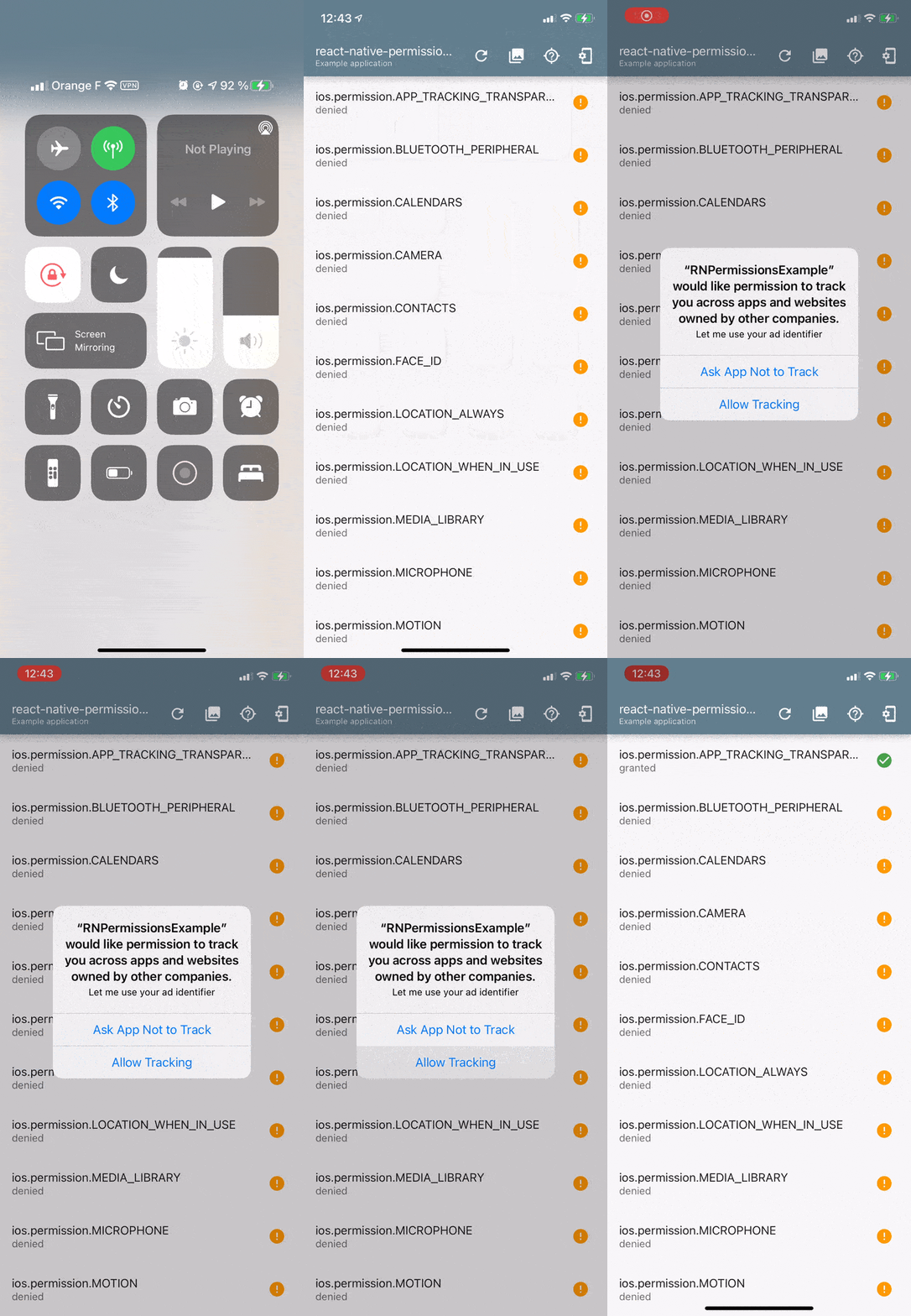
Simulator
- iPhone 8Plus
- iOS 14.2
Everything is working as intended:

Actual device
- Iphone 6Plus
- iOS 14.2
The permission is blocked by default and clicking on the row doesn't trigger the prompt:

Notes
- Since I'm based in France, I tried changing the device's region and language. This didn't change the outcome.
bd-arc
on 20 Nov 2020
Hmmm, that's super weird.
I have exactly the same config (Xcode 12, iOS 14.2 on my iPhone Xr) and I'm also based in France 😅
Could you edit the handler to know if the permission is restricted or denied?
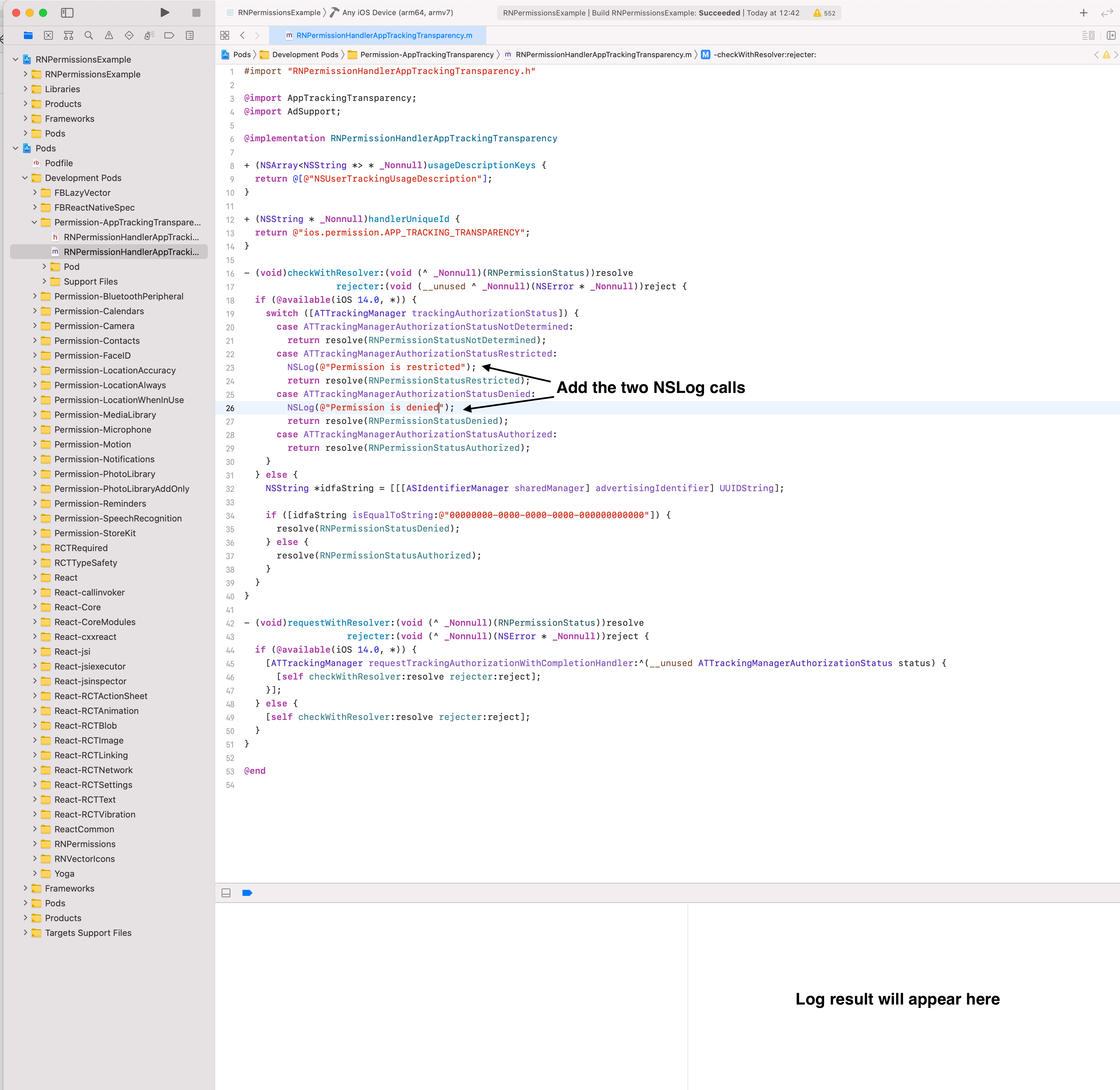
Clean your project folder (Cmd + Option + Shift + K), build it again.
zoontek
on 20 Nov 2020
What a coincidence! Well, at the very least you're giving me hope 😃
I've actually added a bit more logs after my initial testing, because I noticed something pretty strange going on.
Note that I'm deleting the app every single time to make sure that nothing is interfering with the results.
Simulator
- Function
checkWithResolveris called once at startup.
- Permission is not determined.
- I clicked the ATT row once.
- Minor and irrelevant issue spotted: the
checkWithResolvermethod is called twice for every click on that row.
- Minor and irrelevant issue spotted: the
- The prompt was triggered.
- I chose "Deny" -> Permission denied as expected.

Device
I've noticed two issues here:
- First, at startup, instead of being undetermined, the permission is considered
denied(without any prior action). - And now for another strange thing: while the log indicates
deniedon the native side, in the app the permission is shown asblocked.

Is it making any sense to you?
bd-arc
on 20 Nov 2020
Minor and irrelevant issue spotted: the checkWithResolver method is called twice for every click on that row.
This one is normal. The example app spams the check methods. It's triggered each time the app gain focus (which happen when a native alert is closed https://github.com/zoontek/react-native-permissions/blob/3.0.0/example/App.tsx#L84) and each time a permission is requested (https://github.com/zoontek/react-native-permissions/blob/3.0.0/example/App.tsx#L184). And it re-checks all of them 😄
First, at startup, instead of being undetermined, the permission is considered denied (without any prior action).
This one is odd, and is the cause of your issue 🤔
And now for another strange thing: while the log indicates denied on the native side, in the app the permission is shown as blocked.
This one is normal, since the results are mapped on each platform to deliver an identical, abstracted flow across three platforms: Android, iOS and Windows.
See the flow charts:
- https://github.com/zoontek/react-native-permissions/tree/3.0.0#ios-flow
- https://github.com/zoontek/react-native-permissions/tree/3.0.0#android-flow
- https://github.com/zoontek/react-native-permissions/tree/3.0.0#windows-flow
As you can see, the flows are quite similars. That's because we abstract the platform specific statuses.
The remap happen here: https://github.com/zoontek/react-native-permissions/blob/3.0.0/ios/RNPermissions.m#L325 (just realised that RNPermissionStatusRestricted is remapped to unavailable, so checking for restricted vs denied didn't make any sense, sorry, my bad!)
zoontek
on 20 Nov 2020
I found this: https://stackoverflow.com/a/62840480
Is this setting disabled on your phone, by any chance?
zoontek
on 20 Nov 2020
Wow, if that is the root cause, wouldn't that imply that the App Store will deny these apps since they can't pop the auth request? I have had luck with other app store review issues where I directed the reviewer in notes, specifically iOS 14.x simulators do not correctly do sign in with apple (because...of course not) and you have to test on iOS 13.x if you want to test that, so I put it in the notes: "reviewer, if you are testing apple sign in, you must use either a real device or an ios13 simulator, ios14 simulators have known issues with apple sign in" and they pass it. Just a thought
 mikehardy
on 20 Nov 2020
mikehardy
on 20 Nov 2020
@mikehardy That's possible. I also needed to add instructions for the reviewer in some cases.
zoontek
on 20 Nov 2020
@zoontek Thank you so much for all the time and effort!
You've guessed right and found the root cause: the system setting (that I didn't even know existed) was disabled on my phone. As soon as I activated it, everything behaved as it was supposed to.
I'm almost 100% positive that I've never checked anything related to that. So if this is the default iOS value, we're in for even more trouble than expected with everything related to tracking...
The other thing that worries me is that Apple's testers apparently have it disabled on their phones as well, even when they're supposed to check everything related to ATT. Amazing!
@mikehardy Thank you for sharing that, it was helpful!
As crazy as it sounds, I guess we'll have to instruct the testers to enable the system settings on their devices so that they can proceed with the validation.
I'm closing this, but count on me to report what happens next.
Thanks again guys 👍
bd-arc
on 20 Nov 2020
Glad we found a valid explanation!
I didn't do anything with that setting too and it was on… so, I really don't know what's the default 😅
zoontek
on 20 Nov 2020
Hi guys,
I am reopening this cuz I have no idea why it's not working for me (I am also in France, what a coincidence).
I have done everything like said above and my tracking is ON.
Still everytime I call _request(PERMISSIONS.IOS.APP_TRACKING_TRANSPARENCY)_, I have the result : blocked.
I have :
- Installed the package
- Added the permission in podfile
- Added the NSUserTrackingUsageDescription
- Added the iAd.framework in xcode
- Called the function on a button press in the app
Did I miss something ?
Thanks in advance guys for your time !
 guillaume-g
on 1 Feb 2021
guillaume-g
on 1 Feb 2021
Hi,
I have checked the issue #576 and it's still at the same place.
Anyone with a solution ? I tried again to fix it, but still get blocked when asking permissions...
Have a nice day!
guillaume-g
on 29 Apr 2021
I had the problem of having the permission request always return "unavailable".
I solved the problem in two ways:
- on physical device: upgrading ios to version 14.5;
- on simulator: running "Erase all contents & Settings" and reinstallig the app.
Hope it helps!
 lucafronterotta
on 7 May 2021
lucafronterotta
on 7 May 2021
Related issues
 roaringUnicorn
·
17Comments
roaringUnicorn
·
17Comments
 iegik
·
19Comments
iegik
·
19Comments
 ppdbxdawj
·
18Comments
ppdbxdawj
·
18Comments
 rohitgoyal
·
20Comments
rohitgoyal
·
20Comments
 algera
·
44Comments
algera
·
44Comments
Most helpful comment
@zoontek Thank you so much for all the time and effort!
You've guessed right and found the root cause: the system setting (that I didn't even know existed) was disabled on my phone. As soon as I activated it, everything behaved as it was supposed to.
I'm almost 100% positive that I've never checked anything related to that. So if this is the default iOS value, we're in for even more trouble than expected with everything related to tracking...
The other thing that worries me is that Apple's testers apparently have it disabled on their phones as well, even when they're supposed to check everything related to ATT. Amazing!
@mikehardy Thank you for sharing that, it was helpful!
As crazy as it sounds, I guess we'll have to instruct the testers to enable the system settings on their devices so that they can proceed with the validation.
I'm closing this, but count on me to report what happens next.
Thanks again guys 👍