React-native-permissions: No permission handler detected error with use_frameworks!
Bug report
Summary
I have tried this library for last week and experiencing the same issue from the beginning. I can't find what is wrong with my code. Library is working fine with android platform. Issue exists on iOS end. I have gone through almost all of the threads regarding this issue but still couldn't find a solution. When the app is starting I'm getting the 'No permission handler detected' error message. I have tried all the suggestions in the message but couldn't find any luck with them.
I'm using use_frameworks! in my Podfile since the app contains an integration with Mapbox. Although I can simply ignore this message and check any permission inside the code base it is always returning unavailable. It is happening for any permission(Camera/Location etc..). That means the library is not working properly as expected.
My Podfile
````
platform :ios, '10.0'
require_relative '../node_modules/@react-native-community/cli-platform-ios/native_modules'
use_frameworks!
pre_install do |installer|
installer.pod_targets.each do |pod|
if pod.name.eql?('RNPermissions') || pod.name.start_with?('Permission-')
def pod.build_type;
Pod::BuildType.static_library # >= 1.9
end
end
end
end
target 'ChoiceGo' do
pod 'FBLazyVector', :path => "../node_modules/react-native/Libraries/FBLazyVector"
pod 'FBReactNativeSpec', :path => "../node_modules/react-native/Libraries/FBReactNativeSpec"
pod 'RCTRequired', :path => "../node_modules/react-native/Libraries/RCTRequired"
pod 'RCTTypeSafety', :path => "../node_modules/react-native/Libraries/TypeSafety"
pod 'React', :path => '../node_modules/react-native/'
pod 'React-Core', :path => '../node_modules/react-native/'
pod 'React-CoreModules', :path => '../node_modules/react-native/React/CoreModules'
pod 'React-Core/DevSupport', :path => '../node_modules/react-native/'
pod 'React-RCTActionSheet', :path => '../node_modules/react-native/Libraries/ActionSheetIOS'
pod 'React-RCTAnimation', :path => '../node_modules/react-native/Libraries/NativeAnimation'
pod 'React-RCTBlob', :path => '../node_modules/react-native/Libraries/Blob'
pod 'React-RCTImage', :path => '../node_modules/react-native/Libraries/Image'
pod 'React-RCTLinking', :path => '../node_modules/react-native/Libraries/LinkingIOS'
pod 'React-RCTNetwork', :path => '../node_modules/react-native/Libraries/Network'
pod 'React-RCTSettings', :path => '../node_modules/react-native/Libraries/Settings'
pod 'React-RCTText', :path => '../node_modules/react-native/Libraries/Text'
pod 'React-RCTVibration', :path => '../node_modules/react-native/Libraries/Vibration'
pod 'React-Core/RCTWebSocket', :path => '../node_modules/react-native/'
pod 'React-cxxreact', :path => '../node_modules/react-native/ReactCommon/cxxreact'
pod 'React-jsi', :path => '../node_modules/react-native/ReactCommon/jsi'
pod 'React-jsiexecutor', :path => '../node_modules/react-native/ReactCommon/jsiexecutor'
pod 'React-jsinspector', :path => '../node_modules/react-native/ReactCommon/jsinspector'
pod 'ReactCommon/jscallinvoker', :path => "../node_modules/react-native/ReactCommon"
pod 'ReactCommon/turbomodule/core', :path => "../node_modules/react-native/ReactCommon"
pod 'Yoga', :path => '../node_modules/react-native/ReactCommon/yoga'
pod 'DoubleConversion', :podspec => '../node_modules/react-native/third-party-podspecs/DoubleConversion.podspec'
pod 'glog', :podspec => '../node_modules/react-native/third-party-podspecs/glog.podspec'
pod 'Folly', :podspec => '../node_modules/react-native/third-party-podspecs/Folly.podspec'
pod 'SwiftyJSON', '~> 4.0'
pod 'react-native-sqlite-storage', :path => '../node_modules/react-native-sqlite-storage'
target 'ChoiceGoTests' do
inherit! :search_paths
end
permissions_path = '../node_modules/react-native-permissions/ios'
pod 'Permission-LocationAlways', :path => "#{permissions_path}/LocationAlways.podspec"
pod 'Permission-LocationWhenInUse', :path => "#{permissions_path}/LocationWhenInUse.podspec"
use_native_modules!
end
pre_install do |installer|
installer.pod_targets.each do |pod|
if pod.name.start_with?('RNFB')
def pod.build_type;
Pod::BuildType.static_library
end
end
end
end
````
Info.plist
<key>NSLocationAlwaysUsageDescription</key>
<string>Used to visualize your location and suggest transport providers</string>
<key>NSLocationWhenInUseUsageDescription</key>
<string>Used to visualize your location and suggest transport providers</string>
Environment info
react-native info output:
System:
OS: macOS 10.15.4
CPU: (4) x64 Intel(R) Core(TM) i5-7360U CPU @ 2.30GHz
Memory: 94.84 MB / 8.00 GB
Shell: 3.2.57 - /bin/bash
Binaries:
Node: 14.3.0 - /usr/local/bin/node
Yarn: 1.22.4 - /usr/local/bin/yarn
npm: 6.14.4 - /usr/local/bin/npm
Watchman: 4.9.0 - /usr/local/bin/watchman
SDKs:
iOS SDK:
Platforms: iOS 13.4, DriverKit 19.0, macOS 10.15, tvOS 13.4, watchOS 6.2
IDEs:
Android Studio: 3.6 AI-192.7142.36.36.6308749
Xcode: 11.4/11E146 - /usr/bin/xcodebuild
npmPackages:
react: ^16.12.0 => 16.13.1
react-native: ^0.61.5 => 0.61.5
npmGlobalPackages:
react-native-cli: 2.0.1
# paste it here
Library version: ^2.1.5
Steps to reproduce
const res = await check(PERMISSIONS.IOS.LOCATION_WHEN_IN_USE);
console.log(res);
Describe what you expected to happen:
denied/blocked/granted
Always getting : unavailable
 ChanakaDil
All 9 comments
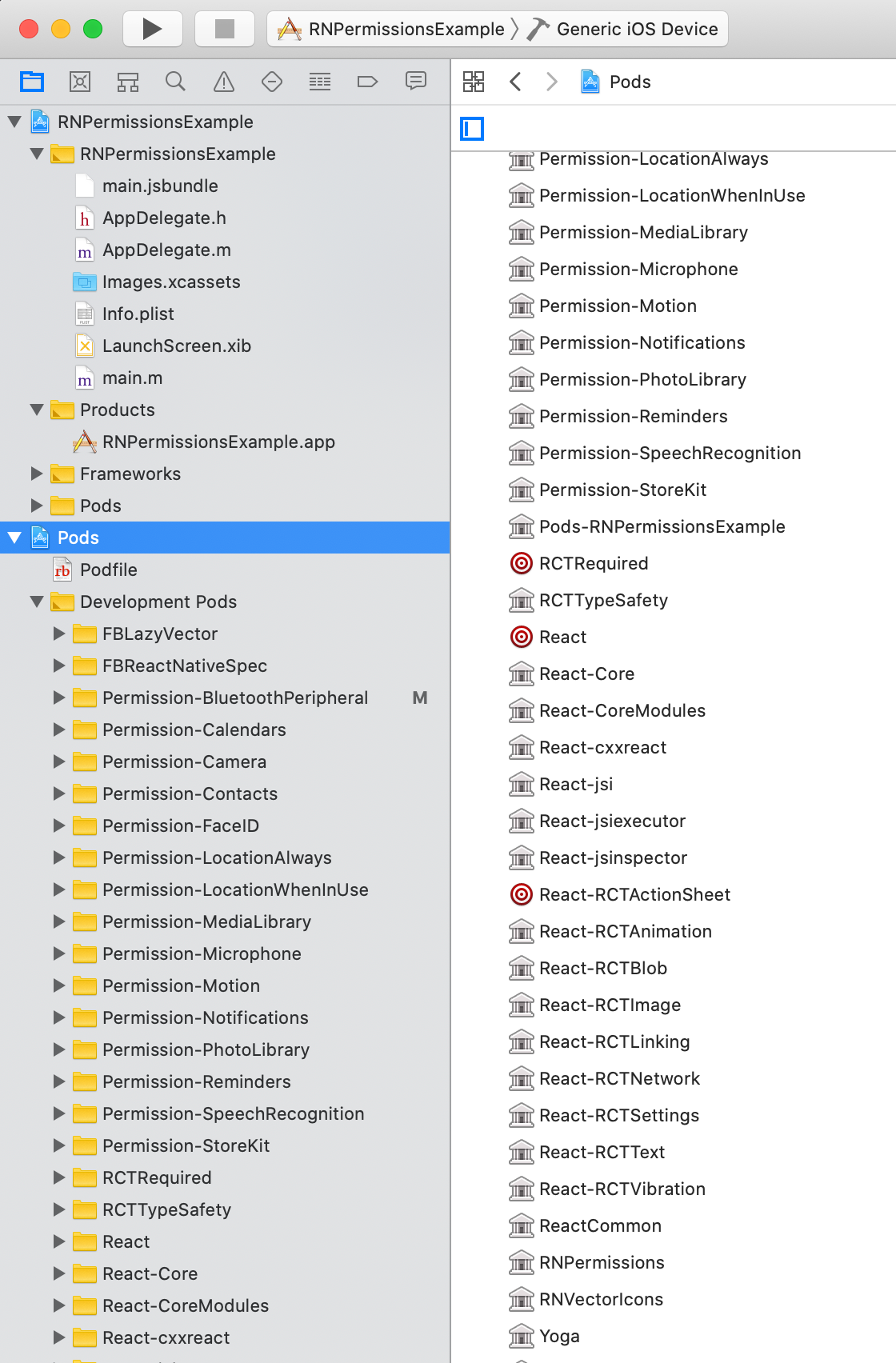
Please submit a screenshot of your installed Pods, like this:
It's probably just a caching issue.
PS: You can merge the two hotfixes you have:
pre_install do |installer|
  installer.pod_targets.each do |pod|
    if pod.name.start_with?('RNFB') || pod.name.eql?('RNPermissions') || pod.name.start_with?('Permission-')
      def pod.build_type;
        Pod::BuildType.static_library # >= 1.9
      end
    end
  end
end
 zoontek
on 2 Jun 2020
zoontek
on 2 Jun 2020
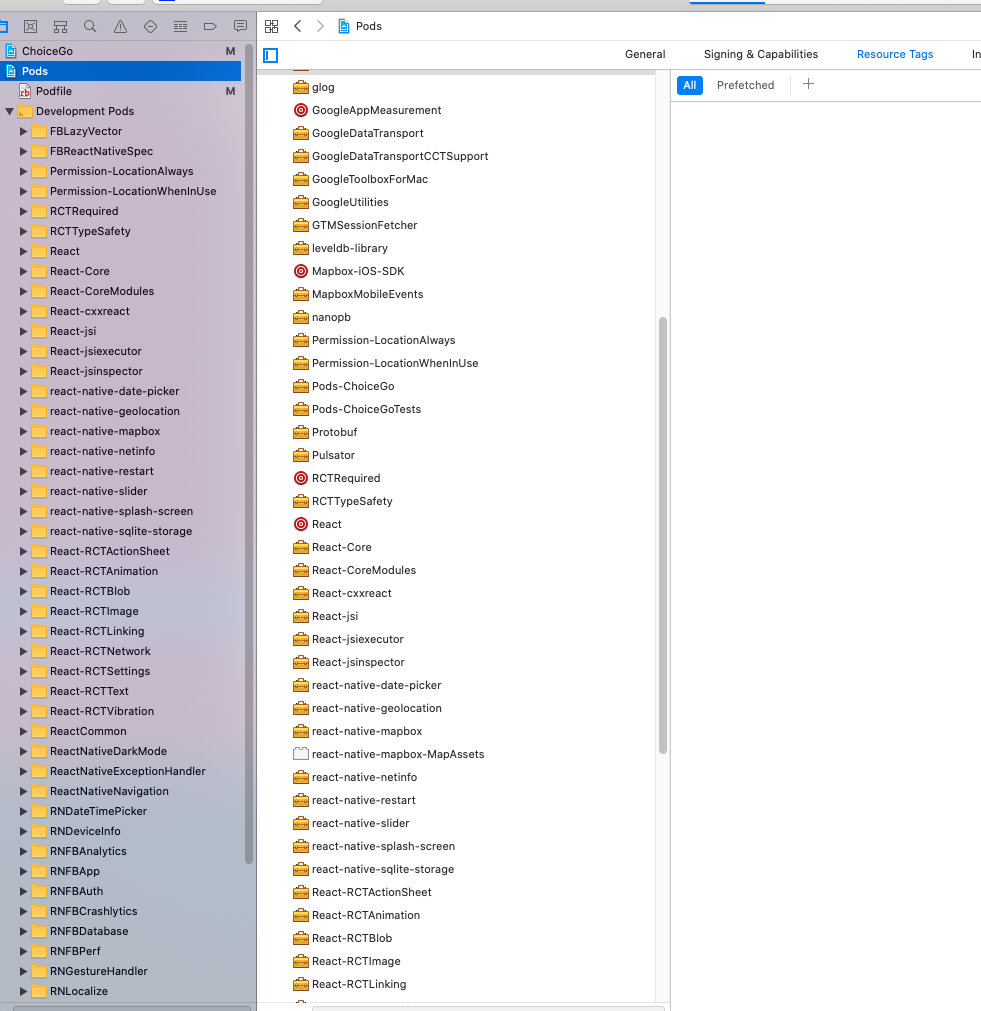
Thanks @zoontek for your quick response. This is the screenshot of my installed pods. I'm actually new to react-native and sometimes I may have missed a key point. I merged your fix, clean and rebuild the code. But still I'm facing the same issue.
ChanakaDil
on 2 Jun 2020
Permission-LocationAlways and Permission-LocationWhenInUse are not linked as static libs (check the icons, it needs to the same that the ones on my screenshot).
Are you sure you use CocoaPods >= 1.9? You don't forget to run a pod install?
zoontek
on 2 Jun 2020
COCOAPODS: 1.9.1
Thanks @zoontek . I found the issue. Actually I couldn't remove below code stuff which was in the bottom of the Podfile after adding your fix.
pre_install do |installer|
  installer.pod_targets.each do |pod|
    if pod.name.start_with?('RNFB')
      def pod.build_type;
        Pod::BuildType.static_library
      end
    end
  end
end
This block might have overridden the merged behaviour.
After removing this block the error message was not seen and returned the permission status correctly. Thank you very much for the great support. Really appreciate your contribution.
ChanakaDil
on 2 Jun 2020
I was having the same issue with React Native 0.63.2.
Solution was
1 - to update my cocopods version with
sudo gem install cocoapods --pre
2 - Made some changes on my POD file.
Here is what my Podfile looks like.
platform :ios, '10.0'
require_relative '../node_modules/react-native/scripts/react_native_pods'
require_relative '../node_modules/@react-native-community/cli-platform-ios/native_modules'

#use_frameworks!

# Convert all permission pods into static libraries
pre_install do |installer|
  installer.pod_targets.each do |pod|
    if pod.name.eql?('RNPermissions') || pod.name.start_with?('Permission-')
      def pod.build_type;
        # Uncomment one line depending on your CocoaPods version
        Pod::BuildType.static_library # >= 1.9
        #Pod::Target::BuildType.static_library # < 1.9
      end
    end
  end
end

target 'hairwegorn' do
  config = use_native_modules!
  inherit! :complete
  use_react_native!(:path => config["reactNativePath"])
  #use_frameworks!
  $RNFirebaseAsStaticFramework = true

  ## Permissions
  permissions_path = '../node_modules/react-native-permissions/ios'
  pod 'Permission-LocationWhenInUse', :path => "#{permissions_path}/LocationWhenInUse.podspec"
  pod 'Permission-Camera', :path => "#{permissions_path}/Camera.podspec"
  pod 'Permission-Notifications', :path => "#{permissions_path}/Notifications.podspec"
  pod 'Permission-PhotoLibrary', :path => "#{permissions_path}/PhotoLibrary.podspec"

  #Google maps
   pod 'GoogleMaps'
   pod 'Google-Maps-iOS-Utils'

  target 'hairwegornTests' do
    inherit! :complete
    # Pods for testing
  end

  target 'hairwegorn-tvOS' do
    # Pods for hairwegorn-tvOS
  end

  target 'hairwegorn-tvOSTests' do
    inherit! :complete
    # Pods for testing
  end
  pre_install do |installer|
    Pod::Installer::Xcode::TargetValidator.send(:define_method, :verify_no_static_framework_transitive_dependencies) {}
  end

end
 Jorciney
on 30 Jul 2020
Jorciney
on 30 Jul 2020
I was having the same issue with React Native 0.63.2.
Solution was
1 - to update my cocopods version with
sudo gem install cocoapods --pre
2 - remove the following code from my pod filepre_install do |installer| installer.pod_targets.each do |pod| if pod.name.eql?('RNPermissions') || pod.name.start_with?('Permission-') def pod.build_type; # Uncomment one line depending on your CocoaPods version Pod::BuildType.static_library # >= 1.9 #Pod::Target::BuildType.static_library # < 1.9 end end end endAfter that, I did a pod install and everything was working again.
So @Jorciney you removed the pre_install method and use_frameworks! ? To get it to work with RN .63 ?
 osikes
on 3 Aug 2020
osikes
on 3 Aug 2020
@osikes I edited my previews response.
Jorciney
on 4 Aug 2020
sudo gem install cocoapods --pre
I also deleted the app and the derived files....
This worked for me!
 shawnFallon
on 11 Aug 2020
shawnFallon
on 11 Aug 2020
@shawnFallon npx react-native-clean-project does all that stuff and some more so you don't have to remember all the little tricks
 mikehardy
on 11 Aug 2020
mikehardy
on 11 Aug 2020
Related issues
 rohitgoyal
·
20Comments
rohitgoyal
·
20Comments
 ppdbxdawj
·
18Comments
ppdbxdawj
·
18Comments
 note89
·
35Comments
note89
·
35Comments
 bithavoc
·
22Comments
bithavoc
·
22Comments
 BasilJohn
·
41Comments
BasilJohn
·
41Comments
Most helpful comment
@shawnFallon
npx react-native-clean-projectdoes all that stuff and some more so you don't have to remember all the little tricks