React-native-permissions: Notifications permission pod is missing in iOS simulator
Bug
Related to #331
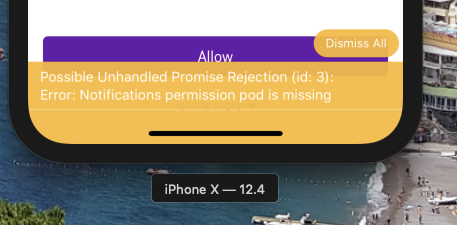
When using checkNotifications() or requestNotifications() in the simulator, we get the warning Notifications permission pod is missing and the functions don't resolve.
Environment info
React native info output:
info
  React Native Environment Info:
    System:
      OS: macOS 10.14.6
      CPU: (12) x64 Intel(R) Core(TM) i7-9750H CPU @ 2.60GHz
      Memory: 33.11 MB / 16.00 GB
      Shell: 3.2.57 - /bin/bash
    Binaries:
      Node: 12.4.0 - ~/.nvm/versions/node/v12.4.0/bin/node
      Yarn: 1.5.1 - /usr/local/bin/yarn
      npm: 6.9.0 - ~/.nvm/versions/node/v12.4.0/bin/npm
      Watchman: 4.9.0 - /usr/local/bin/watchman
    SDKs:
      iOS SDK:
        Platforms: iOS 12.4, macOS 10.14, tvOS 12.4, watchOS 5.3
      Android SDK:
        API Levels: 19, 23, 24, 25, 26, 27, 28
        Build Tools: 23.0.1, 25.0.0, 25.0.1, 25.0.3, 26.0.1, 26.0.2, 26.0.3, 27.0.3, 28.0.0, 28.0.3
    IDEs:
      Android Studio: 3.4 AI-183.6156.11.34.5522156
      Xcode: 10.3/10G8 - /usr/bin/xcodebuild
    npmPackages:
      react: 16.10.2 => 16.10.2
      react-native: 0.59.10 => 0.59.10
    npmGlobalPackages:
      react-native-git-upgrade: 0.2.7
Library version: 2.0.2
Steps To Reproduce
- add the pods into
Podfile cd ios && pod install- run the app and call
checkNotifications()andrequestNotifications()

 grit96
All 10 comments
Including your podfile seems vital
Confirming you have run pod install is important
Making 100% sure if you are running from Xcode that you opened the .xcworkspace is important
 mikehardy
on 7 Oct 2019
mikehardy
on 7 Oct 2019
Running from Xcode to a device works fine.
I was running to a simulator using react-native run-ios from the command line, which should pick up the .xcworkspace. I will now try running to a simulator from Xcode.
My Podfile is:
# Uncomment the next line to define a global platform for your project
platform :ios, '10.0'

target 'CloudVoiceExpress' do
  # Uncomment the next line if you're using Swift or would like to use dynamic frameworks
  # use_frameworks!

  react_native_path = '../node_modules/react-native'
  permissions_path = '../node_modules/react-native-permissions/ios'

  # Pods for CloudVoiceExpress
  pod 'React', path: react_native_path, subspecs: [
    'Core',
    'CxxBridge',
    'DevSupport',
    'RCTActionSheet',
    'RCTAnimation',
    'RCTGeolocation',
    'RCTImage',
    'RCTLinkingIOS',
    'RCTNetwork',
    'RCTSettings',
    'RCTText',
    'RCTVibration',
    'RCTWebSocket',
    'RCTPushNotification'
  ]

  # React Native third party dependencies podspecs
  pod 'yoga', path: "#{react_native_path}/ReactCommon/yoga/yoga.podspec"
  pod 'DoubleConversion', :podspec => "#{react_native_path}/third-party-podspecs/DoubleConversion.podspec"
  pod 'Folly', :podspec => "#{react_native_path}/third-party-podspecs/Folly.podspec"
  pod 'glog', :podspec => "#{react_native_path}/third-party-podspecs/glog.podspec"

  pod 'RNPermissions', :path => '../node_modules/react-native-permissions'
  pod 'Permission-Contacts', :path => "#{permissions_path}/Contacts.podspec"
  pod 'Permission-Microphone', :path => "#{permissions_path}/Microphone.podspec"
  pod 'Permission-Notifications', :path => "#{permissions_path}/Notifications.podspec"

end

post_install do |installer|
  installer.pods_project.targets.each do |target|
    # The following is needed to ensure the "archive" step works in XCode.
    # It removes React & Yoga from the Pods project, as it is already included in the main project.
    # Without this, you'd see errors when you archive like:
    # "Multiple commands produce ... libReact.a"
    # "Multiple commands produce ... libyoga.a"

    targets_to_ignore = %w(React yoga)

    if targets_to_ignore.include? target.name
      target.remove_from_project
    end

    if target.name == "React"
      target.remove_from_project
    end
  end
end
So from Xcode it works to a simulator but from react-native run-ios it does not.
It appears react-native run-ios is using the .xcworkspace as the first lines of the output are:
info Found Xcode workspace CloudVoiceExpress.xcworkspace
info Building using "xcodebuild -workspace CloudVoiceExpress.xcworkspace -configuration Debug -scheme CloudVoiceExpress -destination id=A9B3AF77-4634-4FA2-A8B2-301A987AE1DA -derivedDataPath build/CloudVoiceExpress"
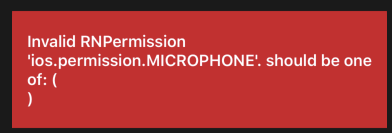
When running on a simulator from react-native run-ios the notification pod error shows when checking notification permissions, and the following error shows when checking other permissions:
grit96
on 7 Oct 2019
Strange - your assumptions (command line using .xcworkspace) and your Podfile seem fine...
I know device and simulator are different CPU architectures (leading to separate build/compile caching and thus odd differences between the two) and I've run into issues on that before, this is a voodoo solution but have you tried the react-native-clean-project module, specifically with a 'Y' on 'wipe iOS build'?
sometimes doing a pod deintegrate && pod install is similar voodoo that can work
I'm sorry my only suggestions are vague but maybe they help
mikehardy
on 7 Oct 2019
Does running from Xcode to the simulator works? I know react-native run-ios can have a strange behavior.
 zoontek
on 7 Oct 2019
zoontek
on 7 Oct 2019
@zoontek yes using the simulator from Xcode does work
grit96
on 8 Oct 2019
@grit86 Then I'm not sure the issue is with this library. Maybe more an issue for https://github.com/react-native-community/cli ?
zoontek
on 8 Oct 2019
@zoontek I've since discovered https://github.com/react-native-community/cli/issues/626 and the problem was to do with react-native run-ios using different caches to Xcode. Clearing these caches has resolved the issue.
grit96
on 9 Oct 2019
@grit96 It's good to know! I will update the README.md with some infos about cache cleaning 🙂
zoontek
on 9 Oct 2019
@zoontek just point to react-native-clean-project and advocate using "wipe iOS build" option. This comes up SO MUCH on react-native-firebase, it's the canonical answer
I use this in CI to make sure - I call in to 'deep-clean'
cat package.json|grep clean
    "react-native-clean-project": "^3.2.4",
    "deep-clean": "./node_modules/.bin/react-native-clean-project --keep-node-modules --remove-iOS-build --keep-brew --keep-pods --remove-iOS-pods --remove-android-build && yarn clean",
    "clean": "\\rm -fr ./node_modules && \\rm -fr dist/* && \\rm -fr ios/build ios/Pods ios/KScoreApp.xcarchive && \\rm -fr android/build android/app/build",
Some of that is a little duplicate (ios/build is wiped by react-native-clean-project but it's part of my "lighter clean" I use sometimes). Some is subtle in that I ask react-native-clean-project to keep pods and keep node modules, then I delete ios/Pods and ./node_modules - the reason is that the react-native-clean-project version can invalidate the cache in your home directory as well forcing big network fetches, I only want the project-local stuff deleted, so I override the behavior basically.
mikehardy
on 9 Oct 2019
Related issues
 MugeshM
·
18Comments
MugeshM
·
18Comments
 algera
·
44Comments
algera
·
44Comments
 iegik
·
19Comments
iegik
·
19Comments
 rohitgoyal
·
20Comments
rohitgoyal
·
20Comments
 tallpants
·
26Comments
tallpants
·
26Comments
Most helpful comment
@zoontek I've since discovered https://github.com/react-native-community/cli/issues/626 and the problem was to do with
react-native run-iosusing different caches to Xcode. Clearing these caches has resolved the issue.