React-native-paper: @types/[email protected] or newer causes "No overload matches this call."
Current behaviour
Run yarn add @types/react-native --dev to install latest version.
After that, VSCode reports "no overload matches this call" with React Native Paper components.
On version 0.63.41 commit, they remove accessibilityTraits and accessibilityComponentType.
Expected behaviour
No error when install @types/react-native latest version.
Code sample
Screenshots (if applicable)
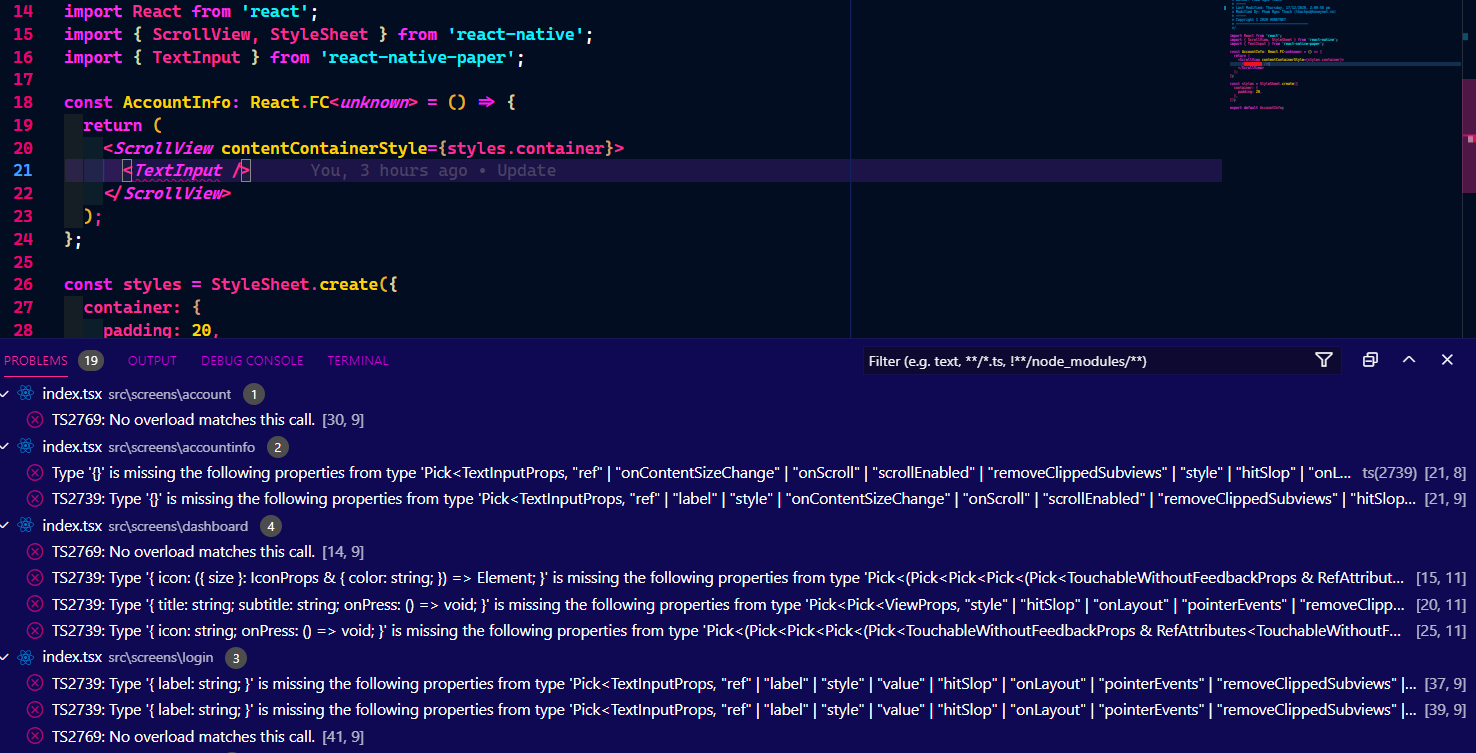
What have you tried
I installed old version (yarn add @types/[email protected] --dev), no errors was showed.
Your Environment
| software | version
| --------------------- | -------
| ios or android | android 10
| react-native | 0.63.4
| react-native-paper | 4.5.0
| node | 14.15.2
| npm or yarn | [email protected]
| expo sdk | none
 pnthach95
All 7 comments
Couldn't find version numbers for the following packages in the issue:
react-native-vector-iconsnpmexpo
Can you update the issue to include version numbers for those packages? The version numbers must match the format 1.2.3.
The versions mentioned in the issue for the following packages differ from the latest versions on npm:
yarn(found:1.22.5, latest:1.22.10)
Can you verify that the issue still exists after upgrading to the latest versions of these packages?
![github-actions[bot] picture](https://avatars.githubusercontent.com/in/15368?v=4&s=40) github-actions[bot]
on 17 Dec 2020
github-actions[bot]
on 17 Dec 2020
can confirm. There are type errors everywhere with @types/[email protected] ("properties accessibilityTraits and accessibilityComponentType are missing"). Anyway yarn add @types/[email protected] --dev fixed it for me too.
 Kauto
on 17 Dec 2020
Kauto
on 17 Dec 2020
edit
Simply decreasing the patch version from 43 to 40 in package.json and hitting yarn in the terminal did not actually change the lock file or the installed types, because the installed 0.63.43 "satisfied the specified version"
ACTUALLY using the command yarn add @types/[email protected] --dev did the correct thing and solved my errors, even with ts4.1.3.
original
Downgrading to @types/[email protected] did not solve this for me. A possible variable in my situation is use of typescript 4.1.3 ( react-native-paper seems to use 3.8 in its 4.5.0 release ? )
@Kauto
@pnthach95
"dependencies": {
"@fortawesome/fontawesome-svg-core": "^1.2.32",
"@fortawesome/free-solid-svg-icons": "^5.15.1",
"@fortawesome/react-native-fontawesome": "^0.2.6",
"react": "17.0.1",
"react-dom": "^17.0.1",
"react-native": "0.63.4",
"react-native-paper": "4.5.0",
"tslib": "^2.0.3"
},
"devDependencies": {
"@babel/core": "^7.12.10",
"@babel/runtime": "^7.12.5",
"@react-native-community/eslint-config": "^2.0.0",
"@types/react": "^17.0.0",
"@types/react-dom": "^17.0.0",
"@types/react-native": "^0.63.40",
"@typescript-eslint/eslint-plugin": "^4.10.0",
"@typescript-eslint/parser": "^4.10.0",
"babel-plugin-transform-react-jsx-source": "latest",
"eslint": "^7.15.0",
"metro-react-native-babel-preset": "^0.64.0",
"react-native-typescript-transformer": "^1.2.13",
"typescript": "^4.1.3"
},
 davidvmckay
on 18 Dec 2020
davidvmckay
on 18 Dec 2020
can confirm. There are type errors everywhere with
@types/[email protected]("propertiesaccessibilityTraitsandaccessibilityComponentTypeare missing"). Anywayyarn add @types/[email protected] --devfixed it for me too.
This was the exact problem - those two props.
davidvmckay
on 18 Dec 2020
 maltoze
on 31 Dec 2020
maltoze
on 31 Dec 2020
@davidvmckay
ACTUALLY using the command
yarn add @types/[email protected] --devdid the correct thing and solved my errors, even with ts4.1.3.
@davidvmckay thank you for posting the correct command.
This was also the source of so many issues I was seeing in TS, crazy stuff like icon resolution etc.
 drfbwilliams
on 4 Jan 2021
drfbwilliams
on 4 Jan 2021
Version 4.7.2 fixed this issue. Now you ~can~ have to install @types/react-native latest version.
pnthach95
on 22 Feb 2021
Related issues
 ButuzGOL
·
3Comments
ButuzGOL
·
3Comments
 tonyxiao
·
3Comments
tonyxiao
·
3Comments
 alikazemkhanloo
·
4Comments
alikazemkhanloo
·
4Comments
 satya164
·
4Comments
satya164
·
4Comments
 zachariahtimothy
·
3Comments
zachariahtimothy
·
3Comments
Most helpful comment
can confirm. There are type errors everywhere with
@types/[email protected]("propertiesaccessibilityTraitsandaccessibilityComponentTypeare missing"). Anywayyarn add @types/[email protected] --devfixed it for me too.