React-native-paper: Typescript warning: Property 'accessibilityStates' is missing in type (...)
Current behaviour
I'm using React Native Paper with typescript. I've just updated all my plugins to their latest version and I'm getting the following error for most of the RNP components:
Property 'accessibilityStates' is missing in type (...)
Expected behaviour
Typing and props should not show warnings
Code sample
<Appbar.Header
  style={[styles.header]}
  statusBarHeight={StatusBar.currentHeight}
>
  <Appbar.Action icon="menu" onPress={navigation.toggleDrawer} />
  <View style={styles.headerContent}>
    <Searchbar
      autoCapitalize="none"
      autoCorrect={false}
      placeholder="Search"
      onChangeText={setQuery}
      ref={inputRef}
      value={query}
      style={styles.headerSearchBar}
      inputStyle={styles.headerSearchInput}
    />
  </View>
  <Appbar.Action icon="tune" onPress={toggleFilters} />
</Appbar.Header>
or
<Text style={styles.catCardTitle}>whatever</Text>
Screenshots (if applicable)


What have you tried
Your Environment
Not using expo, all of my plugins are their latest version at the time of writing this.
  "dependencies": {
    "@react-native-community/async-storage": "^1.10.0",
    "@react-native-community/masked-view": "^0.1.10",
    "@react-navigation/drawer": "^5.8.1",
    "@react-navigation/native": "^5.5.0",
    "@types/color": "^3.0.1",
    "@types/react-native-vector-icons": "^6.4.5",
    "axios": "^0.19.2",
    "color": "^3.1.2",
    "immutability-helper": "^3.1.1",
    "lodash-es": "^4.17.15",
    "qs": "^6.9.4",
    "react": "16.13.1",
    "react-native": "0.62.2",
    "react-native-animatable": "^1.3.3",
    "react-native-background-timer": "^2.2.0",
    "react-native-gesture-handler": "^1.6.1",
    "react-native-keyboard-aware-scroll-view": "^0.9.1",
    "react-native-maps": "0.27.1",
    "react-native-modal": "^11.5.6",
    "react-native-paper": "^3.10.1",
    "react-native-reanimated": "^1.8.0",
    "react-native-safe-area-context": "^3.0.2",
    "react-native-screens": "^2.7.0",
    "react-native-side-menu": "^1.1.3",
    "react-native-spinkit": "^1.5.0",
    "react-native-vector-icons": "^6.6.0",
    "react-redux": "^7.2.0",
    "redux": "^4.0.5",
    "redux-axios-middleware": "^4.0.1",
    "redux-thunk": "^2.3.0",
    "reselect": "^4.0.0"
  },
  "devDependencies": {
    "@babel/core": "^7.10.2",
    "@babel/runtime": "^7.10.2",
    "@react-native-community/eslint-config": "^1.1.0",
    "@types/jest": "^25.2.1",
    "@types/lodash-es": "^4.17.3",
    "@types/qs": "^6.9.2",
    "@types/react-native": "^0.62.12",
    "@types/react-native-autocomplete-input": "^4.0.1",
    "@types/react-redux": "^7.1.8",
    "@types/react-test-renderer": "16.9.2",
    "@typescript-eslint/eslint-plugin": "^3.1.0",
    "@typescript-eslint/parser": "^3.1.0",
    "babel-jest": "^26.0.1",
    "eslint": "^7.0.0",
    "eslint-config-airbnb-typescript": "^7.2.1",
    "eslint-config-prettier": "^6.11.0",
    "eslint-plugin-import": "^2.20.2",
    "eslint-plugin-jsx-a11y": "^6.2.3",
    "eslint-plugin-prettier": "^3.1.3",
    "eslint-plugin-react": "^7.19.0",
    "eslint-plugin-react-hooks": "^4.0.4",
    "jest": "^26.0.1",
    "prettier": "^2.0.5",
    "react-test-renderer": "16.13.1",
    "typescript": "^3.8.3"
  },
node -v: v13.8.0
 reddo
reddo
All 24 comments
Found the following packages mentioned in the issue, but couldn't find version numbers for them:
expo
Can you update the issue to include version numbers for those packages? The version numbers must match the format 1.2.3.
![github-actions[bot] picture](https://avatars.githubusercontent.com/in/15368?v=4&s=40) github-actions[bot]
on 2 Jun 2020
github-actions[bot]
on 2 Jun 2020
Try this delete node_modules folder and run yarn install after that run npx react-native run-android --reset-cache or npx react-native run-ios --reset-cache
If that did not work try downgrading react native paper to 3.8.0
If you still experience the issue provide a runnable repro like a snack demo or a github repo.
 raajnadar
on 3 Jun 2020
raajnadar
on 3 Jun 2020
I am facing the same issue and tried both options but it still doesn't work
 Jovan27
on 3 Jun 2020
Jovan27
on 3 Jun 2020
I'm getting error: unknown option '--reset-cache' for both commands.
reddo
on 3 Jun 2020
Read my comment, I can't help without a runnable repro!
@reddo try upgrading your cli
raajnadar
on 3 Jun 2020
@raajnadar According to this commit https://github.com/DefinitelyTyped/DefinitelyTyped/commit/ec53e42ae41f202f1f83bea94126a717a1848414#diff-7c5007b14419e07403a6a320e5b22742 accessibilityStates is removed from react-native types 20 days ago.
A workaround for this issue is using older versions like "@types/react-native": "0.62.2".
But I think react-native-paper should also update their typescript definitions.
 hamidfzm
on 3 Jun 2020
hamidfzm
on 3 Jun 2020
@hamidfzm it is not a workaround it is the solution. If you use v4 of react native paper you can upgrade to latest version of rn types.
I will update with proper version compatibility.
raajnadar
on 4 Jun 2020
Like _hamidfzm_ said running this command makes errors disappear:
npm i @types/[email protected] --save-dev
previously i had 0.62.12 installed
 piatkiewicz
on 4 Jun 2020
piatkiewicz
on 4 Jun 2020
Thanks, this version solves problem@types/[email protected]
 proteche
on 5 Jun 2020
proteche
on 5 Jun 2020
Hi guys, I'm new to adding types in javascript. I'm just using jsdoc with // @ts-check in regular js files. I tried doing npm i @types/[email protected] --save-dev but it didn't solved the problem for me in vs code.

Am I doing something wrong? I also have No overload matches this call. errors in the other components.
 Noxware
on 7 Jun 2020
Noxware
on 7 Jun 2020
@Noxware Can you paste your package.json?
hamidfzm
on 7 Jun 2020
Sure
{
  "name": "SimpleChat",
  "version": "0.0.1",
  "private": true,
  "scripts": {
    "android": "react-native run-android",
    "ios": "react-native run-ios",
    "start": "react-native start",
    "test": "jest",
    "lint": "eslint ."
  },
  "dependencies": {
    "@react-native-community/masked-view": "^0.1.10",
    "@react-navigation/native": "^5.5.0",
    "@react-navigation/stack": "^5.4.1",
    "react": "16.11.0",
    "react-native": "0.62.2",
    "react-native-gesture-handler": "^1.6.1",
    "react-native-paper": "^3.10.1",
    "react-native-reanimated": "^1.9.0",
    "react-native-safe-area-context": "^3.0.2",
    "react-native-screens": "^2.8.0",
    "react-native-vector-icons": "^6.6.0",
    "socket.io-client": "^2.3.0"
  },
  "devDependencies": {
    "@babel/core": "^7.6.2",
    "@babel/runtime": "^7.6.2",
    "@react-native-community/eslint-config": "^0.0.5",
    "@types/react-native": "^0.62.2",
    "babel-jest": "^24.9.0",
    "eslint": "^6.5.1",
    "jest": "^24.9.0",
    "metro-react-native-babel-preset": "^0.58.0",
    "react-test-renderer": "16.11.0"
  },
  "jest": {
    "preset": "react-native"
  }
}
@Noxware Change this line "@types/react-native": "^0.62.2", to "@types/react-native": "0.62.2", and run npm install.
hamidfzm
on 7 Jun 2020
Sorry, after restarting vs code, it worked. I forgot to apply the ultimate solution of all time. Thanks.
Noxware
on 7 Jun 2020
@Noxware Change this line
"@types/react-native": "^0.62.2",to"@types/react-native": "0.62.2",and run npm install.
FWIW 0.62.8 is the latest version of @types/react-native that still has accessibilityStates defined.
 mars-lan
on 15 Jun 2020
mars-lan
on 15 Jun 2020
Upgrading to "react-native-paper": "4.0.0-alpha.1" fixed this issue for me.
 zholmes1
on 26 Jun 2020
zholmes1
on 26 Jun 2020
I solved the problem by reinstalling @types/react-native with the version I found in node_modules/react-native-paper/package.json

 Hkmu
on 15 Jul 2020
Hkmu
on 15 Jul 2020
Hello 👋, this issue has been open for more than 2 months with no activity on it. If the issue is still present in the latest version, please leave a comment within 7 days to keep it open, otherwise it will be closed automatically. If you found a solution on workaround for the issue, please comment here for others to find. If this issue is critical for you, please consider sending a pull request to fix the issue.
github-actions[bot]
on 14 Sep 2020
react-native-paper 4.1.0 apparently solved the problem
 jmarcosmruk
on 15 Sep 2020
jmarcosmruk
on 15 Sep 2020
im facing this issue in RNP 4.5 and latest react tpes
"devDependencies": {
"@babel/core": "~7.9.0",
"@babel/runtime": "^7.12.5",
"@types/jest": "^26.0.19",
"@types/react": "^17.0.0",
"@types/react-native": "^0.63.42",
"@types/react-navigation": "^3.4.0",
"@types/react-redux": "^7.1.12",
"@types/react-test-renderer": "^17.0.0",
"@typescript-eslint/eslint-plugin": "^4.10.0",
"@typescript-eslint/parser": "^4.10.0",
"babel-preset-expo": "8.3.0",
"eslint-config-prettier": "^7.1.0",
"eslint-plugin-prettier": "^3.3.0",
"husky": "^4.3.6",
"lint-staged": "^10.5.3",
"prettier": "^2.2.1",
"typescript": "^4.1.3"
},
 tylerthedeveloper
on 20 Dec 2020
tylerthedeveloper
on 20 Dec 2020
for I am using a very basic List.Item inside a FlatList and I am getting
Type '{ title: string; description: string; left: () => Element; right: () => Element; }' is missing the following properties from type 'Pick<Props, "onLayout" | "style" | "hitSlop" | "testID" | "hasTVPreferredFocus" | "tvParallaxProperties" | "accessible" | "accessibilityActions" | "accessibilityLabel" | ... 41 more ... | "descriptionEllipsizeMode">': accessibilityComponentType, accessibilityTraitsts(2739)
here are my dev dependencies
    "@babel/core": "~7.12.10",
    "@types/react": "~16.9.56",
    "@types/react-dom": "~16.9.10",
    "@types/react-native": "~0.63.42",
    "eslint": "7.16.0",
    "eslint-config-airbnb": "18.2.1",
    "eslint-plugin-import": "2.22.1",
    "eslint-plugin-jsx-a11y": "6.4.1",
    "eslint-plugin-react": "7.21.5",
    "eslint-plugin-react-hooks": "4.2.0",
    "eslint-config-prettier":"7.1.0",
    "eslint-plugin-prettier":"3.3.0",
    "prettier":"2.2.1",
    "typescript": "~4.1.3",
    "@typescript-eslint/parser":"4.11.0",
    "@typescript-eslint/eslint-plugin":"4.11.0"
 samiq
on 23 Dec 2020
samiq
on 23 Dec 2020
I upgraded my dependencies today, too, and faced the issue initially mentioned. Solved it for now with switching back to @types/[email protected].
 ja-ka
on 14 Jan 2021
ja-ka
on 14 Jan 2021
Using 4.2.0 I still have this problem. I've tried every version of @types/react-native people have suggested, but I continue to see this:
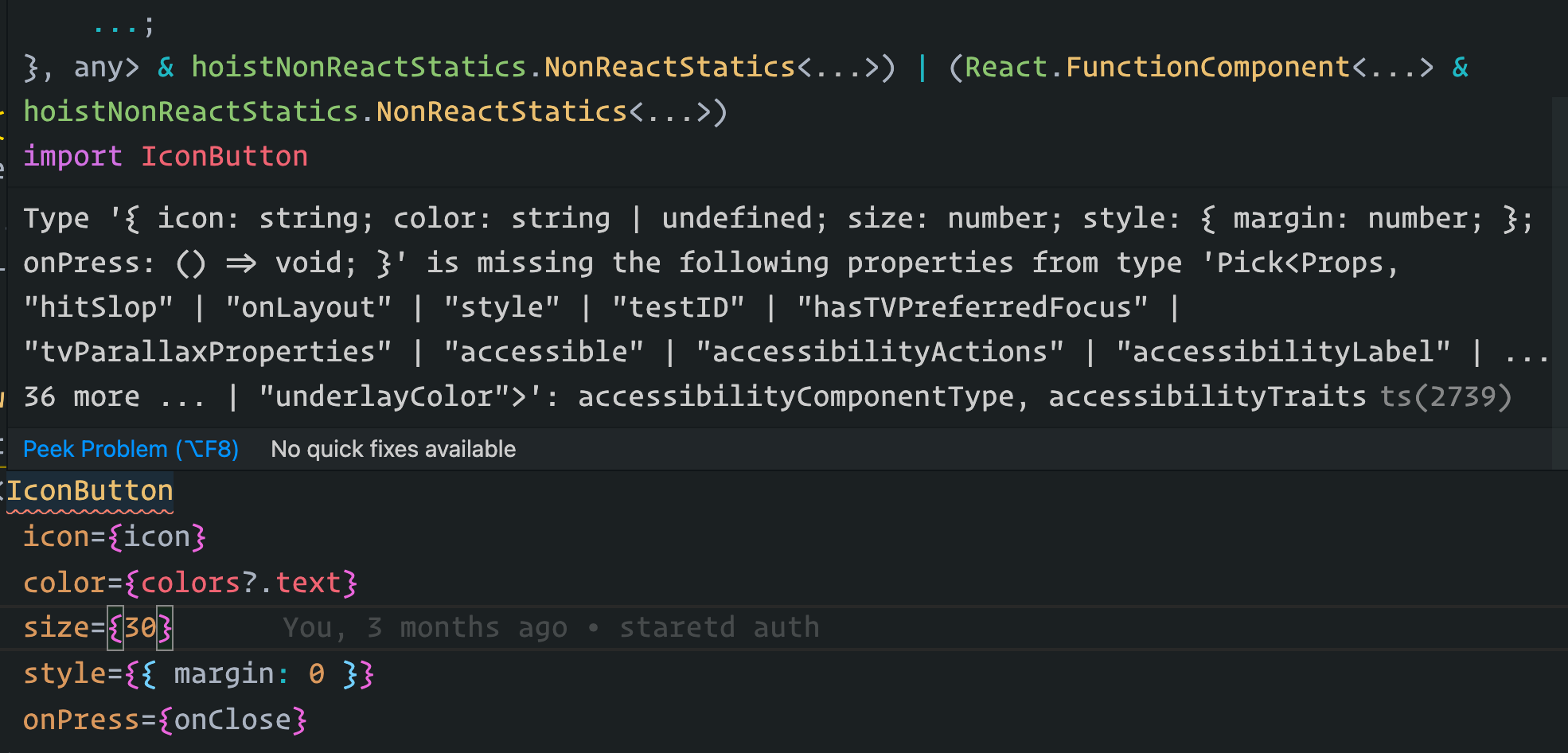
I solved it by adding accessibilityComponentType and accessibilityTraits props.
 nandorojo
on 25 Jan 2021
nandorojo
on 25 Jan 2021
@nandorojo see https://github.com/callstack/react-native-paper/pull/2484
mars-lan
on 25 Jan 2021
Related issues
 tonyxiao
·
3Comments
tonyxiao
·
3Comments
 kpervin
·
3Comments
kpervin
·
3Comments
 cassioseffrin
·
3Comments
cassioseffrin
·
3Comments
 sm2017
·
4Comments
sm2017
·
4Comments
 talaikis
·
3Comments
talaikis
·
3Comments
Most helpful comment
@raajnadar According to this commit https://github.com/DefinitelyTyped/DefinitelyTyped/commit/ec53e42ae41f202f1f83bea94126a717a1848414#diff-7c5007b14419e07403a6a320e5b22742
accessibilityStatesis removed from react-native types 20 days ago.A workaround for this issue is using older versions like
"@types/react-native": "0.62.2".But I think react-native-paper should also update their typescript definitions.