React-native-paper: Issue using react-native-paper with typescript
Ask your Question
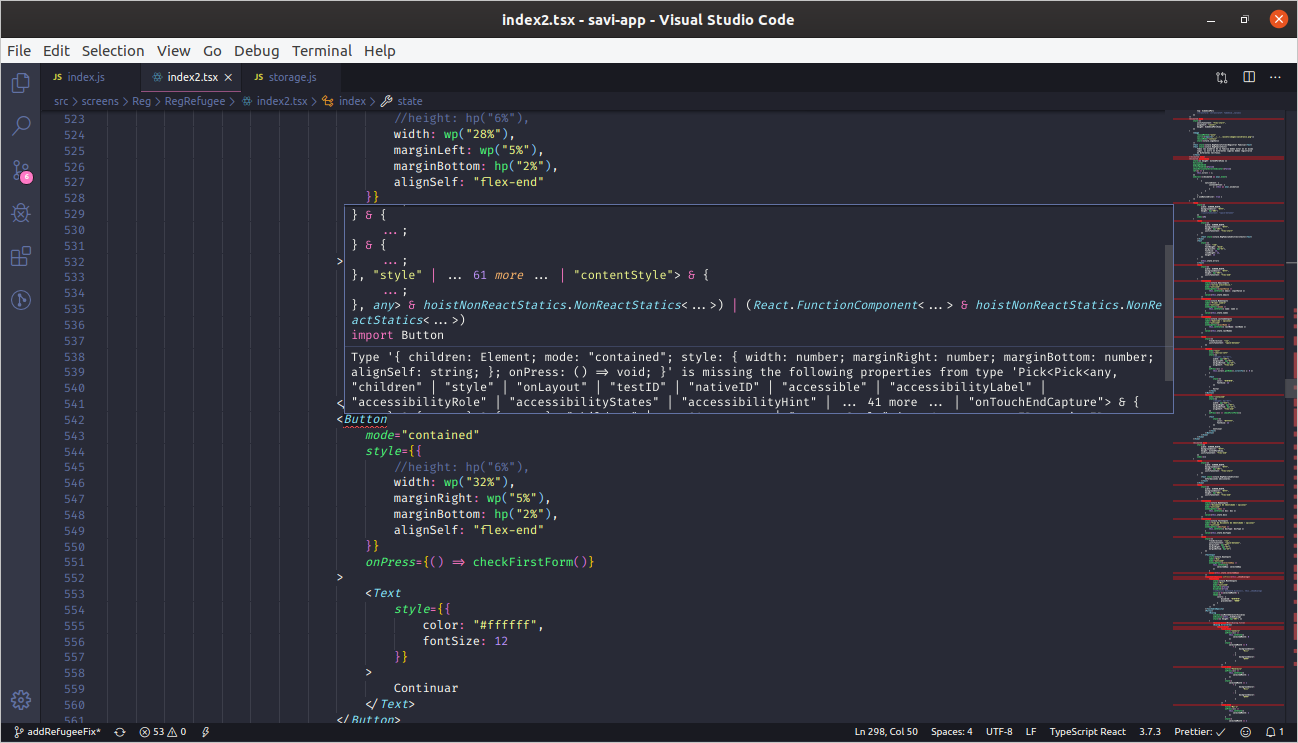
So I am trying react-native-paper for the first time. I am trying to test it out with a bootstrapped expo and typescript application but every time I declare a component I keep getting the following error:
Type '{ children: Element[]; }' is missing the following properties from type 'Pick<any, "style" | "children" | "onLayout" | "testID" | "nativeID" | "accessible" | "accessibilityLabel" | "accessibilityRole" | "accessibilityStates" | "accessibilityHint" | ... 41 more ... | "onTouchEndCapture">'
or similar errors like this:
Type '{ children: string; }' is missing the following properties from type 'Pick<any, "style" | "onLayout" | "testID" | "nativeID" | "accessible" | "accessibilityLabel" | "accessibilityRole" | "accessibilityStates" | "accessibilityHint" | "accessibilityComponentType" | ... 19 more ... | "textBreakStrategy">': style, onLayout, testID, nativeID, and 26 more.
Dependencies Versions:
"@types/react": "~16.9.0"
"@types/react-native": "~0.60.23"
"react-native": "https://github.com/expo/react-native/archive/sdk-36.0.0.tar.gz"
"react-native-paper": "^3.4.0"
"expo": "36.0.0"
Any thoughts?
Thanks
 crofoot
All 11 comments
You need to provide some code mate
 satya164
on 19 Dec 2019
satya164
on 19 Dec 2019
Im getting the same error just importing the components and using it on my application.
 davisuga
on 23 Jan 2020
davisuga
on 23 Jan 2020
i had a similar issue but tried
npm install
npm audit fix
and then it started to work, i guess give it a go as there maybe libs not in sync etc.
 andrewdeakins
on 26 Jan 2020
andrewdeakins
on 26 Jan 2020
I have the same issue, @davisuga @crofoot did you manage to solve it?
 andordavoti
on 25 May 2020
andordavoti
on 25 May 2020
@andordavoti just tried this and it fixed for me: https://brucelefebvre.com/blog/2019/11/26/typescript-react-native-paper/
 antoniocapelo
on 25 May 2020
antoniocapelo
on 25 May 2020
The same happens to me, the previous solution does not work, because I am using react-native 0.62
 andrefedev
on 1 Jun 2020
andrefedev
on 1 Jun 2020
I just installed "react-native-elements" and didn't get any type problem, use any example and it just works, but with paper it seems we have some error with dependencies and types.
andrefedev
on 1 Jun 2020
I am using react native paper from past 1 year I never had any problem with types. I am sure you are doing something wrong from your end @andrefedev
 raajnadar
on 1 Jun 2020
raajnadar
on 1 Jun 2020
@raajnadar I don't think so, I have a clean react-native installation with the typescript template, then install paper and just copy and paste some of your examples and it throws me type errors for any component.

andrefedev
on 1 Jun 2020
any update? how to solve this @andrefedev
 proteche
on 2 Jun 2020
proteche
on 2 Jun 2020
Locked this issue because the original poster & @andrefedev @proteche issue is totally different.
I tried reproducing the issue in a fresh RN installation but every this is working fine for me. Create a new issue with more information & a repro so that we can debug the issue.
raajnadar
on 2 Jun 2020
Related issues
 alikazemkhanloo
·
4Comments
alikazemkhanloo
·
4Comments
 timothystewart6
·
4Comments
timothystewart6
·
4Comments
 zachariahtimothy
·
3Comments
zachariahtimothy
·
3Comments
 sritharanpalani
·
4Comments
sritharanpalani
·
4Comments
 mihaidaviddev
·
3Comments
mihaidaviddev
·
3Comments
Most helpful comment
@andordavoti just tried this and it fixed for me: https://brucelefebvre.com/blog/2019/11/26/typescript-react-native-paper/