React-native-paper: No way to change underline focused color on TextInput without affecting other colors
I tried to change the cursor color in the textinput but it appears to underline, how to disable the underline? or leave it transparent?
 lamecksilva
All 31 comments
Can you give some more info on what you did?
 satya164
on 2 Dec 2018
satya164
on 2 Dec 2018
I want remove this underline color from text input, but the prop "underlineColor" is not working

lamecksilva
on 2 Dec 2018
underlineColor prop is for text input when it is inactive.
 raajnadar
on 11 Dec 2018
raajnadar
on 11 Dec 2018
Right now the underline when focused uses this logic:
https://github.com/callstack/react-native-paper/blob/master/src/components/TextInput.js#L547-L549
The problem is that you cannot change only that color without affecting the whole TextInput. Moreover, we need more docs on all this, see #775.
 ferrannp
on 28 Jan 2019
ferrannp
on 28 Jan 2019
still no solution for this??
I would like my textInput to have a customized underline color when focused, cannot change the purple, is there a way to change globally the color used by this plugin??
 tinni95
on 15 Oct 2019
tinni95
on 15 Oct 2019
Any update on this issue?
 poptocrack
on 28 Oct 2019
poptocrack
on 28 Oct 2019
How to remove the underline without affect text colors?
 douglasjunior
on 9 Nov 2019
douglasjunior
on 9 Nov 2019
If you don't want a material design themed input, use the input from React Native and apply the styling you want https://facebook.github.io/react-native/docs/textinput
satya164
on 9 Nov 2019
I just don't want to have the "underline", but the animated label and everything else I'd like to have.
Unfortunately not every design follows 100% of Material Design. (I have never worked on a project that follow 100% of the recommendations)
To whom it may concern, to "hide" the underline I followed this workaround.
const styles = StyleSheet.create({
inputContainer: {
borderRadius: 4,
height: 55,
overflow: 'hidden',
},
input: {
borderRadius: 0,
borderTopLeftRadius: 0,
borderTopRightRadius: 0,
height: 57,
overflow: 'hidden',
backgroundColor: '#fff',
},
};
...
<View style={styles.inputContainer}>
<TextInput
mode="flat"
label="Username"
style={styles.input}
/>
</View>
Note that Input is 2 pixels bigger than View.
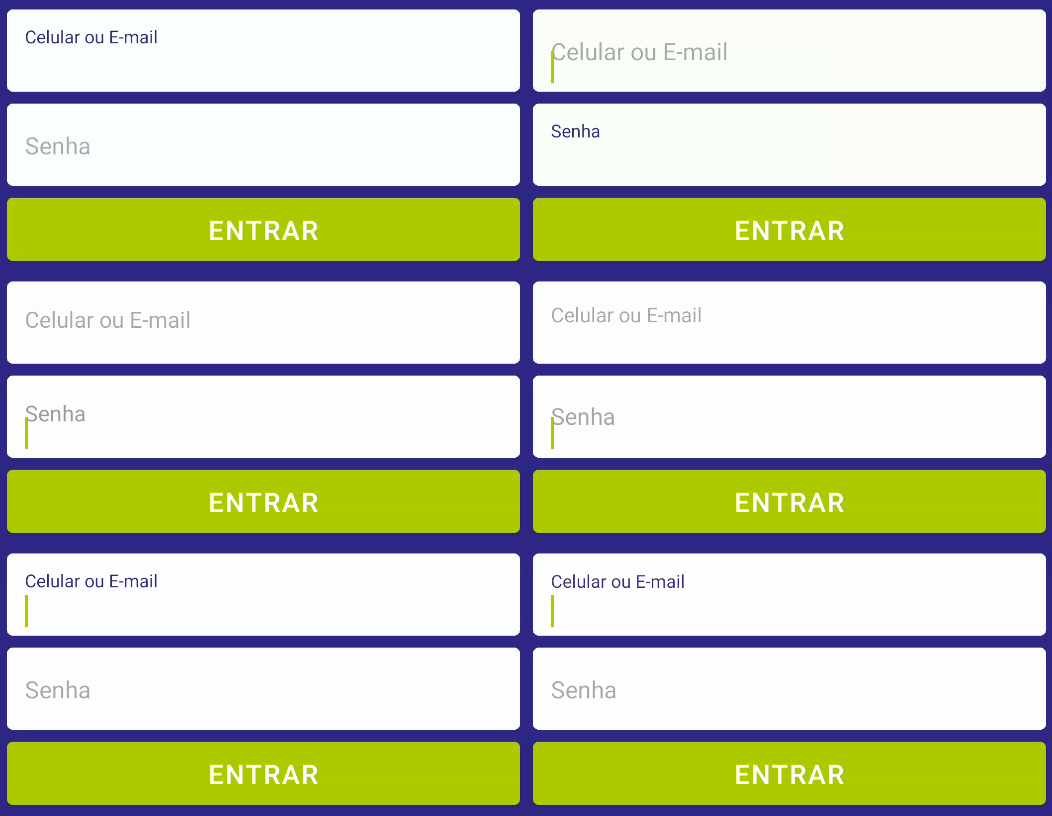
douglasjunior
on 9 Nov 2019
You can use theme={{
colors: {
primary: color,
}
}}
 react-native-copy-right
on 23 Nov 2019
react-native-copy-right
on 23 Nov 2019
I just don't want to have the "underline", but the animated label and everything else I'd like to have.
Unfortunately not every design follows 100% of Material Design. (I have never worked on a project that follow 100% of the recommendations)
To whom it may concern, to "hide" the underline I followed this workaround.
const styles = StyleSheet.create({ inputContainer: { borderRadius: 4, height: 55, overflow: 'hidden', }, input: { borderRadius: 0, borderTopLeftRadius: 0, borderTopRightRadius: 0, height: 57, overflow: 'hidden', backgroundColor: '#fff', }, }; ... <View style={styles.inputContainer}> <TextInput mode="flat" label="Username" style={styles.input} /> </View>Note that Input is 2 pixels bigger than View.
I know its not answer, but it solves
 EhtishamAli786
on 23 Nov 2019
EhtishamAli786
on 23 Nov 2019
To change the Underline and Label color when focused, you need to pass the props theme, like this:
        <TextInput
            label='Password'
            underlineColor='#fff'
            theme={{colors: {text: 'green', primary: 'yellow'}}}
          />
- _Text_ is to change the values that you put in the input
- _Primary_ is to change the underline and the label color
 notmarinho
on 9 Jan 2020
notmarinho
on 9 Jan 2020
any update?
 ilhamsa1
on 4 Feb 2020
ilhamsa1
on 4 Feb 2020
The problem
To change the Underline and Label color when focused, you need to pass the props theme, like this:
        <TextInput
            label='Password'
            underlineColor='#fff'
            theme={{colors: {text: 'green', primary: 'yellow'}}}
          />
- _Text_ is to change the values that you put in the input
- _Primary_ is to change the underline and the label color
the problem is when I want to have two different colors for the label and the underline when focused, which apparently is not possible 👎
tinni95
on 11 Feb 2020
My workaround has been the following :
<TextInput
                label='Email'
                value={email}
                placeholder={"email"}
                onChangeText={text => setEmail(text)}
                style={{ backgroundColor: "white" }}
                selectionColor={Colors.primary}
                underlineColor={"white"}
            />
            <View style={{ marginTop: -2,borderTopColor: "white", borderTopWidth: 10 }} />
I basically added a view after the textinput with the desired borderTopColor to cover the undesired one from the textinput
tinni95
on 11 Feb 2020
Following EhtishamAli786's advice (i.e. setting overflow: 'hidden'), but instead setting bottom margin of TextInput to -2 also works to hide the underline when in focus
 jkjellan
on 24 Feb 2020
jkjellan
on 24 Feb 2020
+1 also looking for a way to solve this issue.
 Evilbits
on 25 Feb 2020
Evilbits
on 25 Feb 2020
I think changing only the underline color breaks the material's guidelines. But, here is a possible solution.
 belgamo
on 8 Apr 2020
belgamo
on 8 Apr 2020
I think changing only the underline color breaks the material's guidelines. But, here is a possible solution.
I never worked on a project that follows 100% of material design guildelines. There will always be something that needs to be customized.
The question is: In React Native we do not have the option to override a CSS class as we do on the web, so it is important that libraries offer a certain level of customization.
A simple property that allows customization of the style is enough.
douglasjunior
on 8 Apr 2020
In addition to @douglasjunior solution, I have added a negative marginBottom value -3 to the text input and that's works perfectly!
 AbdelkhalekESI
on 30 Apr 2020
AbdelkhalekESI
on 30 Apr 2020
Hello 👋, this issue has been open for more than 2 months with no activity on it. If the issue is still present in the latest version, please leave a comment within 7 days to keep it open, otherwise it will be closed automatically. If you found a solution on workaround for the issue, please comment here for others to find. If this issue is critical for you, please consider sending a pull request to fix the issue.
![github-actions[bot] picture](https://avatars.githubusercontent.com/in/15368?v=4&s=40) github-actions[bot]
on 30 Jun 2020
github-actions[bot]
on 30 Jun 2020
This issue is already open... please aprove https://github.com/callstack/react-native-paper/pull/1797 for close this
 xchwarze
on 28 Jul 2020
xchwarze
on 28 Jul 2020
I need to hide the underline color as I will replace it with the progress bar.
Adding theme={{ colors: { primary: 'transparent' } }} will remove the underline but also the label which is not intended.
Here is my use case:
https://snack.expo.io/@dcangulo/password-with-progress-bar
 dcangulo
on 8 Sep 2020
dcangulo
on 8 Sep 2020
I need to hide the underline color as I will replace it with the progress bar.
Adding
theme={{ colors: { primary: 'transparent' } }}will remove the underline but also the label which is not intended.Here is my use case:
https://snack.expo.io/@dcangulo/password-with-progress-bar
Any update?
 wobsoriano
on 13 Sep 2020
wobsoriano
on 13 Sep 2020
There isn't a way to completely remove the underline? Even with a container with hidden overflow I really need vertically grouped inputs with no underline at all.
 rhuankarlus
on 2 Oct 2020
rhuankarlus
on 2 Oct 2020
The solution from @mateusmarinho1999 works very nicely, but feels kinda hacky for me. We are chaging the primary color of the input, and what if something else now/or in future start using the primary color?
Ideally some way to specifically change the color of the underline would be better
 renanborgez
on 20 Oct 2020
renanborgez
on 20 Oct 2020
this is fixed in https://github.com/callstack/react-native-paper/pull/1797
xchwarze
on 20 Oct 2020
this is fixed in #1797
is this working?
 HassanHaiderIX
on 21 Jan 2021
HassanHaiderIX
on 21 Jan 2021
this is fixed in #1797
is this working?
@HassanHaiderIX
Yes, I'm currently using this on my code and works like a charm
renanborgez
on 21 Jan 2021
this is fixed in #1797
is this working?
@HassanHaiderIX
Yes, I'm currently using this on my code and works like a charm
Sorry for being naive but I dont see that PR being merged. I am not sure
how can I hide underline color
HassanHaiderIX
on 21 Jan 2021
this is fixed in #1797
is this working?
@HassanHaiderIX
Yes, I'm currently using this on my code and works like a charmSorry for being naive but I dont see that PR being merged. I am not sure
how can I hide underline color
sorry, I was not clear
I'm using but not from the release channel, I've just implemented that PR by myself on my code
renanborgez
on 21 Jan 2021
Related issues
 mihaidaviddev
·
3Comments
mihaidaviddev
·
3Comments
 ZhengYuTay
·
3Comments
ZhengYuTay
·
3Comments
 timothystewart6
·
4Comments
timothystewart6
·
4Comments
 ButuzGOL
·
3Comments
ButuzGOL
·
3Comments
 zachariahtimothy
·
3Comments
zachariahtimothy
·
3Comments
Most helpful comment
To change the Underline and Label color when focused, you need to pass the props theme, like this: