React-native-paper: Feature request: Customisable numberOfLines for List.Item
Current behaviour
List.Item's title and description texts/components are wrapped inside a Text with fixed numberOfLines. As a result, long text elements are always cut off (even when using custom text components with numberOfLines set).
Expected behaviour
It'd be better if there is a way to customise the numberOfLines for item title/description, or at least a way to disable the default behaviour. I know that I can easily replace List.Item with a View, but I'd like to use List.Item for its standard padding/margin and ripple.
Code sample
Snack: https://snack.expo.io/@jibi/react-native-paper-list.item-numberoflines
Screenshots (if applicable)

What have you tried
- Use a
Subheadingfor title withnumberOfLines - Read the source code -> Write a feature request
Your Environment
| software | version
| --------------------- | -------
| ios or android | Android
| react-native | 0.57 (expo 31)
| react-native-paper | 2.3.1
| node | 10.2.1
| npm or yarn | yarn 1.12.3
 abn-volk
All 10 comments
The feature that you are asking is not under material design guidelines. Can tell me what are you trying to do? Maybe I can give you a better alternative solution.
 raajnadar
on 12 Dec 2018
raajnadar
on 12 Dec 2018
I wanted to show some list items with long text, but the text is always cut off. I've switched to a View and it's working fine now.
Oh, and I didn't realise the 3 line limitation is to comply with the MD guideline. I'll close this then.
abn-volk
on 13 Dec 2018
@raajnadar sometimes guidelines do not correspond to the reality of the data we're trying to present to users.
 tonyxiao
on 2 Mar 2019
tonyxiao
on 2 Mar 2019
What alternative would you recommend for a list item that takes a few lines?
tonyxiao
on 2 Mar 2019
I must disagree with @raajnadar and say that the implementation that took place on list item does not corresponde to the guidelines, itself.
Material guideline is very clear on giving 3 independent lines or 2 lines and the last can grow wrapping down.
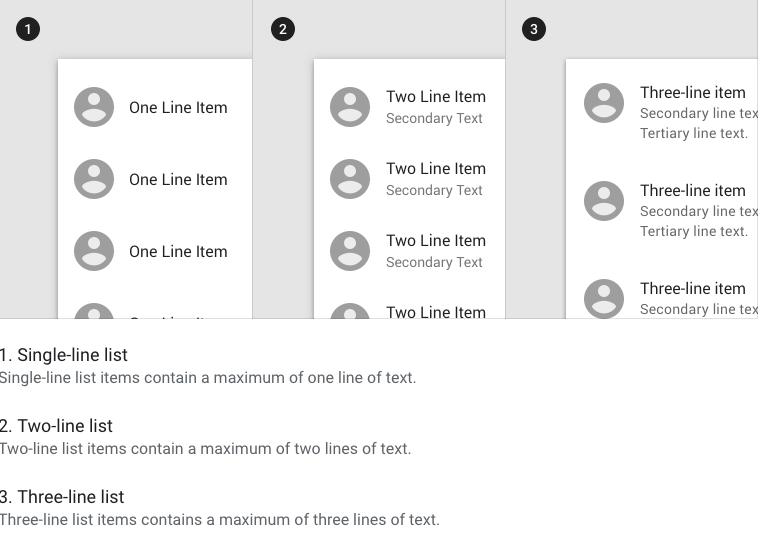
So, to the component to be as the guideline says, it should have a third property to represent the third line, and the behaviour would be the second line to be ellipsed at the end when there is a third line property filled. In case the third line prop does not have content, the second line would be allowed to wrap.
 zerobytes
on 8 Mar 2019
zerobytes
on 8 Mar 2019
Ok Ok, I am opening this issue again..!
raajnadar
on 8 Mar 2019
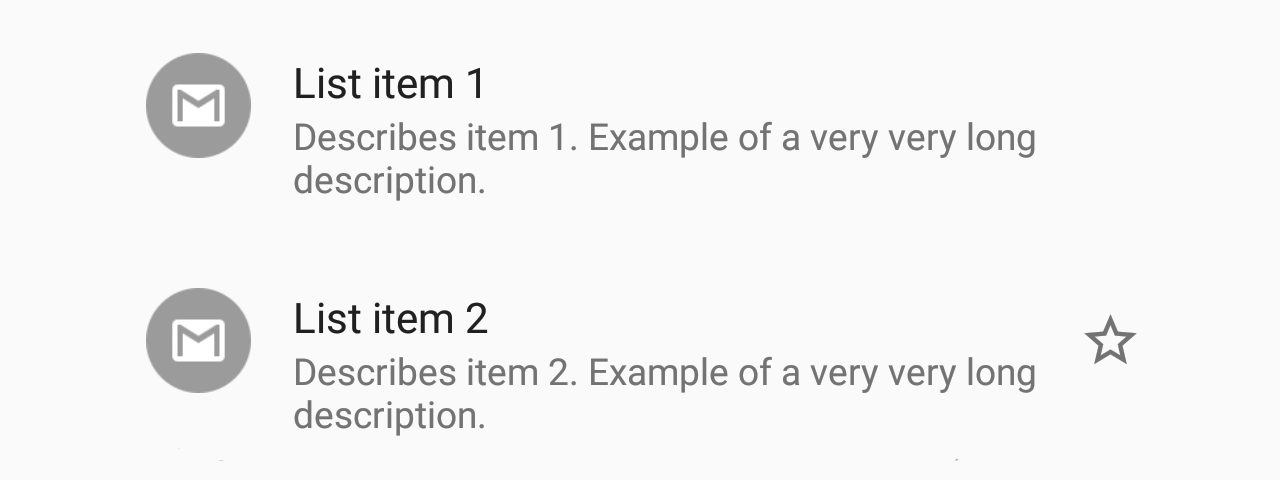
We do support 3 line list items. 3 lines don't mean there should be a 3rd prop. It just means that the total number of lines can be 3, as in your screenshots.
 satya164
on 8 Mar 2019
satya164
on 8 Mar 2019
Is it possible to have max of 1 line in the list
 Yajan
on 14 May 2019
Yajan
on 14 May 2019
996 will make us be able to customize the description prop of List.Item
 brunohkbx
on 14 May 2019
brunohkbx
on 14 May 2019
Fixed.
 ferrannp
on 19 Jul 2019
ferrannp
on 19 Jul 2019
Related issues
 scottybo
·
3Comments
scottybo
·
3Comments
 timothystewart6
·
4Comments
ferrannp
·
4Comments
timothystewart6
·
4Comments
ferrannp
·
4Comments
 ButuzGOL
·
3Comments
ButuzGOL
·
3Comments
 sm2017
·
4Comments
sm2017
·
4Comments
Most helpful comment
@raajnadar sometimes guidelines do not correspond to the reality of the data we're trying to present to users.