React-native-paper: Button Character Styles: Spacing and Caps
I'd like the button text to be normal spacing and not all characters in caps.
Please add this as an option on the component or in the theme styles.

| software | version
| --------------------- | -------
| ios or android | android (haven't tested on ios)
| react-native | 0.55
| react-native-paper | 2.0.0
 jstansbe
All 5 comments
It should be possible to do, by wrapping the button text with a Text component, e.g.
<Button><Text>Toast</Text></Button>
Does it solve your case?
 gawrysiak
on 10 Sep 2018
gawrysiak
on 10 Sep 2018
Passing in a text comp works!
jstansbe
on 10 Sep 2018
@gawrysiak following the Angular Material library texts should not be capitalized.
https://github.com/angular/material2/issues/2637#issuecomment-275573846
https://github.com/angular/material2/issues/2637#issuecomment-316457561
 ocarreterom
on 10 Sep 2018
ocarreterom
on 10 Sep 2018
@ocarreterom we follow google's official material design guidelines which shows the text as uppercased. it doesn't matter what's the default in angular material library.
 satya164
on 10 Sep 2018
satya164
on 10 Sep 2018
@ocarreterom just as @satya164 mentioned, it goes by the MD guide. In both old and new guidelines, the buttons are uppercase by default. I find it a good thing, since it's harder to go wrong with it. I'd like to see things more customizable some day, but this is how it is for now. Hopefully the extra Text wrapper isn't a big issue for your use cases.
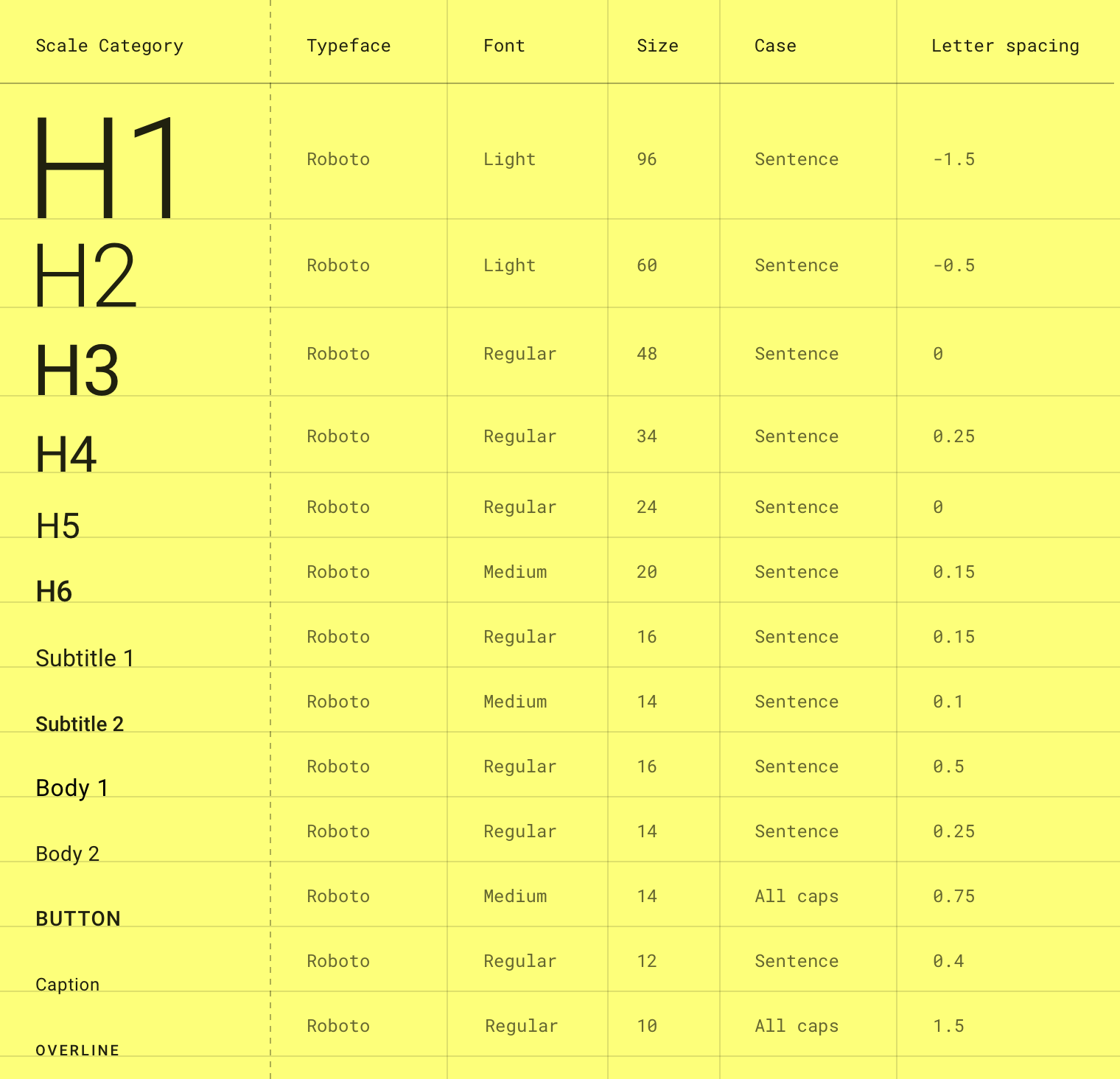
https://material.io/design/typography/the-type-system.html#type-scale
gawrysiak
on 10 Sep 2018
Related issues
 sm2017
·
4Comments
sm2017
·
4Comments
 kpervin
·
3Comments
kpervin
·
3Comments
 ButuzGOL
·
3Comments
ButuzGOL
·
4Comments
ButuzGOL
·
3Comments
ButuzGOL
·
4Comments
 cassioseffrin
·
3Comments
cassioseffrin
·
3Comments
Most helpful comment
@ocarreterom we follow google's official material design guidelines which shows the text as uppercased. it doesn't matter what's the default in angular material library.