React-native-pager-view: InvariantViolation : requireNativeComponent RNCViewpager was not found in the UI manager

 sharief-edv
All 32 comments
It looks like you did not run react-native link @react-native-community/viewpager ?
 ferrannp
on 18 Mar 2019
ferrannp
on 18 Mar 2019
I do ran that , But the mistake i have done before was _(I DID NOT MENTION IT FIRST )_ , i didn't run yarn add @react-native-community/viewpager at first instead i have ran the _npm install --save @react-native-community/viewpager_ as i thought i have to do npm not yarn . After i realized and ran yarn command followed by link command , i am getting the same error.
sharief-edv
on 18 Mar 2019
Is the example in this repository working for you?
ferrannp
on 18 Mar 2019
No @ferrannp , I am getting error
sharief-edv
on 18 Mar 2019
I am also getting this error, so what is the solution ?
 SSWeedie
on 18 Apr 2019
SSWeedie
on 18 Apr 2019
What about not linking / using it in iOS for now? It is not implemented on iOS anyway.
ferrannp
on 18 Apr 2019
Still get the same error without linking
SSWeedie
on 20 Apr 2019
@SSWeedie can I see some code? You should only link it on Android but specially on JS, you should only require it for Android.
ferrannp
on 30 Apr 2019
Getting the same error
Invariant Violation: Invariant Violation:
requireNativeComponent : "RNCViewPager" was not found in the UIManager".
I run both the commands
- For installation
npm install @react-native-community/viewpager - For linking the library
react-native link @react-native-community/viewpager
System configuration :
System:
OS: Linux 4.15 Ubuntu 18.04.2 LTS
CPU: (6) x64 AMD FX(tm)-6300 Six-Core Processor
Memory: 920.17 MB / 3.59 GB
Binaries:
  Node: 8.16.0
  npm: 6.4.1
npmPackages:
  react: 16.8.3 => 16.8.3
  react-native: 0.59.5 => 0.59.5
npmGlobalPackages:
  react-native-cli: 2.0.1
 renishdeveloper
on 30 Apr 2019
renishdeveloper
on 30 Apr 2019
Can someone post a repo where this can be reproduced?
ferrannp
on 30 Apr 2019
@ferrannp Here is the complete code with the implementation steps :
For installation
npm install @react-native-community/viewpager
For linking the library
react-native link @react-native-community/viewpager
Not followed the manual steps as the react-native link @react-native-community/viewpager command does it for me.
Import view pager
import ViewPager from "@react-native-community/viewpager";
ViewPager component
<ViewPager
            style={styles.viewPager}
            initialPage={0}>
            <View key="1">
              <Text>First page</Text>
            </View>
            <View key="2">
              <Text>Second page</Text>
            </View>
          </ViewPager>
Let comment if works for anyone
renishdeveloper
on 6 May 2019
Add the RNCViewPagerPackage class to your list of exported packages.
 AppUU
on 10 May 2019
AppUU
on 10 May 2019
@renishdeveloper that works for me. Do you have a repository I can try?
ferrannp
on 10 May 2019
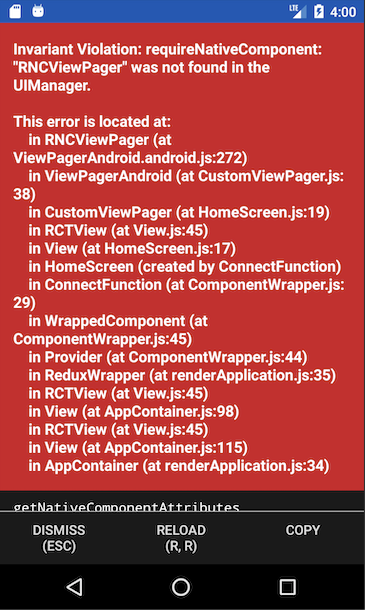
Same error here for ViewPager on Android.
I am also struggling with a similar error stating RNCWebview not found in UIManager for WebView as well for Android and reported here. Everything works well for iOS. Its very frustrating.
I did npm install and than react-native link. Then checked if the ViewPager is linked properly in Android by looking at Application.java, build.gradle(for app) and settngs.gradle files and ViewPager has appropriate entries in all the files mentioned above.
Why UIManager has so many missing reactNativeComponent?
 sangyakhare
on 4 Jun 2019
sangyakhare
on 4 Jun 2019
I don't know if this is useful or not, but I was also getting this issue with a fresh new project. I tried manually linking but that didn't seem to fix the problem. Again, since it was a new project I decided to delete the project and tried again. But this time adding and linking viewpager before running the app on android and creating a component making use of viewpager. It works now thankfully though I'm not fully sure why
 AA25
on 7 Jun 2019
AA25
on 7 Jun 2019
I checked examples and work. I also tested a fresh project and I ran below commands
mkdir toDelete
cd toDelete/
react-native init AwesomeProjectToDelete
cd AwesomeProjectToDelete/
yarn
yarn add @react-native-community/viewpager
react-native link @react-native-community/viewpager
react-native run-ios
react-native run-android
Both commands react-native run-ios and react-native run-android work with no errors.
My configuration:
  React Native Environment Info:
    System:
      OS: macOS 10.14.4
      CPU: (8) x64 Intel(R) Core(TM) i5-8259U CPU @ 2.30GHz
      Memory: 1.74 GB / 16.00 GB
      Shell: 3.2.57 - /bin/bash
    Binaries:
      Node: 11.14.0 - /usr/local/bin/node
      Yarn: 1.15.2 - /usr/local/bin/yarn
      npm: 6.9.0 - /usr/local/bin/npm
      Watchman: 4.9.0 - /usr/local/bin/watchman
    SDKs:
      iOS SDK:
        Platforms: iOS 12.2, macOS 10.14, tvOS 12.2, watchOS 5.2
    IDEs:
      Android Studio: 3.4 AI-183.5429.30.34.5452501
      Xcode: 10.2/10E125 - /usr/bin/xcodebuild
    npmPackages:
      react: 16.8.3 => 16.8.3
      react-native: 0.59.9 => 0.59.9
    npmGlobalPackages:
      react-native-cli: 2.0.1
      react-native-create-library: 3.1.2
Did you linked this lib manually or used above commands ?
@AA25
If you want to link lib manually, checkout example dir.
 troZee
on 10 Jun 2019
troZee
on 10 Jun 2019
I've linked the react-native-viewpager using the command in Android, but it doesn't link in following file:
android/app/src/main/.../MainApplication.java
After I linked manually, it works for me.
For full manually link:
https://github.com/react-native-community/react-native-viewpager/blob/master/README.md#android
 DanielVenturini
on 23 Jun 2019
DanielVenturini
on 23 Jun 2019
How i can use https://github.com/react-native-community/react-native-viewpager/blob/master/README.md#android
if i use expo? I have't 'android' folder
 DrobyshevAlex
on 19 Aug 2019
DrobyshevAlex
on 19 Aug 2019
@DrobyshevAlex you cannot as this library is not supported by Expo. You would have to eject your project.
I am closing this issue as there is no reproducible repro and it is working fine for me in the example and in a new project created with `react-native init.
ferrannp
on 1 Sep 2019
@ferrannp, I have installed "yarn add @react-native-community/viewpager" and then follow the steps but It not run in expo.
 jaythakkar2807
on 9 Oct 2019
jaythakkar2807
on 9 Oct 2019
1.cd ios
2.sudo gem install cocoapods
3.Pod install
 MelchizedekV
on 28 Oct 2019
MelchizedekV
on 28 Oct 2019
@DrobyshevAlex you cannot as this library is not supported by Expo. You would have to eject your project.
The interesting thing is that Expo people recommend using the react-native-viewpager instead of one of their deprecated interface. It is literally the first-line link on the ViewPagerAndroid page.
 yzalvov
on 24 Nov 2019
yzalvov
on 24 Nov 2019
I am on RN 61.5 with "@react-native-community/viewpager": "^3.1.0" and got crashes on iOS (not Android) with the said error.
What helped was manually linking the dependancy for iOS:
put
pod 'react-native-viewpager', :path => '../node_modules/@react-native-community/viewpager'
in your Podfile and run cd ios && pod install
 aryojamousi
on 2 Dec 2019
aryojamousi
on 2 Dec 2019
I had the same issue using react-native 0.61.4 and "@react-native-community/viewpager": "^3.3.0" on android. It was resolved after doing react-native link @react-native-community/viewpager. Why do i have to link it when react native uses auto linking ?
 sushrut-desora
on 13 Feb 2020
sushrut-desora
on 13 Feb 2020
i have used library react-native-scrollable-tab-view version 1.0.0, it has dependency @react-native-community/viewpager then error ocurce. But when i downgrade to version 0.10.0 this error is gone.
 DatNguyenCore
on 5 Apr 2020
DatNguyenCore
on 5 Apr 2020
if you're using expo and you have this issue make sure you're on sdk-37 and see this docs page for installation instructions https://docs.expo.io/versions/latest/sdk/view-pager/
 brentvatne
on 16 May 2020
brentvatne
on 16 May 2020
@yzalvov - we only release sdks once per quarter, so all you need is for someone to make a change in one of the react-native-community repos one day after that release and then there is nothing we can do until the next release. so that is why you would have seen different recommendations in the docs. w
brentvatne
on 16 May 2020
I checked and autolinking for 0.62 here:
https://github.com/troZee/viewPagerExample/tree/autolinking
And everything works fine.
troZee
on 19 May 2020
i had same issue, is it maybe the problem is only for expokit app (eject from manage workflow).
Because my apps didnt get any autolinking, include viewpager
 brambang
on 5 Jun 2020
brambang
on 5 Jun 2020
Getting the same error
Invariant Violation: Invariant Violation:
requireNativeComponent : "RNCViewPager" was not found in the UIManager".I run both the commands
1. ```
   For installation
    npm install @react-native-community/viewpager
   ```

2. ```
   For linking the library
    react-native link @react-native-community/viewpager
   ```
System configuration :
System:
OS: Linux 4.15 Ubuntu 18.04.2 LTS
CPU: (6) x64 AMD FX(tm)-6300 Six-Core Processor
Memory: 920.17 MB / 3.59 GBBinaries: Node: 8.16.0 npm: 6.4.1 npmPackages: react: 16.8.3 => 16.8.3 react-native: 0.59.5 => 0.59.5 npmGlobalPackages: react-native-cli: 2.0.1
saved my time :) thanks a million
 Niz47
on 11 Aug 2020
Niz47
on 11 Aug 2020
i had same issue, is it maybe the problem is only for expokit app (eject from manage workflow).
Because my apps didnt get any autolinking, include viewpager
It might be related to this issue. https://github.com/expo/expo-cli/issues/1398
sushrut-desora
on 12 Aug 2020
To make it work on ios I had to do
react-native link react-native-pager-view
cd ios; pod install; cd ..
React Native version "react-native": "0.63.2",
Pager View version "react-native-pager-view": "^5.1.5",
 narek11
on 23 Apr 2021
narek11
on 23 Apr 2021
Related issues
 ivan3177
·
6Comments
ivan3177
·
6Comments
 hengkx
·
8Comments
ferrannp
·
4Comments
hengkx
·
8Comments
ferrannp
·
4Comments
 Andarius
·
5Comments
ferrannp
·
8Comments
Andarius
·
5Comments
ferrannp
·
8Comments
Most helpful comment
Getting the same error
Invariant Violation: Invariant Violation:
requireNativeComponent : "RNCViewPager" was not found in the UIManager".
I run both the commands
npm install @react-native-community/viewpager
react-native link @react-native-community/viewpager
System configuration :
System:
OS: Linux 4.15 Ubuntu 18.04.2 LTS
CPU: (6) x64 AMD FX(tm)-6300 Six-Core Processor
Memory: 920.17 MB / 3.59 GB