React-native-onesignal: OneSignal React Native SDK Version 4!
Howdy,
Thank you everyone for your patience. The React Native major release version 4 is now in Beta!
This version includes many exciting changes including an overall simplification of the API as well as many of the underlying native improvements and bug fixes.
Some key changes already in Beta:
- Better notification control while app is in foreground
addEventListeneris being replaced by dedicated handler and observer setter functions- Part of OneSignal initialization is now done for you automatically. Simply set the app id to complete the process.
Coming soon:
- A highly requested feature, Typescript Types
Why you should start migrating now
Most importantly, we want to give you the opportunity to voice your opinion and provide feedback so that we can make changes as needed to better suit your implementation.
Furthermore, it is always beneficial to get a head start on migrating your implementation to ensure a smooth transition. As we continue improving OneSignal, being fully migrated to the latest version of the SDK will help minimize potential issues and ensure you can focus on providing value to your customers, improving your business, and creating a delightful messaging experience.
To begin migrating your app to version 4, read our migration guide here. Regarding this guide, please let us know if anything could be clarified or communicated better.
We are looking forward to hearing from you.
Enjoy!
 rgomezp
All 29 comments
Would you recommend migrating React Native apps too?
 taschik
on 30 Oct 2020
taschik
on 30 Oct 2020
Hi @rgomezp I try beta.2 and found a bug based on documentation. Documentation says:
setNotificationWillShowInForegroundHandler
Silence Notification:
If you would like to silence the notification, call complete() with no argument.
When I call complete(), I get an undefined is not an object error in NotificationReceivedEvent.js at line below.
https://github.com/OneSignal/react-native-onesignal/blob/db692f75accbf8031eca0a25caa8d50a75e1ac36/src/NotificationReceivedEvent.js#L14
I solve it to send an empty object as an argument instead of no argument. The code or documentation has to fix.
 eraykose
on 9 Nov 2020
eraykose
on 9 Nov 2020
Howdy @eraykose ,
Thank you for reporting. This was reported in #1082 which a fix is already in the works for. We will resolve this in the upcoming Beta 3 version.
Cheers
rgomezp
on 9 Nov 2020
@rgomezp I'm mostly concerned with properly subscribing/unsubscribing users. Is this going to be simpler? I opened a ticket already 2 weeks ago, would you mind having a quick look? https://github.com/OneSignal/react-native-onesignal/issues/1069
 fritzfr
on 10 Nov 2020
fritzfr
on 10 Nov 2020
@taschik ,
Sorry I missed your comment.
Can you expand on your question a bit? This major release is for the React Native OneSignal SDK and is referring to React Native apps.
rgomezp
on 11 Nov 2020
@rgomezp , In master branch, I can see we have this file NotificationNotDisplayingExtender.java in android/src/main/java/com/geektime/rnonesignalandroid/NotificationNotDisplayingExtender.java. But seems it was removed in beta 4.
I am trying to implement Data & Background notification follow this one https://documentation.onesignal.com/docs/service-extensions#android-notification-extender-service. Could you please let me know what is wrong with NotificationNotDisplayingExtender.java?
Update
Found this one https://documentation.onesignal.com/docs/40-api-android-native#background-notification-control
 r0b0t3d
on 19 Nov 2020
r0b0t3d
on 19 Nov 2020
OneSignal.setNotificationWillShowInForegroundHandler still not working with huawei devices which not supported from google
 bishoymakkar
on 19 Nov 2020
bishoymakkar
on 19 Nov 2020
@r0b0t3d ,
That is correct. Also see these docs and note the limitation on non-native SDKs.
rgomezp
on 19 Nov 2020
@bishoymakkar ,
I see you opened #1096 . Please continue discussion there.
rgomezp
on 19 Nov 2020
It seems that OneSignal.setNotificationOpenedHandler() in 4.0.0-beta.4 behaves differently from OneSignal.addEventListener('opened', handler) with respect to tapping on a push notification when the app is closed, at least on iOS:
The old
OneSignal.addEventListener('opened', handler), if called at the top level of the app, captures the open event even when the app is closed, and opens as the result of tapping on a notification.The new
OneSignal.setNotificationOpenedHandler()instead is not able to capture the open event when the app was closed and opens as a result of tapping on the notification, no matter how early the event handler is set.
This makes it impossible to attach behavior to the "first" opening of a push notification, when the app was previously closed.
 lucaong
on 5 Dec 2020
lucaong
on 5 Dec 2020
Howdy @lucaong 🤠 ,
Thank you for reporting your issue. We tested it and indeed found the bug.
The problem should now be resolved in version 4.0.0-beta.5.
Enjoy!
rgomezp
on 11 Dec 2020
Do you have any plan to support removing the notification feature for iOS in the next releases? I would like to show the notification in the foreground but don't want to show it in the notification center. I didn't see any solution in docs for it. Also searched for removeDeliveredNotificationsWithIdentifiers in the project but couldn't find any code related.
eraykose
on 16 Dec 2020
@eraykose ,
The only real way to clear notifications from the notification center on iOS is via setting your badge icon number to 0. This only works if it was previously greater than 0 so you need to be using badges. Alternatively you can set it to 1 then immediately set it to 0.
Badges
rgomezp
on 16 Dec 2020
@rgomezp Thank you. I will work on it.
eraykose
on 17 Dec 2020
Typescript support is great, thank you. Btw, do you have any ideas for typing additionalData from OSNotification ?
 danlupascu
on 29 Dec 2020
danlupascu
on 29 Dec 2020
I'm upgrading to 4 now, thoroughly enjoying the types and generally enjoying the clean API.
However, I'm currently messing around with setNotificationWillShowInForegroundHandler and I'm not seeing this event fire when the device receives a notification but the app is backgrounded. I AM setting content_available to true on the outgoing notification, and it's handling it correctly when the app is foregrounded.
Since this is the intended replacement for onRecieved (per upgrade guide --> https://documentation.onesignal.com/docs/step-by-step-react-native-3x-to-400-upgrade-guide#step-4---update-event-listeners ) shouldn't this handle any notifications received in the background as well?
I also don't see anything in my xcode logger (logging set to verbose) when the app recieves a notification while in the background now.
 ahartzog
on 30 Dec 2020
ahartzog
on 30 Dec 2020
I'm experiencing this same issue on 4.0.0-beta.5 - https://github.com/OneSignal/react-native-onesignal/issues/749
Is it possible that fix (https://github.com/OneSignal/OneSignal-iOS-SDK/pull/695) didn't make it into this 4.0 beta track or has regressed?
 sbauch
on 31 Dec 2020
sbauch
on 31 Dec 2020
@danlupascu @ahartzog ,
The key for additional data is set by yourself via the dashboard or API notification create request. We could certainly look at a generic interface with a generic key and a more specific type (will most likely be either string or number but I'll have to check to be sure). Is this along the lines of what you have in mind?
@ahartzog ,
I'm happy you are enjoying the major release.
It is true that the handler you mention replaces the received event functionality. Think of it as more of a rename where it is now more clear that this event should only fire while it is in the foreground. So you should not see this event fire when the app is backgrounded. If you want to handle it in the background, you should take a look at our Data & Background Notification reference. Though, be prepared to write some native code in that case!
@sbauch ,
Thanks for raising the issue. We haven't heard of other reports of this so will need to look into it further. It certainly could be a regression. Is this only occurring in the beta? Please open a new issue or add more relevant details in the existing 749 issue. Cheers
rgomezp
on 4 Jan 2021
@rgomezp thanks for the response!
I think you should be a lot more explicit in the documentation and migration reference. In this specifically --> https://documentation.onesignal.com/docs/step-by-step-react-native-3x-to-400-upgrade-guide#step-4---update-event-listeners I think you would be well served to explain that this event does not currently fire if the app is backgrounded.
I wouldn't mind additional setup, but I'm reading the documentation for the background notification reference now (that you linked, thank you) and it appears that it only applies to messages with no content? Which means that any normal message sent while the app is backgrounded can't be processed this way?
If that is correct, this change makes it practically impossible to programmatically control the badge count, which we did because there are some types of messages (via our additionalData params on inbound messages) that I want to increment for, and others I do not.
Additionally, I have a notification shade where the users can see their notification history in-app (along with other events - see image for concept clarity). Currently the onRecieved creates an entry that our server keeps for these. I can't think of any other way to do this if notifications aren't being handled while the app is backgrounded. (Is there a way for me to pull messages sent for a specific external user id? That could replace this, but I just reviewed the REST api docs and I don't see any way to do this).
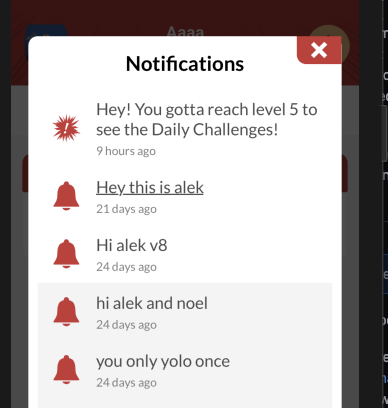
I recognize there's probably deeper concerns here that I probably don't understand, I'm just presenting that this was unclear to me, and it seems others may miss this functionality of being able to run code off of notifications received while the app is backgrounded. I also don't understand why it would go away as an option, since it worked fine in v4.
ahartzog
on 5 Jan 2021
@rgomezp Yes, definitely. Using a generic would probably solve this, we'd be able to configure it as we need.
danlupascu
on 5 Jan 2021
@danlupascu ,
After discussing with the team, we have decided against adding a generic for use with additional data. You can achieve the same thing by simply casting the additional data to the interface you want.
Example:
interface myInterface {
    test: number;
}

let notif = notifReceivedEvent.getNotification();
let additionalData = notif.additionalData as myInterface;
@rgomezp I think that's fine too, it doesn't matter as long as we can type it. Thank you for the solution.
We could create our own helper function to cast the notification using generics
interface PostNotificationAdditionalData {
  postId: string;
}

const castNotification = <T extends OSNotification['additionalData']>(notification: OSNotification) => ({
  ...notification,
  additionalData: notification.additionalData as T,
});

const getPostId = (notification: OSNotification) => {
  const postNotification = castNotification<PostNotificationAdditionalData>(notification);

  return postNotification.additionalData.postId;
};
Heya @rgomezp could you tell me if the functionality to handle notifications while the app is backgrounded is something that is being discussed? If it 100% won't be changing in v5, I'll probably just revert to v4 and keep using that for the foreseeable future.
ahartzog
on 6 Jan 2021
@ahartzog ,
Thank you for your patience.
After discussing with the team, this isn't something we are planning to add until perhaps another major version. We ended up deprecating the "received" event functionality that you're used to from version 3 because this was mainly used for foreground notification events (e.g: you want to update something on the foregrounded app). We replaced this with the more clearly named notificationWillShowInForegroundHandler functionality.
Can you perhaps expand a little bit more around your use case? You mention that you want to only increment the badge for some notifications.
I wouldn't mind additional setup, but I'm reading the documentation for the background notification reference now (that you linked, thank you) and it appears that it only applies to messages with no content? Which means that any normal message sent while the app is backgrounded can't be processed this way?
Without fully understanding your specific use case, I suspect that you will find that in either case it is a better solution (less hacky) to handle notifications via the service extensions as I mentioned previously.
rgomezp
on 6 Jan 2021
The React Native SDK is now out of Beta!
Please upgrade to version ^4.0.3
Enjoy!
rgomezp
on 6 Jan 2021
Thanks for the great work! @rgomezp
When I try to send a delayed push with postNotification method by supplying a future date to sendAfter option, the setNotificationWillShowInForegroundHandler method fires immediately. Shouldn't it wait until the actual notification received?
 brerdem
on 10 Jan 2021
brerdem
on 10 Jan 2021
@brerdem ,
It sounds like your notification is indeed being sent out but early.
Please double check that you are formatting the payload correctly. If the foreground handler is firing it means that your device already sent the HTTP request to OneSignal and the notification was sent out (i.e. it made the round trip). The sendAfter logic doesn't occur at the device-level but rather via OneSignal servers.
Please double check our API Reference regarding notification POST.
rgomezp
on 12 Jan 2021
Thanks for pointing out @rgomezp. Turns out that I made a typo by typing sendAfter instead send_after
brerdem
on 12 Jan 2021
@ahartzog ,
Thank you for your patience.After discussing with the team, this isn't something we are planning to add until perhaps another major version. We ended up deprecating the "received" event functionality that you're used to from version 3 because this was mainly used for foreground notification events (e.g: you want to update something on the foregrounded app). We replaced this with the more clearly named
notificationWillShowInForegroundHandlerfunctionality.Can you perhaps expand a little bit more around your use case? You mention that you want to only increment the badge for some notifications.
I wouldn't mind additional setup, but I'm reading the documentation for the background notification reference now (that you linked, thank you) and it appears that it only applies to messages with no content? Which means that any normal message sent while the app is backgrounded can't be processed this way?
Without fully understanding your specific use case, I suspect that you will find that in either case it is a better solution (less hacky) to handle notifications via the service extensions as I mentioned previously.
I want the mobile app to archive the notification (without clicking on the notification).
So I need when I get a notification when the app is in the background, I want receive event and data
 thanhvt
on 9 Apr 2021
thanhvt
on 9 Apr 2021
Related issues
 LuckyLuky
·
35Comments
LuckyLuky
·
35Comments
 DaniloCouto
·
37Comments
DaniloCouto
·
37Comments
 crushy26
·
35Comments
crushy26
·
35Comments
 GeoffreyPlitt
·
40Comments
GeoffreyPlitt
·
40Comments
 janaka120
·
30Comments
janaka120
·
30Comments
Most helpful comment
The React Native SDK is now out of Beta!
Please upgrade to version
^4.0.3Enjoy!