React-native-onesignal: 'React/RCTAnimationType.h' file not found
Description:
After updates and trying to build and test my app again with xCode i'm getting the error:
'React/RCTAnimationType.h' file not found
_(coming from RCTConvert.h imported in RCTOnesignal.m)_
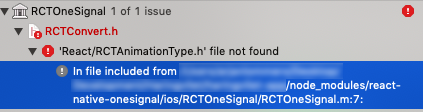
Tried every option there is with manual linkin, Updating manually, set linking headers, remove & reinstall node_modules or change it to RCTAnimationType.h. Nothing helped so far.
Also other files that are getting imported inside RCTOneSignal giving the same error of not found.
Environment
Xcode: 11.3.1
"react": "16.13.1",
"react-native": "0.63.1",
"react-native-onesignal": "3.9.0"
Anything else:
Created the setup with onesignal sdk without cocoapods.
I hope someone has a good solution
 A-digitaltech
All 12 comments
Howdy,
Our apologies for the delayed response. Are you still encountering this issue?
 rgomezp
on 20 Aug 2020
rgomezp
on 20 Aug 2020
Yes i'm still encountering this issue
A-digitaltech
on 20 Aug 2020
Howdy,
We just released a new version of the SDK. Please upgrade and see if this is still happening for you.
Have you tried reproducing this in the example app within the SDK?
rgomezp
on 25 Aug 2020
Hi @rgomezp ,
I did the update and also tried reproducing with the example app.
Just followed the steps of the non-cocoapods setup on the example app and trying to build and getting the same error.
'React/RCTAnimationType.h' file not found
The package.json in the example app has the following dependencies:
"react": "16.9.0",
    "react-native": "^0.61.2",
    "react-native-onesignal": "^3.9.1"
Using the latest xCode version 11.6
A-digitaltech
on 26 Aug 2020
Hi @rgomezp ,
Do you maybe have a solution to fix this issue?
A-digitaltech
on 31 Aug 2020
Hi @A-digitaltech ,
Could you try the following steps:
- clear node_modules
- and run "yarn install"
- rebuild on Xcode
I was able to clear the error running the above steps. Let us know if that works for you!
Sorry, the above fix was for another error "RCTBridgeDelegate.h file not found"
 tyang1
on 3 Sep 2020
tyang1
on 3 Sep 2020
Hi @tyang1 ,
I did tried that. It removed the error of RCTAnimationType.h sometimes and will then fall in the next React/ file that it couldn't find.
Tried it right now.. But still the same Error of not finding RCTAnimationType.h
A-digitaltech
on 3 Sep 2020
I have the same problem @A-digitaltech - I've tried almost everything documented: clearing cache, clearing the build, started a new project from scratch... I exhausted my trick box
 unilogica
on 3 Sep 2020
unilogica
on 3 Sep 2020
Hi @A-digitaltech and @unilogica ,
Thank you for reporting the issue and providing the details.
I was able to reproduce the issue (without Cocoapds), and the error being all the React/xxxx.h header files not found was due to _React_ library not manually linked (manual linking reference: https://reactnative.dev/docs/linking-libraries-ios#manual-linking)
Here I would have to:
- Manually link the React.xcodeproj to the 'Libraries' in my project, and made sure to add the correct libraries in the _Link Binary With Libraries_ section of the Build Phases of my main target (see screenshot below).
- In addition, some other libraries need to also be manually linked following the same step as above:

- Under 'Product' in Xcode, 'Clean Build Folder', and 'Build'
Hope this will fix the issue for you!
tyang1
on 13 Sep 2020
Hi @tyang1 ,
Well this won't work with react-native dependency 0.61 and above because they removed the react.xcodeproj
A-digitaltech
on 14 Sep 2020
Hi @A-digitaltech,
Thank you for your quick follow up.
You are absolutely right, react-native 0.61 no longer supports the xcodeproj for manual linking (and now standardizing iOS support with Cocoapods install).
Our React Native example project would work with the Cocoapods only now with react-native 0.61+. Update the pods and link the React Native libraries using the following:
pod update
pod install
We will update the documentation to have without cocoapods to differentiate between react-native 0.60 and 0.61+.
Sorry about the confusion earlier, let us know if this helps!
tyang1
on 28 Sep 2020
Hi @tyang1 ,
Yes i went using the cocoapods version now and its working again.
So i will close this topic.
Thanks for the help!
A-digitaltech
on 29 Sep 2020
Related issues
 andrewworld
·
3Comments
andrewworld
·
3Comments
 GeoffreyPlitt
·
4Comments
GeoffreyPlitt
·
4Comments
 phantom1299
·
3Comments
phantom1299
·
3Comments
 exclusiveTanim
·
4Comments
exclusiveTanim
·
4Comments
 furkancelik
·
4Comments
furkancelik
·
4Comments