React-native-onesignal: Push token is null in simulator at first load (3.7.2)
Description:
Hi! I am developing an application with OneSignal. I just used the basic methods (onIds, onOpened, onReceive) from the documentation to get device's push id. But in simulators (Android or iOS same problem both) pushToken value is null at first open. When I refresh the app pushToken comes. In real devices (Android or iOS same result as well) it is ok, no problem. Maybe it is because of my app logic. I share my usage below. Do you any idea for that?
Project Files
Javascript
Click To Expand
#### `App.js`:
const App = ({User}) => {
    const [oneSignalInitialized, setOneSignalInitialized] = useState(false);
    const [user, setUser] = useState(null);

    const onReceived = notification => {};
    const onOpened = openResult => {};
    const onIds = device => {
      console.log('REGISTER DEVICE', device);
      // Here returns device.pushToken is null in simulators at first open,
    };

    useEffect(() => {
      if (!oneSignalInitialized && User) {
        OneSignal.inFocusDisplaying(2);
        OneSignal.init('My App Id');
        OneSignal.addEventListener('received', onReceived);
        OneSignal.addEventListener('opened', onOpened);
        OneSignal.addEventListener('ids', onIds);
      }

      setUser(User)

      return () => {
        OneSignal.removeEventListener('received', onReceived);
        OneSignal.removeEventListener('opened', onOpened);
        OneSignal.removeEventListener('ids', onIds);
      };
    }, [User]);

    return (
        <>
        {user && user.token ? (
            <AppNavigations />
        ) : (
          <Authentication />
        )}
      </>
    );
  };
Click To Expand
**`react-native info` output:**
OUTPUT GOES HERE
 enesozturk
All 9 comments
Howdy,
First of all, iOS Simulators don't support push so you will have to test on a real device.
We also recommend putting initialization code in ComponentDidMount.
 rgomezp
on 27 Apr 2020
rgomezp
on 27 Apr 2020
Hi, thanks for response.
Actually iOS Simulators support push notifications if you update your XCode to 11.4. But I did not. That's way I tried on android. My code is doing same in App.js with CDM but I will still try to use class component
enesozturk
on 28 Apr 2020
I was unaware of 11.4 but that's great to hear. I'm not sure how your code is working in its current implementation so CDM is worth a shot to see if it makes a difference
rgomezp
on 29 Apr 2020
I tried with class component structure but got the same issue. Even I can not get pushToken after refresh. It returns null. When I try it in real device that is ok.
This is probably because of the XCode version issue. My current Xcode version is not support notifications in simulator (<11.4). Looking still answers for Android.
enesozturk
on 29 Apr 2020
Xcode 11.4 doesn't really support remote notifications in the simulator. It just now supports "simulating" notifications.
More details can be found in the release notes: https://developer.apple.com/documentation/xcode_release_notes/xcode_11_4_release_notes
Simulator supports simulating remote push notifications, including background content fetch notifications. In Simulator, drag and drop an APNs file onto the target simulator. The file must be a JSON file with a valid Apple Push Notification Service payload, including the “aps” key. It must also contain a top-level “Simulator Target Bundle” with a string value that matches the target application‘s bundle identifier.
simctl also supports sending simulated push notifications. If the file contains “Simulator Target Bundle” the bundle identifier is not required, otherwise you must provide it as an argument (8164566)
 gdeglin
on 30 Apr 2020
gdeglin
on 30 Apr 2020
@enesozturk For Android make sure you pick a device that ends with (Google Play) or (Google APIs) otherwise it won't have the required "Google Play services" app to register for push.
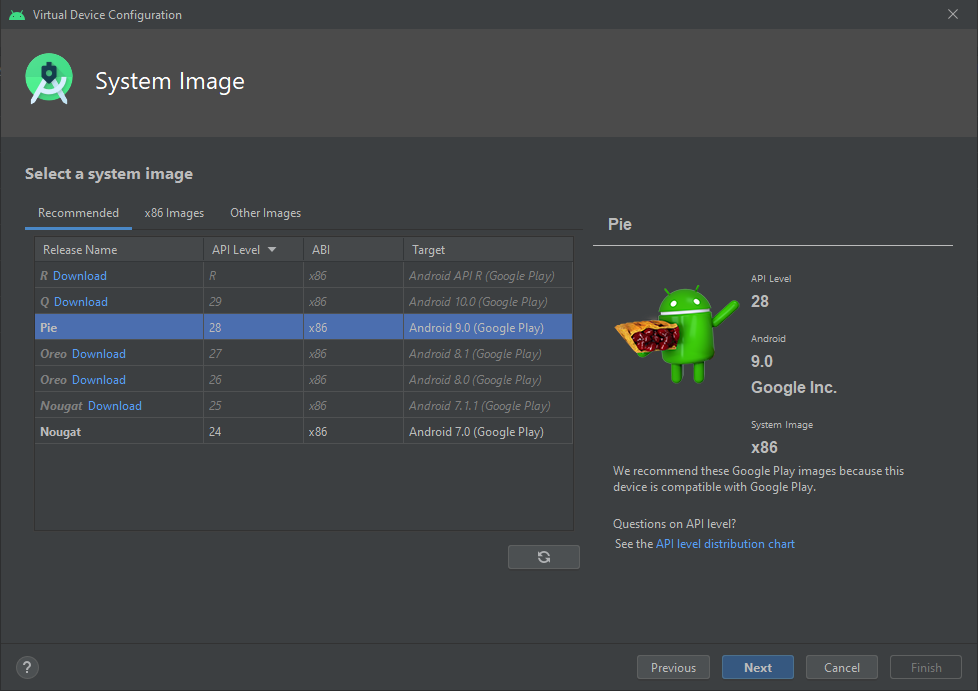
2nd is that on the very first boot fo the emulator it may not register with Google in time. So on a fresh emulator I recommend running your app a 2nd time. Lastly if you are still seeing an issue I recommend checking the logcat for any errors or warnings.
 jkasten2
on 11 May 2020
jkasten2
on 11 May 2020
Thanks for the responses. I use simulator with Google Play services. It may be the reason why it works after refresh as you said. So I continue with that issue.
enesozturk
on 11 May 2020
Howdy,
It sounds like this is a limitation of testing in the emulator. As long as that is the case, I don't really see the issue here unless you can reproduce on a real device. As mentioned above, make sure to run your app a second time to ensure the emulator registers with Google. Can you please confirm whether or not that is the case?
rgomezp
on 28 May 2020
Hi! Thanks for the following up. I tried the setup in Android simulator that have Google Play services and results is fine. I got the device info including pushToken as expected. Here is the project I tried. Thanks again.
enesozturk
on 28 May 2020
Related issues
 andrewworld
·
3Comments
andrewworld
·
3Comments
 Steffi3rd
·
3Comments
Steffi3rd
·
3Comments
 shahchaitanya
·
4Comments
shahchaitanya
·
4Comments
 carloscuesta
·
4Comments
carloscuesta
·
4Comments
 GeoffreyPlitt
·
4Comments
GeoffreyPlitt
·
4Comments