React-native-onesignal: ld: framework not found OneSignal
Hi there
I have an error when try to execute my app in iOS phone or simulator.
I followed the instructions with the page (https://documentation.onesignal.com/docs/react-native-sdk-setup). But the error persists.
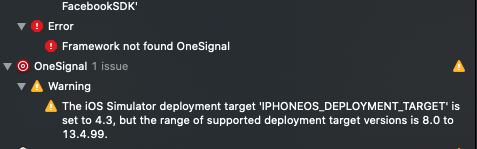

Also, I clean, build, set the commands pod Install, Pod deintegrate, delete Pod folder, PodFile.lockfile, delete files in ~/Library/Developer/Xcode/DerivedData, delete Target OneSignalNotificationServiceExtension and create it again. But the error continues.
I'm using the package react-native-onesignal: ^3.7.1
RN 60+
Thanks
 SERGEIBARATS
All 11 comments
I saw the same problem but got it to work. I noticed when running pod install it warned me about FRAMEWORK_SEARCH_PATHS being modified, so I added $(inherit) to that (search for 'Framework Search Paths' under your Target's Build Settings), and it worked. Seemed that Framework Search Paths was left blank.
 tmaly1980
on 10 Apr 2020
tmaly1980
on 10 Apr 2020
The issue is not resolved..
The warning disappeared, but the error is still there.
SERGEIBARATS
on 11 Apr 2020
Same here. As I noticed, It happened after OneSignal updates from 2.13.0 to 2.13.1.
I'm not sure that I have got the same issue. My OneSignal folder in Pods is empty.

I will get the same result if I use pod 'OneSignal', '>= 2.11.2', '< 3.0' instead of pod 'react-native-onesignal', path: "#{$npm_path}/react-native-onesignal" in my Podfile.
 RoTTex
on 11 Apr 2020
RoTTex
on 11 Apr 2020
+1 please help.
 arnoldpassly
on 13 Apr 2020
arnoldpassly
on 13 Apr 2020
Howdy,
We haven't been able to reproduce on our side.
Have y'all run pod deintegrate && pod install ???
 rgomezp
on 13 Apr 2020
rgomezp
on 13 Apr 2020
pod cache clean --all helped me!
RoTTex
on 13 Apr 2020
I have the same issue any update?
 roysG
on 15 Apr 2020
roysG
on 15 Apr 2020
target 'OneSignalNotificationServiceExtension' do
  pod 'OneSignal', '>= 2.9.3', '< 3.0'
end
helped me
 pyjun01
on 16 Apr 2020
pyjun01
on 16 Apr 2020
Guys, go to "Build Settings" -> "Search Paths"
change the value of $(PROJECT_DIR) to recursive
and Wolla! now it should work!
roysG
on 16 Apr 2020
Howdy,
It sounds like this issue is solved.
Enjoy!
rgomezp
on 22 Apr 2020
Solution recommended by @tmaly1980 ultimately worked for me.
This post also helped me figure out exactly _where_ to make this change -> https://stackoverflow.com/questions/26445784/target-overrides-the-framework-search-paths-build-settings
This is not an issue unique to the One Signal SDK, rather it is a hurdle you can run into with any pod that uses a dynamic framework and not a static library. Still it might be helpful to add a note to the iOS & React Native getting started guides in case others run into this issue 🙏
 ecgreb
on 5 Dec 2020
ecgreb
on 5 Dec 2020
Related issues
 carloscuesta
·
4Comments
carloscuesta
·
4Comments
 andrewworld
·
3Comments
andrewworld
·
3Comments
 shahchaitanya
·
4Comments
shahchaitanya
·
4Comments
 Kisepro
·
4Comments
Kisepro
·
4Comments
 cfmitrah
·
4Comments
cfmitrah
·
4Comments
Most helpful comment
I have the same issue any update?