React-native-onesignal: [iOS] OneSignal not registering device in console
Description:
I'm trying to implement the OneSignal SDK in a 0.59.10 React Native project, I'm not using Cocoapods so a I did the manual link, Android is working fine after doing the first step in the Trobleshooting guide. iOS ins't asking for permissions when app starts and even not registering the device on the OneSignal console.
Some of my questions are:
- Is the manual linking of iOS just this step?
- When I try to do this step, the generated files are not the same as the guide shows. Is it right?

_Finally I think there is something wrong with de docs, it seems there are some gaps when you want to do the manual link._
Environment
- React Native: 0.59.10
- Linking: Manual
- OneSignal: 3.5.0
- Xcode: Version 10.1 (10B61)
- MacOs: Mojave 10.14.6
- I add the lib via yarn
Steps to Reproduce Issue:
- Create a project with react native 0.59.10.
- Install OneSignal.
- Do the manual linking (without cocoapods).
- Initialize OneSignal via JS.
- Start app and look your dashboard
 emilioheinz
All 11 comments
Upgrading some things about the issue. I'm able to register the device in the native iOS side, everything works fine, so it seems that it is something wrong with the linking/bridging of the methods to the JavaScript.
emilioheinz
on 5 Nov 2019
- Yes, that should be enough
- You should see:
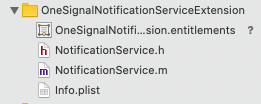
Other than the difference in your service extension, I'm not sure what you're saying the issue is with regards to the bridge. Can you provide more details?
 rgomezp
on 5 Nov 2019
rgomezp
on 5 Nov 2019
@rgomezp I don't know what what type of details you need, sorry.
But what I'm trying to explain is that I've followed the docs, and methods like init or onIds are not called when I'm on a iOS real device, just on Android, I've already tried a lot of stuff, but just implementing OneSignal on the native side of iOS worked for me. So that makes me believe that there is something wrong on the linking step, or with the versions that I'm using (React Native 0.59.10 + OneSignal 3.5.0).
Is it more clear now?
emilioheinz
on 5 Nov 2019
Some more updates for you guys...
I've tried it with react-native link and it worked fine, but I would like to do the manual link, because every lib in mine project is linked like that. So I really think there is a missing step of the manual linking in the documentation that I can't find by myself.
It would be really helpful if you guys could help me with that.
Thanks.
emilioheinz
on 6 Nov 2019
@emilioheinz ,
Can you upgrade to use RN 0.60? I think this would make your life easier as it uses "auto-linking". Also, what's the issue exactly with using react-native link with OneSignal and not the others?
rgomezp
on 7 Nov 2019
Ok, as we are close to upgrade the react native version I'm going to use the link with cocoapods. But It would be nice link the project with both, manual and automatic link. Thank you!!
emilioheinz
on 7 Nov 2019
So is it safe to close this issue?
rgomezp
on 7 Nov 2019
Yes, if you guys are sure that there is no gap in the docs about the manual linking, and no issues about react native and OneSignal versions you can close it.
emilioheinz
on 7 Nov 2019
I have the same issue ...
 AfanasievN
on 20 Nov 2019
AfanasievN
on 20 Nov 2019
@AfanasievN Have you tried with react-native link?
emilioheinz
on 20 Nov 2019
@emilioheinz yes, but I've already resolved it by upgrading to the latest version of OneSignal, and I've used https://documentation.onesignal.com/docs/react-native-sdk-setup with code from the example https://github.com/OneSignal/react-native-onesignal/blob/master/examples/RNOneSignal/ios/OneSignalNotificationServiceExtension/NotificationService.m . My iPhone signed successfully !
AfanasievN
on 20 Nov 2019
Related issues
 nitish1099
·
4Comments
nitish1099
·
4Comments
 quinlanjager
·
4Comments
quinlanjager
·
4Comments
 shahchaitanya
·
4Comments
shahchaitanya
·
4Comments
 suupham2506
·
3Comments
suupham2506
·
3Comments
 exclusiveTanim
·
4Comments
exclusiveTanim
·
4Comments
Most helpful comment
@emilioheinz yes, but I've already resolved it by upgrading to the latest version of OneSignal, and I've used https://documentation.onesignal.com/docs/react-native-sdk-setup with code from the example https://github.com/OneSignal/react-native-onesignal/blob/master/examples/RNOneSignal/ios/OneSignalNotificationServiceExtension/NotificationService.m . My iPhone signed successfully !