React-native-onesignal: com.google.firebase.iid.FirebaseInstanceIdService does not exist Android
Description:
Integrated OneSignal with the official docs. iOS is working fine but Android after build came with this error when init called:
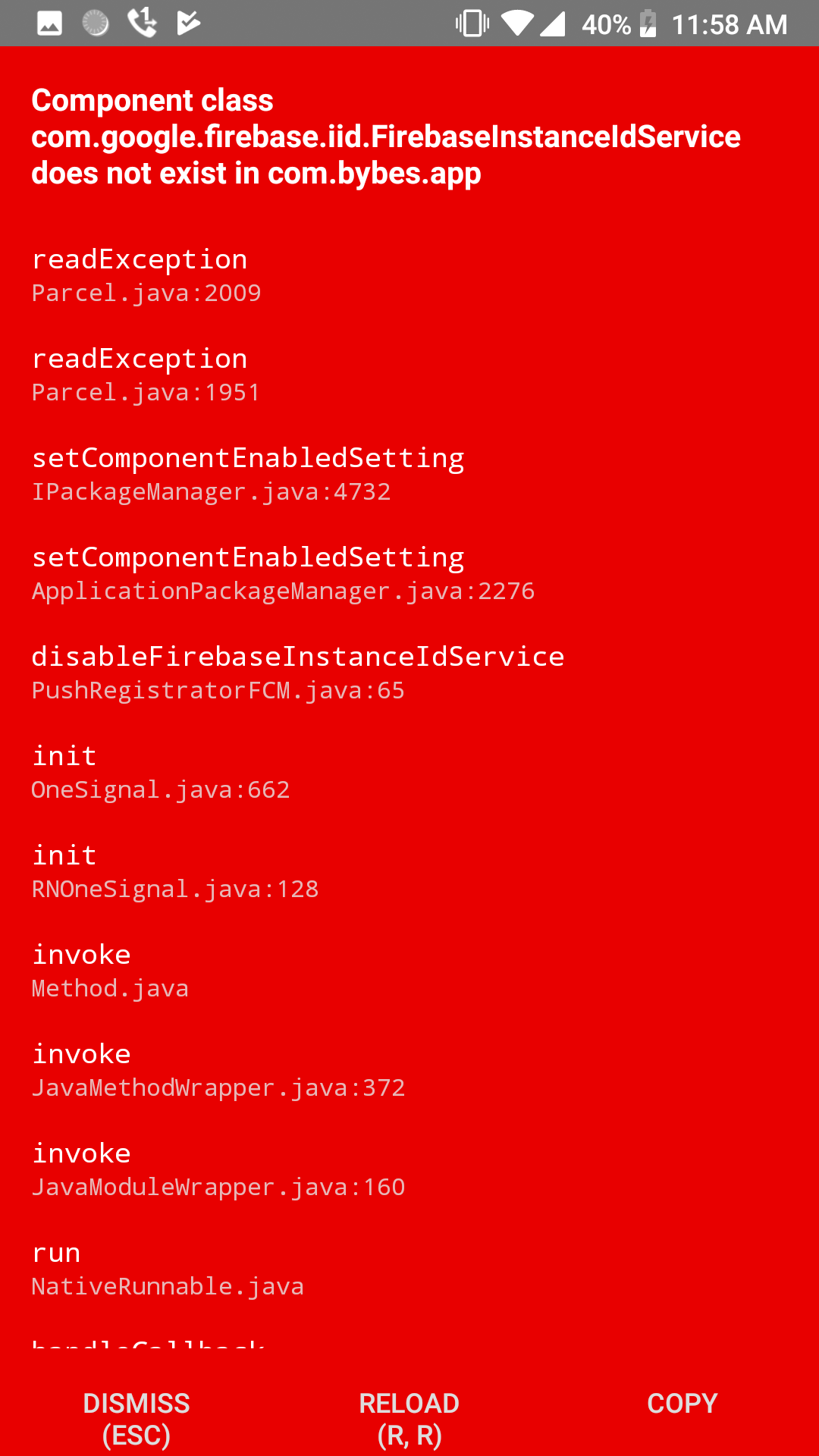
Environment
Latest React Native (0.56)
Latest OneSignal (3.2.6)
NPM (6.2.0)
MacOS
Steps to Reproduce Issue:
- Install the OneSignal SDK using npm into your project
- Link and implement using official docs
- react-native run-android
 DLevai94
All 11 comments
On OneSignal 3.2.4 is working. But every time I press home button, app crashes with this:
No such service ComponentInfo{com.bybes.app/com.onesignal.SyncJobService}
DLevai94
on 6 Sep 2018
@DLevai94 Can you add our gradle plugin to your app/build.gradle and see if the issue still occurs with version 3.2.6 of our SDK?
Add this to the VERY top of your app/build.gradle:
buildscript {
repositories {
maven { url 'https://plugins.gradle.org/m2/'}
}
dependencies {
classpath 'gradle.plugin.com.onesignal:onesignal-gradle-plugin:[0.11.0, 0.99.99]'
}
}
apply plugin: 'com.onesignal.androidsdk.onesignal-gradle-plugin'
repositories {
jcenter()
maven { url 'https://maven.google.com' }
}
Does this crash happen on all devices or just some versions of Android?
 Nightsd01
on 8 Sep 2018
Nightsd01
on 8 Sep 2018
Thank you @Nightsd01 but it’s already present in the app:build.gradle.
On 3.2.6 I get the first issue, with the FirebaseInstanceIdService. I’ll post both of my build.gradle, app/build.gradle when I get to computer if you want it
DLevai94
on 8 Sep 2018
@DLevai94 please do post your app/build.gradle when you get a chance
Nightsd01
on 10 Sep 2018
@Nightsd01
app/build.gradle:
buildscript {
repositories {
maven { url 'https://plugins.gradle.org/m2/'}
}
dependencies {
classpath 'gradle.plugin.com.onesignal:onesignal-gradle-plugin:[0.11.2, 0.99.99]'
}
}
repositories {
jcenter()
maven { url 'https://maven.google.com' }
}
apply plugin: 'com.onesignal.androidsdk.onesignal-gradle-plugin'
apply plugin: "com.android.application"
import com.android.build.OutputFile
/**
* The react.gradle file registers a task for each build variant (e.g. bundleDebugJsAndAssets
* and bundleReleaseJsAndAssets).
* These basically call `react-native bundle` with the correct arguments during the Android build
* cycle. By default, bundleDebugJsAndAssets is skipped, as in debug/dev mode we prefer to load the
* bundle directly from the development server. Below you can see all the possible configurations
* and their defaults. If you decide to add a configuration block, make sure to add it before the
* `apply from: "../../node_modules/react-native/react.gradle"` line.
*
* project.ext.react = [
* // the name of the generated asset file containing your JS bundle
* bundleAssetName: "index.android.bundle",
*
* // the entry file for bundle generation
* entryFile: "index.android.js",
*
* // whether to bundle JS and assets in debug mode
* bundleInDebug: false,
*
* // whether to bundle JS and assets in release mode
* bundleInRelease: true,
*
* // whether to bundle JS and assets in another build variant (if configured).
* // See http://tools.android.com/tech-docs/new-build-system/user-guide#TOC-Build-Variants
* // The configuration property can be in the following formats
* // 'bundleIn${productFlavor}${buildType}'
* // 'bundleIn${buildType}'
* // bundleInFreeDebug: true,
* // bundleInPaidRelease: true,
* // bundleInBeta: true,
*
* // whether to disable dev mode in custom build variants (by default only disabled in release)
* // for example: to disable dev mode in the staging build type (if configured)
* devDisabledInStaging: true,
* // The configuration property can be in the following formats
* // 'devDisabledIn${productFlavor}${buildType}'
* // 'devDisabledIn${buildType}'
*
* // the root of your project, i.e. where "package.json" lives
* root: "../../",
*
* // where to put the JS bundle asset in debug mode
* jsBundleDirDebug: "$buildDir/intermediates/assets/debug",
*
* // where to put the JS bundle asset in release mode
* jsBundleDirRelease: "$buildDir/intermediates/assets/release",
*
* // where to put drawable resources / React Native assets, e.g. the ones you use via
* // require('./image.png')), in debug mode
* resourcesDirDebug: "$buildDir/intermediates/res/merged/debug",
*
* // where to put drawable resources / React Native assets, e.g. the ones you use via
* // require('./image.png')), in release mode
* resourcesDirRelease: "$buildDir/intermediates/res/merged/release",
*
* // by default the gradle tasks are skipped if none of the JS files or assets change; this means
* // that we don't look at files in android/ or ios/ to determine whether the tasks are up to
* // date; if you have any other folders that you want to ignore for performance reasons (gradle
* // indexes the entire tree), add them here. Alternatively, if you have JS files in android/
* // for example, you might want to remove it from here.
* inputExcludes: ["android/**", "ios/**"],
*
* // override which node gets called and with what additional arguments
* nodeExecutableAndArgs: ["node"],
*
* // supply additional arguments to the packager
* extraPackagerArgs: []
* ]
*/
project.ext.react = [
entryFile: "index.js",
bundleInDebug: true,
bundleInDevelopmentRelease: true,
bundleInDemoRelease: true
]
apply from: "../../node_modules/react-native/react.gradle"
/**
* Set this to true to create two separate APKs instead of one:
* - An APK that only works on ARM devices
* - An APK that only works on x86 devices
* The advantage is the size of the APK is reduced by about 4MB.
* Upload all the APKs to the Play Store and people will download
* the correct one based on the CPU architecture of their device.
*/
def enableSeparateBuildPerCPUArchitecture = false
/**
* Run Proguard to shrink the Java bytecode in release builds.
*/
def enableProguardInReleaseBuilds = false
project.ext.envConfigFiles = [
debug: ".env.dev",
developmentrelease: ".env.dev",
uatrelease: ".env.uat",
release: ".env.prod",
]
apply from: project(":react-native-config").projectDir.getPath() + "/dotenv.gradle"
ext {
googlePlayServicesVersion = "15.0.0"
}
android {
compileSdkVersion rootProject.ext.compileSdkVersion
buildToolsVersion rootProject.ext.buildToolsVersion
defaultConfig {
applicationId project.env.get("APP_ID")
minSdkVersion rootProject.ext.minSdkVersion
targetSdkVersion rootProject.ext.targetSdkVersion
versionCode versionMajor * 10000 + versionMinor * 100 + versionPatch
versionName "${versionMajor}.${versionMinor}.${versionPatch}"
renderscriptTargetApi 27
renderscriptSupportModeEnabled true
ndk {
abiFilters "armeabi-v7a", "x86"
}
dexOptions {
jumboMode true
}
}
splits {
abi {
reset()
enable enableSeparateBuildPerCPUArchitecture
universalApk false // If true, also generate a universal APK
include "armeabi-v7a", "x86"
}
}
signingConfigs {
release {
storeFile file(BESMOBILE_RELEASE_STORE_FILE)
storePassword BESMOBILE_RELEASE_STORE_PASSWORD
keyAlias BESMOBILE_RELEASE_KEY_ALIAS
keyPassword BESMOBILE_RELEASE_KEY_PASSWORD
}
development {
storeFile file(BESMOBILE_DEVELOPMENT_STORE_FILE)
storePassword BESMOBILE_DEVELOPMENT_STORE_PASSWORD
keyAlias BESMOBILE_DEVELOPMENT_KEY_ALIAS
keyPassword BESMOBILE_DEVELOPMENT_KEY_PASSWORD
}
}
buildTypes {
debug {
signingConfig signingConfigs.development
}
developmentRelease {
initWith(buildTypes.release)
minifyEnabled enableProguardInReleaseBuilds
matchingFallbacks = ['release', 'debug']
proguardFiles getDefaultProguardFile("proguard-android.txt"), "proguard-rules.pro"
signingConfig signingConfigs.development
}
uatRelease {
initWith(buildTypes.release)
minifyEnabled enableProguardInReleaseBuilds
matchingFallbacks = ['release', 'debug']
proguardFiles getDefaultProguardFile("proguard-android.txt"), "proguard-rules.pro"
signingConfig signingConfigs.development
}
release {
minifyEnabled enableProguardInReleaseBuilds
matchingFallbacks = ['release', 'debug']
proguardFiles getDefaultProguardFile("proguard-android.txt"), "proguard-rules.pro"
signingConfig signingConfigs.release
}
}
// applicationVariants are e.g. debug, release
applicationVariants.all { variant ->
variant.outputs.each { output ->
// For each separate APK per architecture, set a unique version code as described here:
// http://tools.android.com/tech-docs/new-build-system/user-guide/apk-splits
def versionCodes = ["armeabi-v7a":1, "x86":2]
def abi = output.getFilter(OutputFile.ABI)
if (abi != null) { // null for the universal-debug, universal-release variants
output.versionCodeOverride =
versionCodes.get(abi) * 1048576 + defaultConfig.versionCode
}
}
}
}
dependencies {
implementation project(':react-native-onesignal')
implementation project(':react-native-image-resizer')
implementation project(':react-native-fetch-blob')
implementation(project(':react-native-device-info')) {
exclude group: 'com.google.android.gms', module: 'play-services-gcm'
}
implementation project(':react-native-blur')
implementation project(':appcenter-crashes')
implementation project(':appcenter-analytics')
implementation project(':appcenter')
implementation project(':react-native-config')
implementation project(':react-native-image-picker')
implementation project(':react-native-i18n')
implementation project(':react-native-splash-screen')
implementation project(':react-native-linear-gradient')
implementation fileTree(dir: "libs", include: ["*.jar"])
implementation "com.android.support:appcompat-v7:${rootProject.ext.supportLibVersion}"
compileOnly "com.facebook.react:react-native:+" // From node_modules
implementation project(':react-native-geocoder')
// implementation project(':react-native-maps')
// FIX from https://github.com/react-community/react-native-maps/issues/1408
implementation(project(':react-native-maps')) {
exclude group: 'com.google.android.gms', module: 'play-services-base'
exclude group: 'com.google.android.gms', module: 'play-services-maps'
}
implementation "com.google.android.gms:play-services-base:$googlePlayServicesVersion"
implementation "com.google.android.gms:play-services-maps:$googlePlayServicesVersion"
implementation "com.google.android.gms:play-services-location:$googlePlayServicesVersion"
}
// Run this once to be able to run the application with BUCK
// puts all compile dependencies into folder libs for BUCK to use
task copyDownloadableDepsToLibs(type: Copy) {
from configurations.compile
into 'libs'
}
project.ext.vectoricons = [
iconFontNames: [ 'MaterialIcons.ttf' ] // Name of the font files you want to copy
]
apply from: "../../node_modules/react-native-vector-icons/fonts.gradle"
project build.geadle:
// Top-level build file where you can add configuration options common to all sub-projects/modules.
import groovy.json.JsonSlurper
def getNpmVersion() {
def appcenter = System.getenv("APPCENTER_BUILD_ID")
def inputFile = appcenter != null ? new File("./package.json") : new File("../package.json")
def packageJson = new JsonSlurper().parseText(inputFile.text)
return packageJson["version"]
}
def getNpmVersionArray() { // major [0], minor [1], patch [2]
def (major, minor, patch) = getNpmVersion().tokenize('.')
return [Integer.parseInt(major), Integer.parseInt(minor), Integer.parseInt(patch)] as int[]
}
buildscript {
repositories {
jcenter()
google()
maven {
url 'https://maven.google.com/'
name 'Google'
}
}
dependencies {
classpath 'com.android.tools.build:gradle:3.1.4'
// NOTE: Do not place your application dependencies here; they belong
// in the individual module build.gradle files
}
}
allprojects {
repositories {
mavenLocal()
jcenter()
google()
maven {
url 'https://maven.google.com/'
name 'Google'
}
maven {
// All of React Native (JS, Obj-C sources, Android binaries) is installed from npm
url "$rootDir/../node_modules/react-native/android"
}
}
}
subprojects {
ext {
def npmVersion = getNpmVersionArray()
versionMajor = npmVersion[0]
versionMinor = npmVersion[1]
versionPatch = npmVersion[2]
}
afterEvaluate {project ->
if (project.hasProperty("android")) {
android {
compileSdkVersion 27
buildToolsVersion '27.0.3'
}
}
}
}
/**
+ Project-wide Gradle configuration properties
*/
ext {
minSdkVersion = 16
compileSdkVersion = 27
targetSdkVersion = 27
buildToolsVersion = "27.0.3"
supportLibVersion = "27.1.1"
googlePlayServicesVersion = "15.0.0"
androidMapsUtilsVersion = "0.5+"
}
@DLevai94 This would definitely be an issue with our native Android SDK and not specifically caused by our React Native SDK itself, so I will be moving this issue to our Android repo here. I've also created a PR that I believe will fix the problem.
Our Android developer is out on vacation for a week or so, so unfortunately he won't be able to fix this within the next week. I am an iOS developer and I am not confident enough in my Android dependency structure knowledge to say for sure this will fix the issue since I am not personally able to reproduce it, but he may be able to approve my PR before he gets back. If so, I'll go ahead and merge it and release an update.
Nightsd01
on 12 Sep 2018
Also @DLevai94 since I cannot reproduce this issue by myself, it would be extremely helpful if you could test out the PR I made to our Android SDK so we can try to make some progress on this while our Android dev is out.
If you could, could you try editing react-native-onesignal/build.gradle and remove the existing OneSignal dependency, and instead use this jar (created from the new PR branch I made to fix this problem)? Let me know if that fixes the issue for you.
Nightsd01
on 12 Sep 2018
@Nightsd01
/Users/davidlevai/Desktop/Work/2017/BES/bes-mobile/android/app/src/main/java/com/bybes/app/MainApplication.java:7: error: package com.geektime.rn
onesignalandroid does not exist
import com.geektime.rnonesignalandroid.ReactNativeOneSignalPackage;
^
/Users/davidlevai/Desktop/Work/2017/BES/bes-mobile/android/app/src/main/java/com/bybes/app/MainApplication.java:42: error: cannot find symbol
new ReactNativeOneSignalPackage(),
^
symbol: class ReactNativeOneSignalPackage
2 errors
@DLevai94 Do you have tools:node="replace" in the <application ...> tag in any of your AndroidManifest.xml files?
<application
   ...
   tools:node="replace">
This would cause the error you reported in your first post as well as the 2nd No such service ComponentInfo{com.bybes.app/com.onesignal.SyncJobService} error. It would also cause missing errors like this with other plugins. If you can remove it it should fixes these issues.
If removing tools:node="replace" causes build errors follow our Adding the Gradle Plugin step. Let us know if this doesn't help
 jkasten2
on 19 Sep 2018
jkasten2
on 19 Sep 2018
@jkasten2 Thanks it worked. I changed tools:node="replace" to tools:replace="android:label" because another library needed it. Thank you!
DLevai94
on 23 Sep 2018
@DLevai94 Thanks for letting us know, I am sure it will help others who run into this.
jkasten2
on 4 Oct 2018
Related issues
 exclusiveTanim
·
4Comments
exclusiveTanim
·
4Comments
 cfmitrah
·
4Comments
cfmitrah
·
4Comments
 suupham2506
·
3Comments
suupham2506
·
3Comments
 quinlanjager
·
4Comments
quinlanjager
·
4Comments
 GeoffreyPlitt
·
4Comments
GeoffreyPlitt
·
4Comments
Most helpful comment
@DLevai94 Do you have
tools:node="replace"in the<application ...>tag in any of yourAndroidManifest.xmlfiles?This would cause the error you reported in your first post as well as the 2nd
No such service ComponentInfo{com.bybes.app/com.onesignal.SyncJobService}error. It would also cause missing errors like this with other plugins. If you can remove it it should fixes these issues.If removing
tools:node="replace"causes build errors follow our Adding the Gradle Plugin step. Let us know if this doesn't help